
AI for Small Business: The Tools, Tactics, and Workflows That Save Hours Every Week
AI for small business tools start at $0/month. Compare ChatGPT, Jasper, Zapier, and 5 more with real prices, free tiers, and step-by-step setup workflows.

$0–$200
Est. Cost
2 hours
Timeline
6
Total Steps
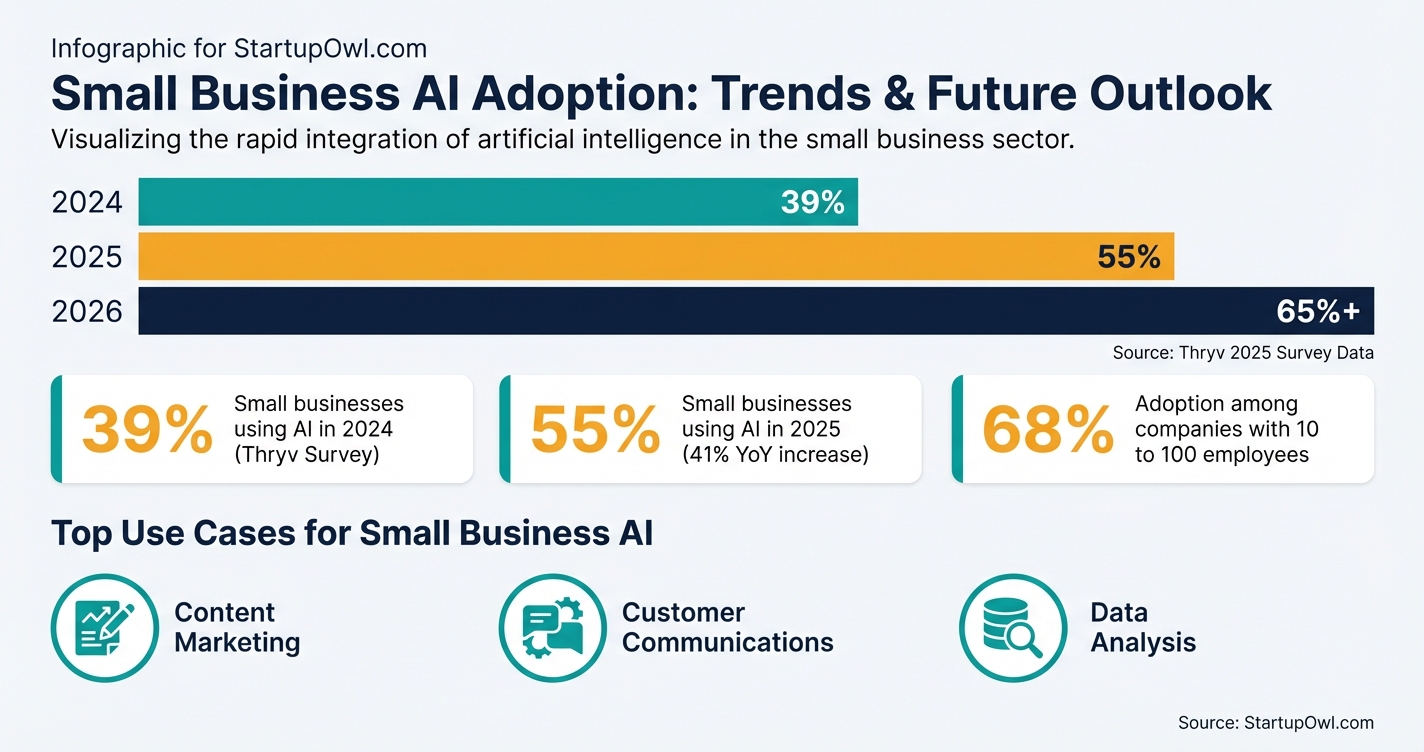
AI adoption among small businesses surged 41% in a single year, jumping from 39% in 2024 to 55% in 2026, according to a Thryv national survey of 540 small business decision-makers. Among companies with 10 to 100 employees, that number hit 68%. If you are still on the fence, your competitors probably are not.
The best part: you do not need an enterprise budget. A stack of free AI tools (ChatGPT, Zapier, HubSpot CRM, Otter.ai) can cut 5 to 10 hours of repetitive work per week from your schedule. This guide walks you through the exact tools, real prices as of 2026, and a step-by-step workflow to get started today.
Whether you need help drafting emails, summarizing meetings, automating data entry, or managing customer relationships, there is an AI tool that fits your budget. Below, you will find verified prices, honest trade-offs, and practical setup steps for each one.
Why AI Matters for Small Businesses Right Now
A McKinsey 2026 report found that 88% of organizations now use AI in at least one business function, up from 78% a year earlier. Small businesses are closing the gap fast. SBA data shows that small firms may be only about a year behind large businesses in AI adoption, a far smaller gap than previous technology cycles like broadband internet.
Content marketing is the most popular AI use case for small businesses, followed by customer communications and data analysis. A Reimagine Main Street survey found that 77% of small businesses say marketing and customer engagement are where AI would have the greatest impact, and 84% are willing to automate marketing content creation.
The tools you need fall into four practical categories: writing and content (ChatGPT, Jasper), meeting management (Otter.ai), workflow automation (Zapier), and customer management (HubSpot CRM). You can build a complete AI-assisted workflow using free tiers alone, then upgrade only where you hit real limits. If you are also building your broader growth plan, pair this with our small business marketing plan and building a brand guides.
How to Build Your Small Business AI Stack in 6 Steps
The steps below take you from zero to a working AI-assisted workflow in about one weekend. Each step includes the tool, the real cost, and exactly what to set up. Do them in order for the fastest results.
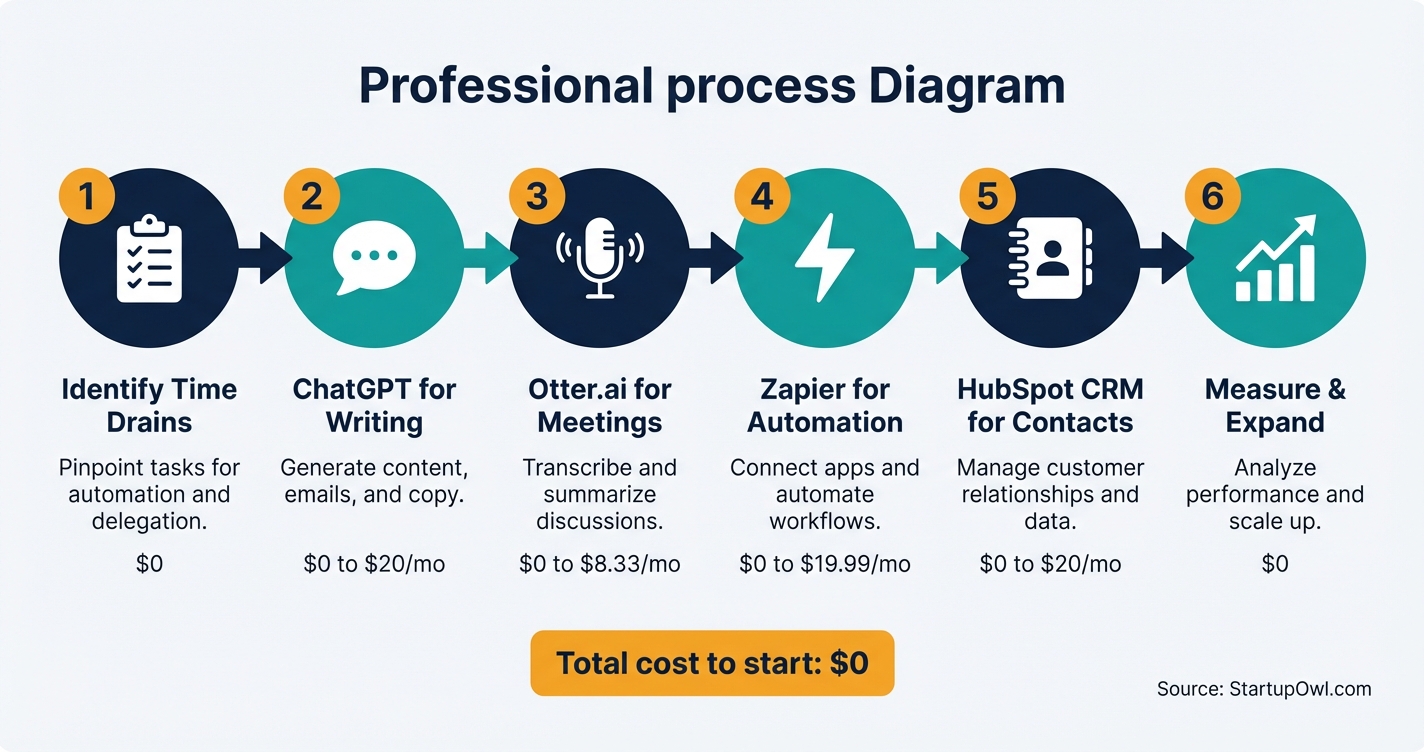
Step 1: Identify your biggest weekly time drain. Track repetitive tasks for one week. Most owners find 5 to 10 hours of automatable work in email drafting, meeting follow-ups, social media posting, and CRM updates.
Step 2: Set up ChatGPT as your daily writing assistant. The free tier gives you access to GPT-5.2 Instant with roughly 10 messages every 5 hours (as of early 2026, per OpenAI). ChatGPT Go costs $8/month for expanded access, and ChatGPT Plus costs $20/month for 5x the usage limits. Create a brand context prompt to paste at the start of each session for dramatically better output.
Step 3: Automate your meeting notes with Otter.ai. The free plan includes 300 minutes/month and integrates with Zoom, Google Meet, and Microsoft Teams. The Pro plan at $8.33/month (annual) gives you 1,200 minutes.
Step 4: Connect your tools with Zapier automations. Zapier's free plan offers 100 tasks/month with two-step workflows. The Professional plan starts at $19.99/month (annual) for 750 tasks and multi-step Zaps across 8,000+ apps.
Step 5: Track contacts and deals with HubSpot CRM. The free plan supports up to 1,000 contacts and 2 users with email tracking, a deal pipeline, and AI email generation. No expiration date, no credit card required.
Step 6: Measure time saved and expand. After 2 to 4 weeks, compare your current time logs to your baseline. A Harvard Business School study found workers using AI saw roughly 25% time savings on knowledge tasks. Pick the next biggest time drain and repeat the process.
The 5 Best AI Tools for Small Business (With Real Prices)
Every tool below has a verified free tier or trial as of 2026. Prices are sourced from official product pages and third-party reviews.
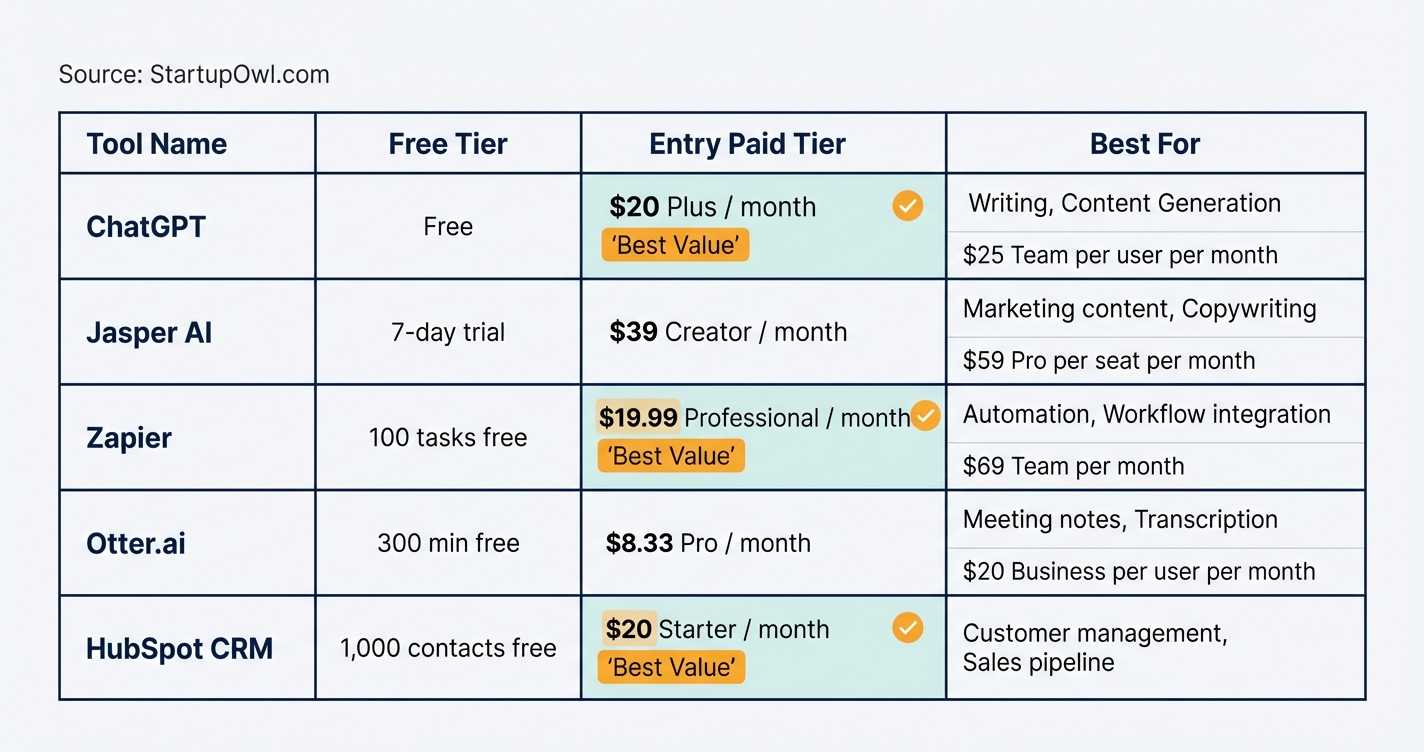
ChatGPT by OpenAI is the Swiss Army knife of AI tools. The free plan works for light daily use. ChatGPT Plus at $20/month unlocks higher usage limits, advanced reasoning modes, and image generation with DALL-E. A ChatGPT Team plan costs $25/user/month (billed annually) with shared workspaces and the guarantee that your business data is not used for training. For our full walkthrough, see our ChatGPT for small business guide.
Jasper AI is built specifically for marketing teams. The Creator plan starts at $39/month (annual billing) with unlimited words, one brand voice, and 50+ content templates. The Pro plan at $59/month (annual) adds up to 5 user seats, 3 brand voices, and SEO optimization tools. A 7-day free trial is available on both plans. Jasper makes the most sense if you produce high-volume marketing content and need brand-voice consistency across campaigns.
Zapier automates the connections between your apps. The free plan includes 100 tasks/month, unlimited Zaps (automations), and AI tools including Zapier Copilot. The Professional plan ($19.99/month annual) adds multi-step Zaps, premium app integrations, and 750 tasks. The Team plan costs $69/month (annual) for up to 25 users. Filters, formatting steps, and branching logic do not count as tasks on paid plans.
Otter.ai turns your meetings into searchable, summarized notes automatically. The free tier gives you 300 minutes/month. The Pro plan at $8.33/month (annual) provides 1,200 minutes and 90-minute conversation limits. The Business plan at $20/user/month (annual) includes 6,000 minutes and unlimited file imports. It works natively with Zoom, Google Meet, and Microsoft Teams.
HubSpot CRM organizes your contacts, deals, and customer interactions in one place with built-in AI. The free plan includes up to 1,000 contacts, 2 users, email tracking, a deal pipeline, live chat, and AI email writing. The Starter plan at $20/month removes HubSpot branding and adds higher email limits. For a full comparison of CRM options, see our CRM for startups guide.
AI Tool Pricing Comparison (as of 2026)
| Type / Provider | Rate | Notes |
|---|---|---|
| ChatGPT Free | $0/month | ~10 messages per 5 hrs on GPT-5.2 Instant |
| ChatGPT Go | $8/month | Expanded access to GPT-5.2 Instant features |
| ChatGPT Plus | $20/month | 5x usage limits, advanced features, DALL-E 4 |
| ChatGPT Team | $25/user/month (annual) | Shared workspace, data not used for training |
| Jasper Creator | $39/month (annual) | 1 seat, unlimited words, 1 brand voice |
| Jasper Pro | $59/month per seat (annual) | Up to 5 seats, 3 brand voices, SEO tools |
| Zapier Free | $0/month | 100 tasks/month, 2-step Zaps, AI Copilot |
| Zapier Professional | $19.99/month (annual) | 750 tasks/month, multi-step, premium apps |
| Otter.ai Free | $0/month | 300 min/month, 30 min per conversation |
| Otter.ai Pro | $8.33/month (annual) | 1,200 min/month, 90 min per conversation |
| Otter.ai Business | $20/user/month (annual) | 6,000 min/month, unlimited file imports |
| HubSpot CRM Free | $0/month | 1,000 contacts, 2 users, email tracking, AI email writer |
| HubSpot Starter | $20/month | Removes branding, higher email volume, basic triggers |
The $0/Month AI Starter Stack
You can build a functional AI workflow for your business without spending anything. Combine ChatGPT Free for writing, Otter.ai Free for meeting notes (300 min/month), Zapier Free for 100 automated tasks/month, and HubSpot CRM Free for up to 1,000 contacts. This stack handles content creation, meeting management, basic automation, and customer tracking. Upgrade individual tools only when you hit their free-tier limits.
5 AI Mistakes That Cost Small Businesses Time and Money
1. Buying enterprise tools before testing free tiers. ChatGPT's free plan, Zapier's 100 tasks, and HubSpot's free CRM are genuinely useful. You should hit real limitations before upgrading. A Reimagine Main Street survey found 37% of small businesses cite lack of time or resources as a barrier, and spending on unnecessary paid tiers makes that problem worse.
2. Publishing AI content without human review. AI models generate plausible-sounding text that can contain factual errors. Every email, blog post, and social caption should be reviewed for accuracy, brand voice, and tone before it goes out. This is especially critical for local SEO content where incorrect details about hours, locations, or services can hurt rankings and trust.
3. Automating without a clear workflow first. Zapier can build any connection you describe, but if your underlying process is broken, you are just automating a mess. Map out the workflow on paper before building the Zap. Start with our free marketing plan template to organize your processes first.
4. Ignoring data privacy in team settings. On ChatGPT's free and Plus plans, your conversations may be used for model training. If you paste customer data, financial details, or proprietary information, use the Team plan ($25/user/month) or Enterprise, which explicitly excludes your data from training.
5. Chasing every new AI tool instead of mastering a few. The AI landscape changes weekly. Pick 2 to 3 core tools, learn them deeply, and ignore the rest until you have a specific need. Tool-hopping wastes more time than it saves and often leads to subscription bloat where you pay for 6 tools and actively use 2.
What to Do This Week
Start today by signing up for ChatGPT (free) and drafting your first brand context prompt. On day two, connect Otter.ai to your calendar for automatic meeting notes. By the end of the week, create your first Zapier automation and import your contacts into HubSpot CRM. Total cost for everything: $0.
Once you have your baseline set, explore our guides on guerrilla marketing ideas, Google Ads for small business, and cost-plus pricing to put your extra hours toward growing revenue. The tools keep getting better and cheaper. Your job is to pick the right ones and actually use them.
Step-by-Step Process
- 1
Identify your biggest weekly time drain
Before you sign up for anything, track where your hours actually go for one week. Write down every repetitive task: drafting emails, summarizing meetings, posting on social media, updating your CRM, creating marketing content. Most small business owners find 5 to 10 hours per week spent on tasks AI can handle.
Rank those tasks by how much time they consume and how formulaic they are. AI works best on predictable, text-heavy tasks. Save creative strategy and relationship-building for yourself.
Tips
- Use a simple spreadsheet with three columns: task name, minutes spent, and whether it follows a repeatable pattern.
- Ask your team to log their tasks too, since they often handle the most automatable work.
Common Mistakes
- Trying to automate everything at once instead of starting with your single biggest time sink.
- Skipping the tracking step and buying tools before you know what problem you are solving.
- 2
Set up ChatGPT as your daily writing assistant
ChatGPT's free tier gives you access to GPT-5.2 Instant with roughly 10 messages every 5 hours, as of early 2026. That is enough for a few email drafts or social media captions per day. If you need more, ChatGPT Plus costs $20/month and gives you 5x the usage limits plus priority access to advanced features.
Create a "brand context" prompt you paste at the start of each session: your business name, what you sell, your tone of voice, and your target customer. This single step dramatically improves output quality. For more ways to put ChatGPT to work, check out our ChatGPT for small business guide.
Tips
- Save your best prompts in a document so you can reuse them without retyping each time.
- Use ChatGPT to repurpose one piece of content (a blog post, for example) into email copy, social captions, and ad headlines.
- If you need marketing-specific AI, Jasper AI starts at $39/month with brand voice features built in.
Common Mistakes
- Publishing AI-generated content without editing it for your brand voice and factual accuracy.
- Using vague prompts like "write me a blog post" instead of specifying audience, format, length, and key points.
- 3
Automate your meeting notes with Otter.ai
If you spend 3+ hours per week in meetings, Otter.ai pays for itself immediately. The free plan gives you 300 transcription minutes per month with a 30-minute cap per conversation. It integrates with Zoom, Google Meet, and Microsoft Teams, and automatically joins your scheduled calls.
The Pro plan at $8.33/month (billed annually) bumps you to 1,200 minutes/month and 90 minutes per conversation. For a team, the Business plan starts at $20/user/month (annual billing) with 6,000 shared minutes.
Tips
- Let Otter join your meetings automatically by connecting your Google or Outlook calendar in settings.
- Review AI-generated action items after each meeting and paste them into your project management tool.
Common Mistakes
- Forgetting to notify meeting participants that an AI bot is recording, which can damage trust.
- Relying on transcription alone without reviewing for accuracy, especially with industry-specific jargon.
- 4
Connect your tools with Zapier automations
Zapier connects over 8,000 apps and lets you build "if this, then that" automations without code. The free plan includes 100 tasks per month with two-step workflows. The Professional plan starts at $19.99/month (billed annually) and unlocks multi-step Zaps, premium apps, and 750 tasks/month.
Start with two or three automations that save the most time. For example: when a new form submission arrives, automatically add the contact to your CRM and send a welcome email. Each connection eliminates manual data entry you would otherwise do dozens of times per week.
Tips
- Use Zapier's AI Copilot to describe what you want in plain English and it will suggest and build the Zap for you.
- Filters and formatting steps do not count toward your task limit on paid plans, so build logic freely.
- Audit your Zaps monthly to disable any that are not saving real time.
Common Mistakes
- Not checking the free plan's 100-task monthly limit, which can run out quickly if you have high-volume triggers.
- 5
Track contacts and deals with an AI-powered CRM
HubSpot's free CRM gives you up to 1,000 contacts, 2 users, email tracking, a deal pipeline, and AI-generated email copy with no expiration date. It is the most practical free CRM for a small business that is just getting organized.
If you outgrow the free plan (most businesses do within 6 to 12 months), the Starter plan begins at $20/month. HubSpot's AI features (branded as Breeze) include content generation, meeting scheduling, and live chat, all integrated into your CRM data. For a deeper comparison of CRM options, read our CRM for startups guide.
Tips
- Import your existing contacts from a CSV on day one so you have a single source of truth immediately.
- Connect your email (Gmail or Outlook) to automatically log every customer interaction.
Common Mistakes
- Assuming the free plan includes automation workflows; you need the Professional plan at $90/month/seat for that.
- Letting contact data get messy early because you did not set naming conventions for deals and companies.
- 6
Measure time saved and expand to the next workflow
After 2 to 4 weeks, compare your time logs to the baseline you captured in Step 1. Most small businesses report saving 5 to 10 hours per week after adopting just 2 or 3 AI tools. A Harvard Business School study found that workers using AI tools saw roughly 25% time savings on knowledge tasks.
Pick the next-highest time drain from your original list and repeat the process. Good second-round additions include AI-powered social media scheduling (check our social media content calendar), Google Ads optimization, or building a small business marketing plan with AI-assisted research.
Tips
- Track a simple metric: hours saved per week per tool. This justifies upgrades to paid tiers later.
- Share your AI workflows with your team so the time savings multiply.
Common Mistakes
- Adding more tools before mastering your first set, which leads to subscription bloat and underuse.
Cost Breakdown
| Item | Cost Range | Notes |
|---|---|---|
| ChatGPT (Free tier) | $0/month | ~10 messages per 5 hours on GPT-5.2 Instant. Good for light daily use. |
| ChatGPT Plus | $20/month | 5x usage limits, priority access to new features, DALL-E image generation. |
| Jasper AI (Creator plan) | $39 to $49/month | $39/month billed annually, $49/month billed monthly. One user seat, unlimited words. |
| Jasper AI (Pro plan) | $59 to $69/month per seat | $59/month billed annually. Up to 5 seats, 3 brand voices, SEO tools. |
| Zapier (Free tier) | $0/month | 100 tasks/month, two-step Zaps only. Good for testing. |
| Zapier (Professional) | $19.99/month | Billed annually. 750 tasks/month, multi-step Zaps, premium apps. |
| Otter.ai (Free tier) | $0/month | 300 transcription minutes/month. 30-minute cap per conversation. |
| Otter.ai (Pro) | $8.33 to $16.99/month | $8.33/month billed annually. 1,200 minutes/month, 90 min per conversation. |
| HubSpot CRM (Free) | $0/month | Up to 1,000 contacts, 2 users, email tracking, deal pipeline. No expiration. |
| HubSpot CRM (Starter) | $20/month | Removes branding, adds higher email volume and basic automation triggers. |
Frequently Asked Questions
ChatGPT's free tier is the most versatile starting point. It handles email drafting, content writing, brainstorming, customer reply templates, and basic data analysis. Pair it with HubSpot's free CRM (1,000 contacts, 2 users) and Zapier's free plan (100 tasks/month) for a complete $0/month AI stack.
A functional free stack costs $0/month using ChatGPT Free, Zapier Free, Otter.ai Free, and HubSpot CRM Free. A typical paid stack (ChatGPT Plus + Zapier Professional + Otter.ai Pro) runs about $48/month. Adding Jasper AI for dedicated marketing content brings the total to around $100 to $110/month.
Yes, if you use ChatGPT more than 5 to 10 times per day. The free tier's rate limits can interrupt your workflow during busy periods. ChatGPT Plus at $20/month gives you 5x the usage limits and priority access to advanced reasoning models, which is meaningful for content-heavy businesses. If you need team features, the Team plan at $25/user/month (annual) adds data privacy protections.
No, but it can do the work of 1 to 2 extra part-time employees on repetitive tasks. AI handles first drafts, data entry, meeting summaries, and scheduling automations well. You still need a human to set strategy, review output for brand accuracy, and make judgment calls on messaging. Think of AI as a force multiplier, not a replacement.
For most small businesses, ChatGPT Plus ($20/month) handles blog posts, emails, social captions, and ad copy well enough. If you produce high-volume content across multiple brands and need built-in brand voice consistency, Jasper AI's Pro plan ($59/month per seat, annual billing) is purpose-built for marketing teams. Read our ChatGPT for small business guide for specific prompt templates.
It depends on the plan. ChatGPT's free and Plus tiers may use your conversations for model training. The Team plan ($25/user/month) and Enterprise plan explicitly exclude your data from training. HubSpot and Zapier follow standard enterprise data protection practices on all plans. Always check each tool's privacy policy before pasting customer data, financial records, or proprietary information.
Some links on this page are affiliate links. If you sign up for a service through them, we may earn a commission at no extra cost to you. This does not influence our rankings.
Sources & References
- Thryv: AI Adoption Among Small Businesses Surges 41% in 2026
- McKinsey: The State of AI in 2026
- SBA Office of Advocacy: AI in Business, Small Firms Closing In (Sep 2026)
- Reimagine Main Street / PayPal: Small Businesses Look to AI for Competitive Edge (Jun 2026)
- OpenAI: ChatGPT Plans and Pricing
- OpenAI: Introducing ChatGPT Go (Jan 2026)
- Jasper AI Pricing Page
- Jasper AI Pricing on G2
- Zapier Pricing Page
- Otter.ai Pricing Page
- Otter.ai Pricing Review (tldv.io, updated 2026)
- HubSpot Free CRM
- HubSpot Product and Services Catalog
- Harvard Business School: AI and Productivity Study
About the Author
Editor, StartupOwl
Eliot leads StartupOwl's state data research. He maintains the site's fifty state records of LLC filing fees, annual costs, processing times, and small business grant programs, checking each figure against the state office that publishes it and logging the date it was verified. Based in New Jersey, he has spent his working life in and around small businesses, and he writes for the founder who wants the real number rather than the advertised one. Every figure under his byline traces to a named source, and when a state proves a number wrong, the correction is published, not buried.
Was this article helpful?
Questions about AI for Small Business
No comments yet. Ask the first question and a member of our team will answer.
Leave a comment