
Best CRM for Startups in 2026: Top Picks for Early-Stage Teams
Compare the 5 best CRMs for startups in 2026. Free plans start at $0, paid tiers from $9/user/month. Real pricing, features, and honest trade-offs.

$0–$59
Est. Cost
30 minutes
Timeline
5
Total Steps
You can start using a real CRM today for $0. HubSpot, Freshsales, Zoho, and Attio all offer free plans with enough features to manage your first hundred (or hundred thousand) contacts. The question is not whether you can afford a CRM, but which free plan fits your workflow best.
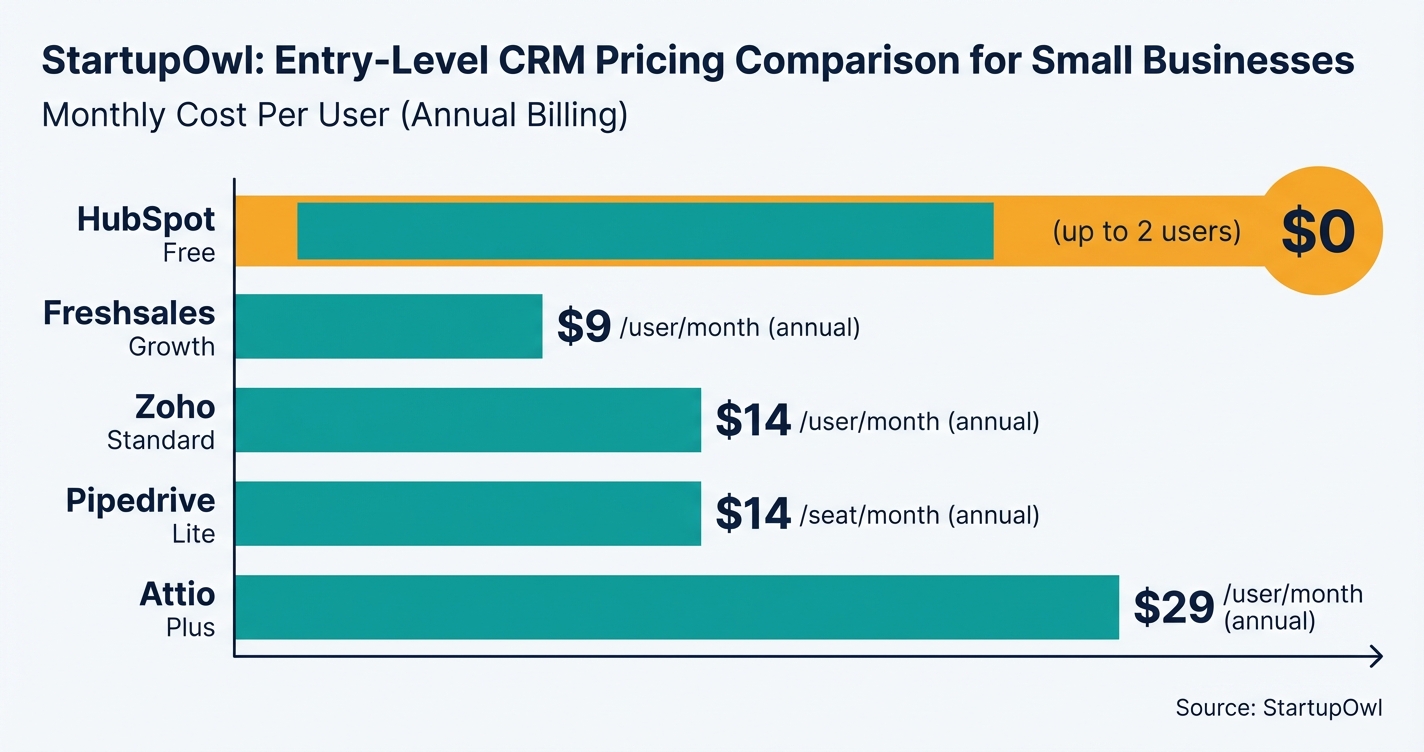
We tested and compared five CRMs that make sense for teams of 1 to 15 people in 2026. Every price and feature claim below is verified against official pricing pages, and we flag exactly where free plans hit their limits. If you are still building your overall growth strategy, start with our small business marketing plan guide.
Why Your Startup Needs a CRM Before You Think You Need One
Spreadsheets break the moment you have more than one person touching customer data. Duplicate entries, lost follow-ups, and missing deal history are the silent killers of early-stage revenue. A CRM centralizes every contact, email, and deal in one searchable place.
The global CRM market is expected to surpass $112 billion in 2026, according to industry projections. That growth reflects how foundational CRM tools have become for businesses of every size. For startups, the right CRM replaces 3 to 5 separate tools (contact list, email tracker, pipeline board, reporting dashboard, and task manager) with a single platform.
If you are also evaluating your tech stack for building a brand or local SEO, your CRM becomes the central hub that connects marketing leads to sales outcomes. The sooner you set it up, the cleaner your data will be when you actually need it.
How to Choose and Set Up Your First CRM in 5 Steps
You do not need a week-long evaluation process. Follow these five steps and you will have a working CRM with real pipeline data within a few hours. The detailed steps with costs, timelines, and links are outlined in the steps section of this guide.
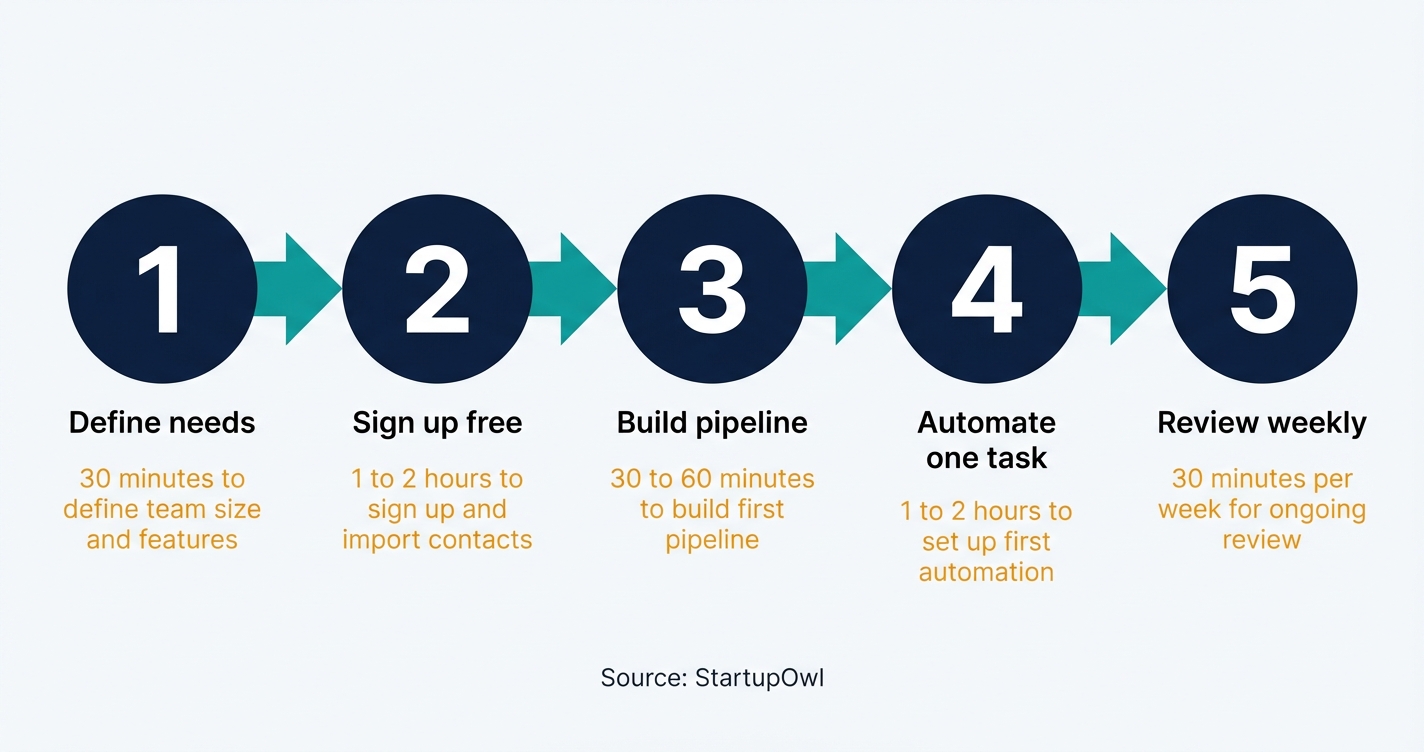
Step 1: Define your team size and must-have features. Write down how many daily users you have and whether you need AI scoring, multiple pipelines, or phone integration. If you only need basic contact and deal tracking, a free plan works.
Step 2: Sign up for a free plan or trial. HubSpot, Freshsales, and Zoho all offer permanent free tiers with no credit card. Pipedrive and Attio offer 14-day free trials. Import your contacts from a clean CSV or sync your email inbox.
Step 3: Build your first pipeline. Keep it to 5 to 7 stages that match your real sales process. Avoid creating stages that nobody uses consistently.
Step 4: Set up one automation. Auto-assign leads, send a follow-up after demos, or flag idle deals. Start with one workflow and expand after a week of testing.
Step 5: Review weekly and upgrade only when you hit a wall. Block 30 minutes every Monday to check pipeline health. Upgrade tiers only after 60 days of real usage data. For help tracking your broader growth metrics, check out our free marketing plan template.
The 5 Best CRMs for Startups in 2026 (With Real Pricing)
Every price below is verified against official pricing pages and third-party sources as of early 2026. Annual billing prices are shown first; monthly billing typically adds 20% to 30%.
1. HubSpot CRM
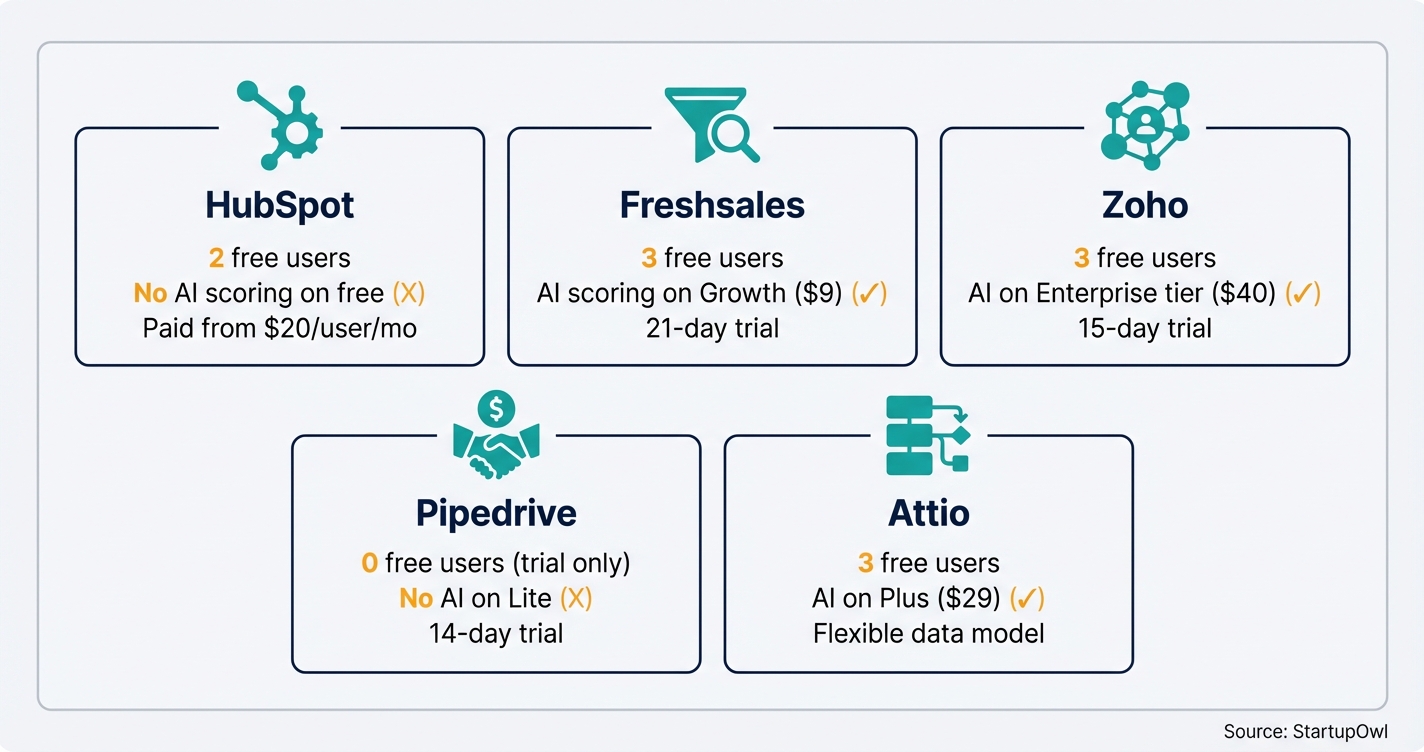
HubSpot's free CRM supports up to 1,000,000 contacts and 2 free users, according to Encharge's 2026 pricing guide. You get deal tracking, email sync, meeting scheduling (1 link), live chat, basic chatbots, and access to the HubSpot App Marketplace. The free plan includes 2,000 email sends per month with HubSpot branding.
Sales Hub Starter costs $20/user/month and removes branding, adds 2 deal pipelines, and unlocks email templates. The HubSpot for Startups program offers up to 90% off Professional and Enterprise plans for seed-stage companies with under $2M in funding. That can drop a $9,600/year Professional plan to roughly $960 in year one.
2. Freshsales by Freshworks
Freshsales offers a free plan for up to 3 users with contact management, email sync, and built-in phone, according to CRM.org's 2026 review. The Growth plan starts at $9/user/month (annual) or $11/user/month (monthly) and adds AI-powered lead scoring via Freddy AI, sales sequences, and customizable pipelines.
The Pro plan jumps to $39/user/month (annual), which unlocks multiple pipelines, custom reports, and advanced workflows. A 21-day free trial is available on all paid plans. The big trade-off: marketing contacts are capped at 500 even on the highest Freshsales Suite tier, so you will likely need a separate email marketing tool. See our ConvertKit vs Mailchimp comparison for options.
3. Zoho CRM
Zoho's free plan supports up to 3 users and includes lead, contact, and deal management plus mobile access, according to Zoho's official pricing page. You get 1 GB of storage, one pipeline, and basic reports. There is no mass email or automation on the free plan.
The Standard plan at $14/user/month (annual) or $20/user/month (monthly) adds mass emailing (250/day), multiple pipelines, custom dashboards, forecasting, and lead scoring. Zoho is part of a 50+ app ecosystem including Zoho Desk, Zoho Projects, and Zoho Analytics, which makes it a strong value pick if you plan to use multiple business tools from one vendor. A 15-day free trial is available for all paid plans.
4. Pipedrive
Pipedrive has no free plan, but its Lite tier starts at $14/seat/month (annual) or $24/seat/month (monthly), according to G2's 2026 pricing data. You get a visual pipeline, custom fields, email sync, an AI sales assistant, and 300+ integrations. A 14-day free trial with Premium features is included.
The Growth plan at $39/seat/month (annual) adds 30+ automation templates, contact enrichment, and a meeting scheduler. Pipedrive's strength is its clean, drag-and-drop interface that requires almost no training. The weakness: add-ons like LeadBooster ($32.50/month) and Campaigns (from $16/month) can push your real cost well above the base price.
5. Attio
Attio offers a free plan for up to 3 users with core CRM features, real-time contact syncing, and basic data enrichment, according to G2's Attio pricing page. The Plus plan starts at $29/user/month (annual) and removes seat limits, adds workflow automations and advanced reporting.
Attio is purpose-built for modern SaaS and VC teams. Its Notion-like interface and flexible relational data model let you create custom objects and attributes that mirror your exact business structure. The Pro tier at $59/user/month unlocks custom objects, advanced permissions, and priority support. If you want a ChatGPT-style AI built natively into your CRM, Attio's AI research agent is a standout feature.
Startup CRM Pricing at a Glance (2026)
| Type / Provider | Rate | Notes |
|---|---|---|
| HubSpot CRM | Free; Starter $20/user/mo | 2 free users, 1M contacts, 2,000 emails/mo. Starter removes branding. |
| Freshsales | Free; Growth $9/user/mo | 3 free users, AI scoring on Growth. 21-day trial. Marketing contacts capped at 500. |
| Zoho CRM | Free; Standard $14/user/mo | 3 free users, 1 GB storage. Standard adds pipelines, dashboards, 250 emails/day. |
| Pipedrive | Lite $14/seat/mo | No free plan. 14-day trial. Add-ons (LeadBooster, Campaigns) increase cost. |
| Attio | Free; Plus $29/user/mo | 3 free users. Plus removes seat limits. Notion-like UI, flexible data model. |
5 CRM Mistakes That Cost Startups Time and Money
1. Choosing the most expensive plan on day one
HubSpot's Marketing Hub Professional costs $800/month plus a one-time onboarding fee. Most startups do not need it until they have 2,000+ marketing contacts and dedicated marketing staff. Start with a free or Starter plan and upgrade only after 60 days of real data.
2. Importing messy contact data
Dumping 5,000 unstructured contacts from a spreadsheet into your new CRM creates duplicate records, inconsistent company names, and unreliable reporting from day one. Spend 1 to 2 hours cleaning your CSV before you import anything.
3. Ignoring the free-plan user limits
Zoho CRM's free plan caps you at 3 users. HubSpot's free tier now limits you to 2 users. If your team is already 4 to 5 people, you will hit a paywall immediately. Factor user limits into your choice before you build your pipeline. If you are comparing platforms for your online store, see our Shopify vs Squarespace guide for that decision.
4. Skipping email sync and logging conversations in your head
If your CRM does not know about your email conversations, your pipeline data is fiction. Every CRM on this list supports Gmail and Outlook sync. Turn it on during setup, not three months later when you realize half your deal history is missing.
5. Building complex automations before your team uses the basics
Automations only work when your underlying data is consistent. If your team is not logging deals and updating stages reliably, automated workflows will fire incorrectly (or not at all). Master manual data entry habits for 2 to 4 weeks before you build automations on top of them.
HubSpot for Startups Can Save You Up to $7,000 in Year One
If you have raised under $2 million in funding and are affiliated with an approved accelerator or VC, you can get 90% off HubSpot Professional and Enterprise plans in year one, 50% off in year two, and 25% off ongoing. Startups with over $2M in funding (up to Series A) qualify for 50% off in year one. Apply at hubspot.com/startups.
What to Do Next
Pick one CRM from this list and sign up for its free plan or trial today. Import your contacts, build a 5-stage pipeline, and commit to logging every deal for 2 weeks. That small investment of time will give you enough data to decide whether you need a paid plan or can stay on free for now.
If you are ready to think bigger about growth, pair your CRM with a small business marketing plan, set up Google Ads for paid lead generation, and use our pricing calculator to make sure your unit economics work before you scale.
Step-by-Step Process
- 1
Define your team size and must-have features
Before you sign up for anything, write down how many people will use the CRM daily and what you need it to do. A solo founder tracking 50 leads needs a very different tool than a 5-person sales team running multi-stage pipelines.
If you only need contact management, deal tracking, and basic email sync, a free plan will work for months. If you need AI lead scoring, multiple pipelines, or phone integration, you will need a paid tier from day one.
Tips
- List every person who will touch the CRM daily, not just sales reps but also founders and ops.
- Rank features as must-have vs. nice-to-have so you don't overspend on a tier you don't need yet.
Common Mistakes
- Buying a mid-tier plan on day one when a free plan covers everything you actually need for the first 6 months.
- 2
Sign up for a free plan or trial and import your contacts
Start with a free plan on HubSpot, Freshsales, or Zoho CRM. All three let you begin immediately without a credit card. Pipedrive and Attio both offer 14-day trials if you prefer their interfaces.
Import your contacts from a CSV or connect your Gmail/Outlook inbox. Most CRMs auto-sync email history within minutes. Clean your data before importing: remove duplicates and standardize company names so your CRM starts with a solid foundation.
Tips
- Export your existing contacts from spreadsheets or email into a single clean CSV before importing.
- Enable email sync on day one so every conversation is logged automatically.
Common Mistakes
- Importing messy data with duplicates and inconsistent names, which makes reporting unreliable from the start.
- Skipping email sync setup, which means half your conversations never land in the CRM.
- 3
Build your first sales pipeline with 5 to 7 stages
Create one pipeline that mirrors your actual sales process. Most startups need 5 to 7 stages: Lead In, Qualified, Demo Scheduled, Proposal Sent, Negotiation, Closed Won, and Closed Lost. Keep it simple.
Resist adding more than 7 stages. Extra stages slow down your team and make reports harder to read. You can always add stages later once you have real data showing where deals stall.
Tips
- Name pipeline stages using plain language your whole team understands without a training session.
- Set a required field (like deal value) at the Proposal Sent stage so your revenue forecasts stay accurate.
Common Mistakes
- Creating 12+ pipeline stages that nobody uses consistently, making your reports meaningless.
- 4
Set up one automation to save time immediately
Pick the single most repetitive task your team does and automate it. Good first automations include auto-assigning new leads to a rep, sending a follow-up email 2 days after a demo, or creating a task when a deal sits idle for 7 days.
On HubSpot's free plan, you get limited workflow actions. Freshsales Growth ($9/user/month) includes sequences and basic workflow automation. Zoho's Standard plan ($14/user/month) adds workflow rules and email templates.
Tips
- Start with a single automation, test it for a week, then layer on more once you confirm it works.
- Use the idle deal notification automation so no opportunity falls through the cracks.
Common Mistakes
- Building 10 automations on day one before your team has established consistent data entry habits.
- 5
Review your CRM data weekly and decide when to upgrade
Block 30 minutes every Monday to review your pipeline. Look at total deal value by stage, average time in each stage, and any deals that have been stuck for more than 14 days. This single habit will tell you whether your CRM is working.
Plan to upgrade when you hit a clear wall: you need more than 3 users (Zoho free limit), you want AI scoring (Freshsales Growth at $9/user/month), or you need multiple pipelines (typically a paid-tier feature on all platforms).
Tips
- Set a calendar reminder every Monday to review pipeline data so it becomes a habit.
- Track your CRM usage for 60 days before upgrading to a paid plan so you know exactly which features you actually need.
Common Mistakes
- Upgrading to a higher tier after just one week because a feature looks appealing, rather than confirming your team will use it.
Cost Breakdown
| Item | Cost Range | Notes |
|---|---|---|
| HubSpot CRM (free plan) | $0 | Up to 2 users, 1,000,000 contacts, basic deal tracking and email (as of 2026) |
| HubSpot Sales Hub Starter | $20/user/month | Removes branding, adds 2 deal pipelines and email templates |
| Freshsales Growth | $9 to $11/user/month | $9 billed annually, $11 billed monthly. Includes AI scoring and pipelines (as of 2026) |
| Zoho CRM Standard | $14 to $20/user/month | $14 billed annually, $20 billed monthly. Multiple pipelines, dashboards, scoring rules (as of 2026) |
| Pipedrive Lite | $14 to $24/user/month | $14 billed annually, $24 billed monthly. Visual pipeline, email sync, AI assistant (as of 2026) |
| Attio Plus | $29/user/month | Billed annually. Unlimited records, workflow automations, advanced reporting (as of 2026) |
Frequently Asked Questions
HubSpot's free CRM is the strongest free option because it supports up to 1,000,000 contacts and includes deal tracking, email sync, live chat, and meeting scheduling. Freshsales and Zoho CRM also offer solid free plans, but both limit you to 3 users with fewer built-in communication tools.
Free plans cover most startups for 3 to 6 months. When you outgrow free, expect to pay $9 to $29/user/month on entry-level paid plans. Freshsales Growth at $9/user/month (annual) is the cheapest paid plan with AI features. For a 5-person team, that is $45/month total.
Upgrade when you hit a concrete wall: you need more users than the free plan allows, you want multiple pipelines, you need workflow automations, or you require custom reporting. Track your usage for at least 60 days before upgrading so you know exactly which features justify the cost.
Yes, if you qualify. Seed-stage startups with under $2 million in funding can get 90% off Professional and Enterprise plans in year one. That drops a $9,600/year Professional plan to roughly $960. The application requires affiliation with an approved VC, accelerator, or incubator partner.
Yes, but switching gets harder over time. All five CRMs on this list support CSV export, and most integrate with migration tools like HubSpot's import wizard. The key risk is losing activity history (logged emails, notes, call records). Export your data within the first 6 months and the migration is usually painless. After a year of heavy use, budget 2 to 5 days for a clean migration.
Yes, but a free plan is all you need at that size. The real value of a CRM at 20 customers is not contact management (a spreadsheet can handle that). It is the email tracking, deal pipeline, and activity logging that help you follow up consistently and close your next 20 faster. Set it up now so your data is clean when you scale.
Some links on this page are affiliate links. If you sign up for a service through them, we may earn a commission at no extra cost to you. This does not influence our rankings.
Sources & References
- HubSpot CRM Official Pricing
- HubSpot for Startups Program
- Freshsales Official Pricing
- Zoho CRM Official Pricing
- Pipedrive Official Pricing
- Attio Official Pricing
- Encharge HubSpot Pricing Breakdown (2026)
- CRM.org Freshsales Review (2026)
- SaaS CRM Review: Freshsales Pricing (2026)
- Zoho CRM Pricing Guide (SaaS CRM Review, 2026)
- G2 Pipedrive Pricing (2026)
- G2 Attio Pricing (2026)
- Authencio Attio CRM Review (2026)
- FTC Endorsement Guides
About the Author
Editor, StartupOwl
Eliot leads StartupOwl's state data research. He maintains the site's fifty state records of LLC filing fees, annual costs, processing times, and small business grant programs, checking each figure against the state office that publishes it and logging the date it was verified. Based in New Jersey, he has spent his working life in and around small businesses, and he writes for the founder who wants the real number rather than the advertised one. Every figure under his byline traces to a named source, and when a state proves a number wrong, the correction is published, not buried.
Was this article helpful?
Questions about Best CRM for Startups in 2026
No comments yet. Ask the first question and a member of our team will answer.
Leave a comment