
Building a Brand from Scratch: A Practical Guide for Small Business Owners
Building a brand costs $0 to $500 for most small businesses. Follow 5 steps to create your logo, colors, voice, and visual identity with free and paid tools.

$0–$500
Est. Cost
14 days
Timeline
5
Total Steps
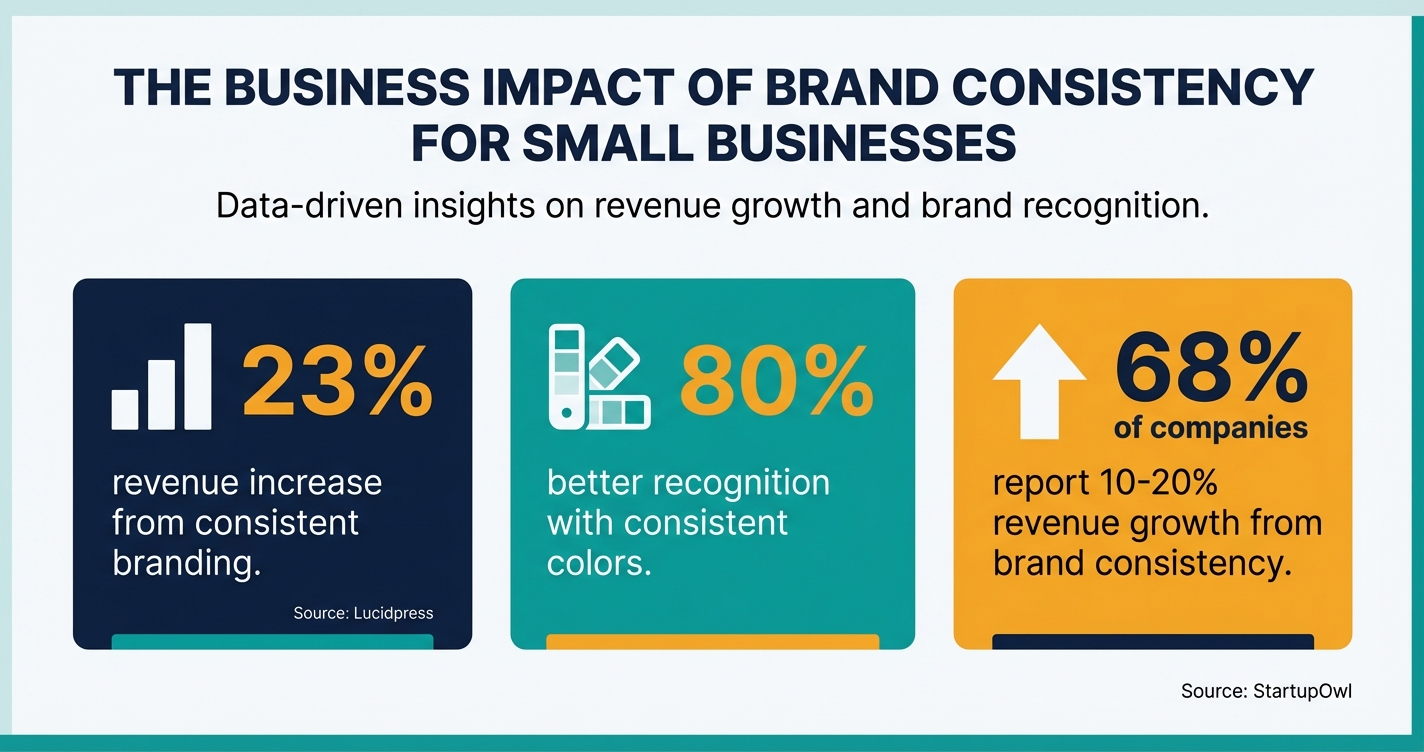
Consistent branding across all platforms can boost your revenue by up to 23%, according to Lucidpress research. Yet most small business owners either skip branding entirely or overspend on agencies charging $5,000+ for a logo and color palette. You don't need to do either.
You can build a professional brand identity (logo, colors, typography, voice, and guidelines) for $0 to $500 using the AI-powered tools available in 2026. This guide gives you the exact five-step process, with real tool prices and timelines for each step.
If you haven't mapped out your broader marketing strategy yet, start with our small business marketing plan guide first. Your brand is the foundation everything else sits on.
What Building a Brand Actually Means for a Small Business
Your brand is not just your logo. It's the complete set of visual elements, language patterns, and emotional associations people connect with your business. That includes your colors, typography, logo, brand voice, and the consistent experience you deliver across every touchpoint.
Research shows that 68% of companies with strong brand consistency report 10-20% revenue growth directly attributable to that consistency. Brands with a memorable color palette are 80% more recognizable than those without one. These aren't vanity metrics; they translate directly to repeat purchases and referrals.
The good news is that building a brand from scratch no longer requires hiring an agency. Tools like Looka (starting at $65 for a premium logo), Canva Pro ($120/year), and Coolors (free) let you build and enforce a professional identity in under two weeks. If you're also thinking about how to position your pricing, check our cost-plus pricing guide, because your brand perception directly affects what you can charge.
Five Steps to Build Your Brand from Scratch
Each step below includes the specific tools you need, what they cost, and how long the step takes. The total investment ranges from $0 (if you stick to free tiers) to around $300-$500/year (if you go with paid plans across the board). Most businesses land somewhere in the middle.
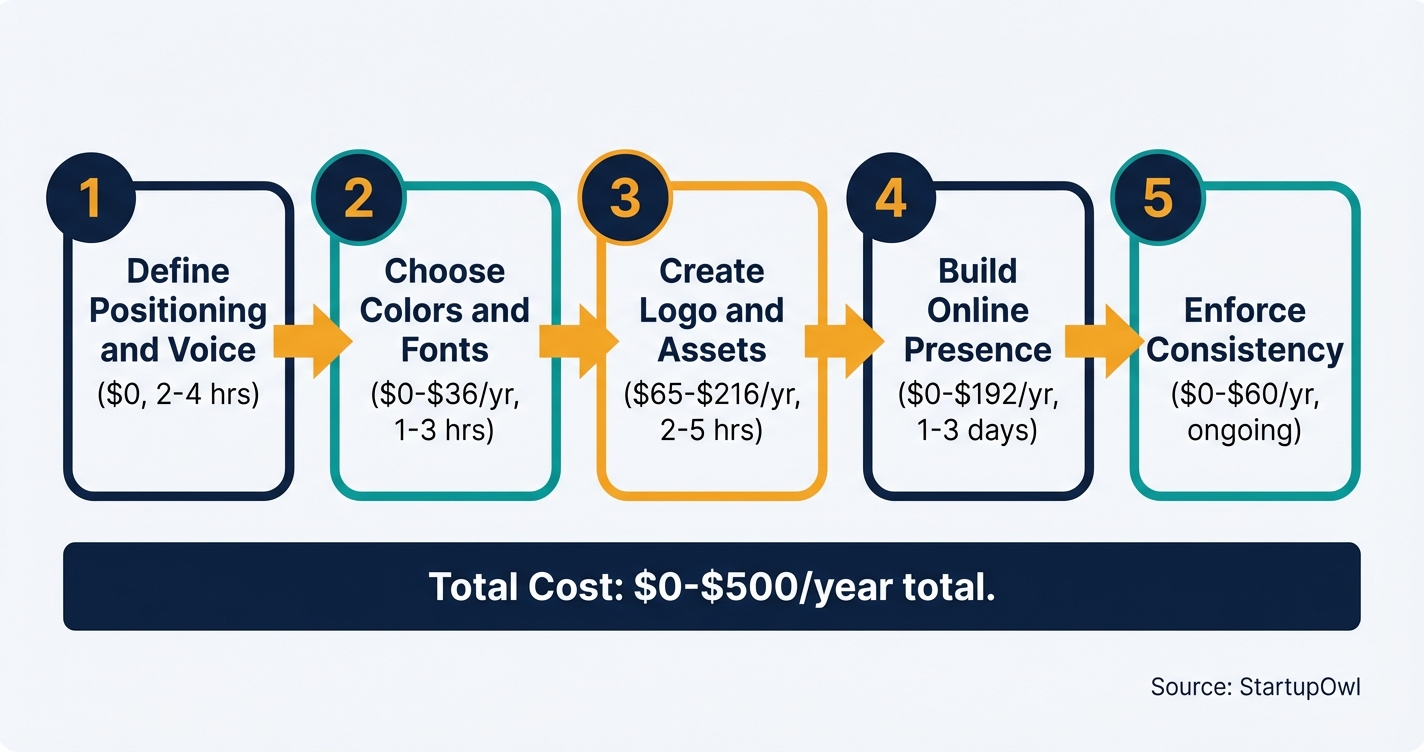
Step 1: Define your brand positioning and voice. Before touching any design tool, write down who you serve, what you solve, and how you sound. Pick 3-5 adjectives (like "friendly, direct, and expert") that guide every piece of content. This costs nothing and takes 2-4 hours. Use our free marketing plan template for a structured worksheet.
Step 2: Choose your brand colors and typography. Use Coolors to generate a palette of 2-3 primary colors and 1-2 neutrals. The free version lets you generate and save palettes with up to 5 colors. Coolors Pro (at $3/month billed annually, as of 2026) expands that to 10 colors and adds unlimited saves. Pair your colors with two fonts from Google Fonts (completely free).
Step 3: Create your logo and visual assets. Looka generates AI-powered logos you can customize in minutes. The Premium Logo Package is $65 (one-time) and includes vector files, multiple variations, and full ownership. The Brand Kit subscription at $96/year adds 300+ branded templates for social media, business cards, and email signatures. Then set up a Brand Kit in Canva Pro ($15/month or $120/year) to manage up to 1,000 Brand Kits with your logos, colors, and fonts.
Step 4: Build your branded online presence. Apply your visual identity to your website, social profiles, email signature, and Google Business Profile. See our Squarespace vs WordPress comparison to pick the right website platform for your budget. If you plan to sell products, read our Shopify vs Squarespace breakdown.
Step 5: Enforce brand consistency across every channel. Create a one-page brand guidelines document and share it with everyone who creates content for your business. Schedule branded social posts with Buffer (free for 3 channels and 10 scheduled posts per channel; Essentials at $5/month per channel adds unlimited scheduling). Run a brand audit quarterly to catch drift before it costs you customers.
What Building a Brand Costs in 2026
| Type / Provider | Rate | Notes |
|---|---|---|
| AI logo (Looka Premium) | $65 one-time | Vector files, multiple variations, full ownership |
| Brand Kit (Looka subscription) | $96/year | 300+ branded templates, business cards, social profiles, brand guidelines |
| Color palette (Coolors) | Free ($36/year for Pro) | Free generates 5-color palettes; Pro adds unlimited saves and 10-color palettes |
| Design platform (Canva Pro) | $120/year ($15/month) | Brand Kits, 140M+ premium assets, 1TB storage, background remover |
| Social scheduling (Buffer) | Free ($5/month per channel for Essentials) | Free plan covers 3 channels with 10 posts each; 14-day free trial for paid plans |
| Typography (Google Fonts) | Free | Thousands of commercially licensed typefaces for web and print |
The Best Branding Tools for Small Businesses
You don't need 15 subscriptions. These four tools cover everything from logo creation to daily brand enforcement.
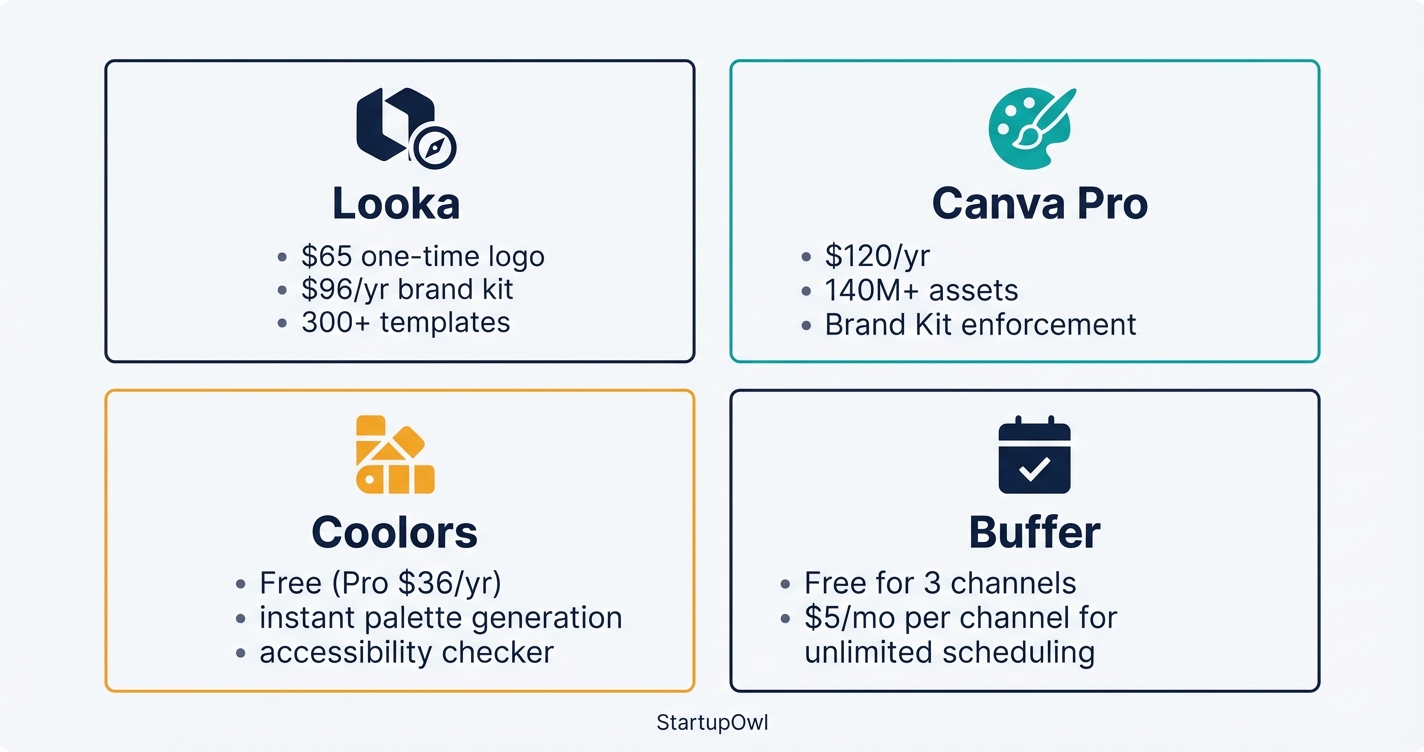
Looka is an AI-powered logo maker built for non-designers. You design for free and pay only when you download. The Premium Logo Package at $65 gives you high-resolution files in multiple formats, and the Brand Kit subscription at $96/year auto-generates social media templates, business cards, letterheads, and brand guidelines using your logo and colors. One limitation: Looka's website builder (included in the $129/year Brand Kit Web plan) is basic compared to dedicated platforms like Squarespace or WordPress.
Canva Pro costs $15/month or $120/year and gives you access to over 140 million premium stock photos, videos, and graphics, plus 610,000+ templates. The Brand Kit feature lets you save up to 1,000 brand profiles with locked logos, colors, and fonts. The free plan includes basic design tools and 5GB of storage but no Brand Kit or background remover. If you're a verified nonprofit, Canva Teams is free for up to 50 users.
Coolors is the fastest way to generate and save color palettes. The free tier lets you create palettes with up to 5 colors and explore thousands of curated schemes. Coolors Pro ($3/month billed annually) unlocks 10-color palettes, unlimited saves, AI palette generation, and a palette visualizer that previews your colors on real design mockups.
Buffer helps you maintain brand voice consistency across social media. The free plan supports 3 channels with 10 scheduled posts per channel. The Essentials plan at $5/month per channel (paid annually, or $6/month monthly) unlocks unlimited scheduling and extended analytics. Annual billing saves you 20%. If you need help planning content, grab our social media content calendar.
Save Money on Canva
Canva offers free Teams access for verified nonprofits (up to 50 users) and free Pro access for verified K-12 teachers and students. If you qualify, that's over $1,200/year in savings. Apply at Canva for Nonprofits or Canva for Education.
Five Brand-Building Mistakes That Cost You Customers
1. Skipping brand guidelines entirely. Without a document that spells out your colors (with hex codes), fonts, logo usage rules, and voice adjectives, every new hire, freelancer, or social post becomes a gamble. Only about 30% of companies have brand guidelines that are widely used and recognized across their organization.
2. Using inconsistent visuals across platforms. Different logos on your website, Instagram, and business cards confuse potential customers. Brands that maintain a consistent visual identity get up to 80% better recognition. Check every touchpoint quarterly.
3. Choosing too many colors. The top 100 brands worldwide use only 1-2 colors in their logos. Stick to 2-3 primary brand colors and 1-2 neutrals. Anything more creates chaos when you (or someone on your team) starts designing.
4. Buying the cheapest logo option without vector files. Looka's $20 Basic package gives you only a PNG file, which pixelates when scaled. Spend the extra $45 on the Premium package to get SVG and other vector formats you'll need for print, signage, and high-resolution screens.
5. Never auditing your brand after launch. Your brand will drift over time, especially as you add team members or new marketing channels. Schedule a simple brand audit every 90 days where you compare every public-facing touchpoint to your guidelines. Early fixes are free; late fixes cost redesigns. For a creative approach to getting noticed, explore our guerrilla marketing ideas guide.
What to Do This Week
Start today by writing your brand positioning statement and choosing 3-5 voice adjectives (that's free and takes under an hour). Then head to Coolors to generate your color palette and Looka to draft your logo. By the end of the week, you'll have a complete visual identity ready to apply across your website and social profiles.
Once your brand is live, track and protect it. Use Buffer's free plan to schedule your first 10 branded posts per channel. You can also use ChatGPT for small business to draft on-brand social copy faster. If you're ready to explore customer relationship tools, see our CRM for startups guide.
Step-by-Step Process
- 1
Define your brand positioning and voice
Before you open any design tool, write down three things: who your ideal customer is, what problem you solve for them, and the one feeling you want people to associate with your business. This is your brand positioning statement, and it should fit into a single sentence.
Then pick 3-5 adjectives that describe how your brand talks (for example: friendly, direct, and playful). These adjectives become your brand voice, and you'll use them to judge every piece of content you create. If you need help structuring this, grab our free marketing plan template that includes a brand voice worksheet.
Tips
- Study 3 competitors' websites for 10 minutes each and note the adjectives that come to mind when reading their copy.
- Ask 5 current or potential customers what words they associate with your business and compare those to your target adjectives.
- Keep your positioning statement under 25 words so it stays actionable.
Common Mistakes
- Writing a brand voice guide so vague that anyone on your team could interpret it differently.
- Copying a competitor's voice instead of differentiating from it.
- 2
Choose your brand colors and typography
Pick 2-3 primary colors and 1-2 neutral supporting colors. Research from Lucidpress shows that a consistent color palette improves brand recognition by up to 80%, so this step matters more than most founders think. Use Coolors (free, with a Pro plan at $3/month billed annually) to generate harmonious palettes in seconds.
For typography, you need exactly two fonts: one for headings and one for body text. Google Fonts offers thousands of free, commercially licensed typefaces. Pair a bold sans-serif heading font with a clean body font and you're set.
Tips
- Lock one color you love in Coolors, then press spacebar to generate complementary options around it.
- Test your palette on dark and light backgrounds to make sure contrast meets WCAG accessibility standards.
Common Mistakes
- Picking 6 or more colors and creating a palette that's impossible to use consistently.
- Choosing trendy colors without checking how they render on mobile screens and in print.
- 3
Create your logo and visual assets
You don't need a $5,000 agency logo when you're starting out. Looka lets you design an AI-generated logo for free and download a premium version with vector files for $65 (one-time purchase, as of 2026). If you want the full brand kit with 300+ branded templates for business cards, social profiles, and letterheads, the Brand Kit subscription costs $96/year.
Once you have your logo, set up a Brand Kit in Canva to enforce your colors and fonts across every design. Canva Pro costs $15/month (or $120/year) and lets you save up to 1,000 Brand Kits with logos, fonts, and colors. The free plan works for basic design but doesn't include Brand Kit functionality.
Tips
- Export your logo in SVG and PNG formats at minimum so you have scalable and web-ready versions.
- Set up your Canva Brand Kit immediately after creating your logo so every future design stays on-brand.
- Request logo variations (icon-only, horizontal, stacked) so you have options for different placements.
Common Mistakes
- Buying only the $20 Basic Looka package (PNG only) when you actually need vector files for print and scaling.
- Skipping the brand guidelines document, which means freelancers and team members will guess at your standards.
- 4
Build your branded online presence
Your website is where your brand comes to life. If you're deciding between platforms, check our Squarespace vs WordPress comparison to see which fits your budget and skill level. For ecommerce, read our Shopify vs Squarespace guide. Hostinger's website builder starts at $2.99/month if you need the most affordable option with a drag-and-drop editor.
Apply your brand colors, fonts, and logo consistently across your site, social media profiles, and email signatures. Set up your Google Business Profile (free) and make sure your logo, business description, and hours are accurate. For more, see our local SEO guide.
Tips
- Use the same profile photo, cover image, and bio copy across every social platform for instant recognition.
- Add your brand colors to your email signature using a free tool like WiseStamp or HubSpot's email signature generator.
Common Mistakes
- Using different logos or color variations across platforms, which fragments your identity and confuses potential customers.
- Launching your site without verifying your Google Business Profile, which hurts local search visibility.
- 5
Enforce brand consistency across every channel
The payoff of branding comes from repetition. According to Lucidpress research, 68% of companies that enforce brand consistency see 10-20% revenue growth. Create a one-page brand guidelines document (colors, fonts, logo usage rules, voice adjectives) and share it with anyone who creates content for your business.
Schedule your first month of branded social content using Buffer. The free plan supports up to 3 channels with 10 scheduled posts per channel. The Essentials plan costs $5/month per channel (paid annually) and unlocks unlimited scheduling. Use our social media content calendar to plan your first 30 days of posts.
Tips
- Run a brand audit every quarter by reviewing your website, social profiles, and email templates for color and voice consistency.
- Use Canva's Brand Kit to lock your templates so team members can't accidentally change fonts or colors.
- Track brand recognition by asking new customers how they heard about you and what words come to mind.
Common Mistakes
- Creating brand guidelines but never distributing them to freelancers, VAs, or new team members.
- Posting on social media without a consistent visual template, which makes your feed look disjointed.
Cost Breakdown
| Item | Cost Range | Notes |
|---|---|---|
| Logo design (AI-generated) | $0-$96/year | Looka Premium logo is $65 one-time; Brand Kit with 300+ templates is $96/year |
| Color palette tool | $0-$36/year | Coolors free plan works for most; Pro is $3/month billed annually |
| Design platform (Canva) | $0-$120/year | Free plan for basics; Pro at $120/year unlocks Brand Kits and premium assets |
| Website builder | $0-$192/year | Hostinger starts at $2.99/month; Squarespace starts around $16/month |
| Social media scheduling | $0-$60/year | Buffer free for 3 channels; Essentials at $5/month per channel (annual) |
| Professional designer (optional) | $200-$5,000 | Only needed for custom logo work; most startups skip this initially |
Frequently Asked Questions
Most small businesses can build a complete brand identity for $150-$300/year using tools like Looka ($65 for a premium logo or $96/year for the full brand kit), Canva Pro ($120/year), and free resources like Coolors and Google Fonts. If you stick entirely to free tiers, you can get started at $0, though you'll miss features like Brand Kits and vector logo files.
No. AI logo makers like Looka produce professional logos with vector files for $65. Canva Pro gives you 610,000+ templates with Brand Kit enforcement for $120/year. Hiring a professional designer makes sense once you're generating consistent revenue and want a fully custom identity, but it's not required at the start.
Plan for 1-2 weeks to complete all five steps, assuming you're working on it part-time alongside running your business. The positioning and voice definition takes 2-4 hours, color and typography selection takes 1-3 hours, and logo creation takes 2-5 hours. Applying everything to your website and social profiles takes 1-3 days.
Your logo is one visual element of your brand. Your brand includes your colors, typography, voice, messaging, customer experience, and the emotional associations people form with your business. A strong logo with inconsistent messaging across channels will still underperform. Research shows consistent branding (not just a great logo) drives up to 23% higher revenue.
Yes, for most small businesses. Canva Pro gives you access to over 140 million premium assets, a background remover, and Brand Kit enforcement that locks your colors and fonts across every design. It won't replace Adobe Illustrator for complex vector work, but for social media graphics, presentations, business cards, and marketing materials, it's more than sufficient at $120/year.
Run a brand consistency audit every 90 days to catch drift across platforms. Most companies do a minor brand refresh every 7-10 years. You don't need a full rebrand unless your target audience, product offering, or market positioning has fundamentally changed. Small, consistent adjustments are cheaper and less risky than a complete overhaul.
Some links on this page are affiliate links. If you sign up for a service through them, we may earn a commission at no extra cost to you. This does not influence our rankings.
Sources & References
- Canva Pricing (Official)
- Canva Pro Pricing Breakdown (Orb)
- Looka Pricing and Packages
- Looka Brand Kit Details (Help Center)
- Buffer Pricing (Official)
- Buffer Pricing 2026 (Social Champ)
- Coolors Pricing
- Brand Consistency ROI Statistics (Amra and Elma)
- Branding Statistics 2026 (Cropink)
- Brand Consistency Revenue Impact (Digital Journal)
- Branding Statistics (DemandSage)
- Brand Consistency Statistics (Capital One Shopping)
- FTC Endorsement Guides
About the Author
Editor, StartupOwl
Eliot leads StartupOwl's state data research. He maintains the site's fifty state records of LLC filing fees, annual costs, processing times, and small business grant programs, checking each figure against the state office that publishes it and logging the date it was verified. Based in New Jersey, he has spent his working life in and around small businesses, and he writes for the founder who wants the real number rather than the advertised one. Every figure under his byline traces to a named source, and when a state proves a number wrong, the correction is published, not buried.
Was this article helpful?
Questions about Building a Brand from Scratch
No comments yet. Ask the first question and a member of our team will answer.
Leave a comment