
Cost-Plus Pricing: How to Calculate Your Markup and When to Use It
Cost-plus pricing adds a fixed markup to your total costs. Learn the 3-step formula, see markup benchmarks by industry (50% to 300%), and find free calculators.

In This Article
- Key Takeaways
- Step-by-Step
- Cost Breakdown
- What Cost-Plus Pricing Actually Is (and What It Is Not)
- How to Calculate Cost-Plus Pricing in 4 Steps
- Free and Paid Tools for Calculating Your Markup
- 5 Cost-Plus Pricing Mistakes That Eat Your Profits
- When to Use Cost-Plus Pricing vs. Value-Based Pricing
- What to Do Next
- FAQ
$0–$99
Est. Cost
30 minutes
Timeline
4
Total Steps
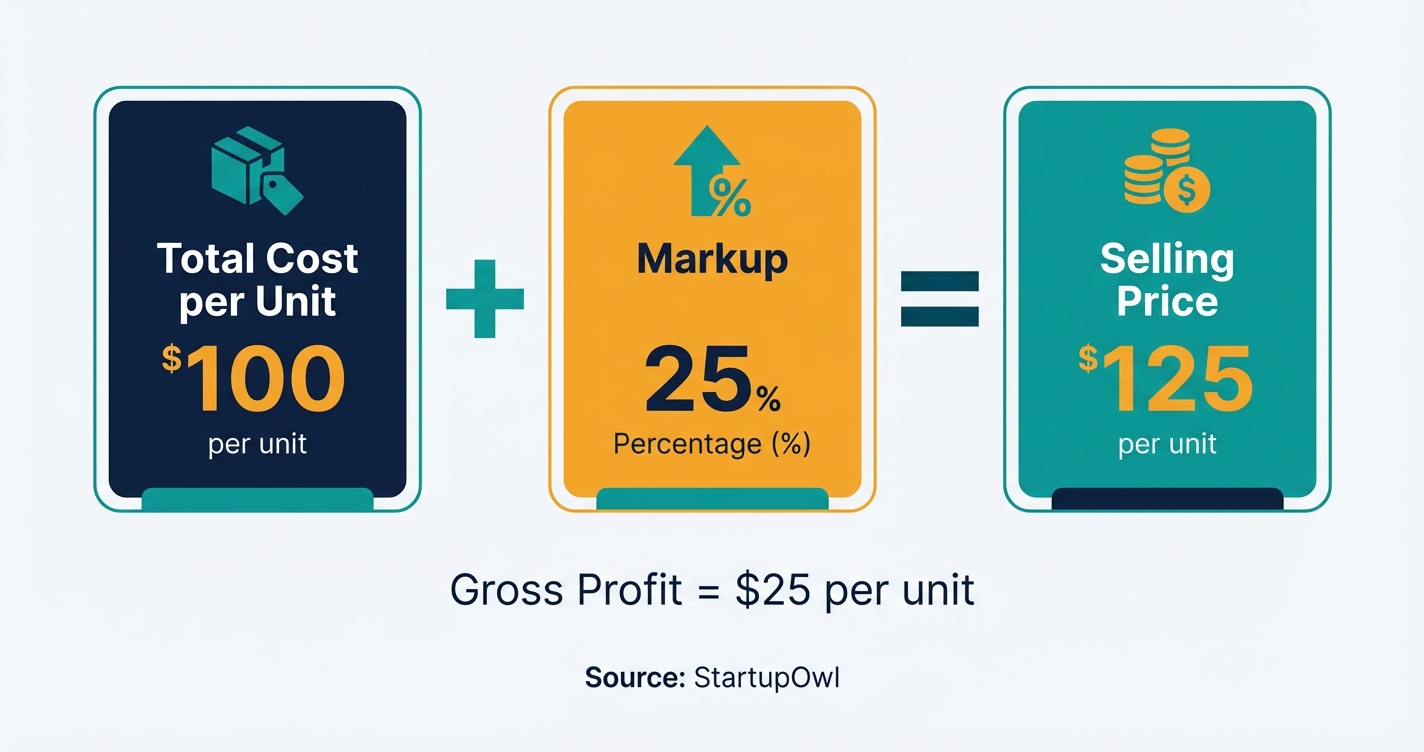
Cost-plus pricing is the most common pricing strategy for small businesses because it is dead simple: calculate your total cost, add a fixed markup, and you have your selling price. The standard formula is Selling Price = Total Cost per Unit × (1 + Markup Percentage). A product that costs $100 to make with a 25% markup sells for $125.
Most retailers use a 50% markup (known as "keystone" pricing), while manufacturers typically mark up 15% to 20% over their bill of materials, according to PROS. This guide shows you how to calculate your markup in four steps, compares cost-plus to value-based pricing, and points you to free tools so you can set profitable prices today.
What Cost-Plus Pricing Actually Is (and What It Is Not)
Cost-plus pricing takes every cost involved in producing or acquiring your product and adds a percentage on top for profit. The costs fall into two categories: direct costs (raw materials, labor, packaging) and indirect costs (rent, utilities, software, insurance). You add them together, multiply by your target markup, and that is your price.
It is not the same as value-based pricing, which sets prices based on what customers believe a product is worth. As Stripe explains, cost-plus pricing is "business-centric" while value-based pricing is "customer-centric." Both have a place in your strategy, and many businesses use a hybrid approach.
Cost-plus works best for businesses with predictable costs and standardized products (think manufacturing, wholesale, and retail). It is commonly used in government contracts because the math is transparent and easy to audit. If your product has strong differentiation or brand appeal, value-based pricing will likely capture more profit.
How to Calculate Cost-Plus Pricing in 4 Steps
Follow these four steps to set your cost-plus price. The whole process takes about 30 minutes for a single product or service, assuming you have your financial records handy. If you are working with dozens of SKUs, block out a half day.
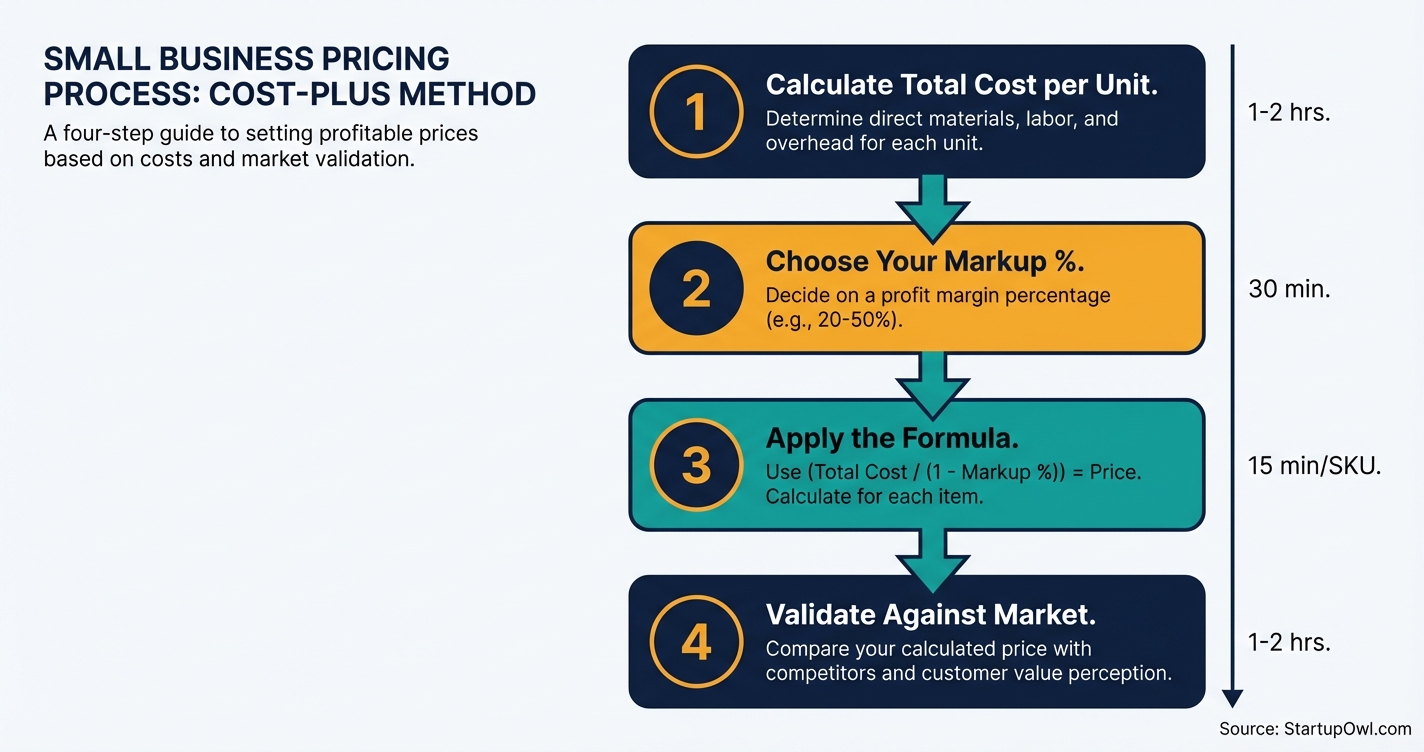
Step 1: Add up your total cost per unit. Pull your direct costs (materials, labor, shipping) and indirect costs (rent, utilities, software) from your accounting software. Divide your monthly fixed overhead by the number of units you sell per month to get a per-unit overhead allocation.
Step 2: Choose your target markup percentage. The retail "keystone" is 50%. Grocery markups average 1% to 3% per item. Clothing runs 100% to 300%. Restaurants mark up food 200% to 400% over wholesale, as reported by NetSuite. Research your industry and competitors to find your sweet spot.
Step 3: Apply the formula. Selling Price = Total Cost per Unit × (1 + Markup %). If your total cost is $50 and your markup is 50%, your selling price is $50 × 1.50 = $75. Always convert markup to margin to see real profitability: a 50% markup equals a 33.3% margin.
Step 4: Validate against the market. Check competitor prices. If your cost-plus price is 20%+ above similar products with no clear differentiator, you need to cut costs, reduce markup, or add more value. Our small business marketing plan guide can help you position your product for the price you want to charge.
Typical Markup Percentages by Industry
| Type / Provider | Rate | Notes |
|---|---|---|
| Grocery (per item) | 1%–3% | High volume, razor-thin margins. Source: NetSuite (as of 2026). |
| General Retail (keystone) | 50% | Standard starting point for most small retailers. |
| Clothing and Apparel | 100%–300% | Higher end for boutique and fashion brands. |
| Restaurants (food over wholesale) | 200%–400% | Covers labor, rent, and food prep overhead. |
| Manufacturing (over BOM) | 15%–20% | Typical for B2B industrial goods. Source: PROS (as of 2026). |
| Wholesale / Distribution | 20%–40% | Average is 20%; specialty distributors go higher. |
| Service Businesses | 40%–60% | Applied to labor + overhead cost per billable hour. |
| Luxury Goods | 100%–500%+ | Brand value and scarcity drive premium markups. |
Free and Paid Tools for Calculating Your Markup
You do not need expensive software to run cost-plus pricing. A spreadsheet handles it fine for most small businesses. But if you manage dozens (or hundreds) of SKUs, these tools save time and reduce errors.
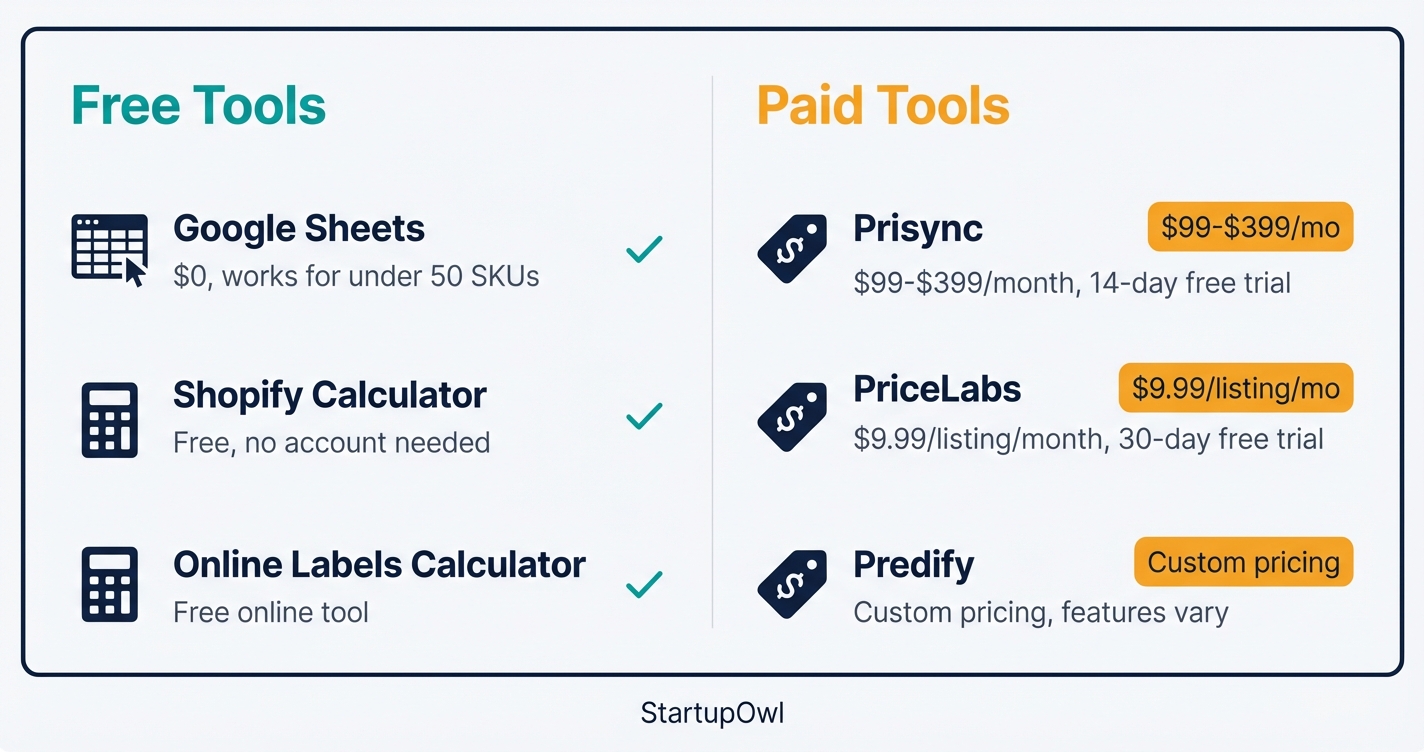
The Shopify Profit Margin Calculator is 100% free and works for any business, not just Shopify stores. Enter your item cost and desired profit percentage, and it returns the selling price and margin instantly. There is no account required.
Prisync is a competitor price-tracking tool that starts at $99/month (Professional plan, up to 100 products with unlimited competitors) as of 2026. It offers a 14-day free trial with no credit card required. Prisync holds a 4.8 out of 5 rating on Capterra with 129 reviews. It is best for e-commerce sellers who need to validate their cost-plus prices against real-time competitor data.
PriceLabs charges $9.99 per listing per month (with a sliding scale for multiple listings) and includes a 30-day free trial. It is designed for vacation rental and Airbnb hosts, not general e-commerce, but it is a good example of dynamic pricing if you want to move beyond cost-plus.
If you sell handmade products, the HSCG Price Calculator is a free member tool specifically for product makers (soap, candles, handmade goods). It walks you through materials, labor, and overhead to suggest a selling price.
Looking for help with your broader pricing strategy? Our pricing calculator can help you model different markup and margin scenarios side by side.
The Free Option Most Small Businesses Should Start With
Open Google Sheets. In Column A, list each product's total cost. In Column B, enter your target markup as a decimal (e.g., 0.50 for 50%). In Column C, use the formula =A2*(1+B2) to get your selling price. In Column D, calculate margin with =(C2-A2)/C2. This 5-minute setup handles cost-plus pricing for any business with fewer than 50 SKUs.
5 Cost-Plus Pricing Mistakes That Eat Your Profits
1. Forgetting indirect costs. Most small businesses undercount overhead by 10% to 25%. If you skip merchant processing fees (typically 2.9% + $0.30 per transaction), returns, or software subscriptions, your "profit" is a mirage. Pull a full expense report before calculating your per-unit cost.
2. Confusing markup with margin. A 100% markup sounds huge, but it only produces a 50% margin. Many new business owners set a 30% markup thinking they will earn 30% profit, when the actual margin is only 23%. Always convert: Margin = Markup / (1 + Markup).
3. Ignoring competitor pricing entirely. Cost-plus pricing does not account for what else is available. As Stripe notes, you "might end up charging more than a better alternative" simply because your costs differ. Spend 30 minutes checking competitor prices before finalizing your markup.
4. Setting prices once and never revisiting them. Supplier costs, shipping rates, and market conditions change. If you set a markup in January and your material costs rise 15% by June, your margin has silently shrunk. Schedule quarterly price reviews on your calendar.
5. Using cost-plus for highly differentiated products. If you sell a unique handmade product, a SaaS tool, or a premium consulting service, cost-plus often undervalues your offering. Value-based pricing captures more of the value you create. Check our guide on building a brand to see how brand perception affects your pricing power.
When to Use Cost-Plus Pricing vs. Value-Based Pricing
Cost-plus pricing works when your costs are stable and predictable, your product competes mostly on price (not brand or uniqueness), and you need a straightforward, auditable pricing method. It is popular in manufacturing, wholesale, retail, and government contracting.
Value-based pricing works better when your product offers unique benefits customers cannot get elsewhere. Software, consulting, luxury goods, and creative services all benefit from pricing based on perceived value rather than production cost. As Intuit notes, "nearly half of business owners want to increase revenue in 2026, and a smarter pricing strategy is one of the most efficient paths to that goal."
The best approach for many small businesses is a hybrid. Use cost-plus as your price floor (the minimum you can charge without losing money), then layer value-based adjustments on top for products where customers perceive extra value. If you are exploring other marketing strategies alongside pricing, our guerrilla marketing ideas guide has low-cost tactics that can increase perceived value without raising your costs.
What to Do Next
Open a spreadsheet, list your top 10 products or services, and calculate your total cost per unit for each. Apply a markup that makes sense for your industry (start with 50% if you are unsure), then validate each price against at least 3 competitors. If you are ready to go deeper, use our pricing calculator to model different scenarios, or read our local SEO guide to drive more traffic to the prices you have set.
Pricing is not a one-time decision. Put a quarterly reminder on your calendar to re-run these numbers, especially when supplier costs or market conditions shift. If you find that cost-plus consistently undervalues your offering, it may be time to explore value-based pricing or start building a brand that commands premium prices.
Step-by-Step Process
- 1
Add up your total cost per unit
Your total cost per unit includes every expense required to produce or acquire one unit. That means direct costs (raw materials, packaging, labor) plus indirect costs (rent, utilities, insurance, software subscriptions). If you sell a service, add up your hourly labor cost plus overhead divided by the number of billable hours.
Use your accounting software to pull these numbers directly. Most small businesses underestimate indirect costs by 10% to 25%, so double-check line items like payment processing fees and shipping before you move on.
Tips
- Include shipping and payment processing fees in your per-unit cost before applying markup.
- Review your costs quarterly because supplier pricing and overhead shift over time.
Common Mistakes
- Forgetting indirect costs like software subscriptions, insurance, and merchant fees, which can erode 10%+ of your margin.
- Using last year's supplier prices instead of current costs.
- 2
Choose your target markup percentage
Your markup percentage depends on your industry, competition, and profit goals. In retail, the standard "keystone" markup is 50% (doubling your cost). Grocery stores operate on 1% to 3% per-item margins, while clothing retailers commonly mark up 100% to 300%. Restaurants typically mark up food 200% to 400% over wholesale.
If you sell services (consulting, freelance, home services), a 40% to 60% markup on your labor-plus-overhead cost is a common starting point. Test your price against competitors before committing. Check out our pricing calculator to model different scenarios.
Tips
- Research 3 to 5 direct competitors' prices to anchor your markup to market reality.
- Start at keystone (50%) and adjust based on your competitive position and unique value.
Common Mistakes
- Picking a markup purely from an industry average without factoring in your local market and overhead.
- 3
Apply the cost-plus formula to set your selling price
The formula is straightforward: Selling Price = Total Cost per Unit × (1 + Markup Percentage). If your total cost per unit is $100 and you want a 25% markup, your selling price is $100 × 1.25 = $125. That $25 difference is your gross profit per unit.
Run this calculation for every product or service SKU. Then convert your markup into a margin to confirm profitability: a 25% markup equals a 20% gross margin ($25 profit / $125 selling price). Keep a spreadsheet or use Shopify's free profit margin calculator to double-check your numbers.
Tips
- A 100% markup only equals a 50% margin, so always convert to margin before finalizing.
- Set a price floor (your total cost) so you never accidentally sell below cost during promotions.
- Document your formula in a spreadsheet so any team member can recalculate when costs change.
Common Mistakes
- Confusing markup with margin (a 50% markup is NOT a 50% margin; it is a 33% margin).
- 4
Validate your price against the market and adjust
Cost-plus pricing ignores what customers are willing to pay, so you need a reality check. Search for competing products on Amazon, Google Shopping, or your local market and compare your cost-plus price to theirs. If you are 20%+ higher without a clear differentiator, you will likely lose sales.
Consider testing two price points with a small segment of customers. If your product has unique benefits (speed, quality, design), you may want to blend cost-plus with value-based pricing to capture more of the value you create. Our small business marketing plan guide can help you position your product to justify premium pricing.
Tips
- Use Prisync's 14-day free trial to track competitor prices automatically if you have 100+ SKUs.
- Re-evaluate your markup every quarter or whenever supplier costs change by more than 5%.
Common Mistakes
- Setting a price once and never revisiting it, even as raw material costs and competitor pricing shift.
Cost Breakdown
| Item | Cost Range | Notes |
|---|---|---|
| Google Sheets or Excel (DIY calculation) | $0 | Good enough for businesses with fewer than 50 SKUs. |
| Shopify Profit Margin Calculator | $0 | Free web tool. Enter cost and desired markup to get recommended selling price. |
| Prisync (competitor price tracking) | $99–$399/month | 14-day free trial. Professional plan tracks up to 100 products with unlimited competitors. |
| PriceLabs (vacation rental pricing) | $9.99/listing/month | 30-day free trial. Best for Airbnb and short-term rental hosts, not general e-commerce. |
| Predify (AI pricing optimization) | Custom pricing (free trial available) | Uses machine learning to suggest ideal prices based on internal and competitor data. |
Frequently Asked Questions
Markup is a percentage of your cost; margin is a percentage of your selling price. A product that costs $50 and sells for $100 has a 100% markup but only a 50% margin. The conversion formula is: Margin = Markup / (1 + Markup). Most e-commerce businesses target a gross margin of 30% to 50%, which translates to a markup of roughly 43% to 100%.
It depends on your industry, but the retail standard (keystone) is 50%, which gives you a 33% gross margin. Service businesses typically use 40% to 60% markup over labor-plus-overhead. Restaurants mark up food 200% to 400% because they carry higher operating costs. Research 3 to 5 competitors in your niche to find the right range for your market.
Consider switching (or adding a value-based layer) when your product has clear differentiation that customers are willing to pay more for. If you sell a SaaS product that saves customers 10 hours per week, pricing based on your server costs misses the point. Cost-plus also struggles in volatile markets where input costs shift faster than you can adjust prices.
Keystone pricing is a specific type of cost-plus pricing where the markup is exactly 100% (doubling your cost). So a $25 wholesale item sells for $50. All keystone pricing is cost-plus, but not all cost-plus pricing uses a 100% markup. You can use any markup percentage with the cost-plus formula.
Yes. Calculate your total cost per billable hour (wages + benefits + overhead divided by billable hours), then add your markup. A freelancer with a $40/hour fully loaded cost and a 50% markup would charge $60/hour. Many consultants eventually move toward value-based pricing as they build expertise and reputation.
Some links on this page are affiliate links. If you sign up for a service through them, we may earn a commission at no extra cost to you. This does not influence our rankings.
Sources & References
- Shopify Profit Margin Calculator
- Stripe: Cost-Based and Value-Based Pricing
- PROS: Distributor Markup and Profit Margins
- NetSuite: Markup Percentage Defined
- Prisync Pricing (G2)
- Prisync (Capterra Reviews)
- PriceLabs Pricing Plans
- Intuit: Value-Based vs Cost-Plus Pricing
- Shopify: Markup vs. Margin
- NI Business Info: Cost-Plus vs Value-Based Pricing
- KORONA POS: Initial Markup in Retail
About the Author
Editor, StartupOwl
Eliot leads StartupOwl's state data research. He maintains the site's fifty state records of LLC filing fees, annual costs, processing times, and small business grant programs, checking each figure against the state office that publishes it and logging the date it was verified. Based in New Jersey, he has spent his working life in and around small businesses, and he writes for the founder who wants the real number rather than the advertised one. Every figure under his byline traces to a named source, and when a state proves a number wrong, the correction is published, not buried.
Was this article helpful?
Questions about Cost-Plus Pricing
No comments yet. Ask the first question and a member of our team will answer.
Leave a comment