
How to Write a Small Business Marketing Plan in 2026 (With Free Template)
Build a small business marketing plan in 7 steps. Includes budget allocation benchmarks, tool recommendations from $0, and a free downloadable template.

$0–$500
Est. Cost
4 hours
Timeline
7
Total Steps
A documented marketing plan gives every dollar a job. It connects your budget to specific channels, ties each channel to measurable goals, and tells you exactly when to cut a campaign that isn't working. Email marketing alone returns an average of $36 for every $1 spent (as of 2026, per Litmus), but only if you have a plan for what to send, to whom, and how often.
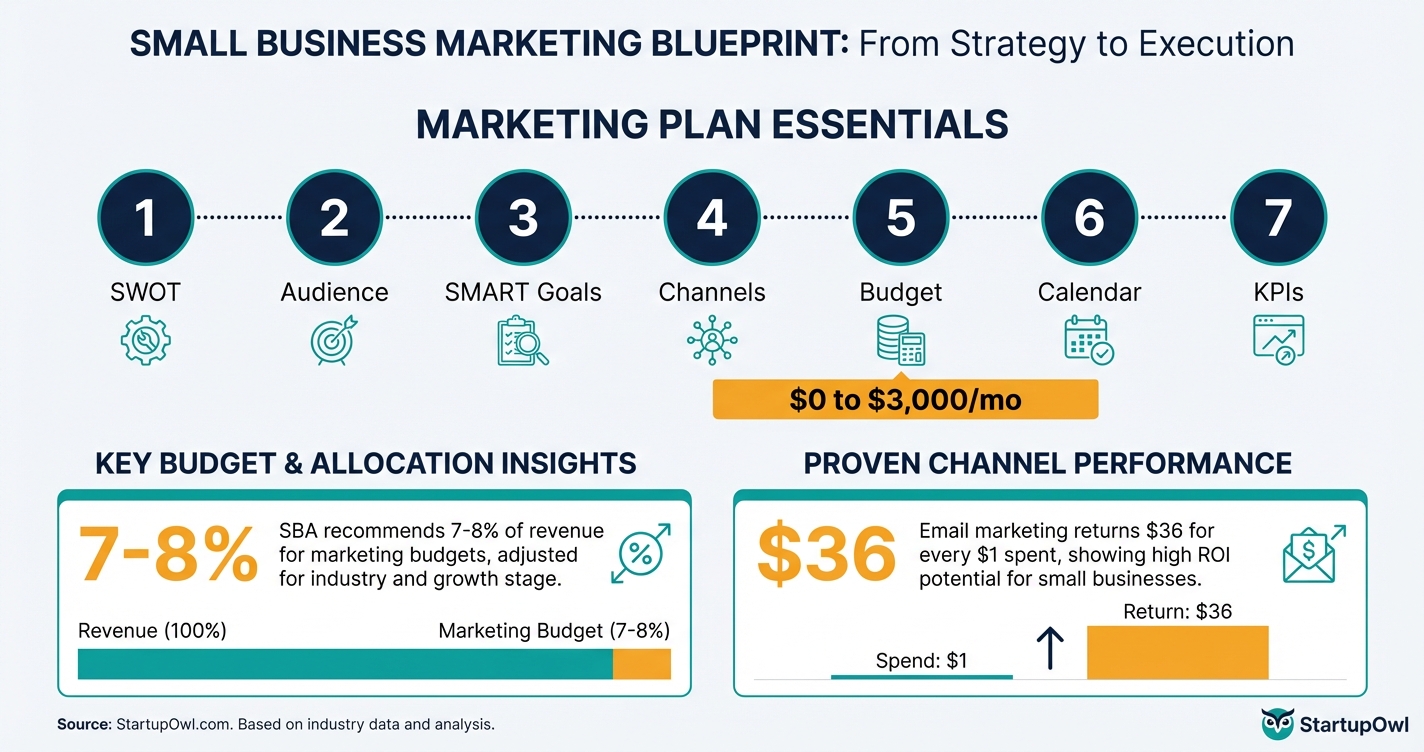
This guide walks you through 7 steps to build your marketing plan from scratch. You'll get real budget benchmarks, tool recommendations starting at $0, and a free marketing plan template you can start filling in right now.
What a Small Business Marketing Plan Actually Includes
A marketing plan is a written document that maps out how you'll attract, convert, and retain customers over a specific period (usually 12 months). It's not a vague strategy deck or a list of social media ideas. It's an operating manual with numbers.
Every effective small business marketing plan covers these core sections:
- Situation analysis and SWOT (strengths, weaknesses, opportunities, threats)
- Target audience profiles with demographics, pain points, and preferred channels
- Competitive analysis documenting how you're positioned against 3-5 direct competitors
- SMART goals (Specific, Measurable, Achievable, Relevant, Time-bound)
- Channel strategy covering digital ads, content/SEO, email, local SEO, and social
- Budget allocation (typically 25-40% digital ads, 20-35% content/SEO, 10-15% tools)
- 90-day tactical calendar with week-by-week actions
- KPIs and measurement framework for monthly reviews
If you're also working on your building a brand strategy or choosing between Squarespace vs WordPress for your website, your marketing plan is where those decisions get formalized with timelines and budgets.
7 Steps to Build Your Marketing Plan
Follow these steps in order. Each one builds on the previous step, and skipping ahead usually means you'll waste money on the wrong channels. The entire process takes about 4-6 hours spread over a week, and you can do it for $0 using free tools.
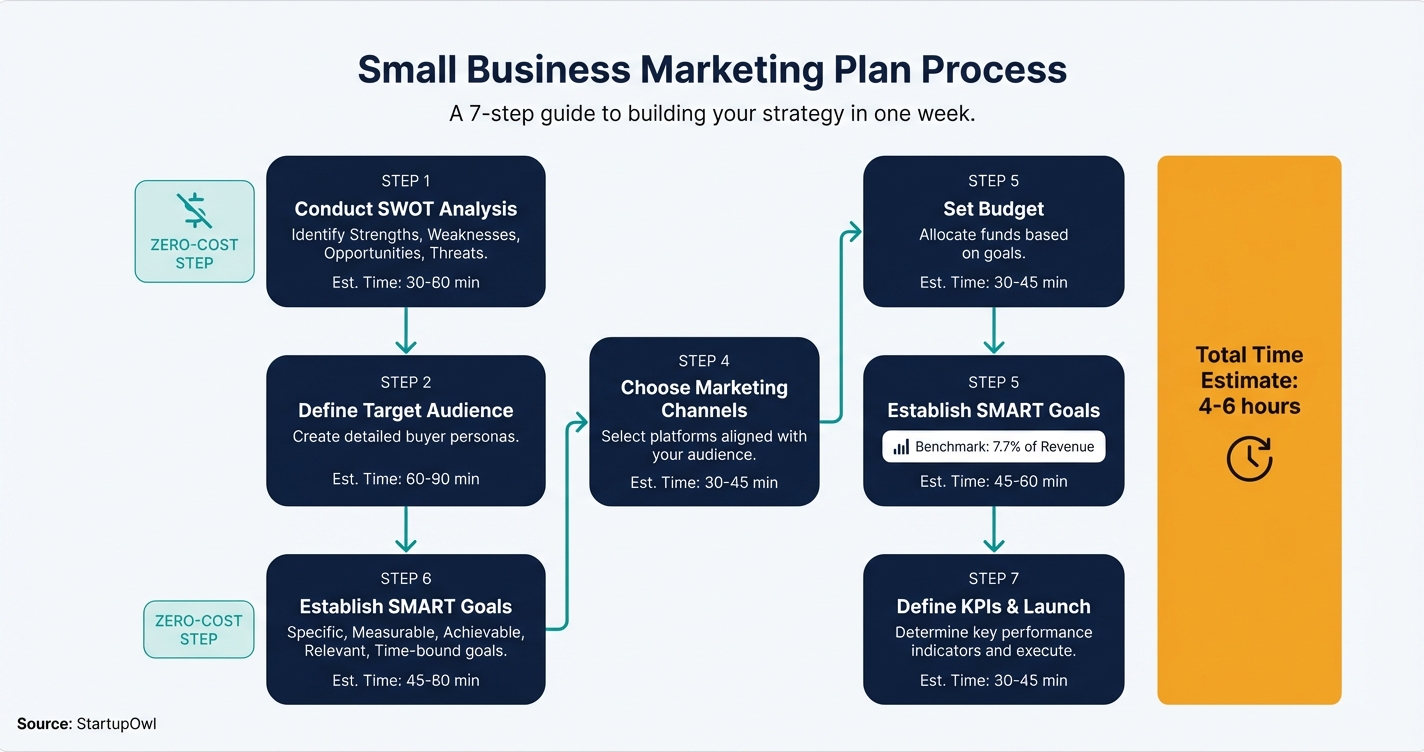
Step 1: Run a Situation Analysis and SWOT. Document your top 3 strengths, weaknesses, opportunities, and threats in one page. Survey 5-10 existing customers to validate your assumptions. Check competitor reviews on Google Business Profile for weaknesses you can exploit in your messaging.
Step 2: Define Your Target Audience. Build 2-3 buyer personas using HubSpot's free Make My Persona tool. Each persona needs a name, job title, biggest problem, primary objection, and preferred channels. Pull real demographic data from your Google Analytics audience reports.
Step 3: Set SMART Goals Tied to Revenue. Write 3-5 goals with specific numbers and deadlines. 'Acquire 50 new email subscribers per month by September 2026' works. 'Get more customers' does not. Work backward from your annual revenue target to calculate how many leads you need each month.
Step 4: Choose Your Marketing Channels. Pick 2-3 channels where your audience actually spends time. Email marketing should almost always be one of them, returning an average of $36 per $1 spent. Local SEO is your second priority if you serve a geographic area. Paid ads come third, once you have tracking in place.
Step 5: Set Your Budget. Gartner's 2026 CMO Spend Survey reports the average company spends 7.7% of revenue on marketing (per Gartner). For a business earning $500,000/year, that's roughly $3,000/month. Pre-revenue? Start with a fixed $200-$500/month you can sustain for 6 months.
Step 6: Build a 90-Day Tactical Calendar. Break your first quarter into weekly action items. Use Google Sheets or our social media content calendar to map it out. Include publishing dates, email sends, ad launches, and monthly review meetings.
Step 7: Set Up KPI Tracking. At minimum, track website traffic, email list growth, email open rate (the industry average is 21.33% per Mailchimp Benchmarks), cost per lead, and revenue from marketing. Schedule a monthly 1-hour review to compare results against goals.
How to Allocate Your Marketing Budget
| Type / Provider | Rate | Notes |
|---|---|---|
| Digital Advertising (Google, Meta, etc.) | 25-40% of budget | Average Google Ads CPC is $5.26 in 2026. Start with at least $1,000/month for useful data. |
| Content and SEO | 20-35% of budget | Blog writing, keyword research, link building. Takes 3-6 months to see organic traffic results. |
| Tech and Tools (CRM, email, design) | 10-15% of budget | Can start at $0 with HubSpot free CRM, Mailchimp free, and Canva free. |
| Social Media | 10-20% of budget | Organic social is free but time-intensive. Budget for a scheduling tool ($0-$25/month). |
| Email Marketing | 5-15% of budget | Highest ROI channel at $36 per $1 spent. Mailchimp Essentials starts at $13/month for 500 contacts. |
Recommended Tools to Execute Your Plan
You don't need a stack of expensive software to run a real marketing plan. Here are 4 tools that cover the essentials, all with usable free tiers.
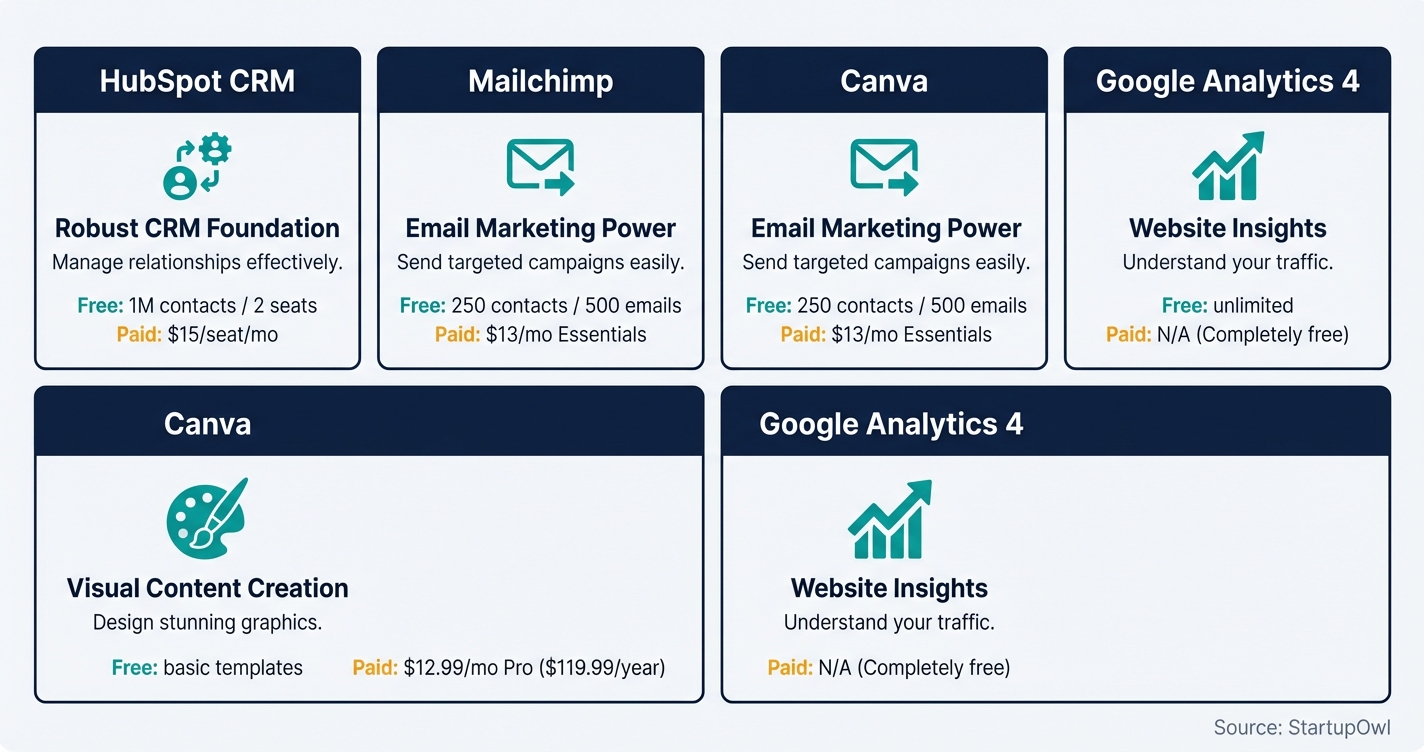
HubSpot CRM (Free / $15 per seat per month Starter). The free CRM supports up to 1,000,000 contacts with deal tracking, basic email marketing (2,000 sends/month), forms, and landing pages (as of 2026, per HubSpot). You're limited to 2 user seats on free. The Starter Customer Platform bundles all hubs at $15/seat/month with no annual commitment required. If you need a CRM for startups, this is the best free starting point.
Mailchimp (Free / $13 per month Essentials). Mailchimp's free plan now covers just 250 contacts and 500 emails/month after a January 2026 reduction (per EmailToolTester). The Essentials plan at $13/month gets you 500 contacts and 5,000 emails. The Standard plan starts at $20/month and adds multi-step automation. If you're comparing options, see our ConvertKit vs Mailchimp breakdown.
Canva (Free / $12.99 per month Pro). The free plan includes thousands of templates and basic editing (as of 2026, per Canva). Pro at $12.99/month (or $119.99/year) unlocks 100+ million premium stock photos, background remover, brand kit, and AI tools through Magic Studio. If you create more than a few social posts per month, Pro pays for itself compared to hiring a freelance designer.
Google Analytics 4 (Free). GA4 is non-negotiable. It tracks website traffic, user behavior, and conversions at no cost. Pair it with Google Search Console (also free) to monitor your search performance and local SEO progress. Set up both within your first week.
Download Your Free Marketing Plan Template
We built a fill-in-the-blank free marketing plan template that follows the exact 7-step structure in this guide. It includes pre-formatted sections for your SWOT, buyer personas, SMART goals, channel strategy, budget allocation, 90-day calendar, and KPI dashboard. Just open it in Google Sheets and start filling in your data.
5 Marketing Plan Mistakes That Waste Your Budget
1. Spreading your budget across too many channels. A $500/month budget split five ways gives each channel $100, which isn't enough for Google Ads (where the average CPC is $5.26, per WordStream's 2026 benchmarks). That buys you about 19 clicks. Pick 2 channels and invest enough to learn what works.
2. Setting goals you can't measure. If you write 'increase brand awareness' without defining a metric (like branded search volume or direct traffic), you'll never know whether it worked. Tie every goal to a number you can track in Google Analytics or your email platform.
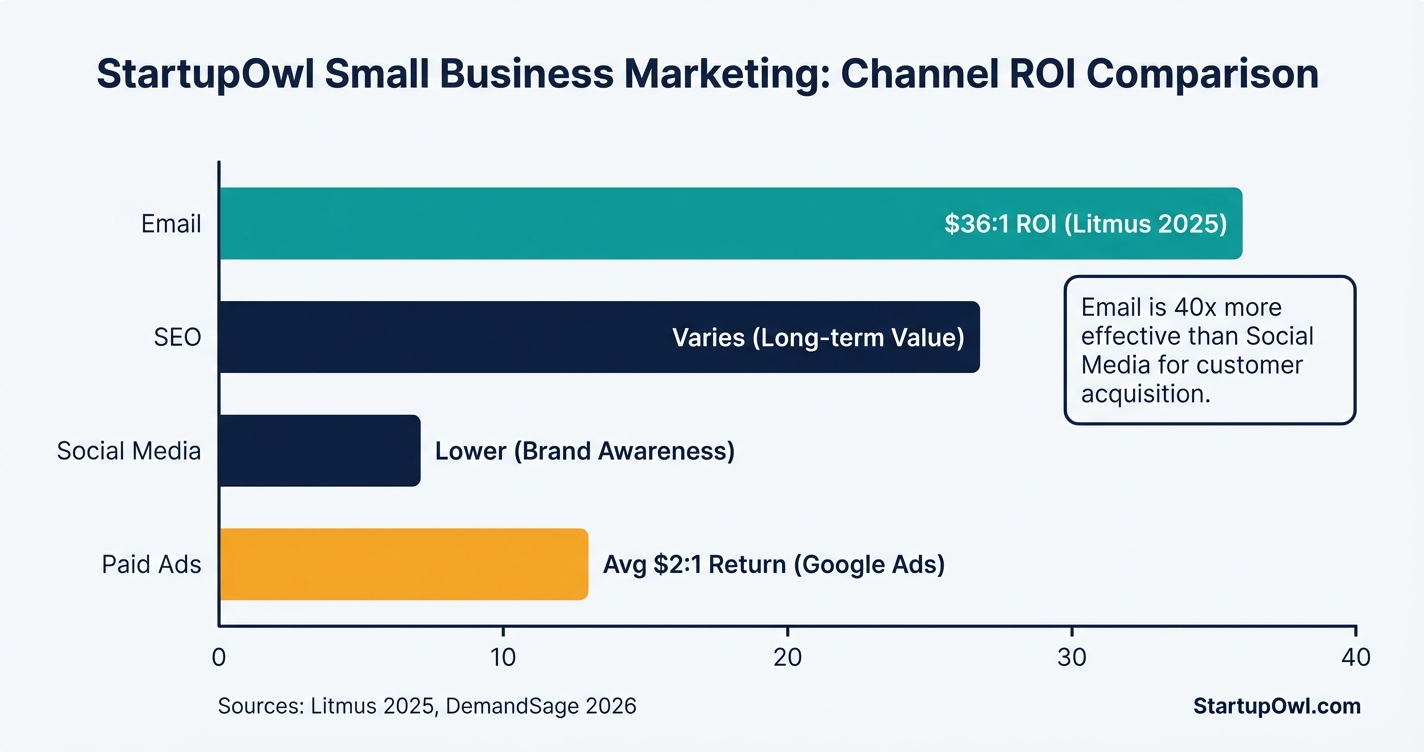
3. Ignoring email marketing. With an average ROI of $36 for every $1 spent, email outperforms social media for customer acquisition by 40x (per DemandSage). If you're spending on ads but not building an email list, you're renting attention instead of owning it.
4. Writing the plan and never revisiting it. A marketing plan needs monthly reviews. Conditions change. Channels that worked in Q1 might underperform in Q3. Schedule a recurring 1-hour monthly meeting to compare actual results against your SMART goals.
5. Forgetting to budget for tools. CRM, email platform, design software, and analytics tools typically eat 10-15% of your total marketing budget. Factor this in from the start, or use free tiers to keep costs at $0 while you validate your channels. Check our guide to accounting software to track marketing spend alongside your other business expenses.
What to Do Right Now
Open our free marketing plan template, fill in your SWOT and 3 SMART goals today, and sign up for a free HubSpot CRM account. Those three actions take under 2 hours and give you the foundation for everything else. Come back to complete Steps 4-7 this week, and you'll have a fully documented plan ready to execute by next Monday.
If you're also thinking about pricing your products, check out our cost-plus pricing guide. And if you need creative ways to market on a shoestring budget, our guerrilla marketing ideas list has 25+ tactics you can execute for under $50.
Step-by-Step Process
- 1
Run a situation analysis and SWOT on your business
Before you write a single word of strategy, you need an honest snapshot of where your business stands. A SWOT analysis (Strengths, Weaknesses, Opportunities, Threats) forces you to document what you're actually good at, where you're falling short, and what market openings your competitors are missing.
Write down your top 3 strengths, 3 weaknesses, 3 opportunities, and 3 threats. Keep each item to one sentence. If you can't name specific competitors in your threats section, you haven't done enough research yet.
Tips
- Survey 5-10 existing customers about why they chose you over competitors.
- Use Google Trends to spot rising search interest in your product category.
- Check competitor reviews on Google Business Profile for weaknesses you can exploit.
Common Mistakes
- Listing vague strengths like 'great customer service' instead of measurable advantages like '4.8-star average across 200 Google reviews'.
- Skipping the threats section because it feels uncomfortable.
- 2
Define your target audience with specific demographics
Your marketing plan needs a detailed profile of your ideal customer, not a vague description like 'small business owners.' Include age range, income bracket, geographic location, biggest pain points, and the channels where they spend time online.
Build 2-3 buyer personas maximum. Each should include a fictional name, job title, the problem they're trying to solve, and the objection that keeps them from buying. HubSpot's free Make My Persona tool walks you through the process in about 15 minutes.
Tips
- Pull demographic data from your Google Analytics audience reports.
- Look at your best 10 customers and find the 3-4 traits they share.
Common Mistakes
- Creating more than 3 personas, which dilutes your messaging and budget.
- Defining demographics without including psychographics like motivations and fears.
- 3
Set SMART goals tied to revenue
Every goal in your marketing plan should be Specific, Measurable, Achievable, Relevant, and Time-bound. 'Get more customers' is not a goal. 'Acquire 50 new email subscribers per month by September 2026 through a lead magnet on our blog' is a goal.
Start with 3-5 SMART goals that connect directly to revenue. If you're running Google Ads for small business, your goal might be 'Generate 20 qualified leads per month at a cost per lead under $50.' If you're focused on organic growth, it might be 'Rank on page 1 for 5 target keywords within 6 months.'
Tips
- Work backward from your annual revenue target to calculate how many leads you need each month.
- Set quarterly checkpoints so you can adjust mid-year, not just at year-end.
Common Mistakes
- Setting goals you can't actually measure because you haven't installed tracking yet.
- Choosing vanity metrics like 'increase social media followers' instead of conversion-focused goals.
- 4
Choose your marketing channels based on your budget
You do not need to be on every platform. Pick 2-3 channels where your target audience actually spends time, and invest enough in each to get real data. A typical small business marketing budget allocates 25-40% to digital ads, 20-35% to content and SEO, and 10-15% to tools.
Email marketing is almost always the right first channel. It returns an average of $36 for every $1 spent (as of 2026, per Litmus). Local SEO is your second priority if you serve a geographic area. Paid ads (Google or Meta) come third, once you have conversion tracking in place. Build your small business marketing plan around channels you can sustain for at least 6 months.
Tips
- Start with email + one organic channel (SEO or social) before adding paid ads.
- The average Google Ads CPC is $5.26 in 2026 (per WordStream). Budget at least $1,000/month for meaningful data.
- Use our free marketing plan template to map channels to goals.
Common Mistakes
- Spreading a $500/month budget across 5 channels instead of concentrating on 2 that work.
- 5
Set your marketing budget using the percentage-of-revenue method
Gartner's 2026 CMO Spend Survey found the average company spends 7.7% of revenue on marketing. For small businesses under $5M in revenue, the SBA recommends 7-8%. If your revenue is $500,000, that means a marketing budget of $35,000-$40,000 per year (roughly $3,000/month).
If you're pre-revenue or just starting, set a fixed monthly budget you can sustain for 6 months without financial stress. Even $200-$500/month is enough to run one paid channel plus a free email tool. Use our pricing calculator to model how much you can afford based on your margins.
Tips
- If you're in aggressive growth mode, push toward 10-15% of revenue instead of the 7-8% baseline.
- Reserve 10% of your marketing budget for testing new channels each quarter.
Common Mistakes
- Basing your budget on last year's revenue instead of your growth target.
- Forgetting to budget for tools (CRM, email platform, design software), which typically eat 10-15% of total spend.
- 6
Build a 90-day tactical calendar with weekly actions
A marketing plan without a calendar is just a wish list. Break your first 90 days into weekly action items with assigned owners and deadlines. Week 1 might be 'Set up Mailchimp account and import contact list.' Week 4 might be 'Publish first blog post targeting primary keyword.'
Use a free tool like Google Sheets or a social media content calendar to map it out. Your calendar should include content publishing dates, email send dates, ad campaign launch dates, and monthly review meetings. This is where ChatGPT for small business can save you hours on content drafts.
Tips
- Color-code your calendar by channel (green for email, blue for social, orange for paid ads).
- Schedule a 30-minute weekly review to check what's working and what needs adjusting.
- Batch-create content monthly rather than scrambling daily.
Common Mistakes
- Planning 6-12 months ahead in detail, then abandoning the plan after month 2 because it's outdated.
- 7
Set up KPI tracking and schedule monthly reviews
Your plan is only as good as the data you collect. At minimum, track these 5 KPIs monthly: website traffic (Google Analytics), email list growth rate, email open rate (industry average is 21.33% as of 2024 per Mailchimp), cost per lead, and revenue generated from marketing.
Set up a simple dashboard in Google Sheets or use HubSpot's free reporting tools. Schedule a monthly 1-hour review where you compare actual results to your SMART goals and decide whether to double down, adjust, or cut a channel. If a channel isn't showing traction after 90 days, it's time to reallocate that budget.
Tips
- Use UTM parameters on every link so you know exactly which campaign drove each conversion.
- Compare your email open rates to industry benchmarks from Mailchimp's annual report.
Common Mistakes
- Tracking too many metrics instead of focusing on the 5 that tie directly to revenue.
- Reviewing data quarterly instead of monthly, which means you lose 3 months before catching a problem.
Cost Breakdown
| Item | Cost Range | Notes |
|---|---|---|
| Email marketing platform | $0-$20/month | Mailchimp free covers 250 contacts. Essentials starts at $13/month for 500 contacts (as of Jan 2026). |
| CRM software | $0-$20/month | HubSpot free CRM supports up to 1,000,000 contacts. Starter begins at $15/seat/month. |
| Design tool | $0-$13/month | Canva Free includes templates and basic editing. Pro is $12.99/month or $119.99/year. |
| Google Ads (optional) | $200-$2,000/month | Average CPC is $5.26 in 2026. Budget at least $1,000/month for statistically meaningful results. |
| SEO tools (optional) | $0-$100/month | Google Search Console is free. Paid tools like Semrush start around $130/month. |
| Social media scheduler | $0-$25/month | Buffer and Later offer free plans for up to 3 channels. |
Frequently Asked Questions
The U.S. Small Business Administration recommends 7-8% of gross revenue for businesses earning under $5 million. Gartner's 2026 CMO Spend Survey confirmed the average across all companies is 7.7%. If your business earns $300,000/year, plan for roughly $1,750-$2,000/month in marketing spend.
Yes. Use our free marketing plan template in Google Sheets, HubSpot's free Make My Persona tool for audience research, and Google Analytics 4 for tracking. The planning itself costs nothing. Your execution budget depends on which channels you choose.
Email marketing consistently delivers the best return, averaging $36 for every $1 spent according to Litmus (2026). Retail and e-commerce businesses see even higher returns at $45 per $1. Automated email flows (like welcome sequences and abandoned cart emails) outperform one-time campaigns significantly.
Review KPIs monthly and do a full plan revision every quarter. Markets, algorithms, and competitor strategies shift too quickly for an annual-only review. Your 90-day tactical calendar should be rebuilt at the end of each quarter based on what the data told you.
You need some way to track leads and customers, and a CRM is the most efficient option. HubSpot's free CRM supports up to 1,000,000 contacts with no time limit, which is more than enough for most small businesses. See our full CRM for startups guide for a detailed comparison.
The average CPC across all industries in the U.S. is $5.26 as of 2026 (per WordStream). However, it ranges from $1.60 for arts and entertainment to $8.58 for legal services. Budget at least $1,000/month to generate enough clicks for meaningful optimization data.
Some links on this page are affiliate links. If you sign up for a service through them, we may earn a commission at no extra cost to you. This does not influence our rankings.
Sources & References
About the Author
Editor, StartupOwl
Eliot leads StartupOwl's state data research. He maintains the site's fifty state records of LLC filing fees, annual costs, processing times, and small business grant programs, checking each figure against the state office that publishes it and logging the date it was verified. Based in New Jersey, he has spent his working life in and around small businesses, and he writes for the founder who wants the real number rather than the advertised one. Every figure under his byline traces to a named source, and when a state proves a number wrong, the correction is published, not buried.
Was this article helpful?
Questions about How to Write a Small Business Marketing Plan in 2026 (With Free Template)
No comments yet. Ask the first question and a member of our team will answer.
Leave a comment