
Google Ads for Small Business: How to Run Profitable Campaigns in 2026
Google Ads costs $1,000 to $5,000/month for most small businesses. Learn setup, bidding, and optimization steps to run profitable campaigns in 2026.

In This Article
$500–$5,000
Est. Cost
14 days
Timeline
6
Total Steps
Some links in this guide are affiliate links, meaning StartupOwl may earn a commission at no extra cost to you if you purchase through them. We only recommend tools we have researched and believe offer real value. This does not influence our editorial recommendations. For more details, see the FTC's endorsement guidelines.
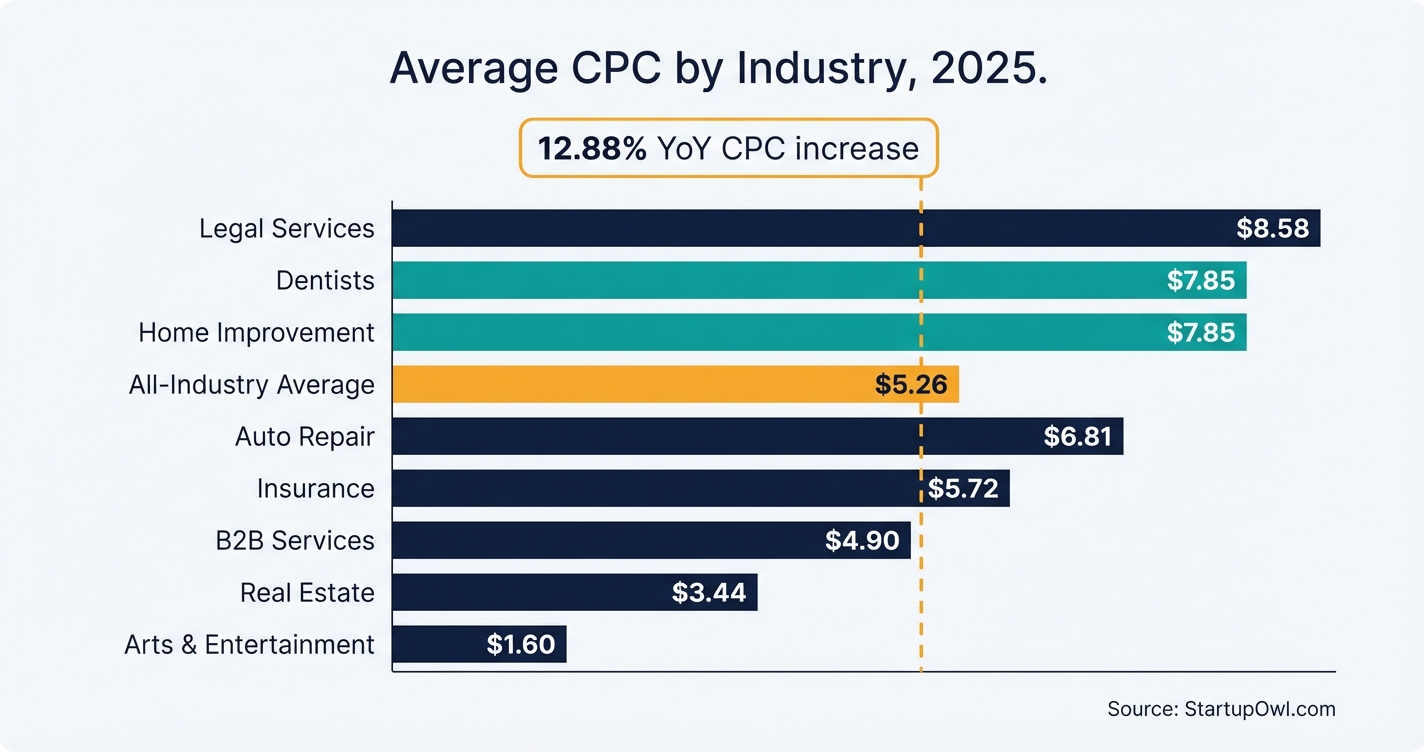
The average cost per click on Google Ads reached $5.26 across all industries in 2026, up 12.88% year-over-year according to WordStream's analysis of 16,000+ campaigns. That sounds expensive. But here's the counterpoint: the average conversion rate also climbed to 7.52%, meaning ads are actually working better for the businesses that set them up correctly.
For most small businesses, a realistic starting budget falls between $1,000 and $3,000/month. That gives Google's algorithm enough click data to learn which searchers are most likely to become your customers. Below that threshold, you are flying blind.
This guide covers everything from first-time setup to advanced optimization. You will learn exactly how much to spend, which campaign type to start with, how to avoid the mistakes that burn through budgets, and when to scale. If you are also building out your broader growth strategy, pair this with our small business marketing plan template.
Why Google Ads Still Works for Small Businesses in 2026
Google Ads is a pay-per-click (PPC) platform where you bid on keywords and only pay when someone clicks your ad. Unlike SEO (which takes months), Google Ads delivers traffic the same day you launch. According to WordStream's 2026 survey, 76% of small businesses report being satisfied with their search advertising results, and nearly half plan to increase their investment.
Google's 2026 platform updates made the system more AI-driven. The "Power Pack" now combines three campaign types: AI Max for Search (captures high-intent searchers), Demand Gen (builds awareness on YouTube and Discover), and Performance Max (orchestrates ads across all Google properties). As WordStream's 2026 year-in-review notes, these tools give you more automation and more transparency than ever.
The catch? Google's AI works for Google's revenue targets, not yours. You need to feed it good data (conversion tracking), give it clear goals (target CPA or ROAS), and check its work weekly (search term reports, channel performance). If you are weighing paid ads against organic growth, our local SEO guide covers what you can do for free alongside your paid campaigns.
How to Set Up and Run a Profitable Google Ads Campaign (Step by Step)
The steps below walk you through a proven launch sequence. Start simple with a Search campaign, build conversion data, then expand to more advanced campaign types. A focused setup almost always outperforms a "launch everything at once" approach.
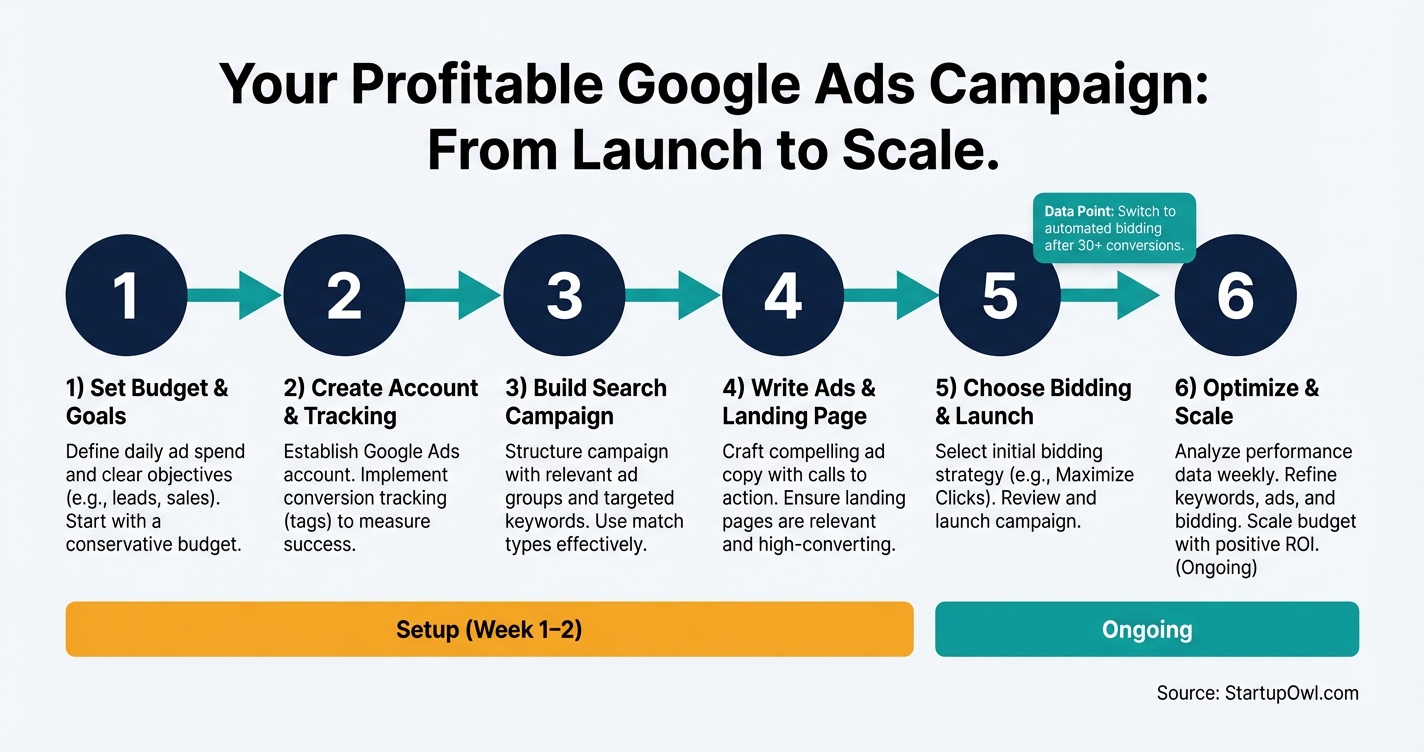
Each step includes estimated costs, timelines, and the specific mistakes that waste the most money. If you are brand new to paid advertising, bookmark this section and follow it sequentially. If you already have a Google Ads account, jump to Step 3 or Step 6 depending on where you are stuck.
For businesses also evaluating their website platform, your choice affects landing page speed and Quality Score. See our Squarespace vs WordPress comparison for help deciding.
Google Ads Cost Per Click by Industry (2026 Benchmarks)
| Type / Provider | Rate | Notes |
|---|---|---|
| Arts & Entertainment | $1.60 CPC | Lowest CPC; strong visual content strategies work well here. |
| Restaurants & Food | $2.05 CPC | Local targeting and ad scheduling during meal hours improve ROI. |
| Travel | $2.12 CPC | Seasonal peaks (holidays, summer) increase costs 15–25%. |
| E-commerce / Retail | $3–$4 CPC | Shopping Ads deliver 43% lower CPC than traditional Search Ads. |
| All Industries Average | $5.26 CPC | Up 12.88% year-over-year; based on WordStream 2026 data. |
| Home & Home Improvement | $7.85 CPC | High-intent terms like 'roof repair near me' command premium prices. |
| Dentists & Dental Services | $7.85 CPC | Patient lifetime value justifies higher acquisition costs. |
| Attorneys & Legal Services | $8.58 CPC | Highest CPC of any industry; some injury keywords exceed $50/click. |
The Best Tools for Managing Google Ads on a Small Budget
Google Keyword Planner (free) is built into your Google Ads account and shows estimated CPC, search volume, and competition for any keyword. Use it before you set your budget to forecast costs. Access it at ads.google.com/home/tools/keyword-planner.
Google Analytics 4 (free) connects directly to your Ads account and tracks what happens after someone clicks. You need this to measure actual revenue, not just clicks. Set it up at analytics.google.com before launching any campaign.
Semrush (from $129.95/month as of 2026) lets you spy on competitor keywords, see what ads they run, and find keyword gaps. Overkill for a $500/month budget, but valuable once you are spending $2,000+/month. See plans at semrush.com/pricing.
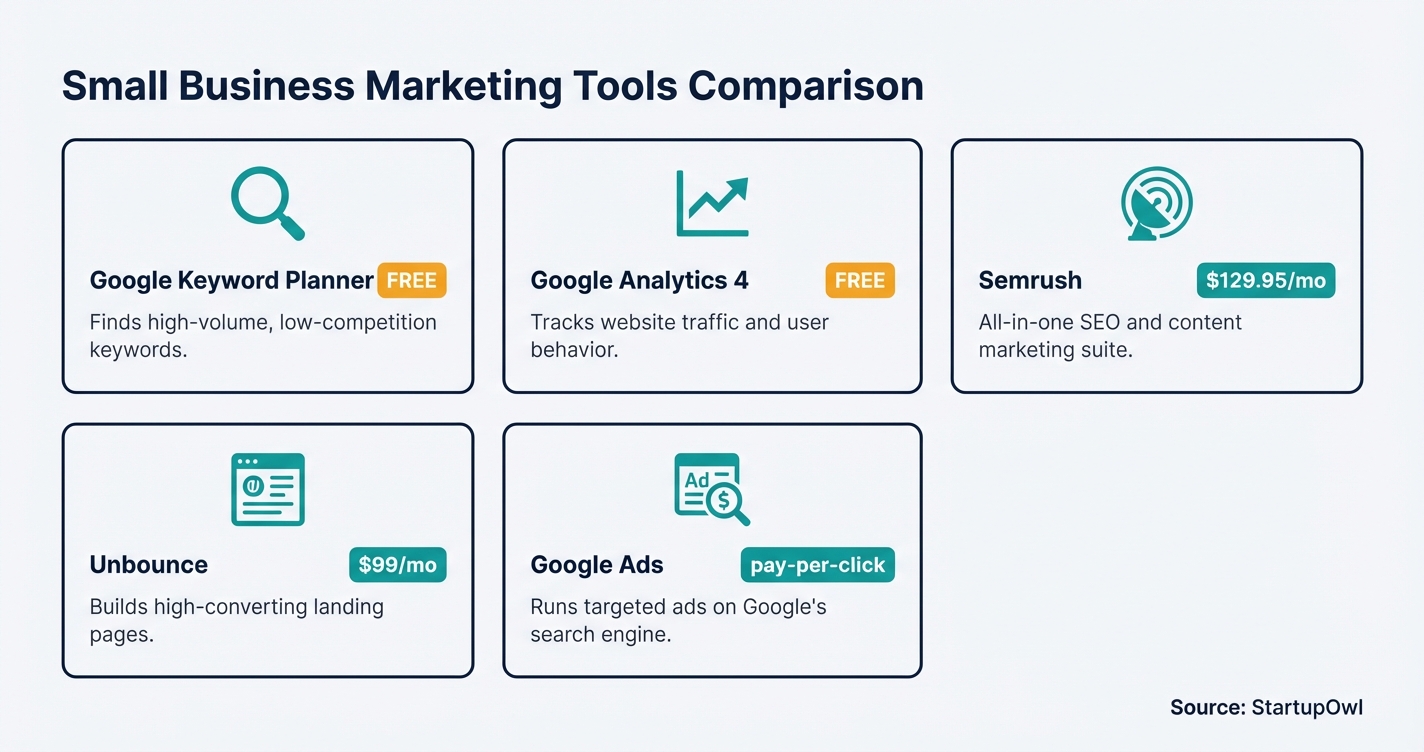
Unbounce (from $99/month) is a landing page builder with built-in A/B testing. Since landing page quality directly impacts your Quality Score (and therefore your CPC), a tool like this can pay for itself. Visit unbounce.com.
If you are also managing email follow-ups for your ad leads, our ConvertKit vs Mailchimp comparison helps you pick the right email tool. And for tracking leads through your pipeline, check our CRM for startups guide.
Should You Use Performance Max in 2026?
Performance Max runs ads across Search, YouTube, Display, Gmail, Maps, and (as of late 2026) Waze. It now includes campaign-level negative keywords and channel performance reporting. But it works best after you have established conversion data. If your budget is under $1,500/month or your conversion tracking is incomplete, stick with standard Search campaigns first. PMax typically needs 4–6 weeks and 20–30 conversions/month to exit its learning phase and optimize effectively.
5 Google Ads Mistakes That Burn Small Business Budgets
1. Launching without conversion tracking. Without it, Google optimizes for clicks (not sales). You end up paying for traffic that never converts. As one 2026 guide from We Make Stuff Happen puts it, "clicks do not equal revenue, and they are often misleading." Set up conversion tracking before spending a cent.
2. Sending traffic to your homepage. Your homepage has too many links, messages, and distractions. A dedicated landing page focused on one offer with one call-to-action can triple your conversion rate. The gap between a bad landing page (2.35% conversion) and a good one (11.45% conversion) is enormous.
3. Skipping negative keywords. One sporting goods advertiser saw an immediate 15% cost reduction after adding "free" and "used" as negative keywords, according to Dataslayer's PMax analysis. Review your Search Terms report weekly and block irrelevant queries.
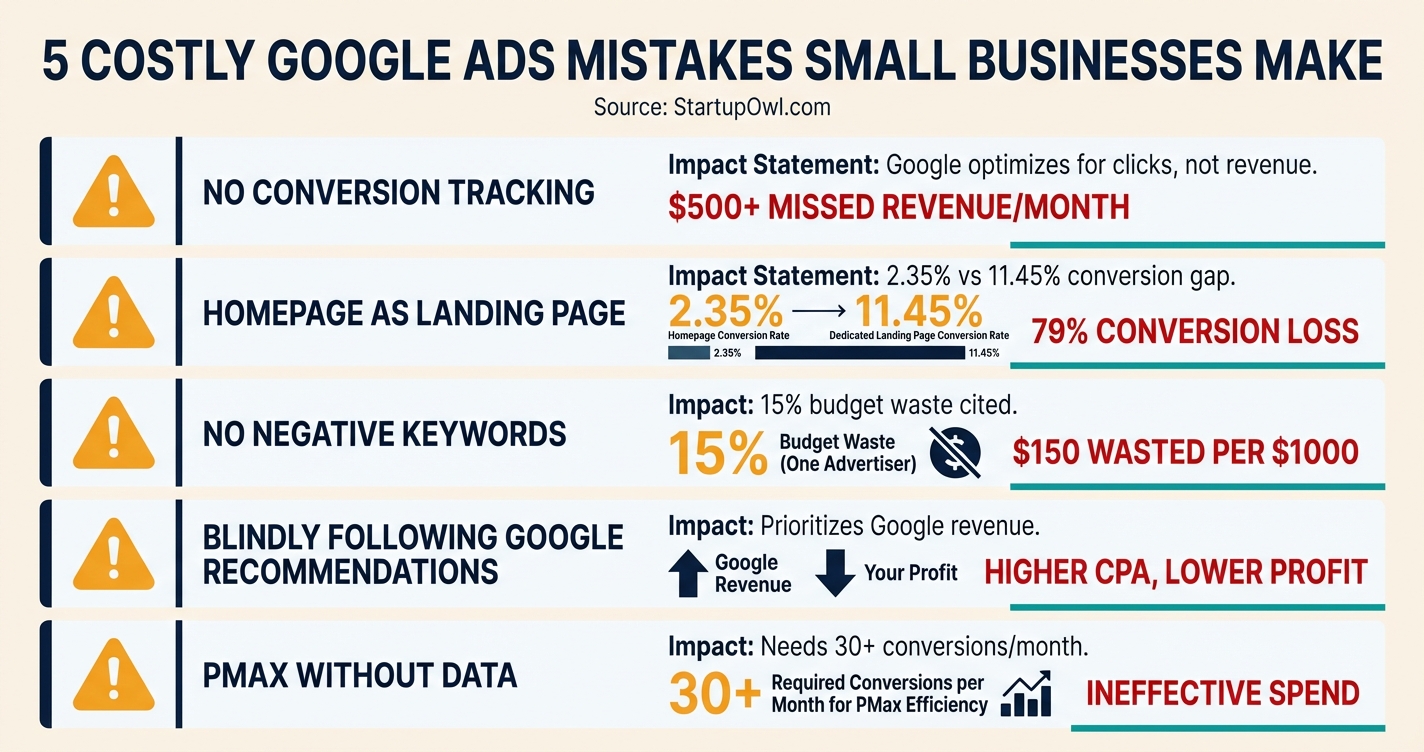
4. Blindly following Google's recommendations. Google's optimization suggestions prioritize Google's revenue, not yours. Evaluate every recommendation against your actual business objectives before clicking "Apply." That includes auto-applying broad match expansions, raising budgets, and adding Display network to Search campaigns.
5. Starting Performance Max too early. PMax needs strong conversion data to work. Without it, the AI spends your money testing irrelevant audiences on Display and YouTube. Build 30+ conversions/month through standard Search campaigns first, then test PMax. If you are exploring guerrilla marketing ideas that cost nothing, those can supplement your paid efforts while you optimize.
Your Next Steps
Start today by running keyword research in Google Keyword Planner for your top 3 services or products. Estimate your monthly CPC budget, install conversion tracking, and launch a single Search campaign with 8–12 tightly themed keywords. Review performance weekly and switch to Smart Bidding once you have 30+ conversions.
For a broader picture of where Google Ads fits into your growth strategy, use our free marketing plan template to map out paid, organic, and email channels together. And if you are still setting up your brand foundation, do that first so your ad messaging has a clear identity from day one.
Step-by-Step Process
- 1
Set your monthly budget and profit targets before touching Google Ads
You need to know two numbers before you spend a dollar: your target cost per acquisition (CPA) and your customer lifetime value (LTV). If your average sale is $200 and you can afford to spend 25% on acquisition, your target CPA is $50.
Most small businesses should budget between $1,000 and $3,000/month to start. That gives Google's algorithm enough click data to optimize. At $5.26 average CPC (the 2026 cross-industry average from WordStream's 2026 benchmarks), a $1,500 budget gets you roughly 285 clicks/month.
Tips
- Use Google's free Keyword Planner to estimate CPC for your industry before setting a budget.
- Work backward from a revenue goal: if you need 20 leads at $50 CPA, budget $1,000/month minimum.
- Set a daily budget cap in Google Ads so you never overspend (Google calculates monthly as daily x 30.4).
Common Mistakes
- Starting with less than $500/month, which produces too few clicks for Google's AI to learn from.
- Ignoring total cost of customer acquisition, which is typically 30–50% higher than ad spend alone when you factor in landing pages, tools, and time.
- 2
Create your Google Ads account and install conversion tracking
Go to ads.google.com and create your account. Skip the guided "Smart Campaign" setup (it limits your control). Instead, click "Switch to Expert Mode" at the bottom of the setup screen.
Before you write a single ad, install conversion tracking. Without it, Google optimizes for clicks rather than leads or sales. Connect Google Analytics 4 (GA4) to your Ads account, then set up conversion actions for form submissions, phone calls, or purchases. As of 2026, Google also recommends Enhanced Conversions for better attribution accuracy in privacy-restricted environments.
Tips
- Use Google Tag Manager to install your tracking tags without editing website code directly.
- Test your conversion tracking by submitting a test form or call before launching any ads.
Common Mistakes
- Using Smart Campaign mode by default, which hides keyword data and limits optimization options.
- Launching ads without conversion tracking, causing Google to optimize for clicks instead of paying customers.
- 3
Build your first Search campaign around high-intent keywords
Start with a Search campaign (not Performance Max). Search campaigns capture people actively looking for what you sell. Use Google's Keyword Planner to find 8–12 closely related keywords per ad group. According to WordStream's 2026 analysis, themed ad groups with 8–12 keywords outperform both single-keyword and bloated 50+ keyword ad groups by 15–25% on efficiency metrics.
Focus on commercial-intent keywords ("buy," "near me," "cost," "hire") and add negative keywords to block irrelevant searches. For example, a plumber should add "DIY," "how to," and "free" as negatives immediately.
Tips
- Separate brand keywords into their own campaign (brand terms convert at 5–10x the rate of generic terms at much lower CPC).
- Target long-tail keywords like 'affordable roof replacement near me' instead of 'roofing' to lower CPC and attract ready-to-buy searchers.
- Review the Search Terms report weekly and add irrelevant queries as negative keywords.
Common Mistakes
- Bidding on broad informational keywords like 'what is email marketing' when you sell email software (these searchers are not ready to buy).
- Skipping negative keywords, which can waste 20–40% of your budget on irrelevant searches.
- 4
Write Responsive Search Ads and build a dedicated landing page
Google's Responsive Search Ads (RSAs) let you provide up to 15 headlines and 4 descriptions. Google's AI then tests different combinations. Include your target keyword in at least 3 headlines, mention a specific benefit or price, and add a clear call-to-action.
Send traffic to a dedicated landing page (not your homepage). According to Unbounce's 2026 conversion benchmark data referenced by Adventure PPC, landing page conversion rates range from 2.35% at the 25th percentile to 11.45% at the 75th percentile. That gap means improving your landing page can triple revenue without spending an extra dollar on ads.
$0–$500 for landing page (free with most website builders, or $200–$500 for a custom page) 4–8 hours support.google.comTips
- Pin your strongest headline (the one with your main keyword) to Position 1 so it always appears.
- Your landing page should focus on one service, one problem, and one clear next step (call, form, or purchase).
- Test two landing page variants with different headlines to find the higher-converting version.
Common Mistakes
- Sending ad traffic to your homepage instead of a focused landing page (homepages have too many distractions and convert poorly).
- Writing generic ad copy without specific numbers, prices, or offers that differentiate you from competitors.
- 5
Choose a bidding strategy and launch your campaign
For your first campaign with no conversion history, start with Maximize Clicks with a maximum CPC cap. This builds initial data without letting Google overspend. Set a max CPC cap at roughly 1.5x your industry's average CPC (use Keyword Planner estimates).
Once you have 30+ conversions in 30 days, switch to Target CPA or Maximize Conversions. Smart Bidding needs conversion data to work; launching it on day one with no data usually means overspending. Set your geographic targeting to only the areas you serve, schedule ads for your business hours, and launch.
Your daily ad budget ($33–$100/day for most small businesses) 1–2 hours to launch, then 2–4 weeks in learning phase support.google.comTips
- Set location targeting to 'Presence' only (not 'Presence or Interest') so you only pay for clicks from people physically in your area.
- Use ad scheduling to run ads only during hours when you can answer the phone or respond to leads.
- Google may spend up to 2x your daily budget on a given day but will not exceed 30.4x your daily budget in a month.
Common Mistakes
- Starting with Target ROAS or Target CPA on a brand new account with no conversion history (the algorithm has nothing to learn from).
- Targeting nationwide when you only serve one city, wasting budget on clicks from customers you cannot serve.
- 6
Optimize weekly and scale what works
Check your campaigns every week. Review the Search Terms report to add negative keywords and identify new keyword opportunities. Watch your Quality Score, which Google rates on a 1–10 scale based on expected click-through rate, ad relevance, and landing page experience. A Quality Score of 8–10 can cut your CPC by up to 50% compared to average (score of 5), according to Google's own ad quality documentation.
After 4–6 weeks of optimized Search campaigns with solid conversion data, consider testing Performance Max. PMax shows your ads across Search, YouTube, Display, Gmail, and Maps from a single campaign. As of 2026, Performance Max includes campaign-level negative keywords, channel performance reporting, and search themes. But PMax works best when Google already has strong conversion data to learn from.
2–3 hours/week of your time (or $500–$2,000/month for agency management) Ongoing (weekly optimization, monthly review) support.google.comTips
- Use the 70-20-10 rule: spend 70% of budget on proven keywords, 20% on expansion tests, and 10% on experimental campaign types.
- Check channel reporting in Performance Max weekly to identify if Display or YouTube is consuming budget without converting.
- Pause keywords with costs exceeding 3x your target CPA and zero conversions after 50+ clicks.
Common Mistakes
- Setting up campaigns and never reviewing them (Google's automation still needs weekly human oversight).
- Jumping to Performance Max before accumulating at least 30 conversions/month in standard Search campaigns.
Cost Breakdown
| Item | Cost Range | Notes |
|---|---|---|
| Google Ads monthly ad spend (small business) | $1,000–$5,000/month | Start at $1,000–$1,500 for initial testing; scale to $3,000–$5,000 once profitable campaigns are identified. |
| Average cost per click (all industries, 2026) | $5.26 average | Ranges from $1.60 (arts/entertainment) to $8.58 (legal services) per WordStream 2026 benchmarks. |
| Landing page creation | $0–$500 | Free with existing website builders; $200–$500 for a custom-designed page via a freelancer. |
| Google Ads management (DIY) | $0 (your time: 2–5 hrs/week) | Suitable for budgets under $3,000/month where hiring an agency is not cost-effective. |
| Google Ads agency management | $500–$2,000/month or 10–20% of spend | Makes sense once spend exceeds $3,000/month and you lack time for weekly optimization. |
| Keyword research tools (optional) | $0–$129/month | Google Keyword Planner is free. Semrush starts at $129/month for competitive analysis. |
Frequently Asked Questions
Most small businesses should budget between $1,000 and $3,000/month to start. That range produces enough click data (roughly 200–570 clicks at $5.26 average CPC) for Google's algorithm to optimize. Businesses in competitive industries like legal or insurance may need $5,000+/month because their CPCs run $8–$9 per click.
The average Google Ads conversion rate across all industries is 7.52% as of 2026, according to WordStream's benchmarks. Top-performing industries like automotive repair hit 14.67%, while finance and insurance sit at 2.55%. If your rate is below 5%, focus on improving your landing page and ad relevance before increasing budget.
Start with Search campaigns. They give you more control over keywords, messaging, and budget allocation. Switch to Performance Max only after you have 30+ conversions per month and solid conversion tracking. PMax needs this data to learn which audiences and channels convert for your business. Without it, PMax tends to leak budget to low-ROI Display placements.
Quality Score is Google's 1–10 rating of your keyword's relevance, ad quality, and landing page experience. A score of 8–10 can reduce your cost per click by up to 50% compared to the average (score of 5). A score of 1–3 can increase CPC by up to 400%. Focus on matching ad copy to keywords and building fast, relevant landing pages to push your score higher.
It is possible but limiting. At $500/month and a $5.26 average CPC, you get roughly 95 clicks per month. That is usually not enough data for Google's Smart Bidding to optimize. You can make it work in low-competition niches with CPCs under $2 by focusing on long-tail, high-intent keywords in a single geographic area.
You can see your first clicks within hours of launching. Meaningful optimization typically takes 2–4 weeks for the initial learning phase and 6–8 weeks to reach steady-state performance. Google's algorithm needs at least 20–30 conversions before Smart Bidding strategies like Target CPA perform reliably.
Some links on this page are affiliate links. If you sign up for a service through them, we may earn a commission at no extra cost to you. This does not influence our rankings.
Sources & References
- WordStream: Google Ads Benchmarks 2026
- WordStream: 11 Biggest Google Ads Updates of 2026
- Google Ads Help: About Ad Quality
- Google Ads Help: About Quality Score for Search Campaigns
- Google Ads Help: Choose Your Bid and Budget
- Google: 2026 Google Ads Highlights
- Google Blog: New Performance Max Features 2026
- Google Accelerate: Channel Performance Reporting in Performance Max
- Dataslayer: Performance Max Guide 2026
- Dataslayer: November 2026 Performance Max Updates
- Adventure PPC: How to Run Google Ads Profitably in 2026
- Focus Digital: Average Google Ads Cost per Click by Industry 2026
- FTC: Endorsement Guides
About the Author
Editor, StartupOwl
Eliot leads StartupOwl's state data research. He maintains the site's fifty state records of LLC filing fees, annual costs, processing times, and small business grant programs, checking each figure against the state office that publishes it and logging the date it was verified. Based in New Jersey, he has spent his working life in and around small businesses, and he writes for the founder who wants the real number rather than the advertised one. Every figure under his byline traces to a named source, and when a state proves a number wrong, the correction is published, not buried.
Was this article helpful?
Questions about Google Ads for Small Business
No comments yet. Ask the first question and a member of our team will answer.
Leave a comment