
Local SEO for Small Business: A Step-by-Step Guide to Ranking in 2026
Local SEO for small business explained in 7 steps. 76% of near-me searchers visit a store within 24 hours. Free tools, $0-$139/mo paid options, and timelines.

In This Article
$0–$500
Est. Cost
6 minutes
Timeline
7
Total Steps
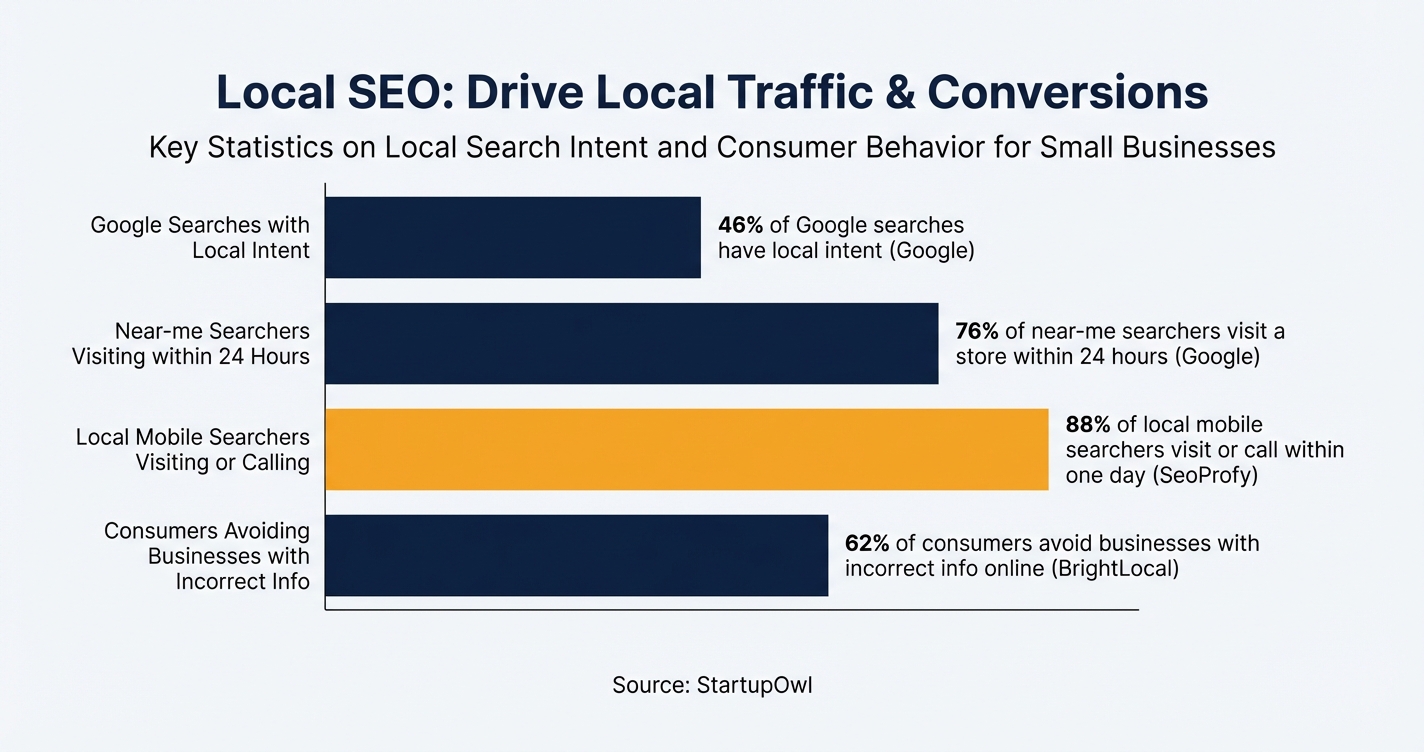
46% of all Google searches have local intent, according to Google's own data. That is roughly 1.5 billion "near me" searches every single month. If your business does not appear in the Local Pack (the map-based results at the top of Google), you are invisible to the customers who are ready to buy right now.
76% of people who perform a local search on their smartphone visit a physical store within 24 hours, according to Google. The best part? The most important local SEO tool (Google Business Profile) is completely free, and you can start seeing your profile in search results within two weeks of verification.
This guide covers seven concrete steps to get your local SEO working, from claiming your Google Business Profile to tracking your rankings monthly. You will not need a big budget. Most small businesses can run effective local SEO with $0 to $52/month in tools and a few hours of work each month. If you need a broader strategy first, start with our small business marketing plan.
Why Local SEO Is the Highest-ROI Marketing Channel for Small Businesses
Local SEO is the process of optimizing your online presence so your business shows up when people search for products or services in your area. It focuses on three things: your Google Business Profile, your website's local content, and your reputation across directories and review sites.
88% of consumers who conduct a local search on their smartphone visit or call a store within one day, according to data compiled by SeoProfy. Businesses that appear in Google's Local Pack (the top three map results) see a 40% higher click-through rate than those listed below. These are not browsing visitors; they are people with their wallet out.
The cost-to-benefit ratio is hard to beat. A verified Google Business Profile receives roughly 1,200 views per month on average, according to SEO.com. Compare that to running Google Ads for small business, where you pay per click. With local SEO, every view and interaction from your GBP listing is free organic traffic. If you are building a brand, local visibility is the foundation everything else sits on.
7 Steps to Rank Your Business in Local Search
Follow these steps in order. Each one builds on the previous, and skipping ahead usually means you will waste time fixing foundational problems later. The full process takes 6 to 12 months to produce consistent ranking improvements, but you will start seeing your profile appear in search within the first 2 to 4 weeks.

Your total tool cost ranges from $0/month (using only free Google tools) to $52 to $170/month if you add a paid rank tracker and local SEO platform. Professional agency services typically start at $1,500/month and go up to $5,000/month for competitive markets, but the steps below are designed so you can do everything yourself.
Each step includes estimated costs, timelines, and the specific URLs where you need to go. If you also sell products online, check our Shopify vs Squarespace comparison for platforms that handle both local and e-commerce SEO well.
The Best Local SEO Tools for Small Businesses (With Real Prices)
You do not need expensive software to rank locally. Start with the free tier and add one paid tool when you are ready to track progress more closely. Here is what each major tool actually costs as of 2026.
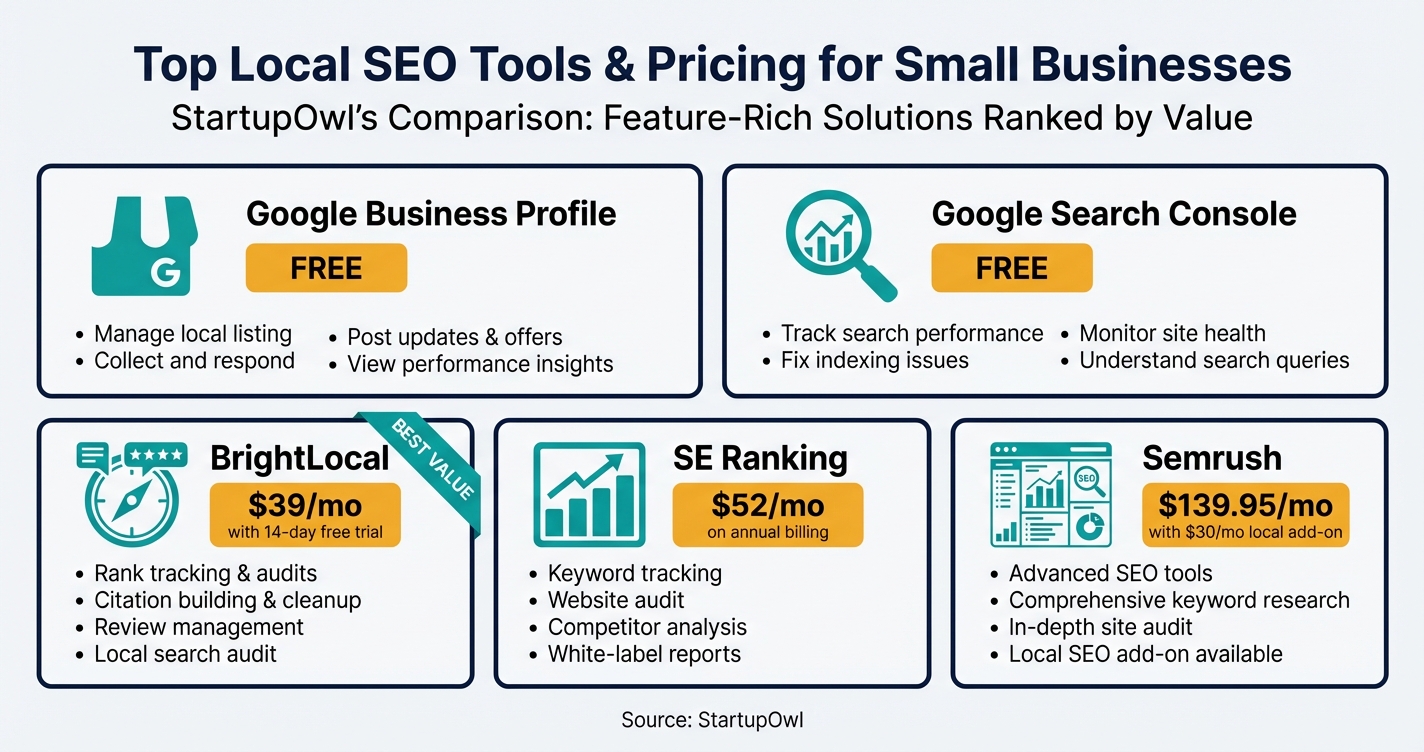
Google Business Profile is free and non-negotiable. It is where your Local Pack listing, reviews, photos, and business information live. In 2026, GBP includes AI-powered features like automated Q&A responses, post scheduling, and image enhancement via the "Transform with AI" tool. Manage it at google.com/business.
BrightLocal starts at $39/month (Track plan) for local rank tracking, citation audits, and competitor insights, as listed on their pricing page. The Grow plan at $59/month adds review management features. Citation Builder is pay-as-you-go at $2 to $3.20 per submission. A 14-day free trial requires no credit card.
SE Ranking starts at $52/month on annual billing for the Essential plan, which includes rank tracking for 500 keywords, site audits, and backlink monitoring, according to SE Ranking's pricing page. The Pro plan at $95.20/month (annual) adds content marketing tools and tracks 2,000 keywords. Both plans include a 14-day free trial.
Semrush Pro starts at $139.95/month (or $117.33/month billed annually with the 17% discount), as shown on Semrush's pricing page. The Local SEO add-on costs an additional $30/month for GBP optimization and citation management. Semrush is the most powerful option but overkill for most single-location businesses.
Google Search Console + GA4 are both free. Search Console shows your search queries, click data, and indexing status. GA4 tracks what visitors do on your site. These two tools together give you roughly 80% of the data you need without spending a dollar. If you are also exploring email marketing tools, see our ConvertKit vs Mailchimp comparison for building a local email list.
Local SEO Tool Pricing at a Glance (2026)
| Type / Provider | Rate | Notes |
|---|---|---|
| Google Business Profile | $0/month | Fully free. Includes posts, reviews, Q&A, photos, and insights. |
| Google Search Console | $0/month | Free. Search query data, crawl reports, indexing status. |
| Google Analytics 4 | $0/month | Free. Traffic sources, user behavior, conversion tracking. |
| BrightLocal Track | $39/month | Local rank tracking, citation audit, competitor insights. 14-day free trial. |
| BrightLocal Grow | $59/month | Adds review management, GBP post scheduling. 14-day free trial. |
| SE Ranking Essential | $52/month (annual) | 500 keywords, site audits, backlink monitoring. 14-day free trial. |
| SE Ranking Pro | $95.20/month (annual) | 2,000 keywords, content marketing tools, 3 user seats. |
| Semrush Pro | $139.95/month | Full SEO suite. Local add-on is $30/month extra. |
| Semrush Local Add-on | $30/month | GBP optimization and local citation management on top of any Semrush plan. |
| BrightLocal Citation Builder | $2-$3.20 per submission | Pay-as-you-go. Bulk rate is $2 per citation. |
5 Local SEO Mistakes That Waste Your Time and Money
1. Inconsistent NAP across directories. If your address says "123 Main St" on Google but "123 Main Street, Suite A" on Yelp, you are creating conflicting signals. 62% of consumers will avoid a business with incorrect information online, according to BrightLocal. Audit every listing and make them match exactly.
2. Neglecting your Google Business Profile after setup. Roughly 56% of businesses have not fully optimized or regularly updated their GBP, according to MarketingLTB research. Google rewards active profiles with better visibility. Post weekly, respond to every review, and update your hours for holidays.
3. Hiring a cheap SEO agency that uses black-hat tactics. Agencies offering "performance-based" local SEO or prices far below $1,500/month often use risky link schemes or fake reviews. These tactics can result in your GBP being suspended or your site being penalized. If a price looks too good to be true, ask exactly what services are included before signing anything.
4. Treating local SEO as a one-month project. Meaningful ranking improvements take 6 to 12 months of consistent effort. Businesses that invest for one or two months and then stop will see their rankings slip right back. SEO is not a campaign; it is an ongoing operating expense like rent or insurance.
5. Ignoring reviews entirely. Reviews are a top-three local ranking factor, and 65% of consumers are more likely to choose a business that responds to reviews. Not asking for reviews, not responding to them, or only responding to positive ones all hurt your visibility and trustworthiness. For ideas on getting more visibility with a limited budget, explore our guerrilla marketing ideas guide.
6. Using an address your profile is not allowed to show. Google says a virtual office, meaning a mailing address you rent but do not operate from, is not eligible for a Business Profile, and a P.O. Box brings a suspension outright. A co-working desk only qualifies with signage, your own staff and customers received during business hours. If your listing has already gone dark, our guide to a suspended Google Business Profile walks the appeal and the documents Google names.
The Free Local SEO Stack (Best Starting Point)
If your budget is $0/month, this is the stack to start with: Google Business Profile for your listing, Google Search Console for search data, and Google Analytics 4 for traffic tracking. These three tools cover about 80% of what you need. Add a paid tool like BrightLocal ($39/month) or SE Ranking ($52/month) only after you have fully optimized your GBP, built your top 20 citations, and need rank tracking data to plan your next moves.
Your Next Steps
Start today by claiming your Google Business Profile if you have not already. Fill out every field, upload photos, and set up a review request link. Then install Google Search Console and GA4 on your website. Those three free tasks will put you ahead of the 56% of local businesses that have not bothered to optimize their online presence at all.
Once your foundation is solid (typically 2 to 4 weeks), add a paid tool like BrightLocal or SE Ranking to track your rankings and manage citations. Budget 3 to 5 hours per month for ongoing optimization, and give it at least 6 months before evaluating results. If you need to build a full marketing strategy around your local SEO, use our free marketing plan template and social media content calendar to stay organized.
Step-by-Step Process
- 1
Claim and verify your Google Business Profile
Your Google Business Profile (GBP) is the single most important piece of your local SEO strategy. It is the free listing that appears in Google Search and Google Maps when someone searches for businesses like yours nearby. A verified profile gets roughly 200 clicks or interactions per month on average, according to SeoProfy's 2026 data.
Go to google.com/business, sign in with a Google account, and follow the prompts to add your business name, address, phone number, hours, and primary category. Google will verify you by postcard, phone, or video depending on your business type. The whole setup takes 15 to 30 minutes, though postcard verification can take 5 to 14 days to arrive.
Tips
- Use the exact same business name, address, and phone number (NAP) that appears on your website and other directories.
- Choose your primary category carefully because it is the biggest factor in which searches trigger your listing.
- Upload at least 10 high-quality photos of your storefront, interior, and team within the first week.
Common Mistakes
- Choosing a broad category like 'Business Service' instead of a specific one like 'Plumber' or 'Italian Restaurant'.
- Letting your profile sit unverified for weeks, which means it will not appear in local search results at all.
- 2
Set up Google Search Console and Google Analytics 4
Google Search Console (GSC) shows you which search queries bring up your site, how many clicks you get, and whether Google can properly crawl your pages. Google Analytics 4 (GA4) tells you where your traffic comes from and what visitors do once they arrive. Both are 100% free and essential for tracking your local SEO progress.
Verify your site in Search Console using the DNS, HTML tag, or domain property method. Then connect GA4 by adding the measurement tag to your site (most website builders like Squarespace and WordPress have a dedicated field for this). If you are comparing website platforms, our Squarespace vs WordPress guide covers which makes SEO setup easier.
Tips
- Use the domain property verification method in Search Console to capture data for all subdomains and URL variations.
- Set up a GA4 'Key Event' for phone calls, form submissions, or direction clicks so you can track actual leads.
Common Mistakes
- Installing the GA4 tag on your homepage only instead of site-wide, which makes your traffic data incomplete.
- Ignoring Search Console for months and missing crawl errors that quietly kill your rankings.
- 3
Optimize your GBP listing with complete, keyword-rich information
Customers are 2.7 times more likely to trust a business with a complete Google Business Profile, according to Google's own data cited by SeoProfy. That means filling out every available field: services, products, business description (up to 750 characters), attributes (like "wheelchair accessible" or "free Wi-Fi"), and a detailed Q&A section.
Write your business description using the keywords your customers actually search for (e.g., "emergency plumber in Austin" not just "plumbing services"). Add your service area if you travel to customers. Post at least once a week using GBP's built-in post feature, which signals to Google that your business is active. In 2026, you can schedule posts directly inside GBP and even use AI-powered image enhancement.
Tips
- Add your full service list with descriptions and price ranges because Google uses this data to match you to specific searches.
- Use the new QR code review feature to collect Google reviews from customers at your physical location.
- Link your social media profiles (Facebook, Instagram, LinkedIn) to your GBP for additional credibility signals.
Common Mistakes
- Stuffing your business name with keywords (e.g., 'Joe's Plumbing - Best Plumber Austin TX') which violates Google's guidelines and can get your profile suspended.
- Neglecting to respond to reviews, which hurts both your rankings and your conversion rate with potential customers.
- 4
Build consistent local citations across directories
A local citation is any mention of your business Name, Address, and Phone number (NAP) on another website. Consistent citations across directories like Yelp, Apple Maps, Bing Places, and industry-specific sites tell Google your business information is accurate. 62% of consumers will avoid a business if they find incorrect information online, according to BrightLocal research.
Start with the major platforms: Yelp for Business, Bing Places, Apple Maps Connect, and Facebook Business. Then add industry-specific directories (Healthgrades for medical, Avvo for legal, TripAdvisor for hospitality). You can do this manually for free, or use a tool like BrightLocal (starting at $39/month) to manage citations at scale. BrightLocal's pay-as-you-go Citation Builder charges $2 to $3.20 per submission.
$0 if done manually; $39-$59/month with BrightLocal 3-5 hours for initial manual submission; ongoing monthly checks brightlocal.comTips
- Use the exact same NAP format everywhere (e.g., do not use 'St.' on one site and 'Street' on another).
- Check for duplicate listings on each platform because duplicates confuse Google and split your review authority.
Common Mistakes
- Ignoring old listings with a previous address or phone number, which creates conflicting signals for Google.
- Paying for hundreds of low-quality directory submissions instead of focusing on the 20 to 30 that actually matter.
- 5
Create location-specific pages and content on your website
Your website needs pages that target the specific locations and services you offer. If you serve multiple cities, create a dedicated landing page for each one (e.g., "/plumbing-services-austin" and "/plumbing-services-round-rock"). Businesses with locally relevant content see up to 80% higher engagement rates, according to PageOptimizer Pro research.
Each location page should include your NAP, embedded Google Map, local testimonials, and LocalBusiness schema markup. Schema helps search engines understand your business type, location, hours, and services in a structured way. For broader marketing context, check out our small business marketing plan guide and our local SEO guide for related strategies.
$0 if you use your existing website builder; $500-$2,000 if hiring a developer 2-4 hours per location page schema.orgTips
- Write unique content for each location page instead of just swapping city names, because Google treats near-duplicate pages as low quality.
- Add an FAQ section to each location page answering common questions your customers ask, which helps you appear in Google's 'People Also Ask' results.
- Include photos specific to each location or service area.
Common Mistakes
- Creating dozens of thin doorway pages with almost identical content that only swap out city names.
- Forgetting to add LocalBusiness schema markup, which means search engines have to guess your business details from unstructured text.
- 6
Build a review generation system
Reviews are one of the top three local ranking factors, and they directly influence whether someone clicks on your listing or scrolls past it. A rating above 4.0 stars correlates with significantly higher click-through and conversion rates. Google now provides official tools for creating review request links and QR codes, formalized in their help documentation as of December 2026.
Create a simple follow-up process: send an email or text within 24 hours of completing a service, including a direct link to your Google review page. Respond to every review (positive and negative) with personalized replies. Our ChatGPT for small business guide covers how to use AI to draft professional review responses quickly.
$0 (manual process); $59/month with BrightLocal Grow plan for review management 1 hour to set up; 15-30 minutes per week to manage support.google.comTips
- Ask for reviews at the point of highest customer satisfaction (right after a successful job or purchase).
- Never offer incentives like discounts or free items in exchange for reviews because Google prohibits this and it violates FTC guidelines.
- Respond to negative reviews within 24 hours with a genuine offer to resolve the issue.
Common Mistakes
- Only asking happy customers for reviews, which looks suspicious if your review velocity suddenly spikes then drops.
- Using generic copy-paste responses to every review, which signals low effort to both Google and potential customers.
- 7
Track your rankings and adjust monthly
You cannot improve what you do not measure. Use a local rank tracking tool to monitor where your business appears for your target keywords in Google's Local Pack and organic results. SE Ranking starts at $52/month (annual billing) and includes rank tracking, site audits, and competitor research. Semrush offers a Local add-on starting at $30/month on top of the base Pro plan ($139.95/month).
Check your Google Business Profile Insights at least monthly. Look at which search queries trigger your profile, how many people request directions versus visit your website, and how you compare to similar businesses in your area. Adjust your GBP categories, content strategy, and review efforts based on what the data shows. For a broader view of your marketing channels, grab our free marketing plan template.
$0 with free tools; $52-$170/month with paid rank trackers 1-2 hours per month for review and adjustments seranking.comTips
- Track your rankings for location-specific keywords (e.g., 'plumber in Austin') not just generic terms.
- Set up Google Search Console email alerts so you are notified immediately about indexing issues or manual penalties.
- Review competitor GBP profiles monthly to spot new strategies like updated categories, services, or post frequency.
Common Mistakes
- Checking rankings daily and making reactive changes instead of looking at monthly trends.
- Ignoring the data and continuing the same strategy for months without analyzing what is and is not working.
Cost Breakdown
| Item | Cost Range | Notes |
|---|---|---|
| Google Business Profile | $0 | Completely free. The single most important local SEO tool. |
| Google Search Console + GA4 | $0 | Free. Essential for tracking search performance and traffic. |
| BrightLocal (Track plan) | $39/month | Local rank tracking, citation audits, and competitor insights. 14-day free trial. |
| SE Ranking (Essential plan) | $52/month (annual) | All-in-one SEO with rank tracking, site audits, and keyword research. 14-day free trial. |
| Semrush (Pro plan) | $139.95/month | Full SEO suite. Local add-on available for additional $30/month. 14-day free trial. |
| Professional local SEO services | $1,500-$5,000/month | Agency-managed local SEO. Expect 6-12 month contracts. 6-month minimum for results. |
| Citation building (manual) | $0 (your time) | 3-5 hours of initial work across 20-30 directories. |
| Citation building (BrightLocal PAYG) | $2-$3.20 per submission | Pay-as-you-go service. Bulk pricing available at $2 per citation. |
Frequently Asked Questions
You can do local SEO for $0/month using Google Business Profile, Search Console, and GA4. Most small businesses add one paid tool at $39 to $52/month (BrightLocal or SE Ranking) for rank tracking and citation management. Professional agency services start around $1,500/month and go up to $5,000/month for competitive markets, as of 2026.
Expect a minimum of 6 months of consistent work before seeing meaningful ranking improvements. Your Google Business Profile can appear in search within 2 to 4 weeks of verification, but climbing into the Local Pack (top 3 map results) for competitive keywords takes sustained effort in content, reviews, and citations over 6 to 12 months.
Yes, Google Business Profile is 100% free with no paid tiers or premium features. You get full access to your listing, reviews, Q&A, posts, photos, messaging, and performance insights at no cost. In 2026, GBP also includes free AI-powered features like automated Q&A responses and image enhancement tools.
Google uses three primary factors for local rankings: proximity (how close the searcher is to your business), relevance (how well your listing matches the search query), and prominence (your overall online reputation including reviews, citations, and backlinks). You cannot control proximity, so focus your effort on relevance (complete GBP, location pages) and prominence (reviews, citations, local backlinks).
Most single-location small businesses can handle local SEO themselves with 3 to 5 hours per month of work and $0 to $52/month in tools. You should consider hiring an agency (budget at least $1,500/month) if you operate in a highly competitive market, manage multiple locations, or simply do not have the time to maintain your listings, content, and reviews consistently.
Reviews are one of the top three local ranking factors. Both the quantity and quality (average star rating) of your Google reviews influence your position in the Local Pack. Businesses with a rating above 4.0 stars and consistent review activity rank higher and convert better. Responding to reviews also sends a positive signal to Google's algorithm.
Some links on this page are affiliate links. If you sign up for a service through them, we may earn a commission at no extra cost to you. This does not influence our rankings.
Sources & References
- Google Business Profile Help Center
- BrightLocal Pricing Page
- SE Ranking Pricing Plans
- Semrush Pricing Page
- Google Search Console
- SeoProfy: 75 Local SEO Statistics for 2026
- BrightLocal: Local SEO Statistics for 2026
- Backlinko: Local SEO Statistics
- Schema.org LocalBusiness Markup
- Google Business Profile Updates 2026 (EmbedSocial)
- Vendr: Semrush Pricing & Plans 2026
About the Author
Editor, StartupOwl
Eliot leads StartupOwl's state data research. He maintains the site's fifty state records of LLC filing fees, annual costs, processing times, and small business grant programs, checking each figure against the state office that publishes it and logging the date it was verified. Based in New Jersey, he has spent his working life in and around small businesses, and he writes for the founder who wants the real number rather than the advertised one. Every figure under his byline traces to a named source, and when a state proves a number wrong, the correction is published, not buried.
Was this article helpful?
Questions about Local SEO for Small Business
No comments yet. Ask the first question and a member of our team will answer.
Leave a comment