
ChatGPT for Small Business, 20 Ways to Use AI to Save Time and Grow in 2026
ChatGPT costs $0 to $25 per user a month for small businesses. Get 20 copy and paste prompts for marketing, sales, support, and operations, with prices checked this month.

In This Article
- Key Takeaways
- Step-by-Step
- Cost Breakdown
- Why Small Businesses Are Spending $20/Month on ChatGPT (and Getting Real Results)
- What ChatGPT Actually Does for a Small Business
- 20 Ways to Use ChatGPT in Your Small Business (With Example Prompts)
- ChatGPT Alternatives Worth Considering for Your Small Business
- 5 Costly Mistakes Small Businesses Make with ChatGPT
- What to Do This Week
- FAQ
$0–$300
Est. Cost
30 minutes
Timeline
5
Total Steps
Some links in this guide are affiliate links, which means StartupOwl may earn a small commission if you sign up through them. This does not affect our recommendations or your price. We only recommend tools we have researched and would use ourselves. Our editorial team follows FTC disclosure guidelines.
Why Small Businesses Are Spending $20/Month on ChatGPT (and Getting Real Results)
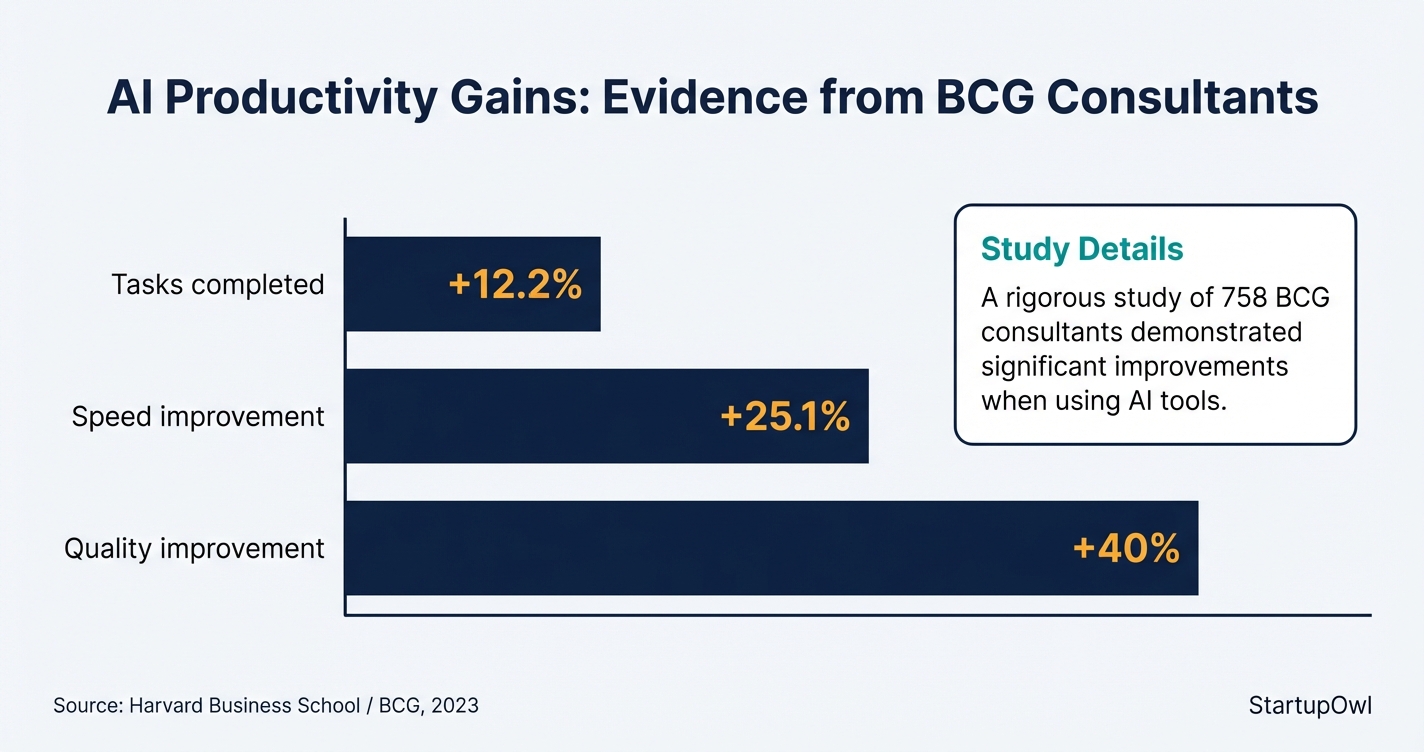
A Harvard Business School study that put 758 Boston Consulting Group consultants through real work found the ones using AI finished 12.2 percent more tasks, worked 25.1 percent faster, and produced results rated 40 percent higher quality than the group working without it. Those are consultants, not shopkeepers, but the tasks are the ones that eat a small business week, writing, summarising, analysing, and pitching. The gap is real money.
The money question is smaller than most owners expect. ChatGPT runs from $0 on the free plan to $25 per user a month for a team on monthly billing, with the heavy Pro tier sitting well above that at from $100 a month. Prices move fast here. Every price on this page was checked at OpenAI on 25 July 2026, because these plans have been renamed and repriced twice in the past year.
What follows is 20 specific jobs to hand it, each with a prompt you can paste as written, the plan it needs, and what it actually saves. None of it needs a developer. If you are building out the wider plan first, pair this with our small business marketing plan template.
OpenAI Now Runs Free Small Business Training, Launched 21 July 2026
On 21 July 2026 OpenAI opened a ChatGPT for small businesses programme. It is training, not a product tier. Virtual webinars walk through workflows in accounting, marketing and ecommerce, and in person AI academies run across the US with the OpenAI Academy team. OpenAI says that at last year's Small Business AI Jams, 78 percent of attendees built a working AI workflow in a single day and 42 percent went on to save more than five hours a week. The programme also carries skills and offers built with Dropbox, Shopify, Intuit, Slack, Atlassian and Wix. Registration is free, so it is worth signing up before you spend anything on a plan.
What ChatGPT Actually Does for a Small Business
ChatGPT is a conversational AI tool from OpenAI that writes text in response to instructions you type, called prompts. Give it a task and it returns a draft, an answer, a summary, an analysis, or a list of ideas. Think of it as a fast first drafter that never gets bored, and never checks its own facts. It drafts, you check.
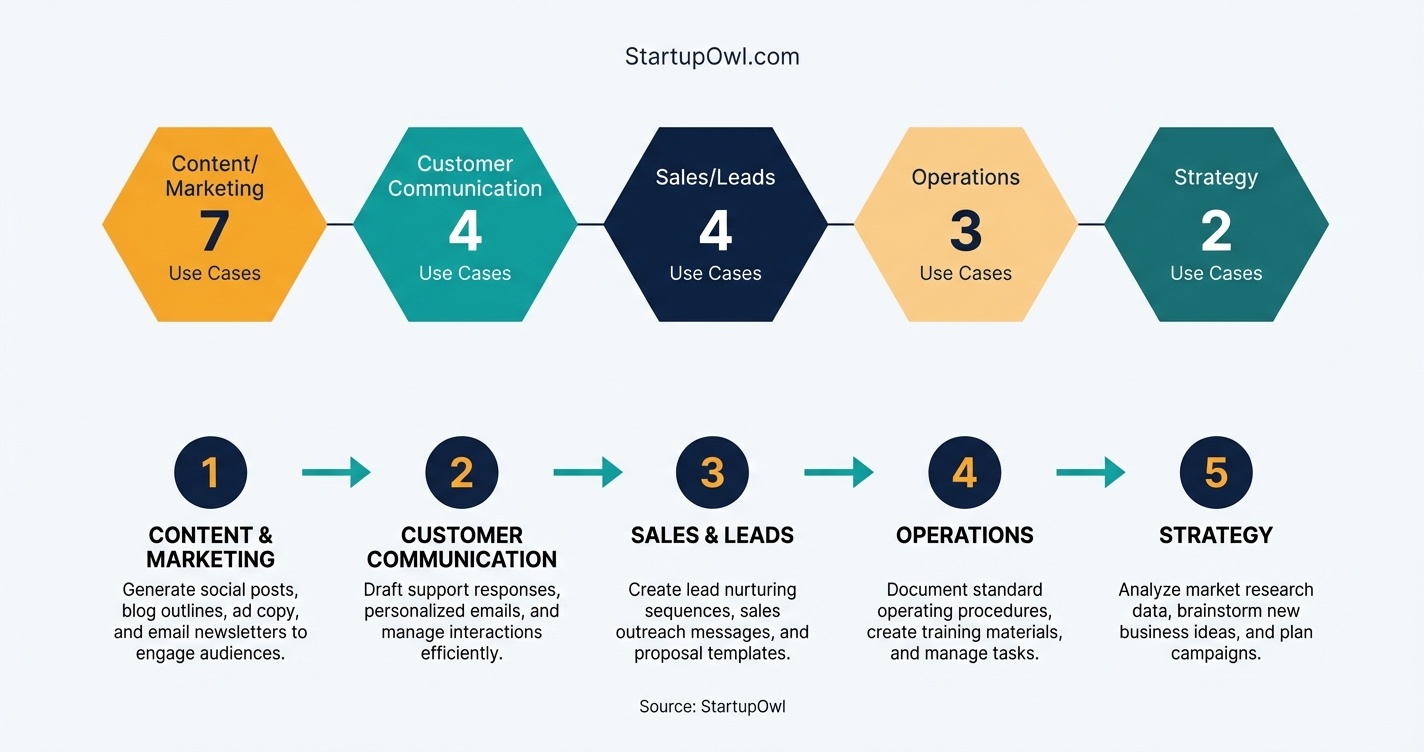
For a small business the useful work falls into five buckets. Content and marketing, blog posts, captions, product copy. Customer communication, replies, FAQs, onboarding email. Sales, prospect research, outreach, proposals. Operations, meeting notes, procedures, feedback analysis. Finance and strategy, pricing research, competitor comparison, business planning.
The difference between ChatGPT and a search engine is that it writes something new for your situation rather than pointing you at pages about it. You can upload your own files, PDFs, spreadsheets, photos, and ask it to read, summarise or rewrite them in your voice. That upload step is the real unlock. It is what turns the tool from a novelty into something that touches your actual paperwork.
20 Ways to Use ChatGPT in Your Small Business (With Example Prompts)
Twenty jobs, grouped by the part of the business they serve. Each one names the cheapest plan that runs it and gives you a prompt to paste as written. Swap the bracketed parts for your own details and the output changes from generic to usable. Most run on the free plan.
Content and Marketing, 1 to 7
- 1. Blog post first drafts. Runs on Free. A 1,000 word draft comes back in about a minute against two or three hours by hand. The saving is not the writing, it is never facing a blank page. You still edit for accuracy and voice, and you check every statistic it offers, because invented sources are its most common failure.Prompt
Write a 1,000 word blog post for [your business type] aimed at [customer]. Target keyword, [keyword]. Use short paragraphs and plain English, no marketing adjectives. Cover [three points]. End with one practical next step. Do not invent statistics, if a claim needs a number, write NEEDS SOURCE instead. - 2. Social captions in batches. Runs on Free. Ask for ten variations of one post rather than one caption ten times, then pick the two that sound like you. Variation is where it beats a person, you get range in seconds and choose, instead of committing to your first idea. Works well against a social media content calendar.Prompt
You write social copy for [business], a [description]. Our voice is [three adjectives]. Write 10 Instagram captions about [topic], each under 125 characters, each with a different hook, one question, one number, one story opener. No hashtags, no emoji. - 3. Product descriptions from a photo. Runs on Free. Upload a product photo or a spec sheet and it writes the copy from what it sees. For a catalogue this turns a week into an afternoon. Stores on Shopify or Squarespace can batch a dozen at once by uploading several images in one message.Prompt
Here is a photo of a product we sell. Write a 70 word web description and a 25 word version for a listing. Buyer is [customer]. Lead with the benefit, not the material. Only describe what you can see in the image, do not guess dimensions, materials or origin. - 4. Email campaign drafts. Runs on Free. Subject lines are the part worth automating, ask for eight and A/B the best two. Give it the segment and the offer and it will draft preview text and body copy in one pass. Compare the platforms that send them in our ConvertKit vs Mailchimp guide.Prompt
Write a marketing email for [business] to [segment] about [offer, with the real price and deadline]. Give me 8 subject lines under 45 characters, preview text under 90, and a 150 word body with one call to action. Tone, [tone]. No exclamation marks. - 5. Ad copy variations. Runs on Free. Paid search rewards volume of tested variants, and writing thirty headlines by hand is where most small advertisers give up. Generate the set, cut the ones that overclaim, test the rest. Our Google Ads guide covers the campaign structure to drop them into.Prompt
Write Google Ads copy for [product] sold to [customer]. 15 headlines at 30 characters or fewer, 4 descriptions at 90 or fewer. Half should lead with the problem, half with the outcome. No superlatives we cannot prove, no free unless I said it is free. - 6. Repurpose one post into five. Runs on Free. Most small businesses publish something good once and never use it again. Paste the post and ask for the other formats. The mechanism is simple, the thinking is already done, only the packaging changes.Prompt
Here is a blog post. Turn it into a LinkedIn post under 200 words, 3 standalone tweets, a 60 word email teaser, and a 45 second video script with a hook in the first line. Keep every claim to what the post actually says, add nothing new. - 7. Meta titles and descriptions. Runs on Free. It counts characters better than you do, which is the entire job. Give it the keyword and page topic and it returns titles inside 60 characters and descriptions inside 160. For local pages, pair it with our local SEO guide.Prompt
Page topic, [topic]. Target keyword, [keyword]. Write 5 meta titles at 60 characters or fewer and 5 meta descriptions at 155 or fewer. Put the keyword near the front. Print the character count after each one so I can check it.
Customer Communication, 8 to 11
- 8. Support replies you can send. Runs on Free. Paste the customer message and your actual policy, and you get a reply in seconds rather than the ten minutes you spend rewording the same refund explanation. Give it the policy every time, or it will invent a generous one.Prompt
You are the support lead at [business]. Our policy, [paste policy]. Reply to the message below in 3 to 4 sentences, warm and direct, no apology stacking. Offer only what the policy allows. If the policy does not cover it, say so and flag it for me instead of promising anything. - 9. FAQ pages from real questions. Runs on Free. Pull your twenty most repeated customer questions out of your inbox and hand them over together. Doing them as a batch keeps the answers consistent, which is what makes an FAQ page feel written rather than assembled.Prompt
Here are 20 questions customers actually ask [business]. Write an answer to each in 40 to 70 words, plain English, consistent voice across all 20. Where an answer depends on our policy or prices, insert [CONFIRM] rather than guessing. - 10. Follow ups that reference the call. Runs on Free. Generic follow ups get ignored. Paste your meeting notes and it writes one that names what was actually discussed, which is the only thing that makes a follow up land.Prompt
Here are my notes from a call with [prospect]. Write a follow up email under 120 words that references two specific things they said, restates the next step and the date, and asks one closing question. No summary of our company, they just heard it. - 11. Onboarding email sequences. Runs on Free. Describe your onboarding process once and get a five email welcome sequence with milestones. Most small businesses never build one because it is a half day of writing nobody schedules.Prompt
Our onboarding for a new [client type] is, [list the steps]. Write a 5 email welcome sequence, days 0, 2, 7, 14 and 30. Each under 150 words with one clear action. Email 1 sets expectations, email 5 asks for feedback.
Sales and Lead Generation, 12 to 15
- 12. Prospect briefs before a call. Needs Plus or Business for reliable web search. Ten minutes of reading compressed into one. Ask for the brief the morning of the call so the search results are current, and check anything you plan to repeat out loud. Useful for filling in your CRM.Prompt
Search the web and write a one page brief on [company, with URL]. Cover what they sell, roughly how big they are, anything published in the last 6 months, and three likely operational pain points a [your service] would touch. Cite a source URL for every factual claim. - 13. Cold outreach that is not a template. Runs on Free. Give it your value proposition and the objections you actually hear, and it drafts openers that answer them up front. The saving is in the variants, not the first draft.Prompt
We sell [offer] to [target]. The three objections we hear most, [list]. Write 3 cold emails under 90 words, each handling a different objection in the opening line. No flattery opener, no I hope this finds you well, one question at the end. - 14. Score inbound leads automatically. Needs Business for connectors, or a Zapier plan. Route form submissions through ChatGPT with your qualifying criteria and it tags each one before you read it. This is the one on this list that genuinely runs without you, so write the criteria tightly.Prompt
Score this enquiry from 1 to 5 for fit with [business]. A 5 has [criteria], a 1 has [criteria]. Reply with only the score, a 12 word reason, and one of HOT, WARM or PARK. No other text. - 15. Proposals and quotes. Runs on Free. Give it the scope, your rates and your terms and it formats a proposal in minutes. It cannot decide your price, and it should never be asked to. Set the number first with our pricing calculator, then have it write the document.Prompt
Write a proposal for [client] covering [scope]. Price, [exact figure]. Timeline, [dates]. Terms, [terms]. Sections, the problem in their words, what we will do, what we will not do, price, timeline, next step. Use my figures exactly, do not round or add options.
Operations, 16 to 18
- 16. Meeting notes into action items. Runs on Free, faster on Plus for long transcripts. Upload the transcript and ask for owners and deadlines, not a summary. A summary is nice, a list with names against it is the thing that changes what happens on Monday.Prompt
Here is a meeting transcript. Give me a table of action items with three columns, action, owner, deadline. Only include items someone actually committed to. Below the table, list up to 3 decisions made and up to 3 questions left open. - 17. Standard operating procedures. Runs on Free. Talk through the process in whatever order it comes out and it returns numbered steps with roles and a checklist. Written SOPs are what makes a business hireable, and they are the document owners put off longest.Prompt
Turn this into a standard operating procedure someone could follow on their first day, [describe the process]. Numbered steps, a role for each, a checklist at the end, and a short list of what to do when it goes wrong. Ask me about any step I described vaguely instead of filling the gap. - 18. Read your customer feedback properly. Runs on Free. Paste a few hundred survey answers or reviews and it groups the complaints by theme. Most owners read the extremes and miss the pattern in the middle. This is the use case that most reliably tells you something you did not know.Prompt
Here are [n] customer reviews. Group the complaints into themes, count how many mention each, and quote one example per theme. Rank by frequency, not by how bad they sound. Separately list anything praised more than three times.
Finance and Strategy, 19 and 20
- 19. Competitor comparisons. Needs Plus or Business for web search. Name three to five competitors and ask for a pricing and positioning grid. Treat every cell as a lead to verify, not a fact. Competitor pricing pages change constantly and this is where it hallucinates most confidently.Prompt
Search the web and build a table comparing [competitor 1], [competitor 2] and [competitor 3] on price, target customer, and their one loudest claim. Add a source URL and the date you found it for every price. If a price is not published, write NOT PUBLISHED rather than estimating. - 20. Business plan first pass. Runs on Free. It writes the structure, the market framing and the assumptions list quickly. It cannot know your market, and a plan built only on what it produces will read like every other one a lender sees. Use our free marketing plan template for the shape.Prompt
Draft a business plan outline for [business] in [location] serving [customer]. For each section, write the questions I need to answer rather than answering them for me. In the financial section, list the assumptions I must supply, do not invent figures.
ChatGPT Plans Compared for Small Business, Checked 25 July 2026
| Type / Provider | Rate | Notes |
|---|---|---|
| Free | $0/month | Limited access to GPT-5.5 Instant. Limited messages, uploads, image creation and memory. Training opt out available in settings |
| Go | $8/month | More GPT-5.5 Instant access, more messages and uploads, longer memory. OpenAI notes this plan may include ads |
| Plus | $20/month | GPT-5.6 reasoning models, expanded messages and deep research, projects, scheduled tasks and custom GPTs |
| Pro | From $100/month | 5x or 20x more usage than Plus, GPT-5.6 Sol Pro reasoning, maximum memory and context. Built for heavy research and agent work |
| Business | $20/user/mo (annual) or $25/user/mo (monthly) | Minimum 2 users. Shared workspace, admin console, SAML SSO and MFA, connectors to Microsoft 365, Google Drive and Slack, no training on your business data by default |
| Enterprise | Custom pricing | Adds SCIM, audit logs, compliance API, IP allowlisting and data residency. SOC 2 Type 2 and ISO 27001 certified. Requires a sales conversation |
ChatGPT Alternatives Worth Considering for Your Small Business
ChatGPT is not the only option, and on price it is no longer the cheapest. Three names are worth checking. Here are the three real alternatives with prices read at each vendor on 25 July 2026, and the situation where each one beats ChatGPT.
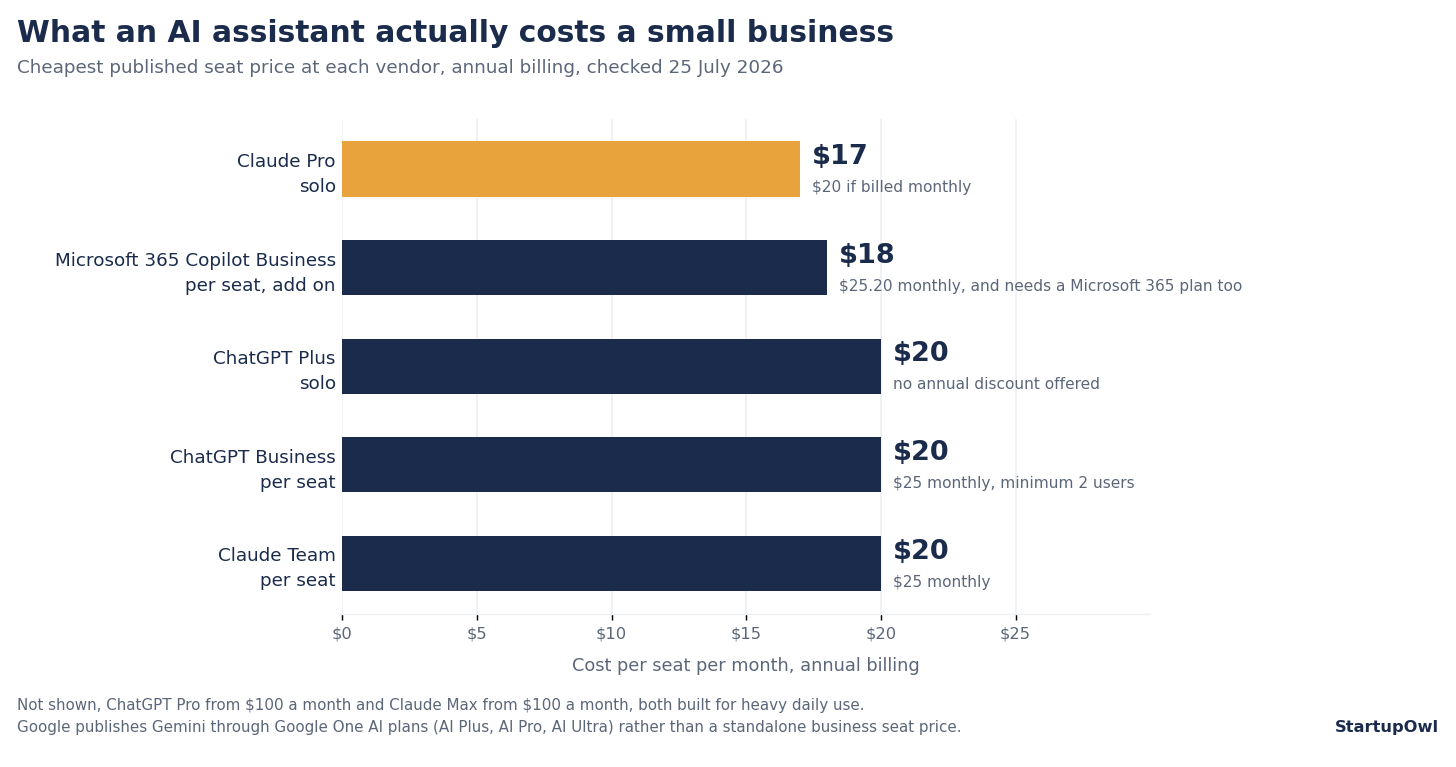
Claude, by Anthropic. Pro is $17 a month billed annually, $200 up front, or $20 billed monthly. The Team plan is $20 per seat a month annually, or $25 monthly, with a premium seat at $100 that carries five times the usage. Claude is the stronger pick for long documents, contract review and code. If your week involves reading forty page agreements or picking apart transcripts, it will hold more of the document in view at once. Pricing at claude.com/pricing.
Gemini, by Google. Google now sells Gemini through Google One AI plans, in three tiers, AI Plus, AI Pro and AI Ultra. The Gemini Advanced name is retired, so ignore any comparison still using it. The case for Gemini is not the model, it is the location. It drafts inside Gmail, builds decks in Slides and analyses data in Sheets without a copy and paste step. If your business runs on Google Workspace, that removes more friction than any model difference will. Current tiers at one.google.com.
Microsoft 365 Copilot Business. The add on starts at $18 per user a month paid yearly, discounted from $21, or $25.20 per user on monthly commitment. It needs an existing Microsoft 365 Business plan underneath it. Microsoft also sells it bundled. Business Standard with Copilot is $23.50 per user a month paid yearly, and Business Premium with Copilot is $32.00. That bundled Standard price is worth a hard look. If your team lives in Word, Excel, Outlook and Teams, Copilot is the most deeply embedded option. Prices at microsoft.com.
Plenty of businesses run two. A common pattern is ChatGPT for general work, Claude for anything document heavy, and whichever of Gemini or Copilot matches the office suite you already pay for. If you are budget conscious, start with one, and only add the second when you can name the specific job the first one keeps failing.
Build Custom GPTs for Your Specific Business
On Plus and Business you can build Custom GPTs, saved assistants that already hold your instructions and your documents. A support GPT that knows your refund policy and product list. A writing GPT loaded with your brand voice guide. The point is that you stop pasting the same three paragraphs of context into every new chat, which is where most of the daily friction actually sits. Set the context once. Build one per major job, support, content, sales, and on Business you can share them with the whole team from the workspace.
5 Costly Mistakes Small Businesses Make with ChatGPT
1. Publishing without fact checking. It invents facts, sources and links, and it does so in the same confident register it uses for things it knows. The Harvard study found that on tasks outside the model strengths, AI users were 19 percentage points less likely to reach the correct answer. Check every statistic, open every link, and verify anything you would be embarrassed to be wrong about in public.
2. Putting sensitive data on a personal plan. On Free, Go, Plus and Pro your conversations may be used to train future models unless you find the setting and switch it off. On Business and Enterprise your data is excluded by default. If you discuss client financials, legal matters or health information, that default is the whole reason to pay for Business, and it is not a feature you should rely on a colleague remembering to enable.
3. Buying Pro when Plus is the answer. Pro starts at $100 a month and exists for people running heavy research and long agent tasks all day. Plus at $20 covers the twenty jobs listed above. Start at Plus, and only move up if you are hitting the limits repeatedly rather than occasionally.
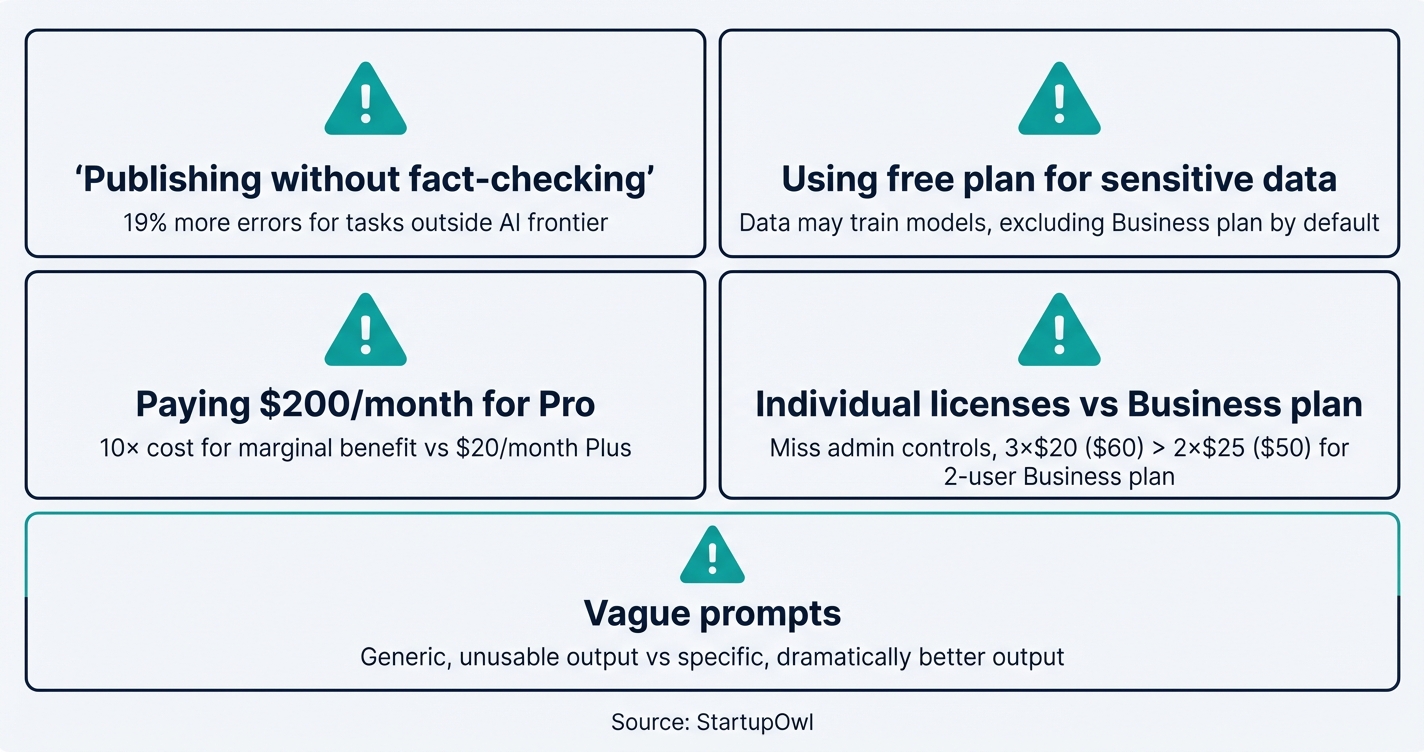
4. Running a team on individual licences. Three people on separate Plus accounts pay $60 a month for three isolated tools. Three Business seats on annual billing cost the same $60 and add a shared workspace, an admin console, SAML SSO, usage analytics and training exclusion by default. On annual billing there is no price penalty for moving, only an admin one, so the only reason teams stay split is that nobody has done the sum.
5. Vague prompting. Write me an email produces something you then rewrite, which saves nothing. Write a three sentence follow up to a restaurant owner who saw our POS demo yesterday, mention the 30 day trial and our 99.9 percent uptime, keep it under 60 words produces something you can send. The output quality tracks the input specificity almost exactly, and that is the cheapest lever on this page.
What to Do This Week
Open a free account at chatgpt.com and spend one session on five real tasks, not invented ones. Reply to an email actually sitting in your inbox. Summarise a document you already have. If that session saves you half an hour, the maths is settled, go to Plus at $20 a month on your own, or Business at $20 per user a month on annual billing once there are two of you.
Then pick the single job from the twenty above that eats the most of your week and build the prompt for it properly. Depth beats breadth here. One prompt you reuse daily beats twenty you tried once.
For the wider picture, connect this to your small business marketing plan and to building a brand that still sounds like a person as more of your competitors publish machine written copy. The businesses that win with AI are not the ones using it most. They are the ones using it on the right jobs, with someone reading the output before a customer does. That last part matters most.
Step-by-Step Process
- 1
Create a free ChatGPT account and test it on real work
Go to chatgpt.com and sign up with your email. The free tier gives limited access to GPT-5.5 Instant, which handles writing, brainstorming and simple research. OpenAI does not publish a message count for the free plan, it only says messages and uploads are limited, so plan to run out and use the runway you have on real tasks.
Write one product description, one reply to a customer email sitting in your inbox now, and one summary of a document you already have. Hypothetical prompts tell you nothing. Real ones tell you where the hours actually go.
Tips
- Keep your best prompts in one document from day one, you will reuse them more than you expect.
- Feed it your actual emails and product copy, not made up examples.
- Upload a PDF or a photo to see how the free tier handles your documents.
Common Mistakes
- Writing vague prompts like help me with marketing instead of naming your business, your customer and the format you want back.
- Judging the tool on invented test tasks that nobody was ever going to pay you for.
- 2
Pick the plan that matches your team size, not your ambition
OpenAI sells six tiers. Solo operators start at Go, $8 a month for light use or Plus, $20 a month for the GPT-5.6 reasoning models, projects, scheduled tasks and custom GPTs. From two people up, Business is $20 per user a month billed annually or $25 billed monthly, and it adds an admin console, SAML SSO, connectors and training exclusion by default.
Here is the number most owners miss. On annual billing Business costs the same per seat as an individual Plus licence. Two people on separate Plus accounts pay $40 a month for less than a two seat Business workspace costs. Skip Pro, which starts at $100 a month, unless you are running heavy research or long agent tasks daily.
Tips
- Billing Business annually saves $5 per user a month, which is $60 a user a year.
- Business and Enterprise are the only tiers where your data is out of training by default, everywhere else it is a setting you have to remember.
- Registered nonprofits can get up to 75 percent off Business or Enterprise through OpenAI for Nonprofits.
Common Mistakes
- Paying from $100 a month for Pro when Plus covers almost everything a small business does.
- Stacking individual Plus seats for a team when annual Business costs the same per seat and adds admin controls.
- 3
Build your first five reusable prompts
Write reusable prompt templates for the five tasks you repeat most. For most small businesses that is customer email replies, social captions, product descriptions, meeting summaries and FAQ answers.
Every good prompt has four parts, a role, your business context, the task, and the output format. Compare help me reply to this customer with you are the support lead at a two person ceramics studio, our policy is 30 day returns on unused items, reply to the message below in three sentences, warm but not chatty. The second one you can send. The first one you have to rewrite.
Tips
- Put your brand voice, business type and customer profile into Custom Instructions once, in Settings, so every chat starts with the context already loaded.
- Open with a role and close with a format instruction, those two lines do most of the work.
- Keep the prompt library somewhere the whole team can edit.
Common Mistakes
- Writing one generic prompt and blaming the model for generic output.
- Publishing what comes back without checking the facts and the numbers.
- 4
Connect ChatGPT to the tools you already run
On Business you get connectors that let ChatGPT read from tools like Google Drive, Slack and Microsoft 365 directly, which removes most of the copy and paste. For anything beyond that, Zapier connects ChatGPT to thousands of apps and now also offers Zapier MCP, which plugs those apps into ChatGPT as tools it can call inside a chat.
Zapier sells Free, Professional, Team and Enterprise plans, priced on task volume. Start on the free tier, build exactly one automation, and run it for a week before you add a second. Automations that nobody checks are how bad drafts reach customers.
Tips
- Try the Business connectors before you pay for a separate automation tool, they may cover what you need.
- Start with one automation, usually draft replies, and only expand once it has survived a full week.
- Watch your task usage, a chatty automation eats a plan allowance fast.
Common Mistakes
- Building ten automations in a weekend and losing track of which ones still work.
- Letting an automation send anything to a customer without a human approving it first.
- 5
Write the review rules before the mistakes happen
AI output needs a human check, and the research says exactly where. The same Harvard Business School study that found a 40 percent quality lift also found that on tasks outside the model strengths, AI users were 19 percentage points less likely to reach the correct answer. Confidence does not drop when accuracy does, which is what makes it dangerous.
Write a one page checklist. Verify every number and date, click every link it produces, check the voice, and have someone qualified read anything with legal, tax or medical content. On Business, use admin roles and usage analytics to see who is using it for what.
Tips
- Write a one page acceptable use policy naming the tasks the tool may and may not touch.
- Require a named human sign off on anything customer facing.
- Treat every citation and link it produces as unverified until you have opened it.
Common Mistakes
- Trusting its output on financial, legal or medical questions without an expert reading it.
- Pasting customer records or card numbers into a Free, Go, Plus or Pro chat, where training exclusion is a setting rather than a default.
Cost Breakdown
| Item | Cost Range | Notes |
|---|---|---|
| ChatGPT Free | $0/month | Limited access to GPT-5.5 Instant, limited messages and uploads, training opt out available in settings |
| ChatGPT Go | $8/month | More messages, uploads and image creation than Free. OpenAI notes this plan may include ads |
| ChatGPT Plus | $20/month | GPT-5.6 reasoning models, projects, scheduled tasks and custom GPTs, expanded deep research |
| ChatGPT Pro | From $100/month | 5x or 20x more usage than Plus, GPT-5.6 Sol Pro reasoning, maximum memory and context. Built for power users |
| ChatGPT Business | $20-$25/user/month | $20 per user billed annually or $25 billed monthly, minimum 2 users. SAML SSO, admin console, no training on your business data by default |
| Nonprofit discount | Up to 75% off | OpenAI for Nonprofits discounts ChatGPT Business or Enterprise for qualifying organisations |
Frequently Asked Questions
It is fine for light, occasional work. Researching a topic, brainstorming a few ideas, drafting one short email. OpenAI describes the free plan as limited access to GPT-5.5 Instant with limited messages and uploads, and it no longer publishes a hard message count, so treat the ceiling as unknown and expect to hit it. Most owners who use ChatGPT daily move to Go at $8 a month or Plus at $20 a month within the first week.
ChatGPT Business costs $20 per user a month billed annually, or $25 per user a month billed monthly, and it needs at least two users. A five person team pays $100 a month on annual billing or $125 on monthly. That buys a shared workspace, an admin console, SAML SSO, connectors to tools like Google Drive and Slack, and your business data stays out of model training by default. Nonprofits can get up to 75 percent off through OpenAI for Nonprofits.
It depends on where your work already lives. ChatGPT has the widest integration surface and the deepest model line up. Claude Pro costs $17 a month on annual billing or $20 monthly, and its Team plan is $20 per seat annually, so it undercuts ChatGPT slightly and is stronger on long documents and code. Google sells Gemini through Google One AI plans, which is the cheapest route if your team lives in Gmail, Docs and Sheets. Microsoft 365 Copilot Business starts at $18 per user a month paid yearly on top of a Microsoft 365 Business plan. Test two before you commit a year.
On Free, Go, Plus and Pro your conversations may be used for training unless you opt out in settings. OpenAI lists an opt out on all four. On Business and Enterprise your data is excluded from training by default, with no toggle to remember. If you handle client financials, health records or legal matter detail, that default is the reason to pay for Business rather than stack individual Plus seats.
Plus at $20 a month is a single person licence with GPT-5.6 reasoning, projects, scheduled tasks and custom GPTs. Business at $20 per user a month annually adds the things a company needs rather than a person, a shared workspace, an admin console, SAML SSO and MFA, usage analytics, spend controls, and training exclusion by default. On annual billing Business costs the same as Plus per seat, so for two or more people there is no price reason to stay on individual Plus licences.
Yes, with a human between the draft and the customer. It works well for drafting replies, building FAQ pages and writing onboarding sequences. Custom GPTs, available on Plus and Business, let you load your refund policy and product catalogue once instead of pasting them into every chat. What you should not do is put it in front of customers unsupervised. It states wrong things confidently, and a refund promise it invents is one you may have to honour.
Some links on this page are affiliate links. If you sign up for a service through them, we may earn a commission at no extra cost to you. This does not influence our rankings.
Sources & References
- ChatGPT Plans and Pricing (OpenAI)
- Introducing the ChatGPT for small business program (OpenAI, 21 July 2026)
- ChatGPT Business Pricing (OpenAI)
- What is ChatGPT Business? (OpenAI Help Center)
- Introducing ChatGPT Go (OpenAI)
- Navigating the Jagged Technological Frontier (Harvard Business School)
- Claude Plans and Pricing (Anthropic)
- Google AI Plans (Google One)
- Microsoft 365 Copilot for Business Pricing (Microsoft)
- Zapier Plans and Pricing
About the Author
Editor, StartupOwl
Eliot leads StartupOwl's state data research. He maintains the site's fifty state records of LLC filing fees, annual costs, processing times, and small business grant programs, checking each figure against the state office that publishes it and logging the date it was verified. Based in New Jersey, he has spent his working life in and around small businesses, and he writes for the founder who wants the real number rather than the advertised one. Every figure under his byline traces to a named source, and when a state proves a number wrong, the correction is published, not buried.
Was this article helpful?
Questions about ChatGPT for Small Business, 20 Ways to Use AI to Save Time and Grow in 2026
No comments yet. Ask the first question and a member of our team will answer.
Leave a comment