
E-Commerce for Small Business: How to Start Selling Online in 2026
E-commerce platforms for small business start at $0/month. Compare Shopify, Wix, BigCommerce, WooCommerce, and Square Online pricing, features, and setup steps.

In This Article
$0–$500
Est. Cost
3 hours
Timeline
5
Total Steps
You can have a functional online store accepting payments in under 3 hours for as little as $0/month on Square Online's free plan, or $29/month on Shopify's annual billing. The hard part is not building the store. The hard part is picking the right platform before you invest your time.
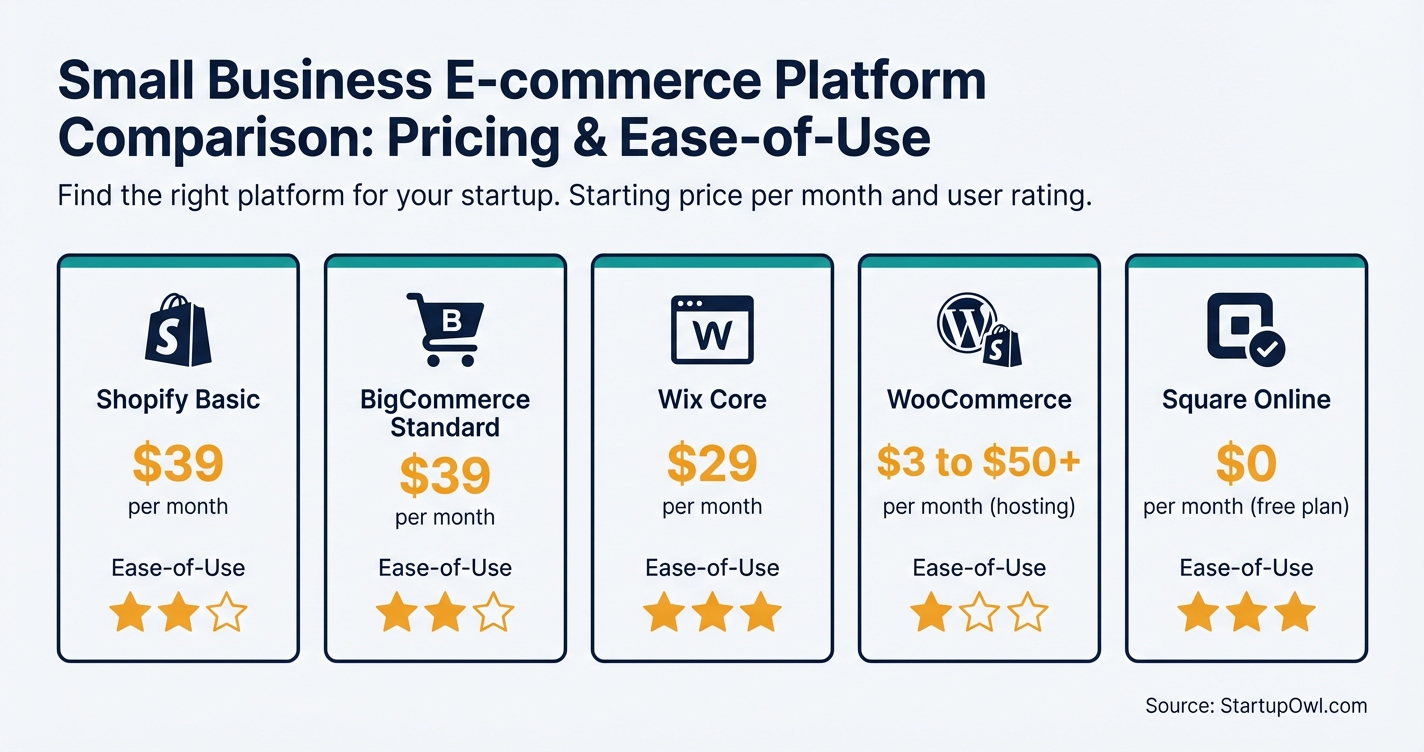
Five platforms dominate the small business e-commerce space in 2026: Shopify, BigCommerce, Wix, WooCommerce, and Square Online. This guide walks you through each one with actual prices, real trade-offs, and a step-by-step setup process you can follow today.
If you already have a small business marketing plan in place, you are ahead of most first-time sellers. If you do not, build one alongside your store so you have traffic ready on launch day.
Why Selling Online Matters for Small Businesses in 2026
E-commerce gives you a second (or third) revenue channel that operates 24/7 without requiring additional staff hours. For brick-and-mortar stores, an online presence lets customers browse inventory before visiting, order for pickup, or buy from anywhere in the country.
The barrier to entry has never been lower. Platforms like Square Online and WooCommerce let you start selling with $0 in monthly fees. Even Shopify now offers its first 3 months at $1/month for new users (as of 2026), giving you a risk-free window to test whether online sales work for your business.
Whether you sell handmade goods, wholesale products, digital downloads, or professional services, there is a platform built for your use case. The key is matching your business type to the right tool so you do not overpay for features you will never use, or outgrow a cheap plan within your first quarter.
How to Set Up Your Online Store in 5 Steps
The full setup process (from account creation to accepting your first payment) takes 90 minutes to 3 hours on hosted platforms like Shopify, Wix, or Square Online. WooCommerce takes longer because you are configuring hosting and WordPress separately. Here is the step-by-step breakdown.
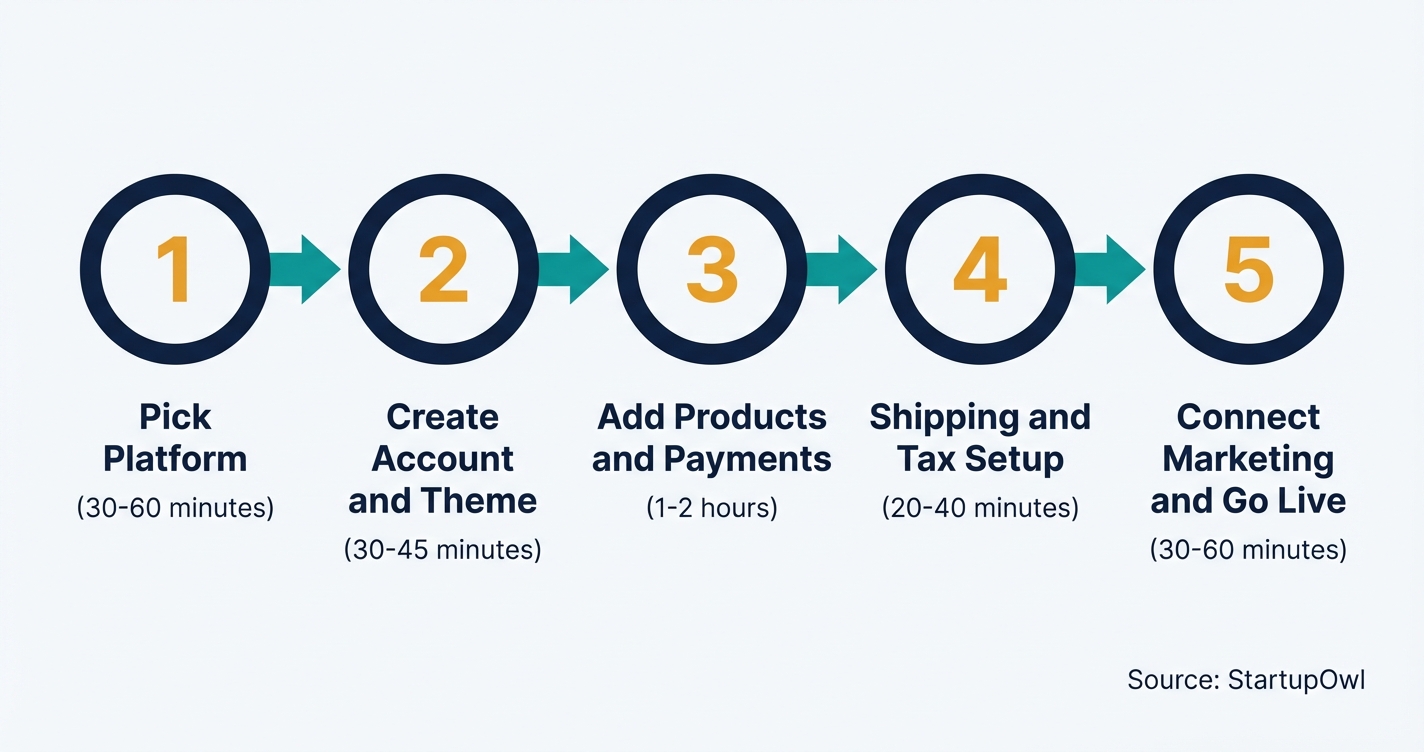
Step 1: Pick your platform. Match your business type to the right tool. Physical product sellers do well on Shopify or BigCommerce. In-store retailers with a POS system should start with Square Online. Service providers and creatives can start on Wix Core at $29/month. WordPress users with technical comfort should consider WooCommerce with hosting from $3 to $50+/month.
Step 2: Create your account and choose a theme. Sign up with a business email. Browse free templates first. Shopify has over 100 free themes, and Wix offers drag-and-drop design tools on every plan. Do not spend more than 30 minutes on your initial theme selection.
Step 3: Upload products and connect payments. Add 5 to 10 products with clear photos and descriptions. Connect Stripe, PayPal, or the platform's native processor. Shopify Payments charges 2.9% + $0.30 on the Basic plan. BigCommerce charges no platform transaction fees on any tier.
Step 4: Set shipping and tax rules. Configure shipping zones and rates. Shopify Basic includes discounts of up to 77% on USPS, UPS, and DHL. For taxes, Shopify's tool is free for your first $100,000 in annual U.S. sales. Factor shipping costs into your cost-plus pricing strategy.
Step 5: Connect marketing tools and go live. Link an email marketing tool (Mailchimp free up to 500 contacts or Klaviyo from $20/month). Install Google Analytics. Test your checkout on mobile and desktop. Then remove your store password and start selling. Use our social media content calendar to plan your launch announcements.
The 5 Best E-Commerce Platforms for Small Business (2026 Pricing)
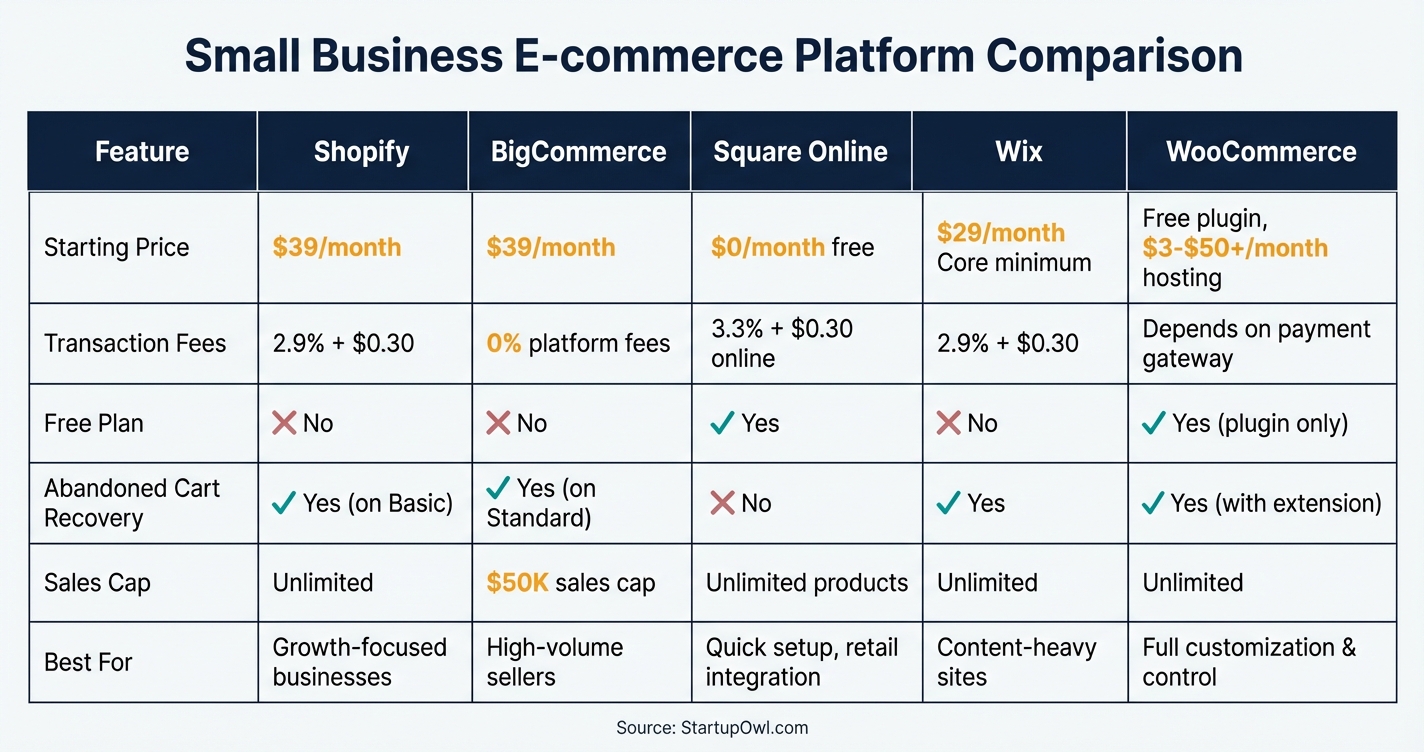
Every price below was verified against official platform pricing pages in early 2026. Monthly prices are standard (not annual billing) unless noted. Annual billing typically saves 10% to 25% depending on the platform.
Shopify
Shopify remains the most popular choice with over 4.2 million active stores (as of 2026, per Shopify). The Basic plan costs $39/month (or $29/month with annual billing) and includes a full online store, abandoned cart recovery, and shipping discounts up to 77%. The Grow plan (formerly "Shopify") is $105/month and adds professional reports plus lower credit card rates of 2.6% + $0.30. Use Shopify Payments to avoid the extra 0.5% to 2% third-party gateway fee.
BigCommerce
BigCommerce Standard starts at $39/month ($29/month annual) and charges zero platform transaction fees on every tier (as of 2026, per BigCommerce). The catch: each plan has an annual sales cap. Standard caps you at $50,000/year, Plus at $180,000/year, and Pro at $400,000/year. Exceeding these limits triggers an automatic upgrade. If you compare Shopify vs Squarespace, BigCommerce is the third option worth considering.
Square Online
Square recently simplified its pricing to three tiers: Free ($0/month), Plus ($49/month), and Premium ($149/month) as of late 2026, per Square. The free plan lets you sell unlimited products but charges 3.3% + $0.30 per online transaction and displays Square branding. The Plus plan drops online processing to 2.9% + $0.30 and adds loyalty programs, marketing tools, and advanced inventory. Best for businesses already using Square for in-person sales.
Wix
Wix has four premium plans from $17 to $159/month (annual billing, as of 2026, per Wix). You need at least the Core plan at $29/month to accept online payments. The Core plan includes 50 GB storage, booking tools, and basic e-commerce functionality. If you are comparing site builders, our Squarespace vs WordPress guide covers additional options.
WooCommerce
The WooCommerce plugin is 100% free, but you need WordPress hosting (starting around $3/month for shared hosting or $20 to $50+/month for managed WooCommerce hosting, per WooCommerce). Quality hosting plans start at roughly $250/year. Add $10 to $20/year for a domain, $0 to $350 for a theme, and $0 to $300+/year for premium extensions. Total realistic first-year cost for a small store: $200 to $1,500.
E-Commerce Platform Pricing at a Glance (2026)
| Type / Provider | Rate | Notes |
|---|---|---|
| Shopify Basic | $39/month ($29 annual) | 2.9% + $0.30 online card rate with Shopify Payments. 3-day free trial + $1/month for first 3 months. |
| BigCommerce Standard | $39/month ($29 annual) | 0% platform transaction fees. $50K/year sales cap before forced upgrade. |
| Square Online Free | $0/month | 3.3% + $0.30 per online transaction. Square branding. Unlimited products. |
| Square Online Plus | $49/month | 2.9% + $0.30 per online transaction. Loyalty, marketing, advanced inventory. |
| Wix Core | $29/month (annual) | Minimum tier for e-commerce. 50 GB storage. 2.9% + $0.30 via Wix Payments. |
| WooCommerce + Hosting | $3 to $50+/month | Plugin free. Hosting, domain, SSL, extensions, and maintenance are your responsibility. |
6 Mistakes That Cost New E-Commerce Sellers Real Money
1. Ignoring Transaction Fee Differences Across Plans
On Square Online's free plan, you pay 3.3% + $0.30 per online sale. On the Plus plan ($49/month), that drops to 2.9% + $0.30. If you process $5,000/month in online sales, the 0.4% difference saves you about $20/month, which means you need roughly $12,250/month in online sales for Plus to pay for itself on processing alone. Calculate your break-even point before upgrading.
2. Choosing WooCommerce Without Technical Readiness
WooCommerce's free plugin is tempting, but you are responsible for hosting, security updates, backups, and performance optimization. Above $5M in GMV, infrastructure costs can hit $500 to $2,000/month in hosting and developer time. For non-technical founders, a hosted platform like Shopify or BigCommerce is a safer (and often cheaper) starting point.
3. Overpaying for Features You Do Not Need Yet
Shopify Advanced ($399/month) offers third-party calculated shipping rates and the lowest card rates. But if you sell fewer than 100 orders/month, the savings on card rates will not cover the $360/month difference versus Basic. Start on the lowest tier that meets your needs. You can always upgrade.
4. Skipping Email Capture on Launch Day
Every visitor who leaves your store without giving you their email is gone forever. Set up an email signup pop-up before you launch, even if your list starts at zero. Mailchimp's free tier handles up to 500 contacts. Read our ConvertKit vs Mailchimp comparison to choose the right tool.
5. Not Testing Mobile Checkout
Over 60% of e-commerce traffic now comes from mobile devices. If your checkout flow breaks on a phone (slow loading, tiny buttons, confusing forms), you lose the majority of potential buyers. Place a real test order on your phone before going live. Check every step from product page to confirmation email.
6. Treating Chargebacks as Someone Else's Problem
A disputed card payment costs $15 in Stripe fees before you argue anything, and the fee is not returned when you win. You get 7 to 21 days to respond. Our guide to fighting a chargeback covers the deadlines and the arithmetic of whether a fight pays.
The Fastest Way to Test Your Product Idea
Not sure if your product will sell? Start with Square Online's free plan or Shopify's $1/month introductory offer. List 5 products, share on social media, and measure demand for 30 days before committing to a paid plan. If you are exploring low-cost marketing tactics, check out our guerrilla marketing ideas for ways to drive traffic without a paid ad budget.
What to Do Right Now
Pick one platform from the list above, sign up for a free trial, and upload your first 5 products today. You do not need a perfect store to start selling. You need a live store with real products, a working checkout, and an email capture form. If you are not sure where to begin your marketing, download our free marketing plan template and use our pricing calculator to set prices that actually cover your costs.
For stores that need help with search visibility, read our local SEO guide. And if you plan to run ads, our Google Ads for small business guide will help you avoid wasting your first ad budget.
Step-by-Step Process
- 1
Pick the right e-commerce platform for your business type
Your platform choice affects everything from monthly cost to how fast you can launch. If you sell physical products and want an all-in-one solution, Shopify (starting at $39/month) or BigCommerce (starting at $39/month) are your safest bets. Both include hosting, SSL, and payment processing in one package.
If you already run a physical store with a POS system, Square Online syncs your in-person and online inventory for $0/month on the free plan. For WordPress users who want full customization control, WooCommerce is free to install but requires separate hosting at $3 to $50+/month.
Tips
- Match your platform to your sales channel. Brick-and-mortar businesses benefit most from Square Online's POS integration.
- Check whether you need abandoned cart recovery (Shopify Basic includes it; BigCommerce Standard does not).
- If you compare Shopify and Squarespace side by side, read our Shopify vs Squarespace comparison.
Common Mistakes
- Choosing the cheapest plan without checking transaction fee percentages (Square Online Free charges 3.3% + 30 cents online vs. 2.9% + 30 cents on Plus).
- Picking WooCommerce without WordPress experience and underestimating the 3- to 4-week learning curve.
- 2
Create your account and set up your store basics
Sign up for your chosen platform using a business email address. On Shopify, you get a 3-day free trial followed by $1/month for 3 months for first-time users (as of 2026). BigCommerce offers a 15-day free trial with no credit card required. Square Online lets you build your entire store on the free tier before spending anything.
During setup, you will add your business name, select a theme or template, and configure basic settings like currency and language. Theme selection takes 15 to 30 minutes on most platforms. Shopify offers over 100 free themes and about 70 premium themes priced between $150 and $350.
Tips
- Use a business email (not a personal Gmail) so your account looks professional from day one.
- Start with a free theme. You can always upgrade to a premium theme after your first 100 sales.
- If you are building a brand from scratch, read our guide on building a brand first.
Common Mistakes
- Spending hours customizing your theme before adding any products. Get products live first, then refine the design.
- Forgetting to connect a custom domain (costs $10 to $20/year) and launching with a yourstore.myshopify.com URL.
- 3
Add your products and connect a payment gateway
Upload your first 5 to 10 products with clear photos, descriptions, prices, and inventory counts. This typically takes 30 to 60 minutes depending on how many product variants you have. Write product descriptions that answer the two questions every shopper asks: "What is this?" and "Why should I buy it from you?"
For payment processing, most platforms integrate with Stripe and PayPal. Shopify Payments (powered by Stripe) charges 2.9% + $0.30 on the Basic plan. BigCommerce charges no platform transaction fees on any tier, though you still pay your payment processor's standard rates (typically 2.2% to 2.9% + $0.30). Square Online processes payments through Square at 2.9% + $0.30 on paid plans or 3.3% + $0.30 on the free plan.
Tips
- Use Shopify Payments or the platform's built-in processor to avoid extra transaction fees (Shopify charges 0.5% to 2% on top if you use a third-party gateway).
- Photograph products on a white background with natural lighting. No studio required.
Common Mistakes
- Launching with only 1 to 2 products. Stores with fewer than 5 products look incomplete and kill buyer confidence.
- Ignoring the difference between platform transaction fees and payment processing fees. They stack on some platforms.
- 4
Configure shipping and tax settings
Set up your shipping zones, rates, and estimated delivery times. Shopify Basic includes shipping discounts of up to 77% with USPS, UPS, and DHL. BigCommerce Standard provides real-time shipping quotes from major carriers on all plans. Square Online offers free in-store and curbside pickup on every tier.
For taxes, Shopify's built-in tax tool is free for your first $100,000 in U.S. sales per year (as of 2026). After that threshold, it charges 0.35% per transaction. Most platforms auto-calculate sales tax for U.S. addresses. If you sell internationally, you will need to configure duties and import taxes (available on Shopify Advanced at $399/month).
Tips
- Offer free shipping on orders over a threshold (e.g., $50). It increases average order value.
- Start with flat-rate shipping if you sell products of similar size and weight. Real-time carrier rates are more accurate but more complex to set up.
Common Mistakes
- Not factoring shipping costs into your product pricing. Use a cost-plus pricing strategy so you do not lose money on every order.
- 5
Connect marketing tools and go live
Before you launch, connect an email marketing platform to capture visitor emails from day one. Mailchimp's free plan supports up to 500 contacts. Klaviyo (popular with Shopify stores) starts at $20/month for up to 500 contacts. If you are comparing email tools, see our ConvertKit vs Mailchimp guide.
Install analytics tracking (Google Analytics is free) so you can measure traffic and conversions immediately. Then test your checkout process by placing a real test order. Confirm that confirmation emails send, payment processes correctly, and shipping rates calculate properly. Once everything checks out, remove your store password and go live.
Tips
- Set up an abandoned cart email sequence on launch day. Shopify Basic, BigCommerce Plus, and Wix Business all include this feature.
- Create a simple launch announcement using our free marketing plan template.
- Consider using ChatGPT for small business to draft your initial product descriptions and email sequences faster.
Common Mistakes
- Going live without testing the full checkout flow on both mobile and desktop. Over 60% of e-commerce traffic comes from mobile devices.
- Skipping email capture and losing your first visitors forever.
Cost Breakdown
| Item | Cost Range | Notes |
|---|---|---|
| Shopify Basic (monthly billing) | $39/month | Includes hosting, SSL, and abandoned cart recovery. 2.9% + $0.30 credit card rate with Shopify Payments. |
| BigCommerce Standard (monthly billing) | $39/month | No platform transaction fees. Capped at $50,000/year in online sales before forced upgrade to Plus. |
| Wix Core (annual billing) | $29/month | Minimum tier for accepting online payments. 50 GB storage. 2.9% + $0.30 processing via Wix Payments. |
| Square Online Free | $0/month | Unlimited products. 3.3% + $0.30 online processing fee. Square branding on site. |
| WooCommerce (self-hosted) | $3 to $50+/month | Plugin is free. You pay separately for hosting, domain ($10 to $20/year), SSL, and premium extensions. |
| Domain name | $10 to $20/year | Many platforms include a free domain for the first year on paid plans. |
| Email marketing (starter tier) | $0 to $20/month | Mailchimp free up to 500 contacts. Klaviyo starts at $20/month. |
| Premium theme (optional) | $0 to $350 one-time | Shopify offers 100+ free themes. Premium themes range from $150 to $350. |
Frequently Asked Questions
Square Online's free plan lets you sell unlimited products for $0/month with a 3.3% + $0.30 per-transaction fee. WooCommerce's plugin is also free, but you will spend at least $3 to $20/month on hosting. If you want a fully hosted all-in-one platform, Shopify offers its first 3 months at $1/month for new users.
Yes, but with trade-offs. Square Online's free tier includes unlimited products, inventory management, and social media integration, but shows Square branding and charges a higher 3.3% + $0.30 online processing fee. WooCommerce's plugin is free, though hosting and a domain still cost money. True "$0 total" is not realistic for a professional store.
Shopify and Wix are the most beginner-friendly options, with most users reaching proficiency in 1 to 2 weeks. Shopify Basic ($39/month) includes everything you need in one package. Wix Core ($29/month) is slightly cheaper and offers a drag-and-drop editor that feels more intuitive for design-focused users.
A realistic monthly budget for a new small store is $80 to $200. That includes your platform fee ($29 to $39), payment processing fees (roughly 2.9% of sales), email marketing ($0 to $20), and possibly one or two apps ($10 to $50). Your total scales with your sales volume because processing fees are percentage-based.
Choose Shopify if you want everything managed for you (hosting, security, updates) and are willing to pay $39/month for that convenience. Choose WooCommerce if you already use WordPress, want unlimited customization, and are comfortable managing hosting and maintenance yourself. WooCommerce can be cheaper at low volume but more expensive at scale due to infrastructure costs.
Requirements vary by state and locality. Most U.S. states require a sales tax permit if you are selling taxable goods. You may also need a general business license from your city or county. Check your state's Secretary of State website for specific requirements. The platforms themselves do not require a business license to sign up.
Some links on this page are affiliate links. If you sign up for a service through them, we may earn a commission at no extra cost to you. This does not influence our rankings.
Sources & References
- Shopify Pricing Plans
- BigCommerce Essentials Pricing
- Wix Pricing Plans
- Square Online Store Plans and Pricing
- WooCommerce Pricing Guide
- Square Unified Pricing and Packaging Announcement
- BigCommerce Pricing (Net Solutions)
- Shopify Pricing Plans 2026 (DemandSage)
- FTC Endorsement Guidelines
- Wix Pricing Plans 2026 (Website Builder Expert)
About the Author
Editor, StartupOwl
Eliot leads StartupOwl's state data research. He maintains the site's fifty state records of LLC filing fees, annual costs, processing times, and small business grant programs, checking each figure against the state office that publishes it and logging the date it was verified. Based in New Jersey, he has spent his working life in and around small businesses, and he writes for the founder who wants the real number rather than the advertised one. Every figure under his byline traces to a named source, and when a state proves a number wrong, the correction is published, not buried.
Was this article helpful?
Questions about E-Commerce for Small Business
No comments yet. Ask the first question and a member of our team will answer.
Leave a comment