
SEO for Small Business: A Practical Guide to Ranking on Google in 2026
SEO for small business starts at $0 with free Google tools and scales to $52+/month for paid platforms. Get the step-by-step plan, tool picks, and timelines.

$0–$1,500
Est. Cost
6 minutes
Timeline
6
Total Steps
93% of online experiences begin with a search engine, yet most small businesses either ignore SEO or overspend on tools they do not need. The good news: you can start ranking on Google using entirely free tools and add paid software only when your needs outgrow them.
This guide covers the exact steps, tool costs, and realistic timelines for doing SEO yourself in 2026. You will learn what to set up on day one (for $0), when to invest in a paid platform, and how long it actually takes to see your pages climb from nowhere to page one.
Why SEO Matters More Than Ever for Small Businesses
SEO (search engine optimization) is the process of making your website more visible in Google's unpaid search results. Unlike Google Ads for small business, where you pay per click and traffic stops the moment your budget runs out, organic rankings compound over time. A well-optimized page can drive free traffic for months or years.
For local businesses, SEO is especially high-impact. When someone searches "best plumber near me" or "dentist open Saturday," Google pulls results from your website and your Google Business Profile. Claiming that profile (free) and optimizing it is part of every local SEO guide for good reason.
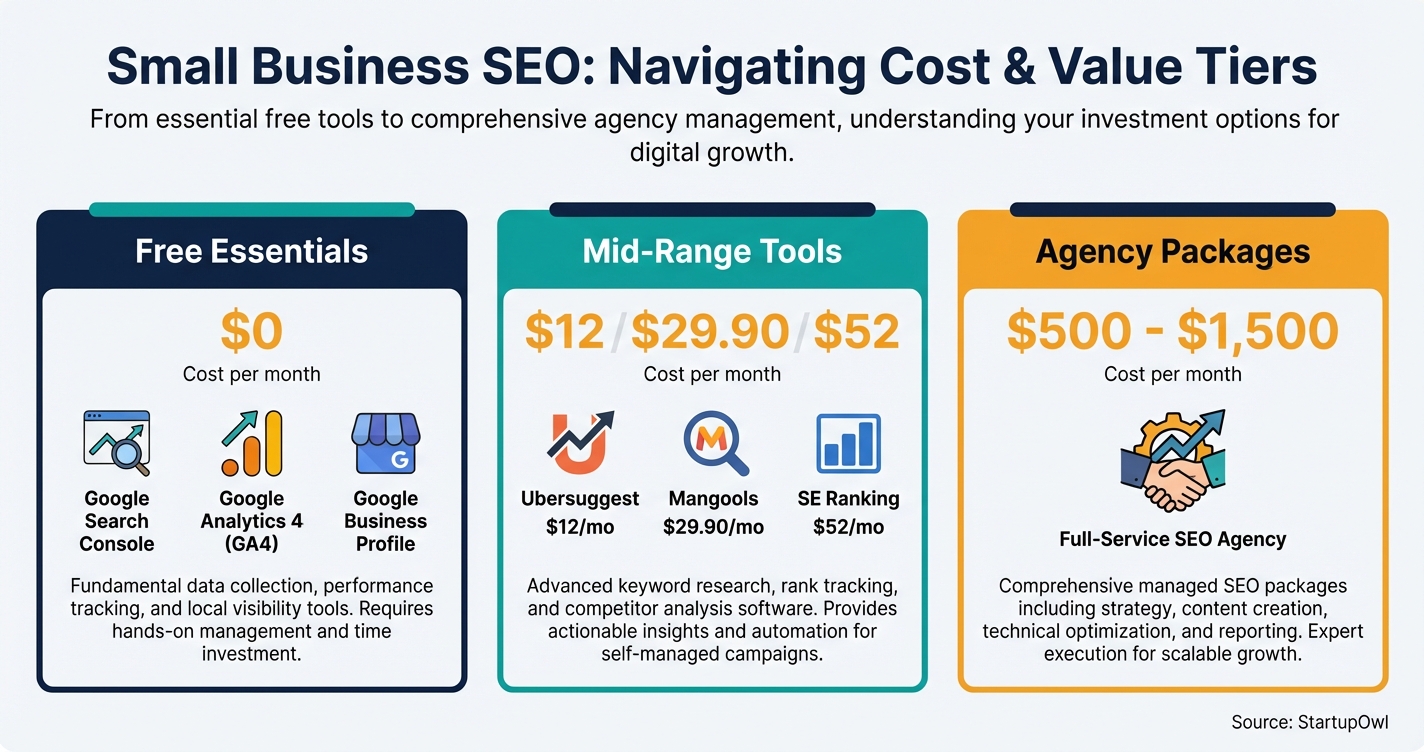
The real question is not whether you need SEO. It is how much time and money you should invest at your current stage. A brand-new solo business can start for $0/month in tool costs and 4 to 6 hours/week of work. A growing business with revenue to reinvest might hire an agency at $500 to $1,500/month for a hands-off approach. This guide helps you decide which path fits.
How to Do SEO for Your Small Business (Step by Step)
The steps below follow a logical order: free foundations first, then keyword research, then content, then link building. Skip ahead if you have already completed a step, but do not jump to content creation before fixing technical problems on your site.
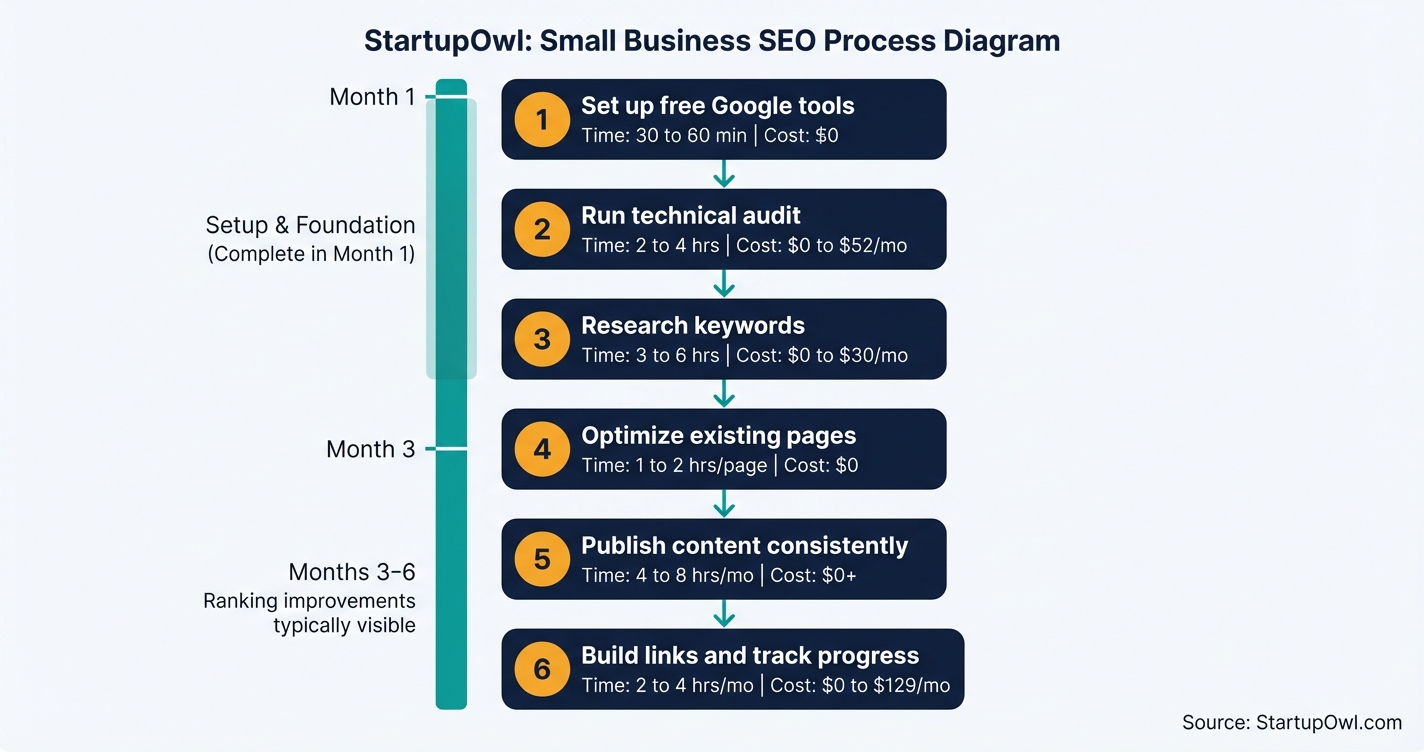
Each step includes the cost, time estimate, and the specific tool or page where you will do the work. For a printable version of this workflow, grab our free marketing plan template, which includes an SEO checklist section.
The Best SEO Tools for Small Businesses in 2026
You do not need five different subscriptions. Most small businesses perform well with the free Google stack plus one paid tool. Here is how the top options compare as of early 2026.
Google Search Console + GA4 (free) should be your non-negotiable starting point. Search Console shows which queries bring impressions and clicks, flags crawl errors, and lets you request indexing. GA4 tracks user behavior on your site. Together, they answer the two most important SEO questions: "What is Google seeing?" and "What are visitors doing?"
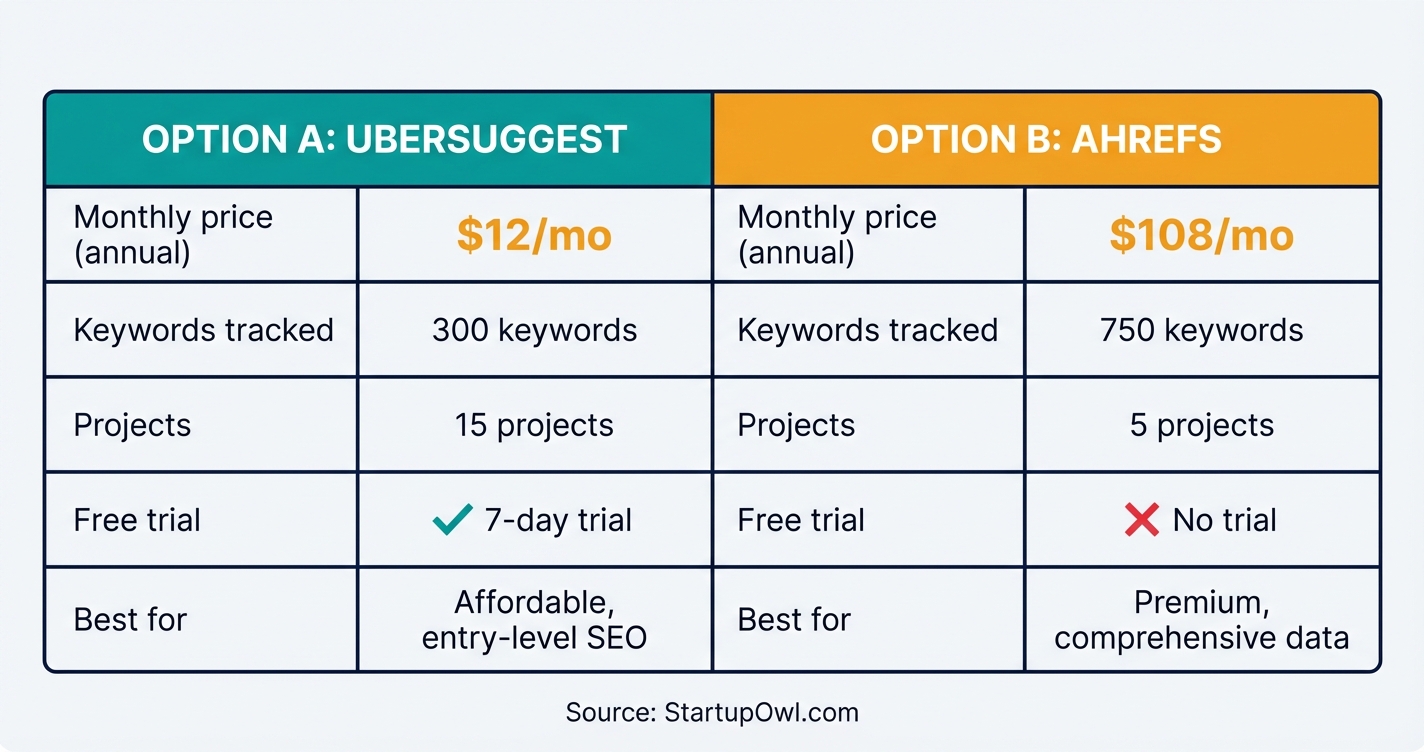
Ubersuggest starts at $12/month for the Individual plan and covers keyword research, rank tracking for up to 300 keywords, and basic site audits across 15 projects. It also offers a lifetime purchase option (a one-time fee starting around $120) that no major competitor matches. The trade-off is a smaller data set and fewer advanced features than professional-grade tools.
Mangools (which includes KWFinder) starts at $29.90/month on the annual Entry plan. The suite includes five tools: KWFinder for keyword research, SERPChecker for SERP analysis, SERPWatcher for rank tracking, LinkMiner for backlinks, and SiteProfiler for site metrics. Its standout feature is city-level keyword data, making it especially useful if you run a local business.
SE Ranking starts at $52/month on the Essential annual plan, with a 14-day free trial and no credit card required. You get rank tracking for 500 keywords, site audits up to 100,000 pages, competitor analysis, and a unique Marketing Plan tool that generates a customized SEO checklist for your site. On Capterra and G2, users consistently note its strong value relative to Semrush and Ahrefs.
Semrush Pro costs $139.95/month (or $117.33/month billed annually with a 17% discount). It includes 5 projects, 500 keyword positions, and access to over 55 tools spanning SEO, content, and competitive intelligence. A 14-day free trial is available for Pro and Guru plans. For small businesses, Semrush is powerful but may be overkill until you are actively publishing content and tracking competitors.
Ahrefs Lite starts at $129/month ($108/month billed annually). It offers 5 projects, 750 tracked keywords, and access to the industry's largest backlink index at 43 trillion links. There is no free trial, and its credit-based system can feel restrictive on the Lite plan. Ahrefs is best suited for businesses where backlink analysis and competitor link research are central to the strategy.
SEO Tool Pricing at a Glance (2026)
| Type / Provider | Rate | Notes |
|---|---|---|
| Google Search Console + GA4 | $0/month | Essential. Covers indexing, traffic data, keyword performance. |
| Ubersuggest Individual | $12/month | Budget keyword research, 300 tracked keywords, 15 projects. Lifetime option available. |
| Mangools Entry (annual) | $29.90/month | 5-tool suite including KWFinder. City-level keyword data. 10-day free trial. |
| SE Ranking Essential (annual) | $52/month | 500 tracked keywords, site audit, competitor analysis. 14-day free trial. |
| Semrush Pro (annual) | $117.33/month | 500 keywords, 5 projects, 55+ tools. 14-day free trial. 17% annual discount. |
| Ahrefs Lite (annual) | $108/month | 750 keywords, 5 projects, 43T backlink index. No free trial. Credit-based system. |
| Ahrefs Starter | $29/month | New entry-level plan. 1 project. Limited features for single-site owners. |
| SEO agency (starter package) | $500 to $1,500/month | Includes audit, Google Business Profile management, and 5 to 10 hours of optimization. |
StartupOwl's Pick for Most Small Businesses
SE Ranking Essential ($52/month) hits the sweet spot for most small businesses. It covers rank tracking, site audits, competitor analysis, and keyword research in a single dashboard. The 14-day free trial requires no credit card, so you can test it thoroughly before committing. If $52/month feels like too much right now, start with free Google tools plus Ubersuggest at $12/month and upgrade when you are ready.
5 SEO Mistakes That Waste Time and Money
1. Paying for premium tools before defining your goals. A local service business paying $249.95/month for Semrush Guru when SE Ranking at $52/month covers every need wastes roughly $2,375/year. Match the tool to your actual workload, not the feature list.
2. Skipping Google Business Profile. For any business with a physical location or service area, GBP is the single highest-impact, zero-cost SEO action you can take. Every professional agency package from $500/month and up includes GBP optimization because it directly affects local pack rankings.
3. Expecting results in weeks, not months. Ranking improvements typically take 3 to 6 months of consistent effort. Many businesses abandon SEO after 4 to 8 weeks, right before the results would have started appearing. Think of SEO as a savings account that compounds, not a lottery ticket.
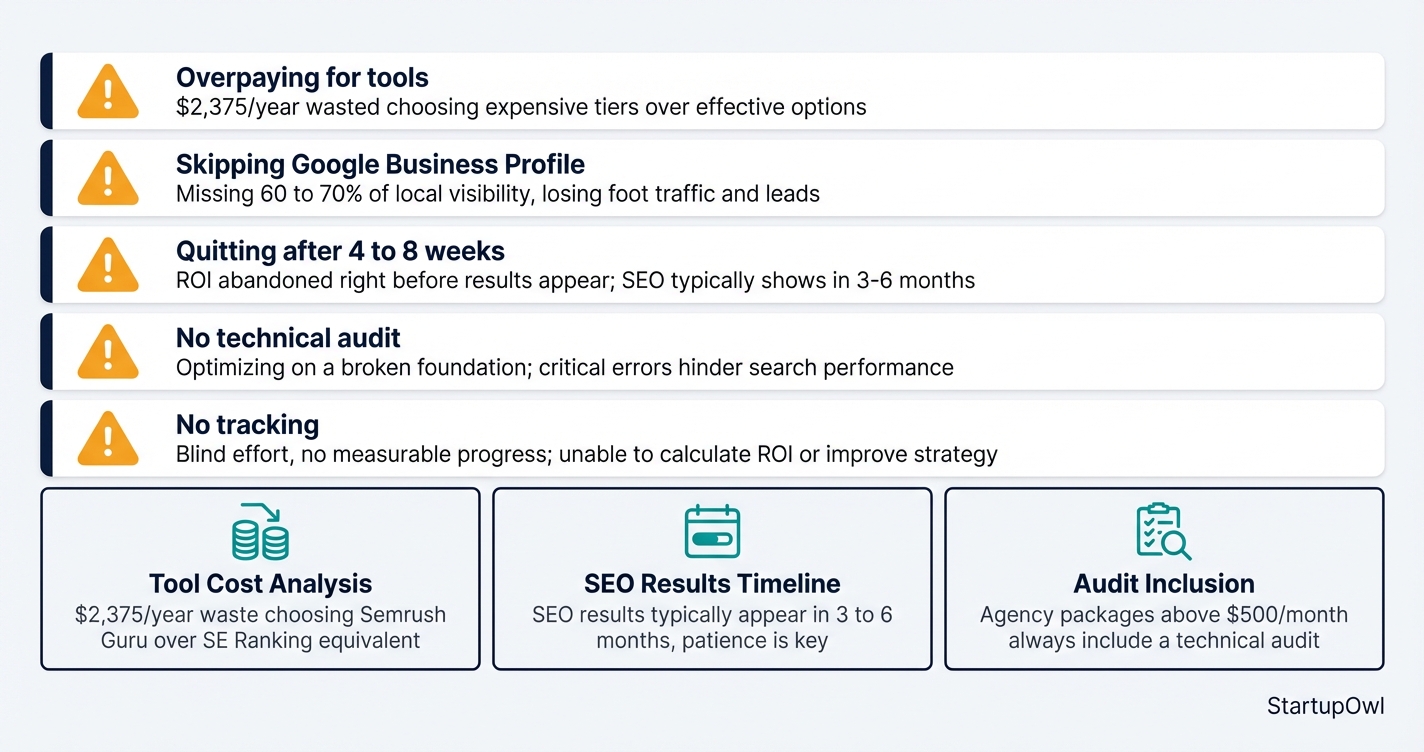
4. Skipping the technical audit. Optimizing keywords on a site with crawl errors, slow load times, or a missing sitemap is like putting premium fuel in a car with a flat tire. Every agency package above $500/month starts with a technical audit for exactly this reason.
5. DIY without tracking. If you invest 4 to 8 hours/week in SEO but never check whether rankings are actually moving, you are flying blind. Set up monthly check-ins using Search Console (free) to measure impressions, clicks, and average position for your target keywords.
6. Stuffing keywords into your Google Business Profile name. Google's guidelines ban service and location words that are not part of your real world name, and its own example of a name that is not acceptable is Midas Auto Service Experts. That is not a ranking penalty, it is a suspension, and the listing goes dark. If yours already has, our guide to a suspended Google Business Profile covers the evidence Google asks for and the filing that fixes a name mismatch.
What to Do This Week
Set up Google Search Console, GA4, and (if applicable) Google Business Profile today. That takes about 30 to 60 minutes and costs nothing. Run a quick site audit with PageSpeed Insights, fix anything critical, and then do your first round of keyword research using the free daily searches in KWFinder or Ubersuggest.
From there, follow the steps in this guide and refer to our small business marketing plan to fit SEO into your broader growth strategy. If your site is built on WordPress or Squarespace, check our Squarespace vs WordPress comparison for platform-specific SEO tips. For email list growth that complements your organic traffic, see our ConvertKit vs Mailchimp breakdown.
Step-by-Step Process
- 1
Set up your free Google SEO toolkit
Create accounts for Google Search Console, Google Analytics 4, and (if you have a physical location or service area) Google Business Profile. These three free tools cover indexing status, traffic data, and local search visibility.
Search Console shows you which keywords already send clicks to your site, flags indexing problems, and lets you submit new pages directly to Google. GA4 tracks what visitors do after they land on your pages. Together, they give you enough data to make smart decisions before spending a dollar on paid software.
Tips
- Verify your domain in Search Console using the DNS method for the cleanest setup.
- Link Search Console to GA4 so you can see keyword data alongside user behavior.
- Claim and complete every field of your Google Business Profile, including hours, photos, and services.
Common Mistakes
- Skipping Google Business Profile and missing local search visibility, which can account for a large share of traffic for service-area businesses.
- Not submitting an XML sitemap to Search Console, which delays Google's discovery of your pages.
- 2
Run a technical audit of your website
Before writing a single blog post or targeting a keyword, you need to know if your site has technical problems that prevent Google from crawling and ranking it. Common issues include slow page speed, missing meta tags, broken links, and mobile-unfriendly layouts.
You can run a free audit with Google's PageSpeed Insights for speed issues and the Mobile-Friendly Test. For a more thorough crawl, tools like SE Ranking (starting at $52/month on the Essential plan, as of 2026) include built-in site audit features that flag issues by priority.
Tips
- Focus first on errors flagged as critical (broken pages, noindex tags, missing canonical URLs) before cosmetic issues.
- Check your Core Web Vitals scores in Search Console; Google uses them as a ranking signal.
Common Mistakes
- Optimizing content without fixing technical issues first, which wastes time on pages Google cannot properly crawl or index.
- Ignoring mobile performance when over 60% of Google searches happen on phones.
- 3
Research keywords your customers actually search for
Keyword research tells you the exact phrases your potential customers type into Google. You need search volume (how many searches per month), keyword difficulty (how hard it is to rank), and intent (are they buying or just browsing).
Start free by looking at the "Performance" report in Google Search Console to see what you already rank for. To find new keywords, Mangools KWFinder (starting at $29.90/month annually, as of 2026) is excellent for beginners because its Keyword Difficulty score makes it easy to spot winnable, low-competition terms. Ubersuggest also starts at just $12/month for an Individual plan if you need an even cheaper starting point.
$0 (Search Console) to $29.90/month (Mangools) 3 to 6 hours initially, then 1 to 2 hours/month ongoing mangools.comTips
- Target long-tail keywords (3+ words) first, like "best dentist for anxious patients Austin" rather than just "dentist Austin."
- Look for keywords with a difficulty score under 30 and search volume above 100 to find realistic ranking opportunities.
- Group keywords by topic so each page on your site targets a cluster of related terms, not just one keyword.
Common Mistakes
- Targeting high-volume, high-competition keywords that established sites dominate, leading to months of wasted effort.
- Ignoring search intent and writing informational blog posts for keywords where Google ranks product or service pages.
- 4
Optimize your existing pages for target keywords
On-page SEO means updating your current pages so Google understands what each one is about. At minimum, include your target keyword in the page title tag, H1 heading, first paragraph, and meta description. Use related terms naturally throughout the body copy.
Structure your pages with descriptive H2 and H3 headings that answer specific questions. Add internal links between related pages on your site (this helps Google crawl your site more effectively and passes authority between pages). If you run a WordPress or Squarespace site, install an SEO plugin like Yoast or Rank Math to guide your on-page edits.
Tips
- Write meta descriptions under 160 characters that include your keyword and a reason to click.
- Add alt text to every image using descriptive phrases (not keyword stuffing) so Google can index them.
Common Mistakes
- Stuffing the same keyword 20 times into a page, which Google penalizes rather than rewards.
- Creating thin, 200-word pages when top-ranking results for your keyword average 1,500+ words.
- 5
Publish helpful content on a consistent schedule
Content is the engine of SEO. Each blog post, guide, or FAQ page gives you a new opportunity to rank for a keyword cluster. Focus on answering questions your customers already ask, and create pages that are genuinely more useful than what currently ranks on page one.
Aim for a minimum of 2 to 4 posts per month if you are doing SEO yourself. Use ChatGPT for small business tasks like generating outlines and first drafts, then add your expertise and real-world examples. Every post should link internally to your service or product pages and to other relevant content on your site.
Tips
- Add FAQ schema markup to posts so your answers can appear in Google's People Also Ask boxes.
- Update existing posts every 6 to 12 months with fresh data and re-submit them in Search Console.
- Prioritize topics where you can share original expertise, data, or case studies (Google rewards first-hand experience).
Common Mistakes
- Publishing a burst of 10 articles in week one, then not posting again for months. Consistency matters more than volume.
- Writing only about your product instead of answering the questions your buyers search for.
- 6
Build backlinks and track your progress monthly
Backlinks (links from other websites to yours) remain one of Google's strongest ranking signals. Start with the easiest wins: get listed in relevant local directories, submit your site to industry-specific resource pages, and ask partners, suppliers, or happy customers to link to you.
Track rankings, organic traffic, and click-through rates monthly in Google Search Console and GA4. If you need deeper competitor backlink analysis, Ahrefs has the industry's largest backlink database at 43 trillion links (as of 2026), starting at $129/month for the Lite plan. For a budget-friendly option, SE Ranking includes backlink monitoring starting at $52/month.
Tips
- Create a simple spreadsheet to log every link you request, the date, and the outcome.
- Set a Search Console alert for any sudden drops in impressions, which can signal a technical problem.
- Review your top 10 target keywords every 30 days and note which are moving up vs. stalling.
Common Mistakes
- Buying backlinks from link farms, which violates Google's spam policies and can result in a manual penalty.
- Checking rankings daily and panicking over normal fluctuations instead of tracking month-over-month trends.
Cost Breakdown
| Item | Cost Range | Notes |
|---|---|---|
| Google Search Console + GA4 + Business Profile | $0 | Essential baseline. Covers indexing, traffic data, and local search. No reason not to set these up day one. |
| Ubersuggest (Individual plan) | $12/month | Budget keyword research and site audits. Also offers a one-time lifetime purchase option. Good for solo owners. |
| Mangools/KWFinder (Entry plan, annual) | $29.90/month | Five-tool SEO suite including KWFinder. Beginner-friendly interface with city-level keyword data for local businesses. |
| SE Ranking (Essential plan, annual) | $52/month | All-in-one platform with rank tracking, site audits, and a Marketing Plan tool. 14-day free trial. Best value mid-tier option. |
| Semrush (Pro plan, annual) | $117.33/month | Professional-grade platform. 5 projects, 500 keyword tracking. 17% discount on annual billing. 14-day free trial available. |
| Ahrefs (Lite plan) | $129/month | Largest backlink database (43 trillion links). 5 projects, 750 keywords. No free trial. Credit-based usage system. |
| SEO agency (small business package) | $500 to $1,500/month | Hands-off option. Typically includes technical audit, Google Business Profile management, and 5 to 10 hours of optimization. |
Frequently Asked Questions
Most small businesses see measurable ranking improvements in 3 to 6 months of consistent work, according to data from Shopify and Mangools. Local businesses targeting less competitive keywords often see movement faster (month 2 to 3), while highly competitive industries may need 6 to 12 months before significant changes appear.
You can absolutely do it yourself using free Google tools and one affordable paid tool ($12 to $52/month), but expect to spend 4 to 8 hours per week learning and executing. An agency package at $500 to $1,500/month saves you time and comes with expertise, but costs $6,000 to $18,000/year. If your hourly rate is high and SEO is not your skill, an agency often delivers better ROI starting around month 4.
Google Search Console is the most valuable free SEO tool because it shows you exactly which keywords bring impressions and clicks, flags indexing issues, and lets you submit pages directly to Google. Pair it with Google Analytics 4 for user behavior data and you have a solid free stack.
You can start at $0/month with free tools and your own time. The typical small business spends $30 to $55/month on a single paid tool (like SE Ranking or Mangools) plus 4 to 8 hours of weekly effort. If you outsource to an agency, realistic starting packages run $500 to $1,500/month. Anything below $500/month from an agency is unlikely to deliver strategic, measurable results.
Semrush Pro ($139.95/month) offers a broader toolset with 55+ features, a 14-day free trial, and add-ons for local SEO and content marketing. Ahrefs Lite ($129/month) has the larger backlink database (43 trillion links) but no free trial and a credit-based usage system that can feel limiting. For most small businesses, neither is necessary at the start. SE Ranking at $52/month or Mangools at $29.90/month covers 80%+ of what you need at a fraction of the cost.
Standard SEO focuses on ranking your website pages in Google's organic results nationwide (or globally). Local SEO specifically targets the Google Map Pack and location-based searches like "coffee shop near me." If you have a physical location, both matter, but start with local SEO because it is faster to see results and directly drives foot traffic. Our local SEO for small business guide covers the full process.
Some links on this page are affiliate links. If you sign up for a service through them, we may earn a commission at no extra cost to you. This does not influence our rankings.
Sources & References
- Google Search Console Help
- Google's SEO Starter Guide
- SE Ranking Official Pricing
- Semrush Pricing and Plans
- Ahrefs Pricing
- Mangools Plans and Pricing
- Ubersuggest Pricing Plans
- Shopify: How Long Does SEO Take?
- Search Engine Land: How Long Does SEO Take to Work?
- FTC Endorsement Guides
- Backlinko: Semrush Pricing Guide (2026)
- TopAdvisor: Ahrefs Pricing Plans (2026)
About the Author
Editor, StartupOwl
Eliot leads StartupOwl's state data research. He maintains the site's fifty state records of LLC filing fees, annual costs, processing times, and small business grant programs, checking each figure against the state office that publishes it and logging the date it was verified. Based in New Jersey, he has spent his working life in and around small businesses, and he writes for the founder who wants the real number rather than the advertised one. Every figure under his byline traces to a named source, and when a state proves a number wrong, the correction is published, not buried.
Was this article helpful?
Questions about SEO for Small Business
No comments yet. Ask the first question and a member of our team will answer.
Leave a comment