
Email Marketing for Small Business: A Complete Getting-Started Guide for 2026
Email marketing for small business starts at $0 and scales to $79/month at 5,000 contacts. Compare Brevo, MailerLite, Mailchimp, and more with real prices.

$0–$79
Est. Cost
2 hours
Timeline
6
Total Steps
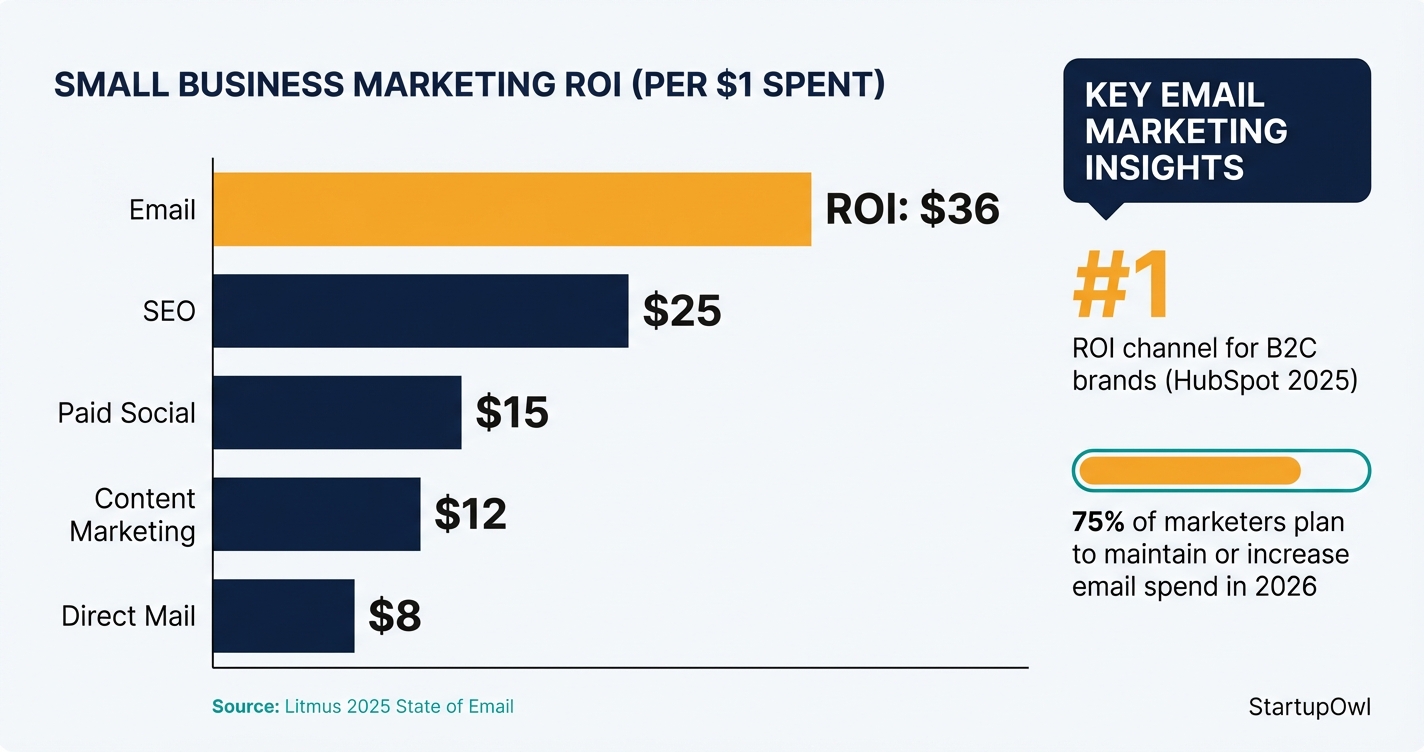
Email marketing delivers an average return of $36 for every $1 spent, according to Litmus' 2026 State of Email report. That makes it the highest-ROI marketing channel available to small businesses, outperforming paid search, social media, and direct mail by a wide margin.
You don't need a big budget to start. Platforms like Brevo, MailerLite, and Mailchimp all offer free plans, and paid tiers start as low as $9/month. This guide shows you exactly how to pick a platform, build your list, and send your first campaign (with real prices verified as of early 2026).
Why Email Marketing Still Wins for Small Businesses
About 75% of marketers plan to maintain or increase their email marketing investment in 2026, according to the HubSpot State of Marketing Report. Email ties with organic social media as the second most-used marketing channel (used by 40% of marketers), behind only short-form video.
The key advantage of email over social media is ownership. Social platforms can change their algorithms overnight (and they do). Your email list belongs to you. When you hit send, your message lands in every subscriber's inbox without a feed algorithm filtering it out.
For B2C brands specifically, email marketing was ranked the number-one ROI-driving channel in HubSpot's 2026 data, beating paid social and content marketing. If you are selling products or services directly to consumers, email should be the first marketing channel you set up (even before you finalize your small business marketing plan).
How to Set Up Email Marketing in 6 Steps
Getting from zero to your first email campaign takes about 2 to 4 hours on the day you start, then roughly 30 minutes per week for ongoing sends. Below is the step-by-step breakdown with real costs and timelines for each stage.
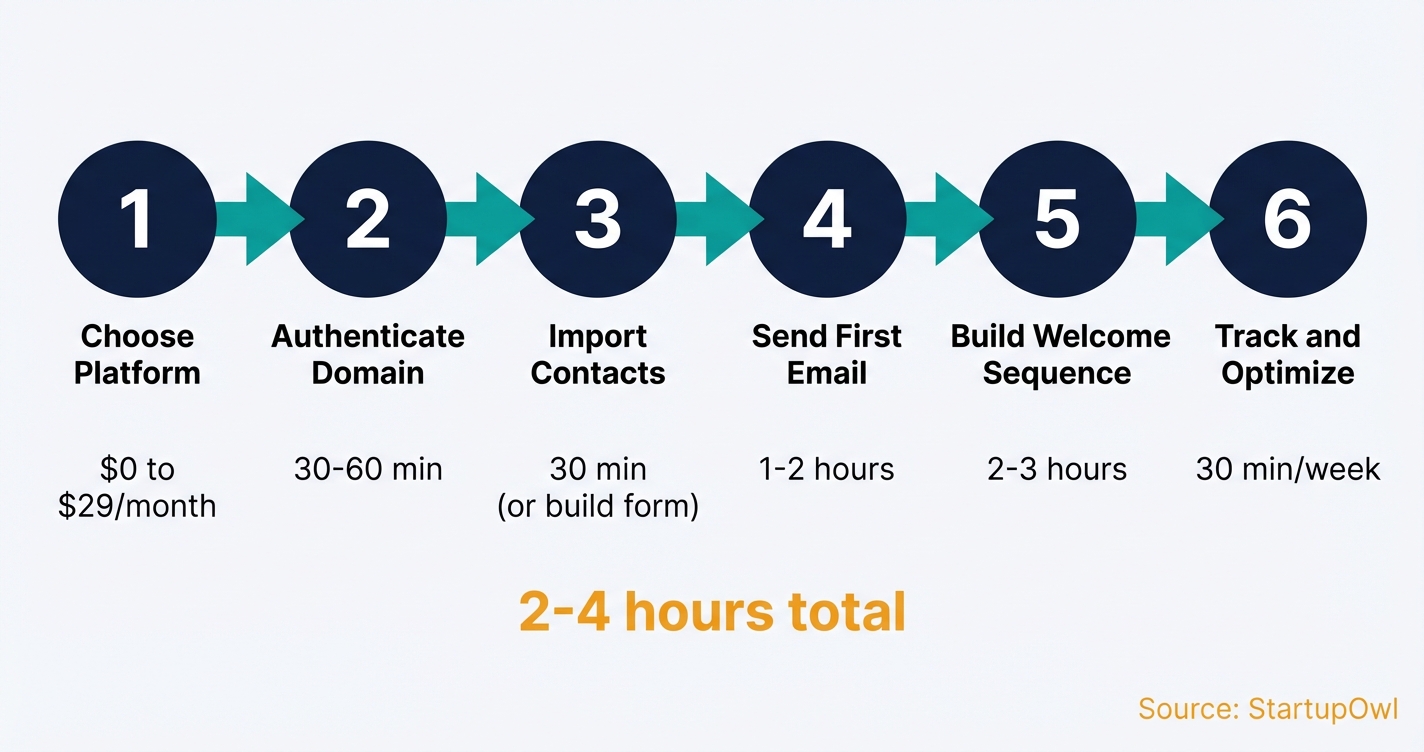
Step 1: Pick the right platform. Your choice here locks in your pricing model for months, so compare carefully. Brevo charges by email volume ($9/month for 5,000 sends, unlimited contacts). MailerLite charges by subscriber count ($10/month for 500 subscribers, unlimited emails). Mailchimp also charges by contacts ($13/month for 500 contacts) but scales more steeply.
Step 2: Authenticate your domain. Add SPF, DKIM, and DMARC records to your domain's DNS settings. Every major platform provides a setup wizard for this. It takes 30 to 60 minutes and is the single most important deliverability step you will take.
Step 3: Import contacts or build a signup form. Upload existing customer emails via CSV, or create a signup form. MailerLite includes a form builder and up to 10 landing pages on its free plan. Never buy email lists.
Step 4: Design and send your first campaign. Use your platform's drag-and-drop editor and a pre-built template. The average open rate across all industries is roughly 21%, so invest time in a strong subject line. Always preview on mobile (over 41% of email views come from mobile devices).
Step 5: Build a welcome automation sequence. Set up 3 to 5 automated emails that trigger when someone subscribes. Brevo's free plan supports automations for up to 2,000 contacts. MailerLite includes automations on its free tier. Mailchimp requires the $13/month Essentials plan for any automation.
Step 6: Track results and optimize. Monitor your open rate, click-through rate (average across industries is about 2%), and unsubscribe rate weekly. Clean your list every quarter by removing contacts who have not opened in 90 days.
The 5 Best Email Platforms for Small Businesses in 2026
We compared pricing, features, and limitations across the most popular platforms. Prices below are verified as of early 2026 from each platform's official pricing page.
Brevo (Best for Cost Optimization)
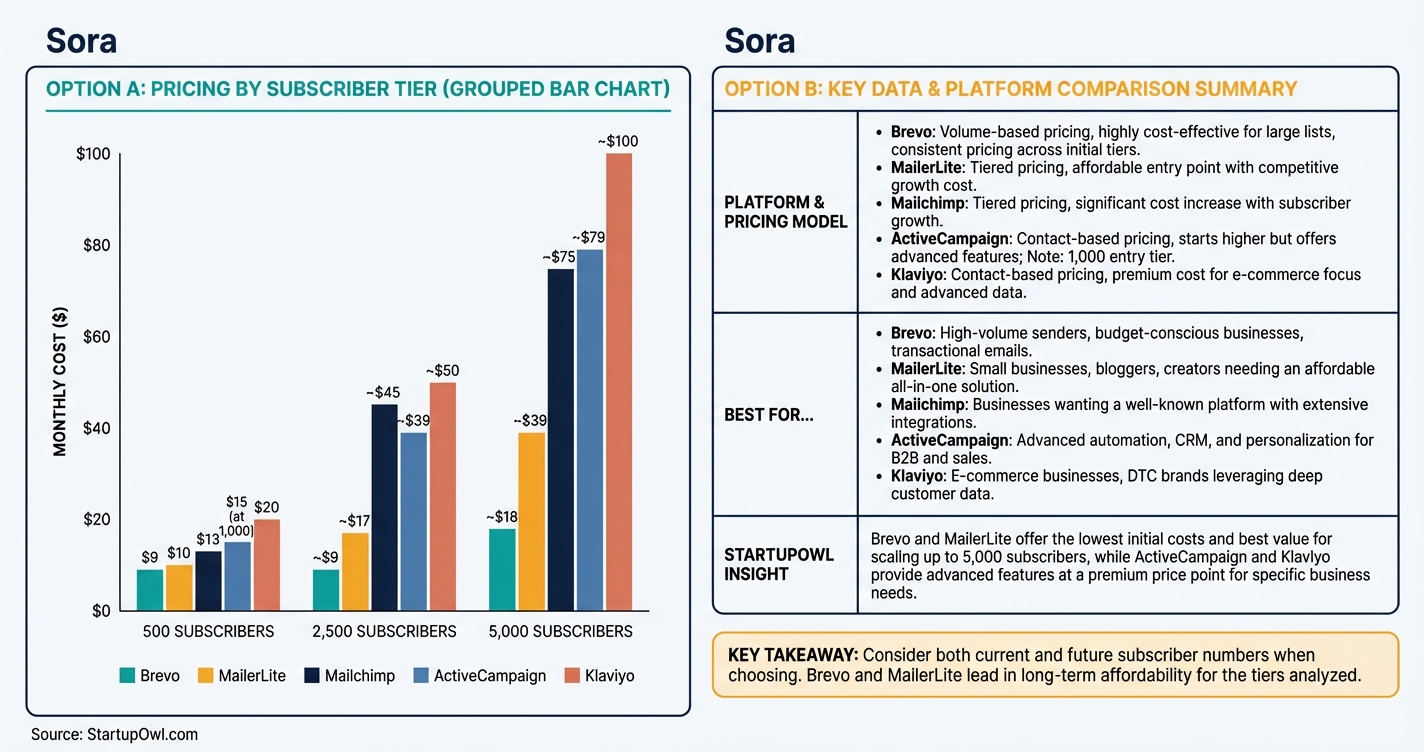
Brevo's Starter plan costs $9/month for 5,000 emails, with no limit on how many contacts you can store. The free plan includes 300 emails/day (roughly 9,000/month), 40+ email templates, and automation for up to 2,000 contacts. Brevo does not charge per contact, which makes it the cheapest option at scale. At 5,000 subscribers sending 4 emails each per month, you would pay roughly $18/month on the Standard plan (compared to $75+ on Mailchimp). Brevo also includes SMS and WhatsApp messaging on paid plans. The trade-off is that the interface is functional but not the most polished. Visit brevo.com/pricing for current rates.
MailerLite (Best All-in-One Toolkit)
MailerLite's Growing Business plan starts at $10/month for 500 subscribers with unlimited emails, landing page templates, a website builder, and branding removal. The free plan covers 500 subscribers and 12,000 emails/month with automations, forms, and one website. At 5,000 subscribers, you will pay about $39/month on Growing Business. MailerLite's drag-and-drop editor is one of the cleanest in the market. The downside is limited integrations compared to larger platforms. Non-profits get a 30% discount on all paid plans. See pricing at mailerlite.com/pricing.
Mailchimp (Largest Integration Ecosystem)
Mailchimp's Essentials plan starts at $13/month for 500 contacts (5,000 email sends). The Standard plan starts at $20/month for 500 contacts (6,000 sends) and adds advanced automations and generative AI features. The free plan was cut to 250 contacts and 500 emails/month in January 2026, with no automation included. At 2,500 contacts, Essentials costs roughly $45/month. Mailchimp's biggest advantage is 300+ native integrations with third-party apps. But Mailchimp now charges for unsubscribed and inactive contacts on some plans, which inflates costs. Check prices at mailchimp.com/pricing. (Deciding between these two? See our ConvertKit vs Mailchimp comparison.)
ActiveCampaign (Best Automation Builder)
ActiveCampaign's Starter plan costs $15/month for 1,000 contacts on annual billing ($19/month on monthly billing). The Plus plan at $49/month unlocks advanced automation branching, lead scoring, landing pages, and a built-in CRM. At 5,000 contacts, the Starter plan costs roughly $79/month. Be aware that newer accounts are charged for all contacts, including unsubscribed and bounced ones. ActiveCampaign offers a 14-day free trial with Pro-level features, but no permanent free plan. See activecampaign.com/pricing.
Klaviyo (Best for E-Commerce)
Klaviyo's Email plan starts at $20/month for 251 to 500 active profiles, with a send limit of 10x your active profile count. The free plan covers 250 profiles and 500 email sends/month, plus 150 SMS credits. Klaviyo includes revenue attribution and predictive analytics on all paid plans, which is unusual at this price point. Since February 2026, Klaviyo bills based on total active profiles (whether you email them or not), which can drive costs up if you do not clean your list regularly. Best suited for Shopify and other e-commerce stores. See klaviyo.com/pricing.
Platform Pricing at a Glance (as of Early 2026)
| Type / Provider | Rate | Notes |
|---|---|---|
| Brevo Starter | $9/month (5,000 emails) | Unlimited contacts. Volume-based. Add $9/month to remove branding. |
| MailerLite Growing Business | $10/month (500 subscribers) | Unlimited emails. Scales to ~$39/month at 5,000 subscribers. |
| Mailchimp Essentials | $13/month (500 contacts) | 5,000 email sends. Scales to ~$75/month at 5,000 contacts. |
| ActiveCampaign Starter | $15/month (1,000 contacts) | Annual billing. $19/month on monthly billing. Plus plan at $49/month. |
| Klaviyo Email | $20/month (251–500 profiles) | Active profile billing. Includes revenue attribution and predictive analytics. |
5 Email Marketing Mistakes That Cost Small Businesses Money
1. Choosing a platform based on the entry price, not the price at scale
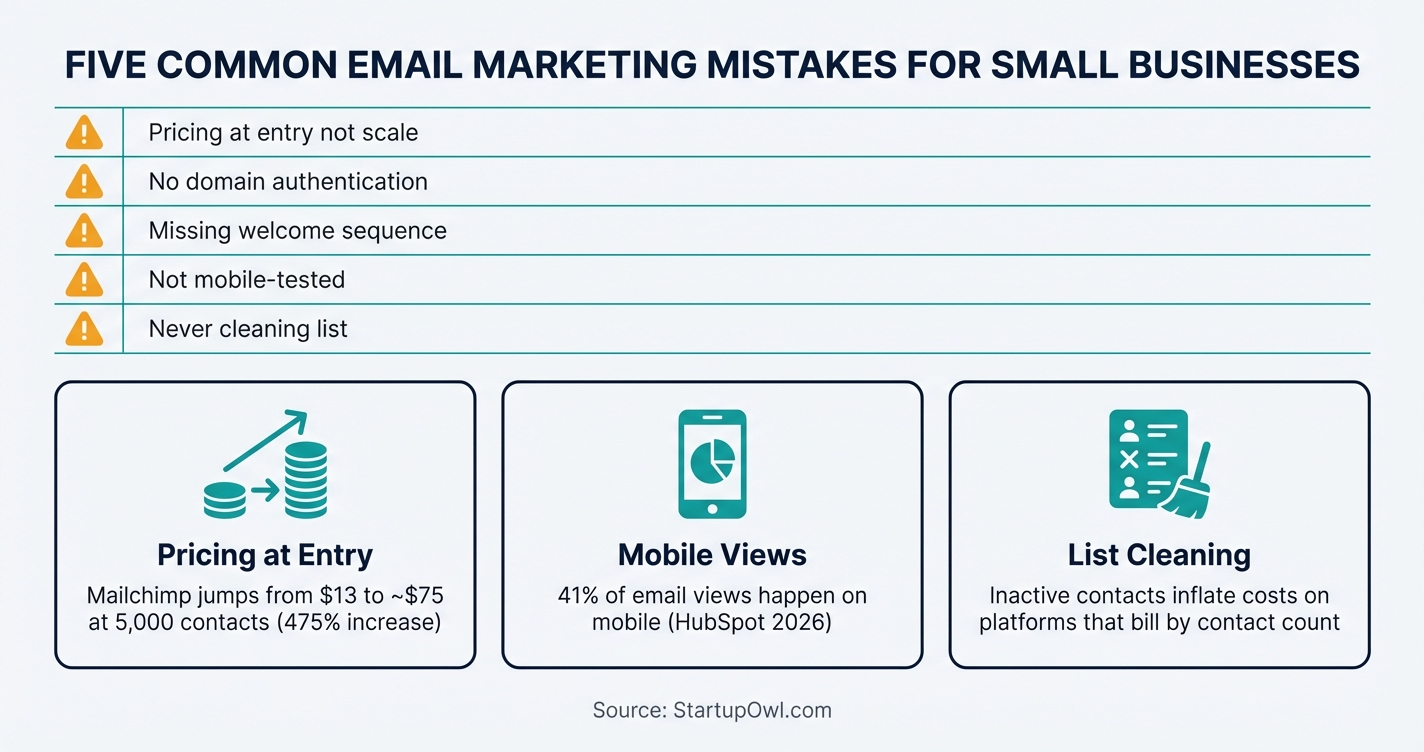
Mailchimp's $13/month entry looks friendly until you hit 5,000 contacts and see a bill of roughly $75/month. That is a 475% increase. Brevo handles the same volume for about $18/month. Before you sign up, check what you will pay at 2,500 and 5,000 subscribers.
2. Skipping domain authentication
Without SPF, DKIM, and DMARC records, your emails are far more likely to land in spam. Every platform provides a setup guide for this. It takes less than an hour and has the single biggest impact on whether your emails get seen.
3. Sending without a welcome sequence
New subscribers are at peak interest when they first sign up. If you wait days or weeks to email them, engagement drops sharply. Set up a 3 to 5 email automated welcome series before you start actively growing your list.
4. Ignoring mobile rendering
Over 41% of email views happen on mobile devices, according to HubSpot's marketing statistics. If your emails are not mobile-responsive, nearly half your audience sees broken layouts. Always send a test email and preview it on your phone.
5. Never cleaning your list
Inactive subscribers hurt your sender reputation and inflate your costs (especially on contact-based platforms). Remove contacts who have not opened any email in 90 days. On Klaviyo and ActiveCampaign, those inactive contacts still count toward your billing total even if you never email them.
Which Free Plan Is Actually Worth Using in 2026?
MailerLite's free plan is the strongest option for most new businesses. It includes 500 subscribers, 12,000 emails/month, automation workflows, signup forms, and one website. Brevo's free plan is better if you already have a large contact list because it stores up to 100,000 contacts (but caps you at 300 emails/day). Mailchimp's free plan dropped to 250 contacts and 500 emails/month in January 2026 with no automation, making it the weakest free tier of the three.
What to Do Right Now
Start by signing up for MailerLite's free plan (best for most businesses) or Brevo's free plan (best for large contact lists). Authenticate your sending domain, import your contacts, and set up a welcome email automation before you send your first campaign. The whole process takes about 2 to 4 hours.
Once you are ready to build out your full marketing strategy, use our free marketing plan template to connect your email efforts with your other channels. And if you are still building your brand, our guide to building a brand will help you define the voice and visuals that make your emails recognizable in a crowded inbox.
Step-by-Step Process
- 1
Pick the right email platform for your budget and list size
Your platform choice determines what you pay today and what you'll pay in 12 months. Start by estimating how many subscribers you expect within your first year, then compare prices at that tier (not the entry-level tier).
If you have fewer than 500 subscribers, MailerLite's free plan gives you 12,000 emails/month with automations and landing pages included. Brevo's free plan lets you store up to 100,000 contacts but caps you at 300 emails/day. Mailchimp's free plan limits you to just 250 contacts and 500 emails/month as of January 2026.
For paid plans, Brevo charges by email volume (starting at $9/month for 5,000 emails) while MailerLite and Mailchimp charge by subscriber count. This distinction matters at scale.
Tips
- Compare prices at the 5,000-subscriber mark, not 500, to see your real future costs.
- Brevo's volume-based pricing keeps costs low even with large contact lists because you only pay for emails sent.
- Check if the platform counts unsubscribed contacts toward your billing total (Mailchimp and ActiveCampaign now do).
Common Mistakes
- Choosing a platform based on the $0/month entry price without checking what 5,000 contacts costs (Mailchimp jumps to roughly $75/month at that level).
- Ignoring that Mailchimp's free plan removed automation features entirely in June 2026.
- 2
Set up your account and authenticate your sending domain
Create your account (email address and organization name are typically all you need). Then configure your sending domain by adding SPF, DKIM, and DMARC DNS records. This tells email providers like Gmail and Outlook that you are authorized to send from your domain.
Most platforms walk you through this during onboarding. Brevo, MailerLite, and Mailchimp all include step-by-step DNS setup guides. Skipping domain authentication is the fastest way to land in the spam folder.
Tips
- Set up authentication before sending your first email, not after deliverability problems appear.
- Use a subdomain (like mail.yourdomain.com) for marketing emails to protect your primary domain's reputation.
Common Mistakes
- Skipping domain authentication and sending from a generic email address, which tanks deliverability from day one.
- 3
Import your existing contacts or create a signup form
If you already have customer emails (from a CRM, spreadsheet, or POS system), export them as a CSV and import into your email platform. Most platforms accept CSV uploads and map columns automatically.
If you are starting from scratch, create a signup form and embed it on your website. MailerLite's free plan includes a form builder and up to 10 landing pages. Brevo includes customizable signup forms on every plan, including free.
Never purchase email lists. Bought lists have sky-high bounce rates, damage your sender reputation, and violate the terms of every reputable email platform.
Tips
- Add a signup form to your highest-traffic pages (homepage, blog posts, checkout confirmation).
- Offer something specific in exchange for an email address (a discount code, checklist, or free template).
- Keep your signup form to one or two fields (name and email) to maximize conversion rates.
Common Mistakes
- Buying or renting email lists, which violates CAN-SPAM regulations and gets your account banned.
- Importing very old contacts without running a re-permission campaign first.
- 4
Design and send your first email campaign
Use your platform's drag-and-drop editor to build your first email. Brevo offers 40+ templates on the free plan. MailerLite includes a drag-and-drop editor on all plans. Mailchimp provides templates on Essentials ($13/month) and above.
Keep your first email short (under 200 words), use one clear call-to-action, and personalize the subject line with the recipient's first name. The average email open rate across industries is roughly 21%, so a compelling subject line is your highest-impact lever.
Send a test email to yourself first. Check it on both desktop and mobile (over 41% of email views happen on mobile devices, according to HubSpot's 2026 marketing statistics).
Tips
- Aim for a subject line under 50 characters so it displays fully on mobile screens.
- Personalized emails generate a 29% higher open rate and 14% higher click-through rate compared to generic sends.
Common Mistakes
- Sending without previewing on mobile, where nearly half of all email opens occur.
- 5
Build a welcome automation sequence
A welcome sequence is a series of 3 to 5 emails that send automatically when someone joins your list. This is the single highest-engagement email you will ever send, so do not skip it.
MailerLite includes automation workflows on its free plan. Brevo's free plan supports automations for up to 2,000 contacts. If you chose Mailchimp, you will need at least the Essentials plan ($13/month) since the free plan no longer includes any automation features.
Structure your welcome sequence like this: Email 1 delivers what you promised (the discount or freebie). Email 2 introduces your brand story. Email 3 highlights your most popular product or service. Space them 2 to 3 days apart.
$0 on Brevo or MailerLite free plans; $13/month on Mailchimp Essentials 2 to 3 hours to write and set up brevo.comTips
- Your welcome email typically sees 50% or higher open rates, so include your strongest offer or content.
- Use AI tools like ChatGPT to draft initial email copy, then edit for your brand voice (see our guide to ChatGPT for small business).
Common Mistakes
- Not having any welcome sequence at all, letting new subscribers go cold before you ever email them.
- 6
Track your results and optimize your sending schedule
After your first few sends, review your open rate, click-through rate (CTR), and unsubscribe rate inside your platform's dashboard. The average CTR across all industries is about 2%. If yours is below that, test different subject lines, send times, and content formats.
Most platforms include A/B testing on paid plans. MailerLite includes basic A/B testing on the Growing Business plan ($10/month). Mailchimp includes it on Essentials ($13/month). Brevo's Standard plan ($18/month) adds A/B testing along with landing pages.
Set a consistent sending cadence (weekly or biweekly) and stick to it. Inconsistent sending trains subscribers to forget about you.
$0 to $18/month depending on A/B testing needs 30 minutes per week for ongoing optimization MailchimpTips
- Run A/B tests on subject lines first (highest impact) before testing send times or design changes.
- Clean your list every quarter by removing contacts who have not opened an email in 90 days.
- Integrate your email platform with your CRM to track which emails lead to actual sales.
Common Mistakes
- Never reviewing analytics and continuing to send the same type of email even when open rates are declining.
- Sending too frequently (daily) to a list that only expects weekly updates, driving unsubscribe rates above 1%.
Cost Breakdown
| Item | Cost Range | Notes |
|---|---|---|
| Brevo Starter plan (5,000 emails/month) | $9/month | Volume-based pricing; unlimited contacts included. 10% off annual billing. |
| MailerLite Growing Business (500 subscribers) | $10/month | Unlimited emails, templates, landing pages. Scales to $39/month at 5,000 subscribers. |
| Mailchimp Essentials (500 contacts) | $13/month | Contact-based pricing. Reaches roughly $75/month at 5,000 contacts. |
| ActiveCampaign Starter (1,000 contacts) | $15 to $19/month | $15/month on annual billing, $19/month on monthly. Advanced automation requires Plus at $49/month. |
| Klaviyo Email (251 to 500 active profiles) | $20/month | Best for e-commerce. Active-profile-based billing; includes revenue attribution and predictive analytics. |
Frequently Asked Questions
You can start for $0/month on free plans from Brevo, MailerLite, or Mailchimp. Once you outgrow the free tier, paid plans start at $9/month (Brevo) or $10/month (MailerLite). Most small businesses with under 2,500 subscribers spend $10 to $45/month, depending on the platform and features they need.
MailerLite offers the most useful free plan for small businesses, with 500 subscribers, 12,000 emails/month, automations, and a landing page builder included at no cost. Brevo's free plan stores more contacts (up to 100,000) but limits you to 300 emails/day. Mailchimp's free tier was cut to just 250 contacts and 500 emails/month in early 2026, making it the least useful of the three.
For most small businesses, once per week is the sweet spot. It keeps you top-of-mind without overwhelming subscribers. If you sell products online, you can increase to 2 to 3 times per week during promotions. The key metric to watch is your unsubscribe rate. If it goes above 0.5% per send, you are likely emailing too often.
The average email open rate across all industries is roughly 21%. A rate above 30% is considered strong, and anything over 50% is exceptional. Your open rate depends heavily on your subject line, sender name, and how recently the subscriber joined your list. Welcome emails typically see open rates of 50% or higher.
No, but you need somewhere to collect email addresses. MailerLite's free plan includes a landing page builder and even a basic website builder, so you can create a signup page without an existing site. If you already have a site, embed your signup form on your homepage and highest-traffic pages. (Deciding on a platform? Check our Squarespace vs WordPress guide.)
Mailchimp works well if you have a small list (under 2,500 contacts) and rely on its 300+ third-party integrations. But its pricing scales steeply: the Essentials plan jumps from $13/month at 500 contacts to about $45/month at 2,500 contacts. If budget is your priority, Brevo or MailerLite offer better value at every list size.
Some links on this page are affiliate links. If you sign up for a service through them, we may earn a commission at no extra cost to you. This does not influence our rankings.
Sources & References
- Brevo Official Pricing Page
- MailerLite Official Pricing Page
- Mailchimp Official Pricing Page
- ActiveCampaign Official Pricing Page
- Klaviyo Official Pricing Page
- Litmus 2026 State of Email: ROI of Email Marketing
- HubSpot 2026 Marketing Statistics, Trends, & Data
- EmailToolTester: Brevo Pricing 2026
- EmailToolTester: Mailchimp Pricing 2026
- EmailToolTester: ActiveCampaign Pricing 2026
- PriceTimeline: Mailchimp Pricing Changes
- FTC Endorsement Guides
About the Author
Editor, StartupOwl
Eliot leads StartupOwl's state data research. He maintains the site's fifty state records of LLC filing fees, annual costs, processing times, and small business grant programs, checking each figure against the state office that publishes it and logging the date it was verified. Based in New Jersey, he has spent his working life in and around small businesses, and he writes for the founder who wants the real number rather than the advertised one. Every figure under his byline traces to a named source, and when a state proves a number wrong, the correction is published, not buried.
Was this article helpful?
Questions about Email Marketing for Small Business
No comments yet. Ask the first question and a member of our team will answer.
Leave a comment