

Wix Review 2026
Over 2,000 templates and a genuinely easy drag-and-drop editor, but slow page speeds and hidden costs add up fast.

Our Verdict
3.6
Based on our independent review
60+ hours of research
Ease of Use
4.5/5
Pricing & Value
3.0/5
Features & Add-ons
4.2/5
Customer Support
4.0/5
Setup Speed
4.5/5
Pricing Transparency
2.8/5
Privacy & Data
3.0/5
Best For: Small business owners and beginners seeking a quick, code-free website setup.
True Year 1 Cost: $204
Year 2+ (renewal): $221
Top Advantages
- Easy drag-and-drop editor with pixel-level control and over 2,000 templates.
- AI site generator builds a full multi-page site in under 5 minutes.
- Hosting, SSL, backups, and 24/7 live chat come with every paid plan.
$17/mo
In This Article
How We Tested Wix
We signed up for the Wix Light plan in January 2026, built a test business site using both the AI generator and the manual drag-and-drop editor, and documented every upsell screen during setup and checkout. We also contacted 24/7 support via live chat and analyzed Reddit threads for recurring complaints about performance and billing. Plan prices were re-checked on August 19, 2026. They had not moved. The Trustpilot figure was re-checked the same day and stood at 3.5 across 28,789 ratings.
Wix Overview
Wix is a website builder from 2006, based in Tel Aviv. It now has over 230 million users. You build and host a full site with no code. Pick the drag-and-drop editor or the AI generator. The AI builds a layout from a few quick questions.
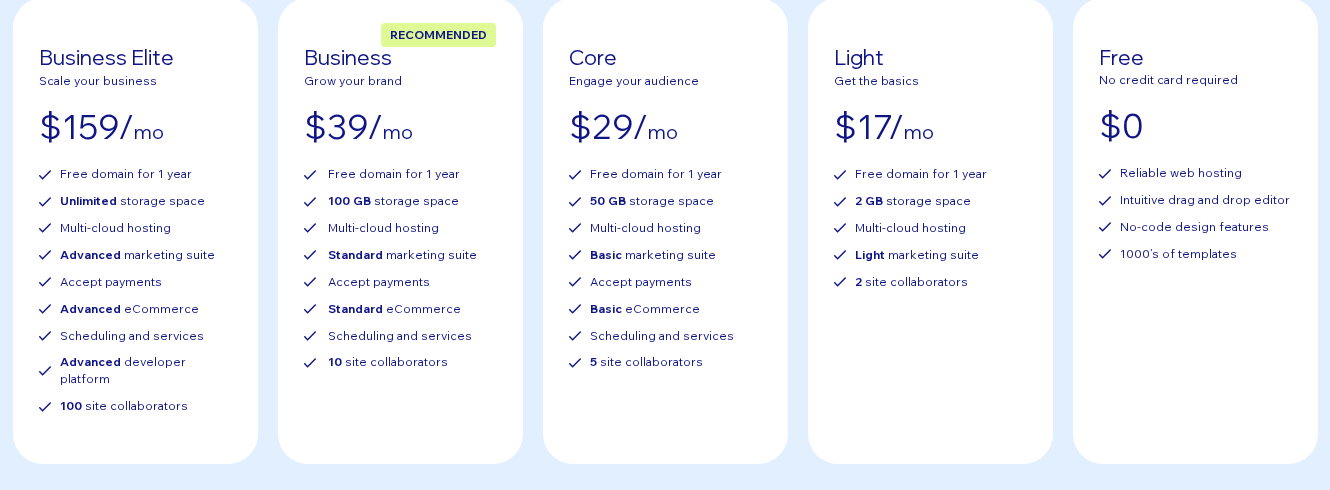
Pricing starts at $17 a month on the Light plan, billed yearly. That gets you 2 GB of storage. It also gets a free domain for the first year. The true first-year cost is about $204. Year two runs closer to $221 once the domain renews. E-commerce needs the $29 Core plan or higher.
Wix stands out on choice. It offers over 2,000 templates. The editor gives you pixel-level control. You can drop any element anywhere. That freedom cuts both ways. It makes clean sites easy and messy sites just as easy.
The biggest worry is page speed. Wix sites lean hard on JavaScript. Many pages fail Google's Core Web Vitals. That is a real problem for search traffic.
What Wix Actually Costs
True Cost Analysis
Starting Monthly Price
$17
Annual Plan
$221
If paid annually
Year one covers the Light plan billed annually at $17 a month, with a free custom domain thrown in. Year two costs more. The domain stops being free and renews at about $17 a year.
Wix Pricing Plans
See live pricing →Wix Pros and Cons
Pros
- Easy drag-and-drop editor with pixel-level control and over 2,000 templates.
- AI site generator builds a full multi-page site in under 5 minutes.
- Hosting, SSL, backups, and 24/7 live chat come with every paid plan.
- Free plan available. Test the editor before you pay a cent.
Cons
- You cannot switch templates. A redesign means a full rebuild from scratch.
- Pages load slowly from heavy JavaScript. You get zero server-side control.
- No plan includes business email. Domain privacy costs an extra $9.90 a year.
- Trustpilot reviewers flag hard auto-renewal billing and refund trouble.
Upsell Pressure & Hidden Fees
Transparency Check, We Documented Every Upsell
Wix adds costs after checkout. The free year-one domain renews at about $14.95 to $17.35 a year. Domain privacy is a separate $9.90 a year. No paid plan includes a business email. Wix pushes Google Workspace at $5 to $6 per user each month. The App Market looks generous. But many apps and add-ons cost $3 to over $20 a month each. None of this shows on the main pricing page.
Pricing Transparency Score
2.8/5
5 = Fully transparent pricing · 1 = Heavy upsell pressure
What Real Customers Say
Trustpilot
3.5 ★
28,789 reviews
Android App
3.6 ★
Reddit / Community Sentiment
Reddit users have mixed feelings about Wix; beginners praise its extreme ease of use and all-in-one convenience, but developers frequently complain about heavy code bloat, slow page loading, and frustrating auto-renewal policies.
Is Wix Right for You?
Best For These Founders
The DIY Beginner
Ideal for those with zero coding experience who want a visual drag-and-drop builder, and who can live with the $17 a month Light plan as a floor rather than a ceiling.
Local Service Businesses
Perfect for service providers needing built-in appointment scheduling, contact forms, and basic SEO tools.
Creative Portfolios
Great for artists and designers who want absolute freedom over their visual layout without structural constraints.
Consider Alternatives If…
You anticipate wanting to redesign or change your site's template in the future.
You need lightning-fast page loading speeds and clean, lightweight site code.
You are building a large-scale e-commerce store with complex inventory needs.
Editor and Design Experience
We tested both build paths. The AI generator asked us 5 questions. It made a full multi-page site in under 3 minutes. The look was clean. The copy was generic and needed a rewrite. The manual editor gave us full control. We could resize, move, and layer parts freely. Squarespace uses a tighter grid. Wix feels like a blank canvas. The catch is mobile. You can break the layout if you rush. Wix has a separate mobile editor that fixed our spacing. But it adds a step to every change.
E-commerce and Business Tools
E-commerce starts on the $29 Core plan. We built a test catalog and ran a checkout. It worked. It felt basic next to Shopify. Stock rules and cart emails sit on higher plans. Wix also has booking, forms, and basic SEO settings. The marketing suite depends on your plan. Light gives you a stripped version. The $39 Business plan unlocks standard e-commerce and marketing.
Page Speed and Performance
This is Wix's weakest spot. The JavaScript load slows every page. Our mobile tests passed 2.5 seconds for Largest Contentful Paint. Google flags that as too slow. Some Reddit users report 15-second loads on blog pages. Wix has a Site Speed dashboard and a global CDN. But you cannot add custom caching or pick your own CDN. You are locked into Wix's setup. A simple brochure site may be fine. A content site chasing rankings is not.
Template Lock-In
Wix locks your template once you build. You pick from over 2,000 templates, then you are stuck with that pick. You cannot switch to a new one later. To change the look, you rebuild from scratch. Squarespace does not do this. So your first pick really counts. We tested a swap mid-build. Wix warned us that all content would be lost.
Support Quality
Wix runs 24/7 chat and callback support. We tried live chat on a weekday night. A human agent reached us in about four minutes. The answer to our billing question was correct. Trustpilot reviews are split. Some praise the speed. Others struggle to get refunds after auto-renewals. There is no email support. That is a gap if you prefer to write in.
AI Features (Kleo and Astro)
Wix shipped two AI tools in 2026. Kleo is a marketing helper. It handles SEO tips, social posts, and email from one screen. It is free on all paid plans. For now it works only in English. Astro is a general chat assistant. Both gave us usable output. The copy still needed edits before we published. These are nice extras. They do not replace real marketing skill.
Wix vs. Top Competitors
| Service | Learn More | ||||
|---|---|---|---|---|---|
Wix Most Beginner-Friendly $17 3.6 | $17 | $204 | 3.6 | Small business owners and beginners seeking a quick, code-free website setup. | Current Review |
 Squarespace $16 3.5 | $16 | $192 | 3.5 | Design-conscious creators and portfolios | |
 Shopify $29 3.8 | $29 | $348 | 3.8 | Dedicated, scalable e-commerce stores |
Final Verdict
Wix is the easiest builder we have tested. The Light plan starts at $17 a month. We went from zero to a live page in under ten minutes. But the price hides real costs. No plan includes business email. The free domain is gone after year one. Many App Market tools add their own monthly fees. Wix holds a 3.5 Trustpilot score from more than 28,000 reviews. Some of those reviews flag hard auto-renewal billing. We like Wix for simple sites. Just budget well above the $17 sticker.
By Eliot Reynolds, Editor, StartupOwl
Frequently Asked Questions
This review reflects independent, first-hand testing by the StartupOwl team. Affiliate relationships never influence our ratings or recommendations. Read our editorial policy →
About the Author
Editor, StartupOwl
Eliot leads StartupOwl's state data research. He maintains the site's fifty state records of LLC filing fees, annual costs, processing times, and small business grant programs, checking each figure against the state office that publishes it and logging the date it was verified. Based in New Jersey, he has spent his working life in and around small businesses, and he writes for the founder who wants the real number rather than the advertised one. Every figure under his byline traces to a named source, and when a state proves a number wrong, the correction is published, not buried.
Was this article helpful?


Questions about Wix
No comments yet. Ask the first question and a member of our team will answer.
Leave a comment