
Business vs Personal Bank Account and Why You Must Separate Them
Separating your business and personal bank accounts costs $0 to $30 per month and protects you from IRS audits, pierced liability, and lost deductions.

You need a separate business bank account if you run an LLC or a corporation. So does any business that wants clean books. It costs $0 to $30 per month at most providers. Opening one takes under 30 minutes online. It protects you from IRS audit risk and from personal liability for business debts.
Mixing the two accounts is expensive. It can cost you thousands in lost deductions, IRS penalties, and personal liability for business debts. Opening a separate business checking account takes 10 to 30 minutes online. It costs $0 per month at fintech providers like Mercury or Bluevine. This guide walks you through six steps to separate your finances and keep the IRS happy.
Get these items ready first. Missing even one document can delay your application by days.
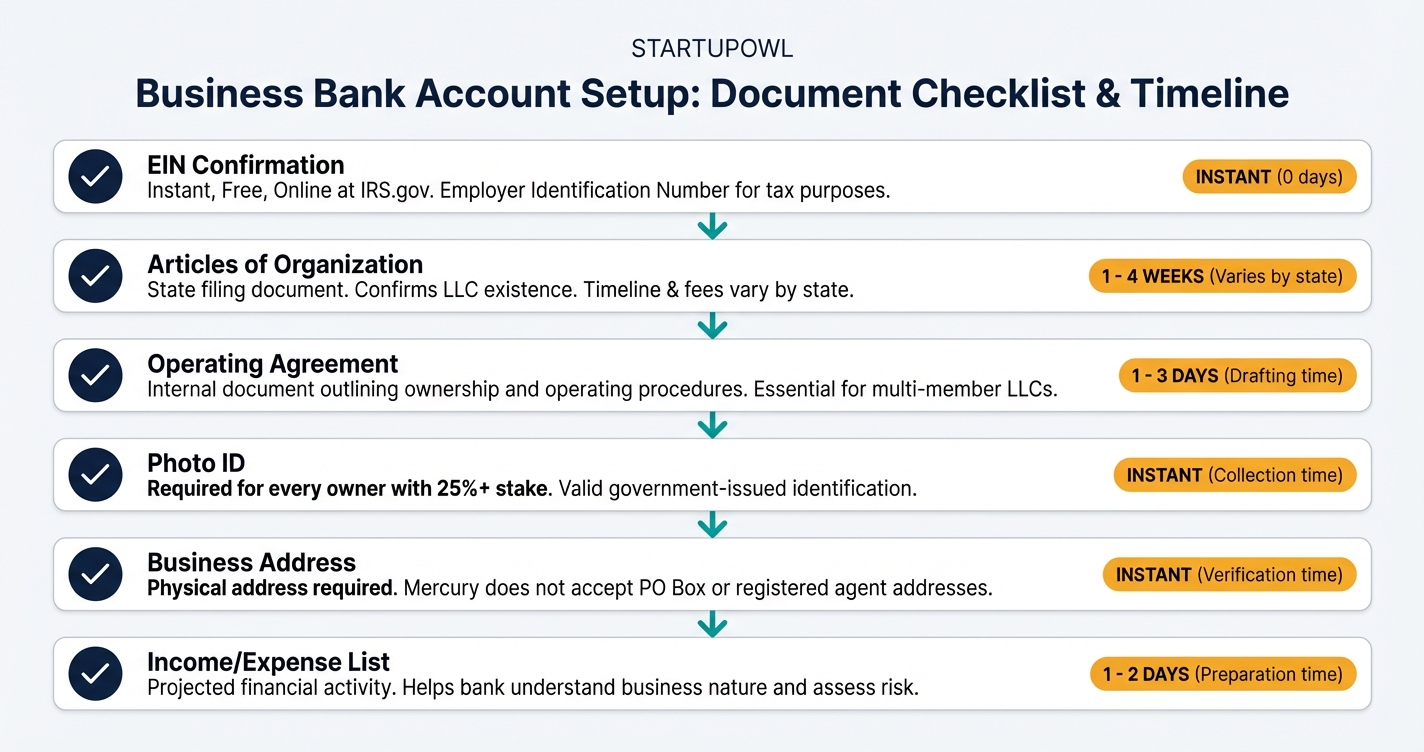
- Employer Identification Number (EIN) from the IRS, or your Social Security Number if you are a sole proprietor without employees. Apply free at IRS.gov. See our EIN application guide for a full walkthrough.
- Formation documents such as Articles of Organization (LLC) or Articles of Incorporation (corporation), filed with your state's Secretary of State.
- LLC operating agreement or corporate bylaws. Some banks will not open your account without one. Get started with our LLC operating agreement guide.
- Government-issued photo ID (driver's license or passport) for every owner holding 25% or more of the business.
- Business address and phone number that match your formation documents. A home address works for most fintechs, but Mercury does not accept registered agent or PO Box addresses.
- A list of all business income sources and recurring expenses currently running through your personal account. You will need this to complete the migration in Step 4.
The whole separation takes 1 to 3 hours. Spread it across a few days. The account application itself takes 10 minutes at most fintech providers. Approval times vary. Mercury typically approves within 1 to 2 business days. Traditional banks may take 3 to 5 business days and sometimes want an in-branch visit.
Step 4 takes the longest. It moves all your income and expense flows. Expect 1 to 2 hours logging into every payment processor, subscription service, and client portal. Some processors, Stripe among them, take 1 to 2 business days to verify new bank details by micro-deposit.
You may want to keep a few business expenses on your personal card. Do not. Even one commingled charge weakens your liability protection and messes up your books. Set a hard cutoff date and stick to it.
Step-by-Step Process
- 1
Get Your EIN and Gather Formation Documents
Before you can open a business bank account, you need your Employer Identification Number (EIN) from the IRS. If you have not already applied for one, you can get it instantly online at IRS.gov during business hours (Mon-Fri, 7am-10pm ET). Sole proprietors without employees can use their Social Security Number instead.
Gather your Articles of Organization (for LLCs) or Articles of Incorporation, your LLC operating agreement, and a government-issued photo ID for every owner with 25% or more ownership. You will also need your business address and phone number.
Tips
- Apply for your EIN online between 7am and 10pm ET to get it instantly; fax and mail applications take 4 to 6 weeks.
- Save your EIN confirmation letter (CP 575) as a PDF because you will need it for every bank application.
- If you formed your LLC through a service, your Articles of Organization are usually in your account dashboard.
Common Mistakes
- Paying a third-party service $50 to $150 for an EIN when the IRS issues them for free at IRS.gov.
- Not having your operating agreement ready, which some banks require before they will open your account.
- 2
Choose Between a Fintech or Traditional Business Bank
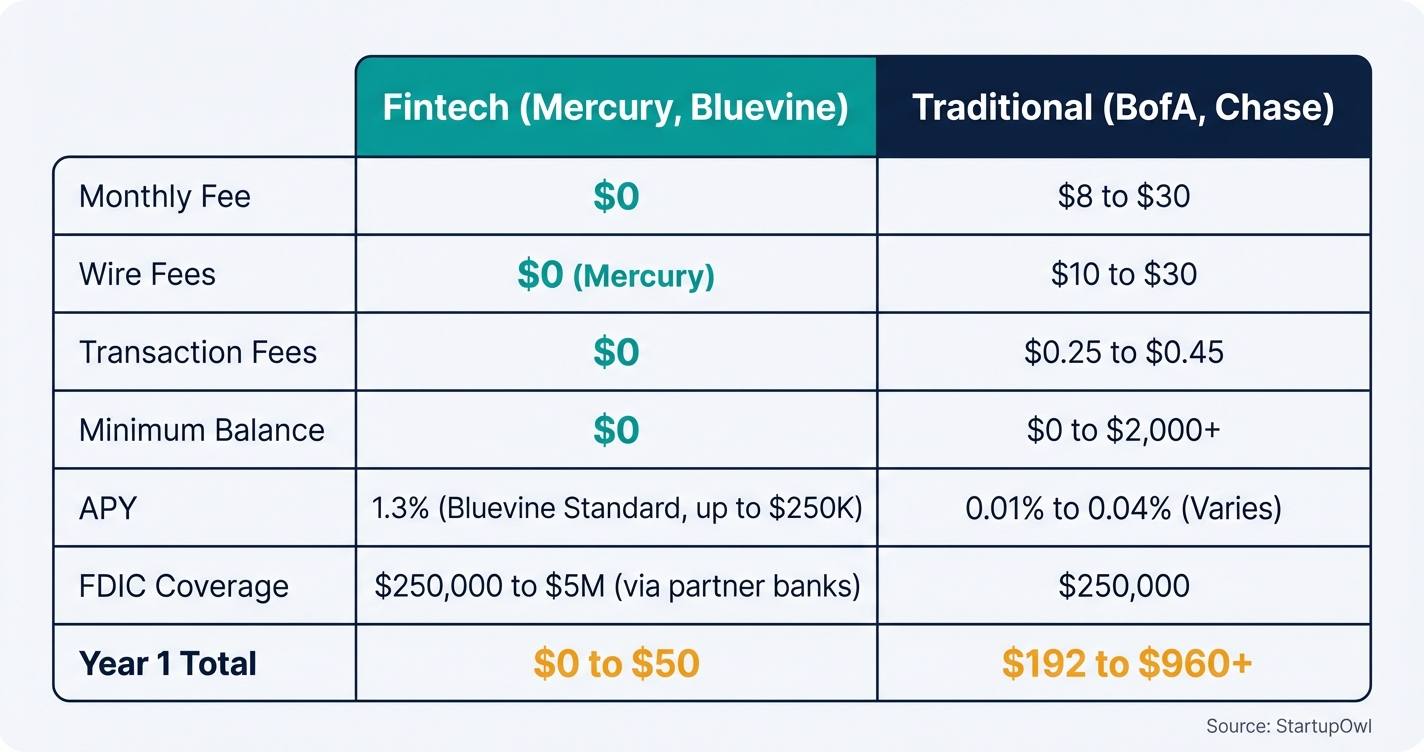
Your first big decision is whether to go with an online-only fintech bank or a traditional bank with branch access. Fintech options like Mercury and Bluevine charge $0 per month with no minimum balance. Traditional banks like Bank of America charge $16 to $29.95 per month unless you maintain $5,000 to $25,000 in minimum balances.
If you handle cash deposits regularly (restaurants, retail), you need a traditional bank. If your business is digital (consulting, e-commerce, SaaS), a fintech account saves you $192 to $360 per year in monthly fees alone. Compare options on our best business bank accounts page.
Tips
- Mercury offers free domestic and international USD wire transfers, which saves $15 to $30 per wire versus traditional banks.
- Bluevine's Standard plan pays 1.3% APY on balances up to $250,000 with no monthly fee if you meet activity requirements.
Common Mistakes
- Choosing a bank solely based on the monthly fee without calculating total cost including wire fees, transaction limits, and cash deposit charges.
- Picking a traditional bank with a $5,000 minimum balance when your average balance hovers around $2,000, costing you $16 to $30 monthly.
- 3
Open Your Business Checking Account Online or In-Branch
Apply for your business checking account using the documents you gathered in Step 1. Most fintech applications take 10 minutes online and are approved within 1 to 2 business days. Traditional bank applications can be completed in-branch or online, but approval may take 3 to 5 business days.
You will need to provide your EIN, formation documents, government ID for each owner, business address, and an initial deposit (some fintechs require $0; traditional banks may require $25 to $100). For a detailed walkthrough, see our how to open a business bank account guide.
Tips
- Mercury's application takes about 10 minutes and approvals typically come in 1 to 2 business days.
- Some banks like Chase offer sign-up bonuses of up to $500 for new business checking customers who meet deposit requirements.
- Open a business savings account at the same time to separate your operating cash from your tax reserve fund.
Common Mistakes
- Entering your personal address instead of your registered business address, which can delay approval.
- Forgetting to fund the account within the required timeframe, which some banks treat as grounds for automatic closure.
- 4
Move All Business Income and Expenses to the New Account
This is the most critical step. Update your payment processors (Stripe, PayPal, Square), client invoices, and any recurring revenue sources to deposit into your new business account. Then redirect all business expenses (software subscriptions, vendor payments, advertising) to pay from the business account or a linked business debit or credit card.
Set a firm cutoff date. After that date, zero business transactions should flow through your personal account. If you accidentally pay a business expense from your personal account, reimburse yourself from the business account and document it. This clean separation is what protects your LLC's liability shield and keeps your books audit-ready.
Tips
- Create a spreadsheet listing every recurring charge and income source so you do not miss any during the switch.
- Pay yourself a regular owner's draw or salary through a formal transfer rather than pulling cash as needed.
Common Mistakes
- Leaving one or two subscriptions on your personal card, which creates commingling that weakens your liability protection.
- Not updating your direct deposit information with clients, so payments continue landing in your personal account for months.
- 5
Connect Your Business Account to Accounting Software
Link your new business bank account to accounting software like QuickBooks ($35 per month) or Xero ($29 per month) within the first week. This creates an automatic transaction feed that categorizes your income and expenses in real time. Mercury syncs directly with QuickBooks, Xero, and NetSuite. Bluevine offers up to 6 months free Xero for Plus and Premier plan customers.
Automatic syncing eliminates manual data entry and reduces bookkeeping errors. Without it, you are stuck downloading CSV files and manually reconciling (which costs $50 to $150 per month in extra bookkeeper time). For more options, check our best accounting software for small business comparison.
Tips
- Set up bank rules in QuickBooks or Xero so recurring expenses auto-categorize, saving you 2 to 3 hours of bookkeeping per month.
- Review uncategorized transactions weekly rather than monthly to avoid a pile-up at tax time.
- Bluevine offers 3 to 6 months of free Xero depending on your plan tier.
Common Mistakes
- Connecting your personal bank account to your business accounting software, which imports personal transactions and creates a mess.
- 6
Set Up a Monthly Reconciliation Routine
Block 30 minutes on the last business day of each month to reconcile your business bank account against your accounting software. This means confirming every transaction in your bank statement matches your books. QuickBooks and Xero both have built-in reconciliation tools that make this a guided, check-the-box process.
Monthly reconciliation catches errors, duplicate charges, and unauthorized transactions before they snowball. It also means your books are always audit-ready. If you skip reconciliation for 3 or more months, expect to spend 2 to 4 hours (or $100 to $300 in bookkeeper fees) cleaning up the backlog. For deeper guidance on accounting workflows, see how to set up small business accounting.
Tips
- Set a recurring calendar reminder for the last business day of each month so reconciliation becomes habit.
- If your balance is off by even $1, track down the discrepancy immediately rather than adjusting it away.
Common Mistakes
- Skipping reconciliation for months, then scrambling at tax time when your books do not match your bank statements.
Pick a fintech provider and this costs $0 per month. Here is the real year-one breakdown.
A free fintech account plus free accounting software costs $0 a year. That is Mercury or Bluevine Standard with Wave. Pick QuickBooks Simple Start at $35 per month and a traditional bank at $16 per month and the year runs about $612. Most new businesses land in between. Budget $300 to $600 per year for banking and accounting.
Not separating costs more. Disallowed deductions in an IRS audit can add $2,000 to $10,000+ to your tax bill. A pierced corporate veil can expose your home, savings, and other assets to business creditors. See our business bank account fees breakdown.
Cost Breakdown
| Item | Cost Range | Notes |
|---|---|---|
| EIN application | $0 | Free at IRS.gov; avoid third-party services charging $50 to $150 |
| Business checking account (fintech) | $0 per month | Mercury and Bluevine Standard charge no monthly fee |
| Business checking account (traditional bank) | $8 to $30 per month | Waivable with $5,000 to $25,000 minimum balance at most banks |
| Initial deposit | $0 to $100 | Most fintechs require $0; traditional banks may require $25 to $100 |
| Accounting software | $0 to $50 per month | Wave is free; QuickBooks starts at $35 per month; Xero starts at $29 per month |
| Wire transfer fees (traditional bank) | $10 to $30 per outgoing wire | Mercury offers free USD wires; Bluevine Standard charges $15 per domestic wire |
| Excess transaction fees | $0.30 to $0.65 per transaction over limit | Only applies to traditional banks; fintechs typically offer unlimited transactions |
| NSF or overdraft fees | $0 to $35 per occurrence | Mercury and Bluevine charge $0 overdraft fees; traditional banks average $35 |
Your account is open and the money flows through it. Take these next steps now.
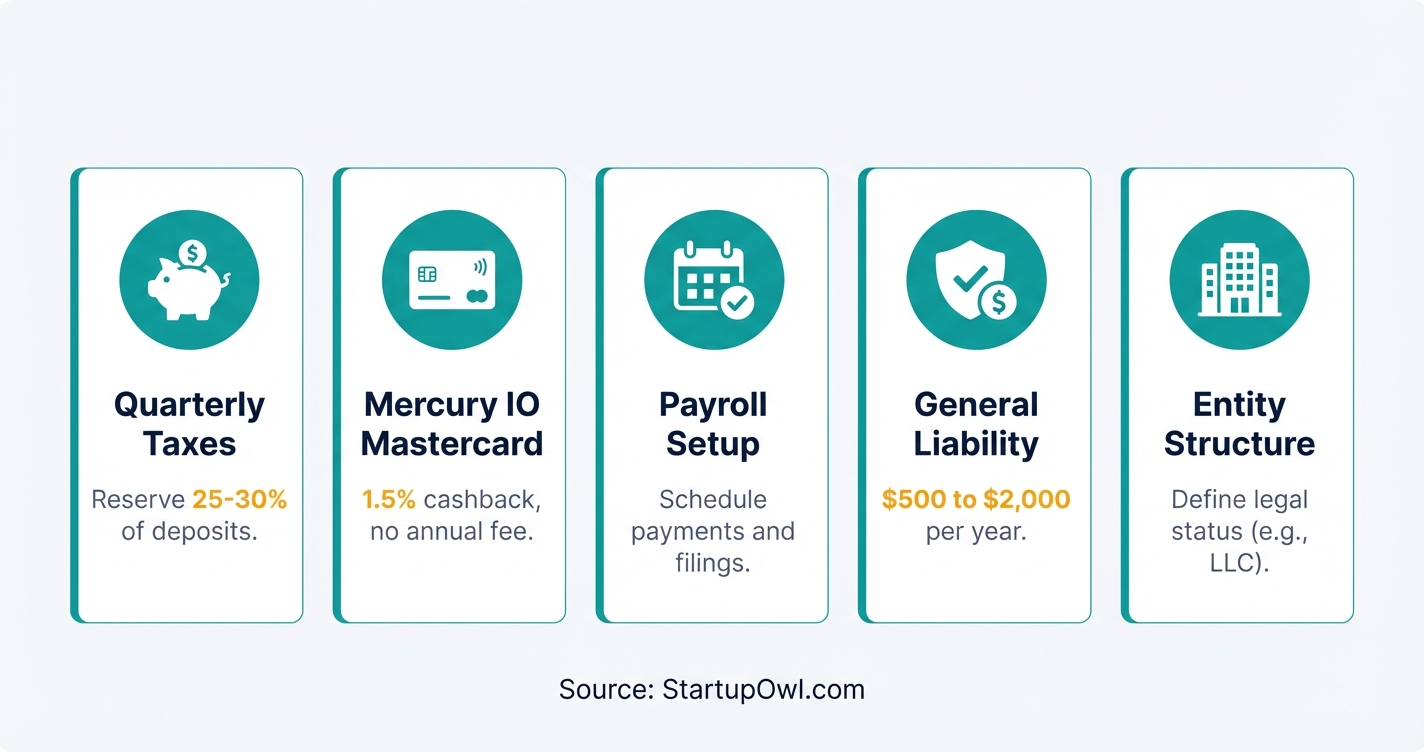
- Open a business savings account at the same bank. Transfer 25% to 30% of every deposit into it for estimated quarterly tax payments. This prevents the common cash crunch when IRS payments come due.
- Get a business credit card to separate business purchases further and build business credit. Mercury's IO Mastercard offers 1.5% cashback with no annual fee. Bluevine offers a Business Cashback Mastercard as well.
- Set up payroll if you plan to pay yourself a salary (required for S Corps). See our how to set up payroll guide. Best payroll services start at about $40 per month.
- Review your business insurance needs now that your finances are separated. A general liability insurance policy typically costs $500 to $2,000 per year and protects your business from third-party claims.
- Consider your entity structure. If you are still a sole proprietor, separating your bank accounts is a good first step, but it does not give you the liability protection of an LLC. Compare options in our LLC vs S Corp tax comparison.
Your business account does not carry consumer fraud rules
Regulation E protects consumer bank accounts. A business checking account is not one. The rule covers accounts opened mainly for personal, family, or household use. It defines a consumer as a natural person (12 CFR 1005.2). Your LLC is not a person. Move the money and the rulebook changes.
On a personal account the numbers are fixed. Report a stolen card within two business days and your loss stops at $50. Wait longer and the cap is $500 (12 CFR 1005.6). A bad transfer on your statement gives you 60 days. Miss that and later losses are yours. Your bank gets 10 business days to investigate. If it takes the full 45 days, it must put the money back while it works (12 CFR 1005.11).
| Protection | Personal account | Business account |
|---|---|---|
| Rule that governs it | Regulation E, 12 CFR part 1005 | Your deposit agreement plus UCC Article 4A |
| Loss cap on a stolen card | $50 with notice in two business days, $500 after | Whatever your deposit agreement sets |
| Deadline to report a bad transfer | 60 days from the statement | Whatever your deposit agreement sets |
| Money back during the investigation | Provisional credit within 10 business days | No federal right to it |
| Disputing a false credit entry | FCRA dispute rights on your consumer file | No FCRA rights on a business file |
Your business account runs on two other things. One is your deposit agreement. The other is UCC Article 4A, the state law for wires and ACH transfers. Article 4A says a payment order counts as yours, authorized or not, if the bank offered a commercially reasonable security procedure and followed it in good faith. It goes further. A procedure counts as reasonable if the bank offered one, you turned it down, and you signed to take the risk.
Your business credit file sits outside the consumer rules too. The Fair Credit Reporting Act defines a consumer as an individual. A consumer report covers personal, family, or household credit (15 U.S.C. 1681a). A false trade line on a business file is not covered. You are asking a bureau to fix it. That is not a right.
None of this argues for keeping business money in your personal account. The liability and tax reasons stand. They are the whole point of this guide. It argues for opening the account carefully. On our best business bank accounts comparison, look past the monthly fee. Check the controls. Look for approval steps on big transfers, staff cards with their own limits, and a way to block ACH debits you never set up. Ask what the security procedure is before you need it.
The Complete Checklist
- Apply for an EIN at IRS.gov01
Get your Employer Identification Number online for free in under 10 minutes.
10 minutes$0 - Gather formation documents and owner IDs02
Collect Articles of Organization, operating agreement, and government photo IDs for all 25%+ owners.
15 minutes$0 - Compare fintech and traditional bank options03
Evaluate Mercury, Bluevine, Chase, and Bank of America based on fees, features, and cash deposit needs.
15-30 minutes$0 - Open your business checking account04
Apply online or in-branch and fund the account with your initial deposit.
10 minutes to apply; 1-5 days for approval$0 to $100 - Update payment processors to deposit into the business account05
Redirect Stripe, PayPal, Square, and all client payment sources to your new business account.
30 minutes$0 - Move all recurring business expenses to the business account06
Switch software subscriptions, vendor payments, and advertising spend to your business debit card or account.
30-60 minutes$0 - Set a firm cutoff date for personal account usage07
After this date, zero business transactions should touch your personal account.
5 minutes$0 - Connect your bank account to accounting software08
Link to QuickBooks, Xero, or Wave for automatic transaction syncing.
15 minutes$0 to $50 per month - Set up bank rules for auto-categorization09
Create rules in your accounting software so recurring transactions categorize automatically.
20 minutes$0 - Schedule your first monthly reconciliation10
Block 30 minutes on the last business day of the month to reconcile your bank statement against your books.
30 minutes per month$0
Here are the essential tools and resources you need to complete your business and personal bank account separation.
- IRS EIN Online Application (free, instant during business hours)
- Mercury Business Banking ($0 per month, free USD wires, FDIC insured up to $5M through partner banks)
- Bluevine Business Checking ($0 per month Standard plan, 1.3% APY, FDIC insured up to $3M)
- Chase Business Complete Banking ($15 per month, waivable; 4,900+ branches for cash deposits)
- Bank of America Business Advantage ($16 to $29.95 per month; waivable with $5,000 to $25,000 balance)
- QuickBooks Online (starts at $35 per month; syncs with Mercury, Bluevine, and most banks)
- Xero (starts at $29 per month; free for 3 to 6 months with Bluevine)
- Wave (free accounting software for freelancers and micro-businesses)
For help choosing between providers, see our best business bank accounts and best accounting software for small business guides.
These mistakes cost the most. New owners make them when separating, or when failing to separate at all.
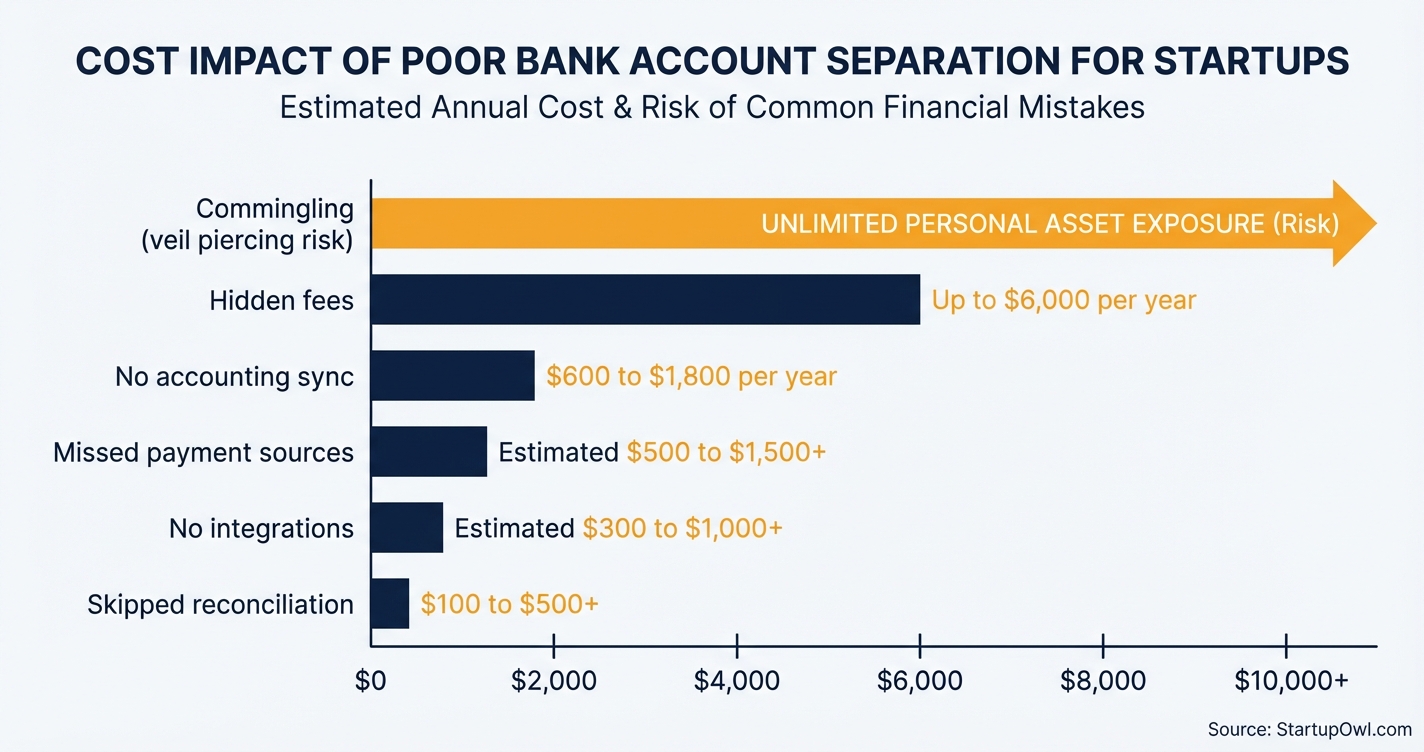
- Using your personal account "just for now." There is no such thing as temporary commingling. Every business transaction through your personal account weakens your LLC's liability shield. Courts have pierced the corporate veil of LLCs specifically because owners commingled personal and business funds, exposing the owner's home, savings, and personal assets to business creditors.
- Ignoring transaction fees beyond the monthly rate. A business checking account advertised at $15 per month can actually cost $45+ per month once you add wire transfer fees ($10 to $30 each), excess transaction charges ($0.30 to $0.65 each after your monthly limit), and cash deposit fees. Always calculate your total cost of banking, not just the headline fee. See our business bank account fees guide for details.
- Not connecting to accounting software. Without an automatic bank feed, you are stuck with manual data entry. That means more bookkeeper hours ($50 to $150 per month extra) and a higher risk of miscategorized expenses that trigger IRS questions.
- Failing to update all payment sources on migration day. If even one client keeps depositing into your personal account, you have commingled funds again. Create a full list of every income source and expense before you switch.
- Choosing a bank without integration support. If your bank cannot sync with QuickBooks, Xero, or your preferred accounting tool, you will waste hours on manual reconciliation every month. Verify software compatibility before you open the account.
- Skipping monthly reconciliation. Unreconciled accounts accumulate errors. After 3 months of skipped reconciliation, expect to spend 2 to 4 hours (or pay a bookkeeper $100 to $300) to clean up the backlog. After 12 months, the cleanup can cost $500+.
Frequently Asked Questions
Technically, yes. The IRS does not require sole proprietors to hold a separate business account. It still recommends one, because tracking deductions is easier. Commingling raises your audit risk. Any deduction you cannot document may be thrown out. Open a free business account at Mercury or Bluevine and skip the risk.
Fintech accounts at Mercury and Bluevine cost $0 per month. There is no minimum balance. Traditional banks charge $8 to $30 per month. You can often waive that by holding a $5,000 to $25,000 minimum balance. Watch the hidden costs, wire transfer fees run $10 to $30 each and excess transaction fees run $0.30 to $0.65 each.
The IRS may disallow your deductions, assess back taxes, and add penalties plus interest. In serious cases it opens a fraud investigation. Expect to document every expense. At a minimum you will prove each one was legitimate. Disallowed deductions alone can add $2,000 to $10,000+ to your tax bill depending on your revenue.
Yes, and it is one of the most common reasons courts pierce the veil. Mix personal and business funds and a court may decide your LLC is not a separate legal entity. Creditors can then pursue your personal assets, your home, savings, and car, to satisfy business debts. Single-member LLCs are the most exposed.
The application takes 10 minutes at most fintech providers. Mercury approves most accounts in 1 to 2 business days. Traditional banks may take 3 to 5 business days. Some still want an in-person branch visit. Have your EIN, formation documents, and photo ID ready to avoid delays.
Both charge $0 per month on their base plans. Mercury gives free domestic and international USD wire transfers, plus up to $5 million in FDIC cover through its sweep network. It suits businesses that send wires often. Bluevine pays 1.3% APY on balances up to $250,000, with activity requirements, so it wins on idle cash. Neither takes cash deposits.
No. Regulation E covers accounts opened mainly for personal, family, or household use. It defines a consumer as a natural person (12 CFR 1005.2). A business checking account fails both tests. You do not get the $50 loss cap. You do not get the 60 day window or provisional credit. You get your deposit agreement and UCC Article 4A instead.
Your deposit agreement and UCC Article 4A decide it. Regulation E does not. Under Article 4A a payment order counts as yours, authorized or not. The test is whether your bank offered a commercially reasonable security procedure and followed it in good faith. It also counts if the bank offered one, you turned it down, and you signed to take the risk. Call your bank the hour you notice. Put the request in writing.
You can ask. The Fair Credit Reporting Act does not give you the right. The FCRA covers individuals. A consumer report covers personal, family, or household credit (15 U.S.C. 1681a). Business credit files sit outside that. Each bureau runs its own dispute process on its own timeline. Keep every invoice and contract that proves the entry is wrong.
Sources & References
- IRS: Apply for an Employer Identification Number (EIN) Online
- IRS: Income & Expenses (Sole Proprietor Personal vs Business)
- IRS Internal Revenue Manual 4.10.4: Examination of Income (Commingling Analysis)
- Mercury Business Banking: Pricing
- Bluevine Business Checking: Plans and Pricing
- Bank of America: Business Schedule of Fees (February 2026)
- Nolo: Piercing the Corporate Veil (LLCs and Corporations)
- Business.com: Business Banking Fees
- 12 CFR 1005.2, Regulation E definitions of account and consumer
- 12 CFR 1005.6, Liability of consumer for unauthorized transfers
- 12 CFR 1005.11, Procedures for resolving errors and provisional credit
- UCC 4A-202, Authorized and verified payment orders
- 15 U.S.C. 1681a, Fair Credit Reporting Act definitions
About the Author
Editor, StartupOwl
Eliot leads StartupOwl's state data research. He maintains the site's fifty state records of LLC filing fees, annual costs, processing times, and small business grant programs, checking each figure against the state office that publishes it and logging the date it was verified. Based in New Jersey, he has spent his working life in and around small businesses, and he writes for the founder who wants the real number rather than the advertised one. Every figure under his byline traces to a named source, and when a state proves a number wrong, the correction is published, not buried.
Was this article helpful?
Questions about Business vs Personal Bank Account, Why You Must Separate
No comments yet. Ask the first question and a member of our team will answer.
Leave a comment