
Bookkeeping Basics for Startups
What small business bookkeeping costs in 2026, from a free Wave account to $149 a month for a real bookkeeper, and what the IRS actually requires.

In This Article
Definition
Bookkeeping is the daily practice of recording every financial transaction your business makes so you can track income, expenses, and tax obligations.
Bookkeeping is the daily recording of your business income, expenses and payments. DIY software runs $0 to $70 monthly. A human bookkeeper starts at $149 a month through Wave Advisors and rises from there. The IRS requires no particular method, only records that clearly show your gross income, deductions and credits.
Federal law sets no bookkeeping method. What you spend is your call. It runs from $0 to about $149 a month before you reach full outsourced accounting. The IRS asks one thing, that your records show your income and expenses accurately. Every dollar above that line buys back your own time. This guide prices each option at its list rate, checked at the vendor on 20 July 2026, and gives the record rules most guides stop halfway through.
Wave Starter at $0 a month, manual transaction entry, no automatic bank imports
Free Option
$19 to $38 a month for Wave Pro or QuickBooks Simple Start, both billed monthly
Low-End
$149 a month and up for Wave Advisors, a named bookkeeper on your books
Mid-Tier
Full outsourced accounting with AP, AR and payroll is quoted per business, so ask for the fee in writing
Premium
Bookkeeping is the process of recording every dollar that flows into and out of your business. That includes sales income, expenses like rent and software, payments to contractors, and transfers between accounts. It is the raw data underneath your accounting, your tax filings and your reporting. Nothing else works without it.
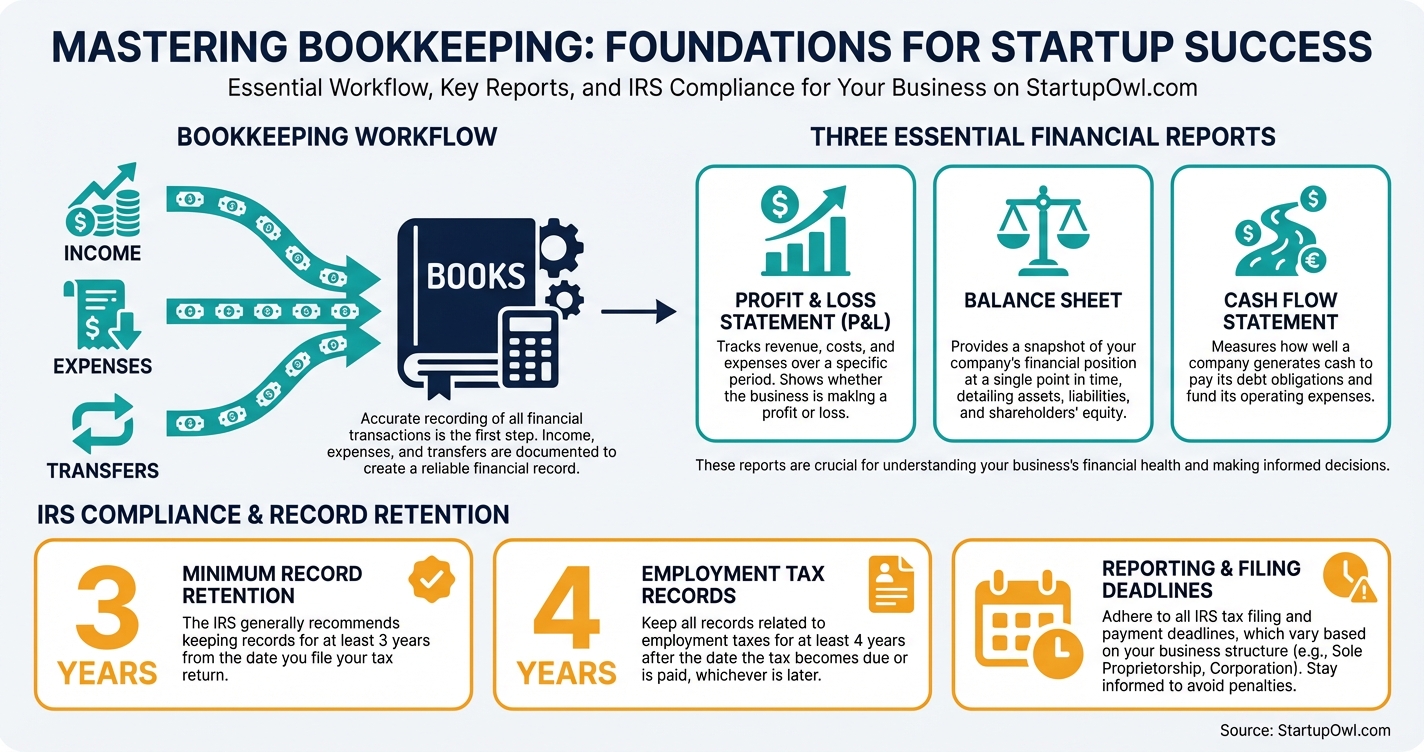
Think of it as a logbook. Every invoice you send, every bill you pay, every receipt you keep gets entered somewhere. Without it you are guessing at profit, overpaying tax, or missing deductions.
There are two ways to record each entry. Single entry records it once. That works for very simple businesses. Double entry records every transaction as both a debit and a credit, which is what accounting software does by default. As the IRS puts it in Publication 583, your books "must show your gross income, as well as your deductions and credits."
A freelance designer earning $80,000 a year records every client payment, every software charge, every home office expense and every quarterly tax payment. That is bookkeeping. The accountant who takes that data and files the return is doing accounting, a different job built on top of your books.
Messy books cost real money. If you cannot substantiate a deduction in an audit, you lose it. On $20,000 of deductions, poor records can mean a surprise bill of $3,000 to $7,000 depending on your bracket and self employment tax.
The retention rules go further than the three years most guides quote. IRS Topic 305 sets five clocks. The general rule is 3 years from the date you filed. Employment tax records run at least 4 years after the tax is due or paid. If you leave out more than 25 percent of your gross income, the IRS has 6 years. A claim for a refund from a bad debt or worthless securities runs 7 years. And for a fraudulent return, or a return you never filed, there is no limit at all.
So three years is the floor, not the answer. Keep the records seven years. That covers every clock except fraud, and no filing habit fixes fraud.
Clean books also let you decide fast. You know this month's margin. You know whether you can afford a hire, and what to set aside for quarterly tax. A lender or investor will ask for your profit and loss statement, balance sheet and cash flow statement, and all three come straight out of your bookkeeping. Choosing the tool that produces them is the next decision, and our guide to the best accounting software for small business compares the roster.
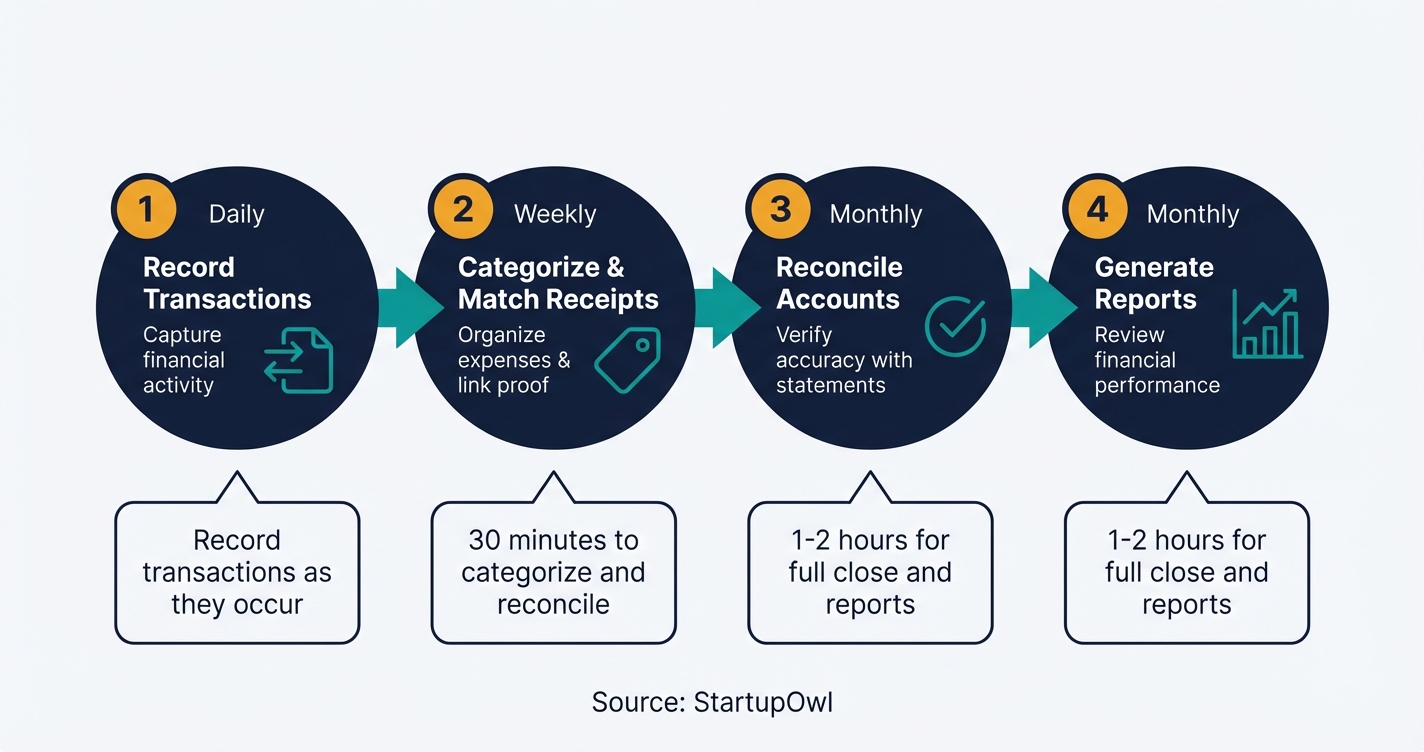
Bookkeeping runs on a cycle. That holds whether you do it or hire it out. The daily work is recording transactions as they happen, or letting your bank feed import them. Most software imports automatically once you connect an account.
Before any of that, pick a method. Cash accounting records income when the money lands and expenses when you pay them. It is the simpler choice. It is right for most service businesses with no inventory. Accrual accounting records income when you invoice and expenses when the bill arrives, even if no money has moved. Accrual gives a truer picture of a month, and the IRS generally requires it once you carry inventory or pass the gross receipts threshold for your entity. Ask your CPA before you switch, because changing methods after the fact means filing for IRS consent.
Then comes the weekly pass. You categorize transactions and reconcile the account so your books match your bank. Publication 583 tells you to "record expenses when they occur" and identify the source of every receipt, ideally daily.
At month end you close the books. Reconcile every account, review for errors, then generate three reports. The profit and loss statement shows revenue minus expenses. The balance sheet shows what you own, what you owe and your equity. The cash flow statement shows the actual movement of money. Those three are what your accountant, lender or investor will read.
With a tool like QuickBooks Online most of this is semi automated. You connect your business bank account. The software then pulls transactions, suggests categories and builds the reports.
You can set this up in under 2 hours. Before you start, open a business bank account and get your EIN from the IRS.
- Pick your software. Under $50,000 in revenue, start with Wave at $0 or Zoho Books, free for businesses under $50,000. Planning to hire, QuickBooks Online Simple Start lists at $38 a month and is the platform most CPAs already use.
- Connect your bank. Link checking and credit cards so transactions import. About 10 minutes.
- Set up your chart of accounts. This is the category list for income and expenses. Most software ships a default you can edit. Spend 20 to 30 minutes on it.
- Book a weekly slot. Block 30 minutes to categorize, match receipts and reconcile. Small backlogs go fast.
- Close monthly. On the first or second business day, reconcile the prior month, read your profit and loss and balance sheet, and save a copy. Expect 1 to 2 hours once it is routine.
Prefer to hand it over? Wave Advisors puts a dedicated bookkeeper on your books from $149 a month billed annually, or $199 month to month, and that price includes the Wave Pro features. Freelance bookkeepers hired directly usually quote $25 to $50 an hour, though that is a market range rather than a published rate, so get the monthly figure in writing before you sign. Either way, keep a separate business bank account so whoever does the work has clean data.
Your cost comes down to one decision. Do it yourself with software, or pay a person. Every list price below was checked at the vendor's own pricing page on 20 July 2026, with the billing basis stated, because the sticker and the bill are rarely the same number.
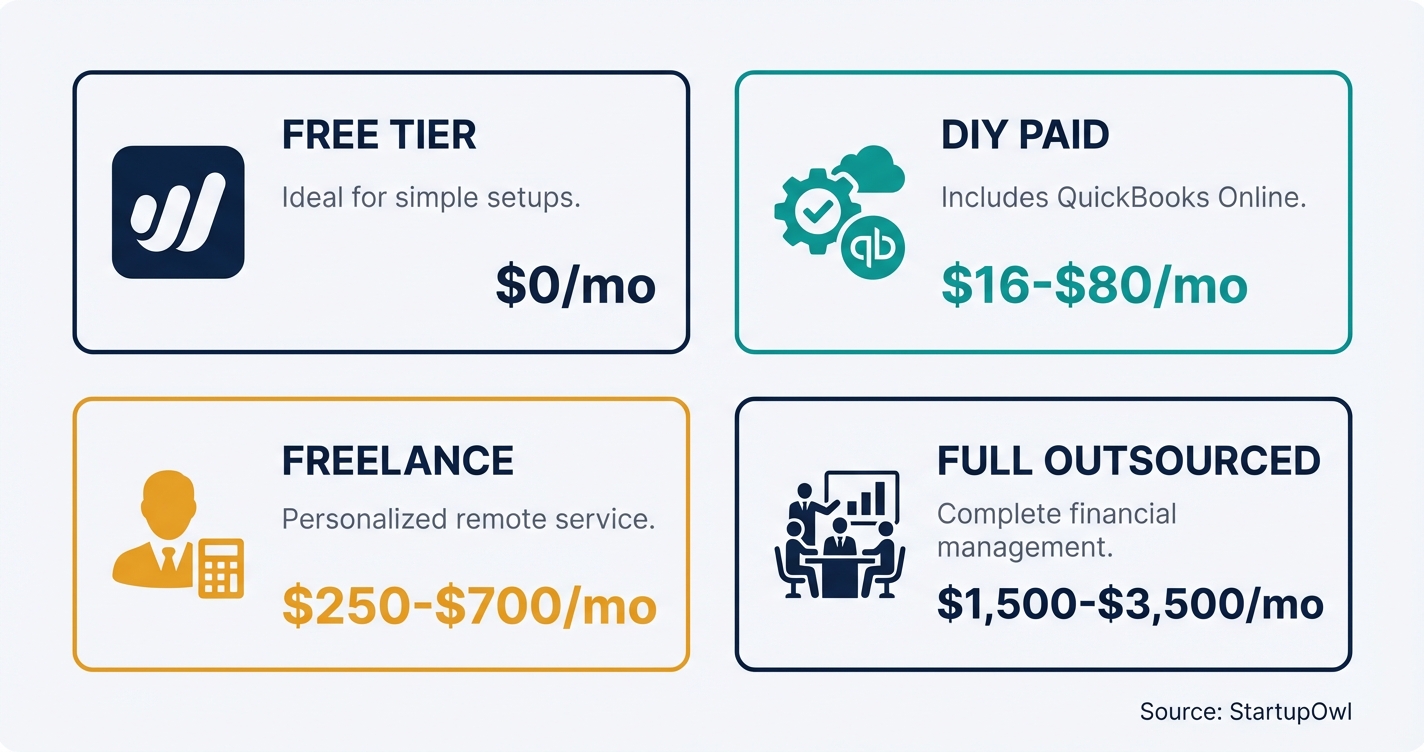
Free software costs $0 a month. Wave's Starter plan covers invoicing, expense tracking and reporting at no charge. The catch is that automatic bank imports sit on the paid tier, so on Starter you enter transactions by hand. Wave Pro is $19 a month billed monthly, or $190 a year billed annually, and it adds the auto import, receipt capture and late payment reminders.
Paid software runs $23 to $70 a month for a solo business. QuickBooks Online lists at $38 for Simple Start, $75 for Essentials, $115 for Plus and $275 for Advanced, with a standing offer of 50 percent off for the first 3 months. That promo is the number to ignore. Month four is the real price. FreshBooks lists at $23 for Lite (5 clients), $43 for Plus (50 clients) and $70 for Premium (unlimited), billed monthly, with 10 percent off if you pay yearly. Xero, which is not on our tested roster and so is here for comparison only, prices its US plans at $25 for Early, $55 for Growing and $90 for Established. Our guide to the best accounting software for small business compares them feature by feature.
A freelance bookkeeper is the middle ground. Rates in this market run about $25 to $50 an hour, which lands near $250 to $700 a month at a normal transaction volume. Nobody publishes that as a list price, so treat it as a range and ask for the monthly fee before you commit.
Managed bookkeeping starts lower than most guides claim. Wave Advisors is $149 a month billed annually and $199 month to month. You get a named bookkeeper. Full outsourced accounting adds accounts payable, receivable and payroll coordination. Nobody lists a price for it. It is quoted per business, so the honest answer is that nobody can price it for you from a web page. Ask for the fee, the scope and the notice period in writing.
Budget 1 to 3 percent of revenue. On $200,000 that is $2,000 to $6,000 a year, or roughly $167 to $500 a month.
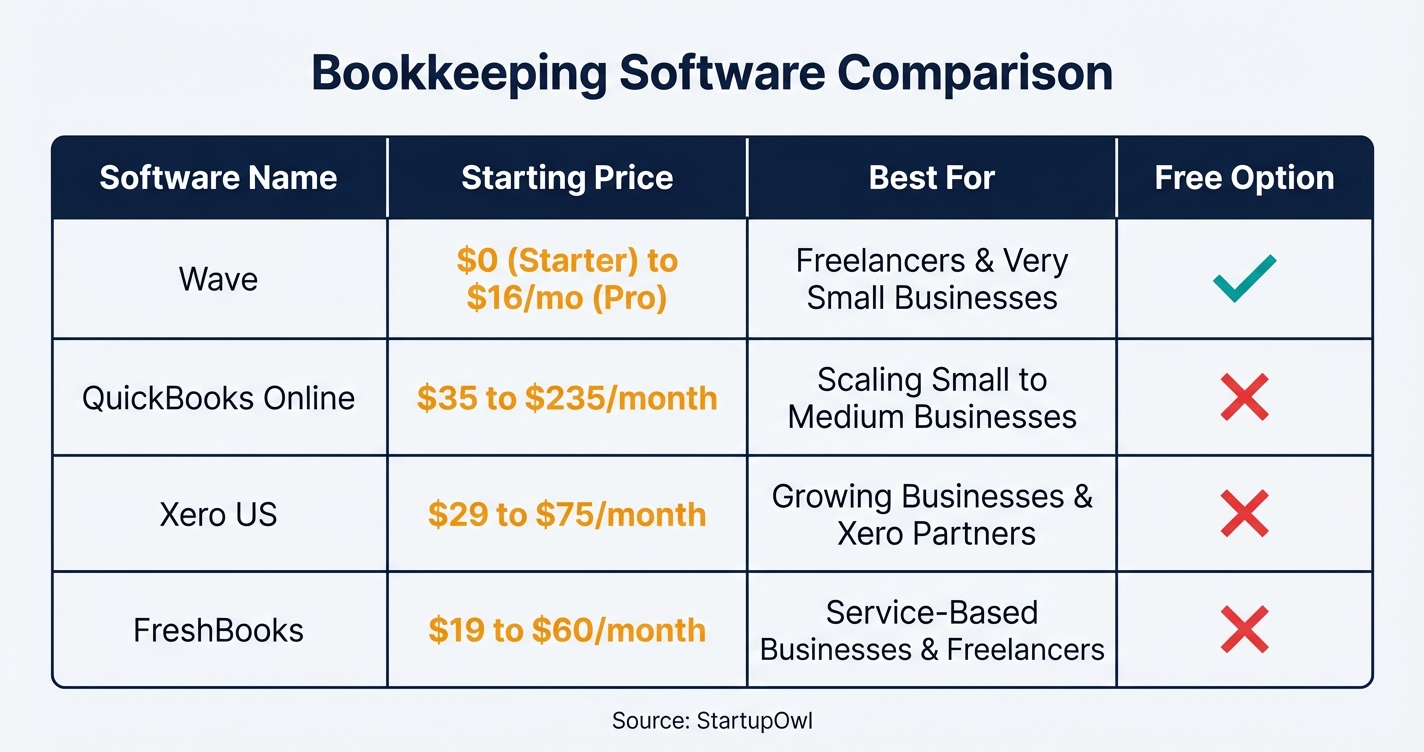
Freelancers and solo consultants have the simplest books. You track client invoices, a few recurring expenses and quarterly estimated tax. Wave's free plan or FreshBooks Lite at $23 a month covers it. Budget 30 minutes a week. The real risk is mixing personal and business spending, so open a business bank account first.
E-commerce businesses carry volume and inventory. You need software that handles sales tax across states, syncs with your storefront and tracks cost of goods sold. QuickBooks Online Plus at $115 a month is the roster fit here. Xero Growing at $55 is the cheaper comparison, though it is not a tool we have tested. Many store owners outgrow doing it themselves inside a year.
Retail and restaurants deal with daily cash, tips, shrinkage and multiple terminals. Most need a bookkeeper from day one. Tip compliance and food cost tracking push the quote up, so ask for a price that names your transaction volume.
Professional services firms need project level tracking and, for law firms, trust accounting. QuickBooks Online Plus covers that at $115. An S Corp adds owner payroll, distributions and reasonable compensation, which is the part founders get wrong.
LLCs and S Corps carry specific obligations. An LLC taxed as a partnership keeps a separate capital account for each member. An S Corp tracks shareholder distributions, officer compensation and loan balances. If you formed through one of the best LLC formation services, make sure the chart of accounts you set up matches the entity you chose.
1. Mixing personal and business spending. This is the most common error and the fastest route to a painful audit. Put a $500 business purchase on a personal card and it may never reach your books at all. Open a business bank account, most business bank accounts cost $0 to $30 a month, and run everything through it.
2. Letting categorization slide. It takes 5 minutes to categorize a week. It takes 5 hours to categorize a quarter, because by then you have forgotten what half the charges were. Founders who ignore this all year often pay a CPA $1,000 to $3,000 for catch up work at tax time.
3. Skipping monthly reconciliation. If your books say $12,000 and the bank says $10,500, something is wrong. A duplicate entry, a missed expense, or worse. Reconciling monthly catches it while it is still small.
4. Picking software on price alone. Wave is free. If your CPA only works in QuickBooks, you will pay to migrate later. Ask your accountant which platform they open every April, before you commit, because their answer is worth more than any feature list.
5. Ignoring the chart of accounts. The default list includes categories you will never touch and misses ones you need. Half an hour of editing upfront saves hours of recategorizing later. Your CPA can hand you a template for your industry.
Frequently Asked Questions
Wave's free plan costs $0. Paid software runs $23 to $70, with QuickBooks Online Simple Start at $38 and FreshBooks Lite at $23. A managed service with a dedicated bookkeeper starts at $149 a month through Wave Advisors. A freelance bookkeeper hired directly usually lands between $250 and $700 a month.
Cash accounting records money when it moves. It is the simpler choice for most service businesses with no inventory. Accrual records income when you invoice and expenses when the bill arrives, which shows a truer monthly picture. The IRS generally requires accrual once you carry inventory or pass the gross receipts threshold, and switching later needs IRS consent.
Yes, most founders can. Cloud software imports bank transactions and suggests categories, so no formal training is needed. Budget 30 minutes a week for review and 1 to 2 hours a month for reconciliation. Once you have employees, inventory, or revenue past roughly $250,000, the hours and the risk both grow enough that hiring usually pays for itself.
IRS Topic 305 sets five clocks. The general rule is 3 years from the date you filed. Employment tax records run at least 4 years after the tax is due or paid. Omit more than 25 percent of your gross income and the window is 6 years. A refund claim from a bad debt runs 7 years. For a fraudulent or unfiled return, there is no limit.
Bookkeeping is the daily record, categorizing expenses, reconciling accounts and producing statements. Accounting is the analysis, tax planning and strategy built on that record. A bookkeeper typically bills $25 to $50 an hour in this market. A CPA charges several times that. You need the books either way, because the accountant cannot work without them.
Wave has the most capable free plan, covering invoicing, expense tracking and reporting at $0. The catch is the bank feed. Automatic imports sit on Wave Pro at $19 a month. Zoho Books is free under $50,000 in revenue, and both export cleanly when you outgrow them.
Hire when you pass roughly $250,000 in revenue, take on employees, or spend more than 5 hours a month on the books. At that point $149 to $700 a month buys back the hours and removes the error risk. The tell is simpler than any threshold. If you are behind by more than a month, you have already outgrown doing it yourself.
Sources & References
About the Author
Editor, StartupOwl
Eliot leads StartupOwl's state data research. He maintains the site's fifty state records of LLC filing fees, annual costs, processing times, and small business grant programs, checking each figure against the state office that publishes it and logging the date it was verified. Based in New Jersey, he has spent his working life in and around small businesses, and he writes for the founder who wants the real number rather than the advertised one. Every figure under his byline traces to a named source, and when a state proves a number wrong, the correction is published, not buried.
Was this article helpful?
Questions about Bookkeeping Basics for Startups
No comments yet. Ask the first question and a member of our team will answer.
Leave a comment