
How to Do Payroll for Small Business
Set up and run payroll in 7 steps, from getting your EIN to filing quarterly taxes. Includes 2026 tax rates, provider pricing, and deposit deadlines.

To do payroll, you need an EIN, state tax registrations, completed W-4 and I-9 forms from each employee, a pay schedule, and a payroll method (software, manual, or outsourced). Most small businesses spend $49 to $80 per month plus $6 to $12 per employee on payroll software like Gusto or OnPay. Your employer tax burden adds roughly 7.65% to 10%+ on top of every paycheck in FICA and unemployment taxes.
7
Total Steps
$0–$200
Est. Cost
1-3 hours for initial setup, then 15-30 minutes per pay period
Timeline
Medium
Difficulty
Running payroll for a small business costs between $0 and $80 per month (plus $5 to $12 per employee) if you use software, and takes about 1 to 3 hours to set up the first time. The real expense is not the software; it is the 7.65% employer-side FICA tax you owe on every dollar of wages, plus federal and state unemployment taxes. This guide walks you through every step, from applying for an EIN to depositing taxes with the IRS, so you can pay your team on time and stay compliant.
Before you touch payroll software or calculate a single deduction, make sure you have these prerequisites in place. Missing any of them will delay your first payroll run.
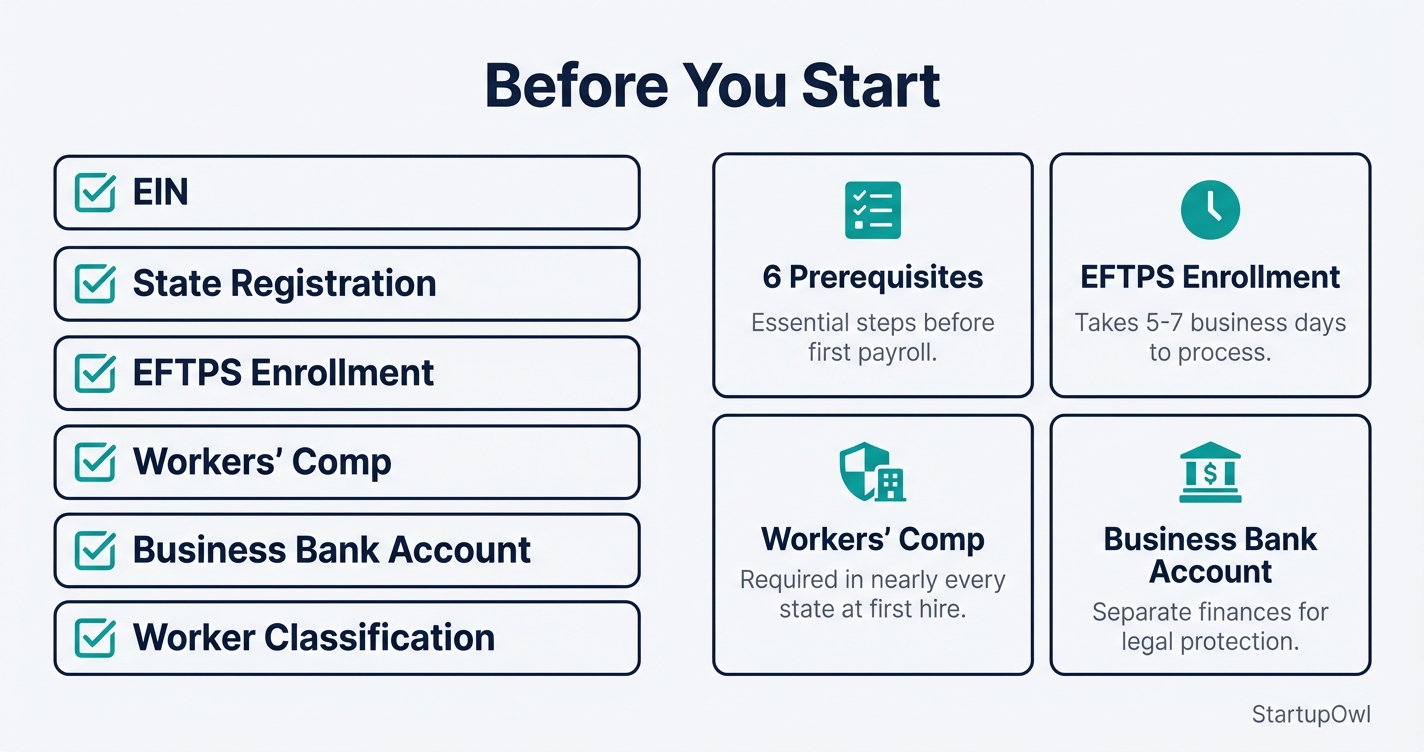
- Employer Identification Number (EIN) from the IRS. Apply at IRS.gov/EIN. If you formed an LLC through a service, you likely received one during formation. See our EIN application guide for step-by-step help.
- State tax registration for income tax withholding and unemployment insurance. Each state has its own portal; find yours through your Secretary of State website or SBA.gov.
- EFTPS enrollment at EFTPS.gov. Your PIN arrives by mail in 5 to 7 business days, so enroll immediately.
- Workers' compensation insurance, required in nearly every state when you hire your first W-2 employee. Get quotes at best business insurance.
- A dedicated business bank account (or separate payroll account) to keep payroll funds separate from operating cash. See how to open a business bank account.
- Classified workers correctly as W-2 employees or 1099 contractors under DOL guidelines. A contractor who lives abroad raises a second question, where the work is physically performed, and that one decides whether you withhold and which form you file, see how to pay foreign contractors. Misclassifying an employee as a contractor can trigger penalties, back taxes, and interest.
Your first payroll run will take the longest. Expect to spend 1 to 3 hours entering company data, employee information, and verifying bank connections. If you use a provider like Gusto or OnPay, onboarding is mostly self-guided with step-by-step prompts.
After the initial setup, each payroll run takes 5 to 15 minutes with software. You review hours, confirm deductions, and hit submit. The software calculates federal, state, and local taxes automatically. Direct deposits typically clear within 2 to 4 business days, depending on your plan tier.
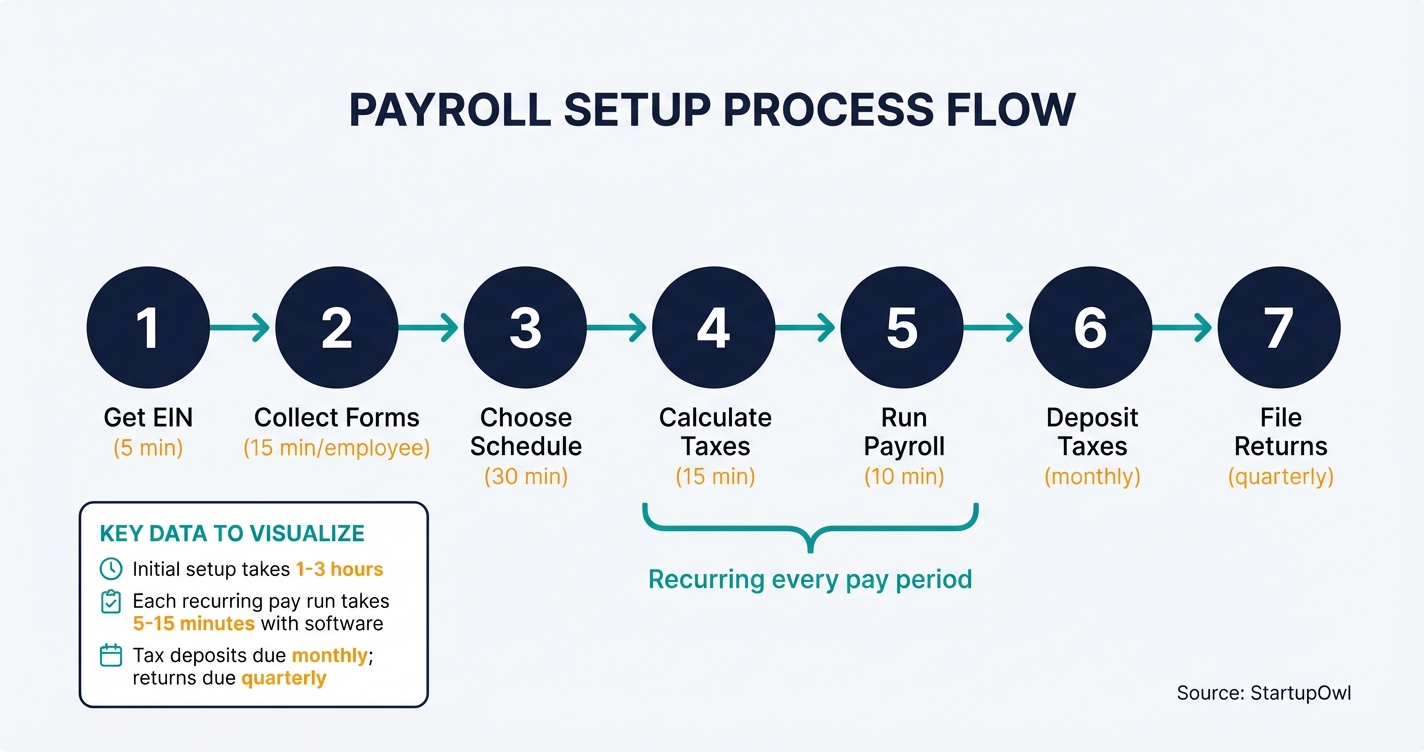
The biggest adjustment is the ongoing tax deposit and filing schedule. As a new employer, you are a monthly schedule depositor, meaning your combined FICA and federal income tax withholdings are due by the 15th of the following month. Quarterly Form 941 filings are due at the end of the month after each quarter closes. Your payroll software handles both deposits and filings if you set it up correctly.
If you are paying yourself as the sole employee of an S Corp, the process is simpler but the obligations are the same. You still file Form 941 quarterly and issue yourself a W-2 at year end. See LLC vs S Corp tax comparison for guidance on reasonable salary requirements.
Step-by-Step Process
- 1
Get Your Employer Identification Number (EIN)
Your EIN is the nine-digit number the IRS uses to identify your business for tax purposes. You cannot legally withhold and remit payroll taxes without one. Apply online at IRS.gov and you will receive your EIN instantly upon completion.
If you already have an EIN from your LLC or corporation formation, you do not need a second one. One EIN covers all payroll and tax obligations for a single entity. Keep your confirmation letter (CP 575) in a safe place; banks, payroll providers, and state agencies will ask for it repeatedly.
You will also need to register with your state's tax agency and unemployment insurance program. Most states have a separate employer registration portal. Some states (like California and New York) require registration with multiple agencies.
Tips
- Apply online between 7 a.m. and 10 p.m. ET, Monday through Friday, for instant approval.
- Have your SSN or ITIN and legal business name ready before starting the application.
- Register with your state's unemployment insurance and withholding tax agencies immediately after receiving your EIN.
Common Mistakes
- Applying for a new EIN when you already have one from LLC formation (one EIN per entity is the rule).
- Forgetting to register with the state tax agency, which can delay your first payroll run by weeks.
- 2
Collect Employee Tax Forms and Documents
Before you can run a single paycheck, every employee must complete a Form W-4 (federal tax withholding) and a Form I-9 (employment eligibility verification). The W-4 tells you how much federal income tax to withhold from each paycheck based on the employee's filing status and claimed dependents. The I-9 must be completed within 3 business days of the employee's start date.
You also need a direct deposit authorization form with the employee's bank routing and account numbers. Some states require a separate state withholding form in addition to the federal W-4. Check your state's tax agency website for specifics.
Store all forms securely. The IRS requires you to keep payroll records for at least 4 years after the tax is due or paid, whichever is later. I-9 forms must be retained for 3 years after hire or 1 year after termination, whichever is later.
Tips
- Create a digital onboarding packet with W-4, I-9, direct deposit form, and state withholding form so new hires can complete everything before day one.
- Use E-Verify (free from USCIS) to confirm employment eligibility electronically if your state requires it.
Common Mistakes
- Failing to complete the I-9 within 3 business days of the employee's first day of work, which can result in fines of $281 to $2,789 per form.
- Accepting an expired document for I-9 Section 2 verification.
- 3
Choose Your Payroll Schedule and Method
You have four pay frequency options: weekly (52 pay periods), biweekly (26 pay periods), semi-monthly (24 pay periods), or monthly (12 pay periods). Biweekly is the most common choice for small businesses. Check your state's minimum pay frequency law before deciding; some states (like California) do not allow monthly pay for non-exempt employees.
Next, pick your payroll method. You have three options. Payroll software (such as Gusto, OnPay, or QuickBooks Payroll) automates calculations, tax filings, and direct deposits for $45 to $80/month base plus $5 to $12 per employee. Manual processing with spreadsheets costs nothing but leaves you responsible for every calculation and filing. Outsourced payroll through a provider like ADP handles everything for a custom-quoted fee.
For most businesses with 1 to 25 employees, payroll software is the best value. See our full comparison at best payroll services for small business.
Tips
- Biweekly payroll is the easiest frequency to manage and the most expected by employees.
- If you already use QuickBooks for accounting, QuickBooks Payroll offers seamless integration starting at $45/month plus $5 per employee.
- OnPay offers one flat plan at $49/month plus $6 per employee with no tiers or upsells, making cost prediction simple.
Common Mistakes
- Choosing monthly payroll in a state that requires more frequent payments for hourly workers (check your state's labor department website).
- Going manual to save money, then making a tax calculation error that triggers an IRS penalty of 2% to 15% of the amount owed.
- 4
Calculate Gross Pay, Deductions, and Employer Taxes
For each pay period, calculate gross pay first. For hourly employees, multiply hours worked by the hourly rate (including overtime at 1.5x for hours over 40 per week under the FLSA). For salaried employees, divide the annual salary by the number of pay periods.
Then apply deductions in this order. Withhold federal income tax based on each employee's W-4 and the IRS Publication 15-T tables. Withhold Social Security tax at 6.2% on wages up to $184,500 (2026 wage base) and Medicare tax at 1.45% on all wages, per IRS Topic 751. The employee's combined FICA withholding is 7.65%.
As the employer, you owe a matching 7.65% in FICA taxes. You also owe FUTA tax at 6.0% on the first $7,000 of each employee's wages, reduced to an effective rate of 0.6% (or $42 per employee per year) after the standard 5.4% state credit. State unemployment (SUTA) rates and wage bases vary. Subtract any pre-tax deductions for health insurance, retirement contributions, or flexible spending accounts before calculating taxable wages where applicable.
Employer FICA is 7.65% of wages; FUTA is $42/employee/year (most states) 15-45 minutes per pay period (manual); 5-10 minutes with software IRS.govTips
- Payroll software automates every calculation in this step, virtually eliminating math errors.
- For 2026, the Social Security wage base is $184,500 (up from $176,100 in 2026), so update your systems at year-start.
- Withhold the additional 0.9% Medicare tax once an employee's wages exceed $200,000 in the calendar year.
Common Mistakes
- Failing to match employee FICA contributions dollar-for-dollar, which doubles your penalty exposure since you owe both the employee's and employer's share.
- Forgetting to update the Social Security wage base at the start of the new year.
- 5
Run Payroll and Pay Your Employees
With calculations complete, it is time to process payments. If you use payroll software, review the payroll summary (gross pay, deductions, net pay for each employee), confirm accuracy, and click submit. Most providers process direct deposits within 2 to 4 business days, so run payroll at least that far in advance of payday. Gusto's Simple plan, for example, requires a 4-day lead time for direct deposit.
If you pay by check, print checks from your payroll system and distribute them on payday. Keep a separate business checking account or a dedicated payroll account to prevent cash flow confusion. This is especially important for businesses with irregular revenue. See how to open a business bank account for setup instructions.
Issue pay stubs to every employee showing gross pay, each deduction, and net pay. Most states require detailed pay stubs by law. Your payroll software generates these automatically.
Tips
- Schedule payroll runs on a recurring calendar reminder at least 4 business days before payday.
- Verify bank account details before the first direct deposit to avoid failed transactions and delays.
Common Mistakes
- Running payroll too late and missing the direct deposit processing window, leaving employees unpaid on payday.
- Using your operating account for payroll instead of a dedicated payroll account, which makes reconciliation difficult and increases the risk of spending tax funds.
- 6
Deposit Payroll Taxes with the IRS and Your State
After each payroll run, you must deposit withheld federal income tax, employee FICA, and employer FICA with the IRS. New employers are monthly schedule depositors, meaning taxes are due by the 15th of the following month, per IRS Notice 931. If your total tax liability exceeds $50,000 during the lookback period, you become a semiweekly depositor.
All federal tax deposits must be made electronically through the Electronic Federal Tax Payment System (EFTPS). Enroll in EFTPS as soon as you get your EIN; enrollment can take 5 to 7 business days. Late deposits trigger IRS penalties starting at 2% (1 to 5 days late) and climbing to 15% (more than 10 days past a notice).
FUTA taxes are deposited quarterly if your liability exceeds $500 for the year. State unemployment and income tax deposit schedules vary by state. Your payroll software can handle these deposits automatically in most cases.
Free (EFTPS enrollment is free; penalties for late deposits range from 2% to 15%) Monthly by the 15th (for new employers); quarterly for FUTA eftps.govTips
- Enroll in EFTPS the same day you receive your EIN so your account is active before your first deposit is due.
- Most payroll software (Gusto, OnPay, QuickBooks Payroll) files and deposits federal and state taxes automatically as part of the subscription.
- Set a calendar reminder for the 10th of each month to review and confirm your monthly deposit.
Common Mistakes
- Missing the deposit deadline by even one day triggers a 2% penalty on the full amount owed, which can cost hundreds of dollars on a $10,000 tax liability.
- Failing to enroll in EFTPS early enough, then scrambling to make a same-day wire payment (which your bank may charge $25+ for).
- 7
File Quarterly and Annual Payroll Tax Returns
File Form 941 (Employer's Quarterly Federal Tax Return) by the last day of the month following each quarter. The 2026 deadlines are April 30, July 31, November 2 (October 31 falls on Saturday), and February 1, 2027. Form 941 reports total wages paid, federal income tax withheld, and Social Security and Medicare taxes for the quarter.
File Form 940 (Annual FUTA Tax Return) by January 31 of the following year (February 10 if all deposits were timely). At year end, generate Form W-2 for each employee and file copies with the Social Security Administration by January 31. Late W-2 filings carry penalties starting at $60 per form and increasing to $340 per form after August 1.
Your payroll software should generate and file all these forms automatically. If you do payroll manually, use the IRS e-file system or a service like TaxBandits to file electronically.
Free (if using payroll software that includes filing); $20-$50 per quarter if using a standalone e-filing service Quarterly (Form 941) and annually (Form 940, W-2s) IRS.govTips
- Even if you use payroll software that auto-files, verify each quarterly 941 against your payroll register to catch discrepancies.
- Set a year-end reminder in November to verify all employee addresses before generating W-2s in January.
Common Mistakes
- Filing Form 941 late triggers a 5% penalty per month on the unpaid tax, up to 25% of the total tax due.
- Issuing W-2s with incorrect Social Security numbers, which can result in penalties of $60 to $340 per incorrect form.
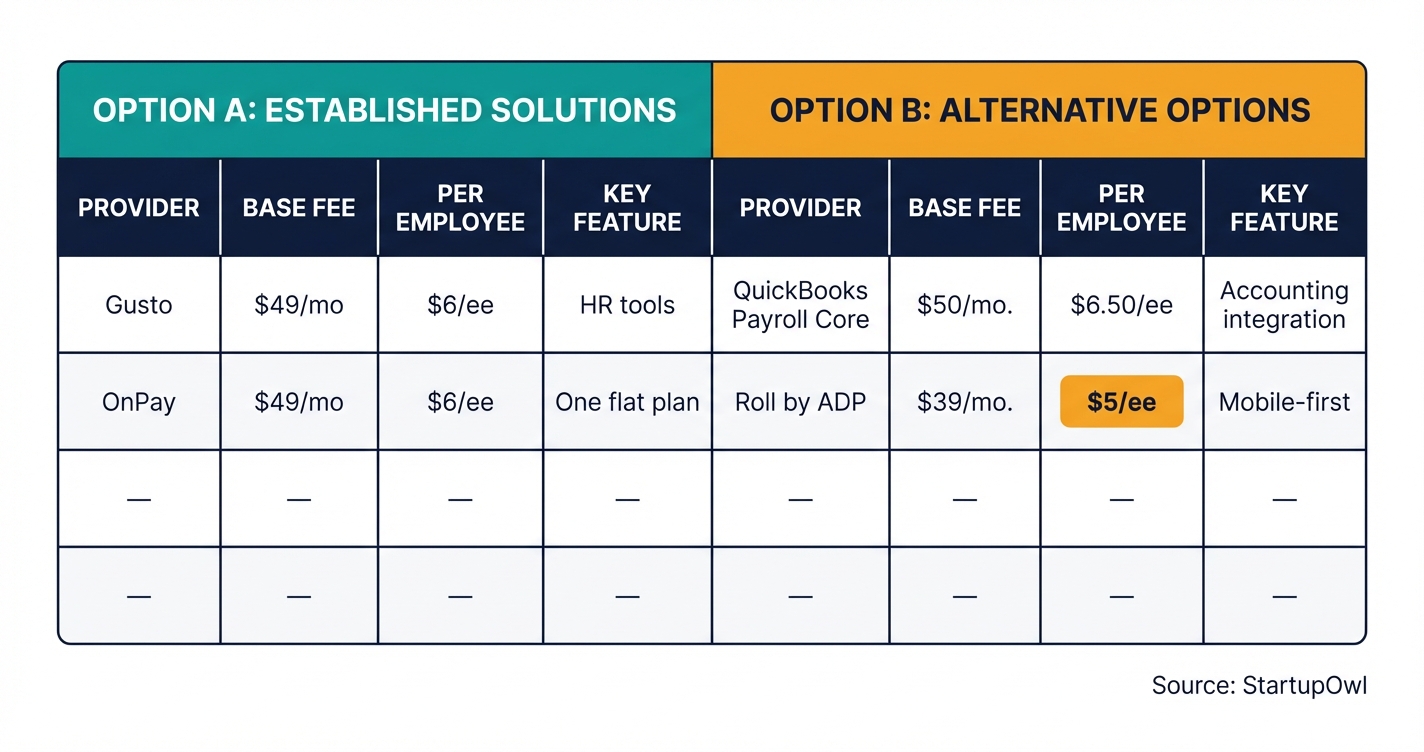
Your total payroll cost has two components: the software or service fee, and the employer taxes you owe on top of every paycheck.
Software costs range from $0 (manual/spreadsheet) to $80+ per month plus per-employee fees. Gusto starts at $49/month plus $6 per employee as of 2026. OnPay charges the same ($49/month plus $6 per employee) with one flat plan. QuickBooks Payroll Core starts at $50/month plus $6.50 per employee. Roll by ADP offers a budget option at $39/month plus $5 per employee. ADP's full-service RUN product requires a custom quote.
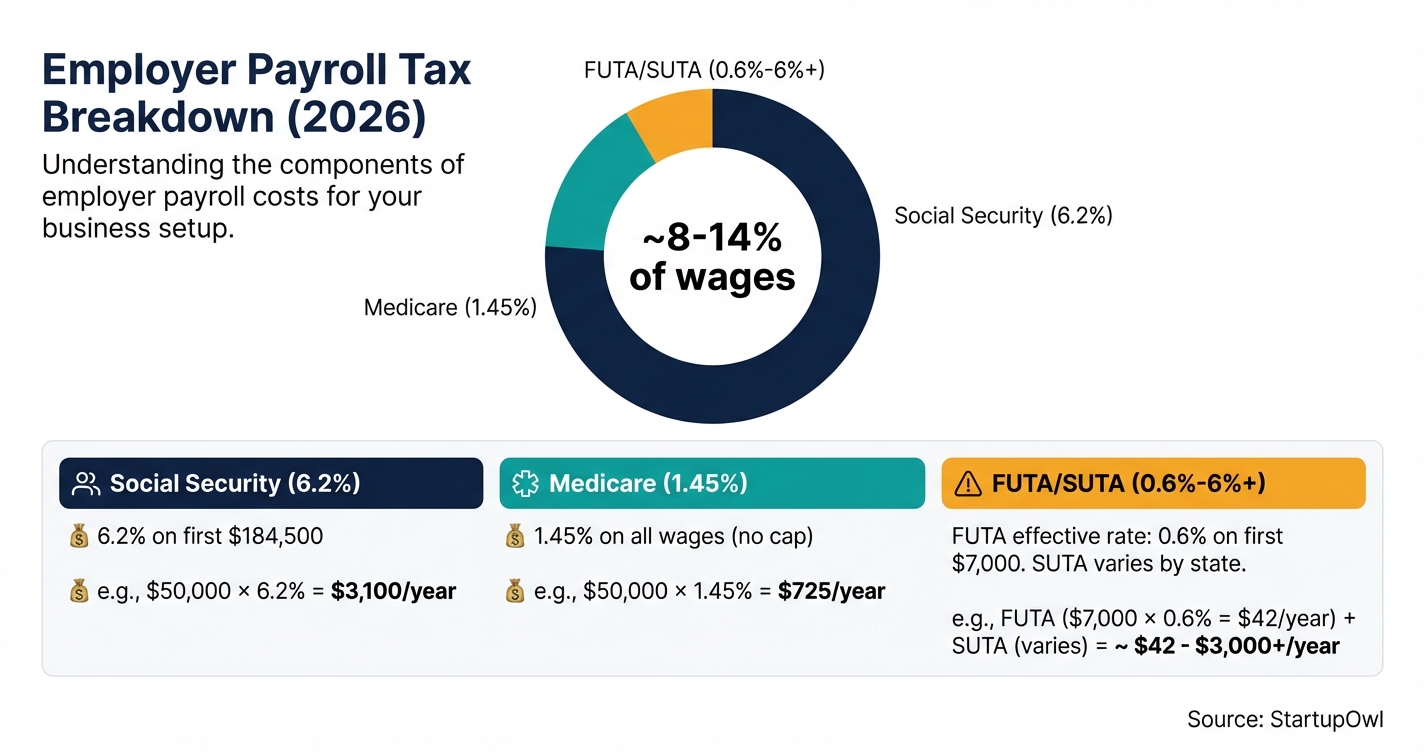
Employer tax costs add approximately 8% to 12% to every dollar of wages you pay. That includes 6.2% for Social Security (on the first $184,500 of wages in 2026), 1.45% for Medicare, and 0.6% to 6%+ for state unemployment taxes depending on your state and experience rating. FUTA costs most employers about $42 per employee per year.
For a 5-person team earning an average of $50,000 each, expect to pay roughly $55 to $110/month in payroll software fees and approximately $19,125/year in employer payroll taxes (7.65% FICA alone).
Cost Breakdown
| Item | Cost Range | Notes |
|---|---|---|
| EIN Application | Free | Apply online at IRS.gov for instant approval |
| State Employer Registration | Free to $25 | Varies by state; most states offer free registration |
| Payroll Software (Gusto Simple) | $49/mo + $6/employee/mo | Single-state payroll, automated tax filing, as of 2026 |
| Payroll Software (OnPay) | $49/mo + $6/employee/mo | One flat plan, multi-state payroll, all features included |
| Payroll Software (QuickBooks Payroll Core) | $50/mo + $6.50/employee/mo | Integrates with QuickBooks Online accounting, as of mid-2026 |
| Roll by ADP | $39/mo + $5/employee/mo | App-based payroll for very small businesses; 3-month free trial |
| Manual Payroll (spreadsheet) | $0 | You handle all calculations and filings; high error risk |
| Employer FICA Taxes | 7.65% of wages | 6.2% Social Security (on first $184,500) + 1.45% Medicare |
| FUTA Tax | $42/employee/year (effective) | 0.6% on first $7,000 of wages after state credit; higher in credit-reduction states |
| State Unemployment Tax (SUTA) | 0.5% to 6%+ of wages | Rate and wage base vary by state and employer experience rating |
| Workers' Compensation Insurance | $0.50 to $3+ per $100 of payroll | Required in most states when you hire your first employee |
Once your first payroll run is complete and deposits are confirmed, take these follow-up steps to keep your payroll system running smoothly.
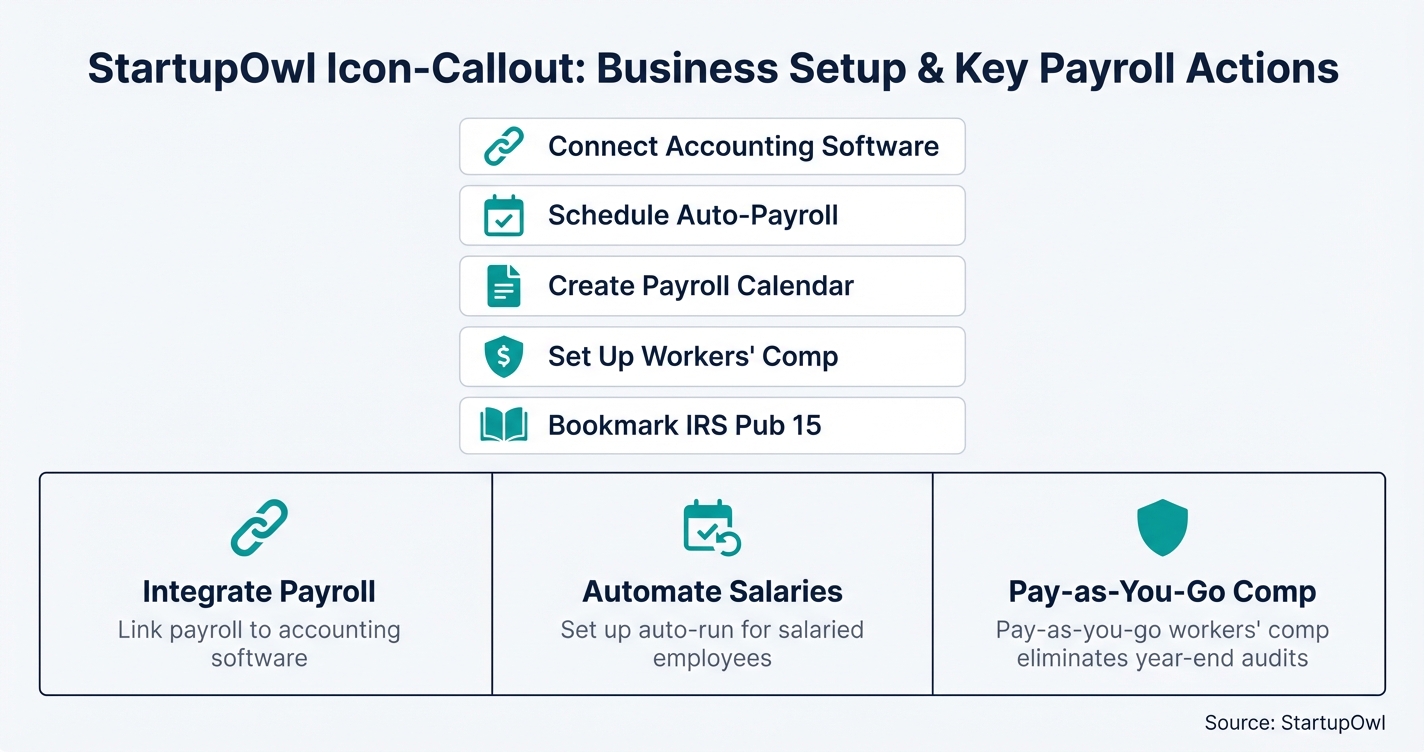
- Connect payroll to your accounting software. If you use QuickBooks, Xero, or FreshBooks, link your payroll provider so labor costs, tax liabilities, and payments sync automatically. See how to set up small business accounting.
- Set up automated payroll runs. Most providers let you schedule recurring payroll so you never miss a payday. Gusto and QuickBooks Payroll both support auto-run for salaried employees.
- Create a payroll calendar. Map out every pay date, tax deposit deadline, and quarterly filing date for the full year. The OnPay 2026 payroll tax calendar is a free resource.
- Review workers' compensation. If your payroll provider offers pay-as-you-go workers' comp (Gusto and OnPay both do), set it up to eliminate year-end audits and large lump-sum premiums.
- Bookmark IRS Publication 15. Circular E is the definitive employer tax guide, updated annually. Reference it for withholding tables, deposit schedules, and tax rates.
- Set the termination date rather than deleting the employee. Removing a leaver from payroll software is how a final run gets skipped, and payroll records must be kept 3 years from the last entry under 29 CFR 516.5. The employee offboarding checklist covers the final pay run and the records that follow it.
The Complete Checklist
- Apply for an EIN at IRS.gov01
Required before you can withhold or deposit any payroll taxes.
5-15 minutesFree - Register with your state tax agency02
Set up state income tax withholding and unemployment insurance accounts.
15-30 minutesFree to $25 - Enroll in EFTPS for federal tax deposits03
All federal payroll tax deposits must be made electronically through EFTPS.
5-7 business days for PIN arrivalFree - Collect W-4 forms from all employees04
Determines federal income tax withholding for each employee.
10 minutes per employeeFree - Complete I-9 forms within 3 business days of hire05
Verifies employment eligibility; must examine original documents in person.
15 minutes per employeeFree - Set up direct deposit authorization06
Collect bank routing and account numbers from each employee.
5 minutes per employeeFree - Choose a pay frequency07
Select weekly, biweekly, semi-monthly, or monthly; verify state minimum requirements.
10 minutesFree - Select and set up payroll software08
Sign up, connect your bank account, and enter company and employee data.
30-60 minutes$39-$80/month base - Run your first payroll09
Enter hours or salary, review deductions, and submit at least 4 business days before payday.
15-30 minutesIncluded in software - Deposit payroll taxes by the 15th of the following month10
New employers are monthly depositors; deposit via EFTPS or through your payroll software.
MonthlyFree (penalty of 2%-15% if late)
Certified Payroll on a Public Works Job
Take a construction job paid for with federal money and one payroll rule changes. The Davis-Bacon and Related Acts cover federal and federally funded contracts over $2,000 to build, alter or repair a public building or a public work. Those contracts ask for payroll information every week covered work happens. The trigger is the contract, not your headcount. A two person crew on a $6,000 school repair is inside the rule. A 40 person crew building private homes is outside it.
Two things here get reported wrong, often by payroll companies. Start with the name. Certified payroll is not a credential. There is no exam and no certificate. The word points at a signature. Page 2 of Form WH-347 holds a Statement of Compliance. You sign it to swear the payroll is right, and that each worker got at least the Davis-Bacon rate for the job they did. The Department of Labor says you do not have to get it notarised. It also says a false one carries the penalties of 18 U.S.C. 1001, a fine, up to five years in prison, or both.
The second is where the report goes. It does not go to the Department of Labor. Under 29 CFR 5.5(a)(3)(ii) it goes to the federal agency on the contract. If no federal agency is on it, send it to the owner or sponsor who keeps the records. A subcontractor sends payrolls to the prime contractor, who answers for every payroll on the job.
| Field | What goes in it |
|---|---|
| Worker name and number | Name plus a number that identifies the worker, such as the last four digits of a Social Security number. Full Social Security numbers, addresses, phone numbers and emails must stay off the weekly report. |
| Work classification | The classification from the wage determination in your contract. Someone who works two trades in one week gets a row for each. |
| Hours each day | Straight time and overtime, day by day, for work on this project. |
| Rate of pay | The rate you actually paid, straight time and overtime, without cash paid in lieu of fringe benefits. |
| Fringe benefits | Either the hourly credit for bona fide plans or the cash paid instead of them. |
| Gross earned | What the worker earned on this project, and their gross for all work that week if they worked elsewhere too. |
| Deductions | Every deduction from the week's gross pay, with anything filed under Other explained. |
| Net pay | The amount actually paid to the worker for all hours that week. |
Form WH-347 is optional. The weekly submission is not. You can send the same information in any format your agency accepts, and a signed page 2 of the WH-347 covers the compliance statement on its own. Number your payrolls from one and keep counting up. A week with covered work in it owes a report.
Your State Runs Its Own Version
Federal coverage is one layer. States have their own prevailing wage laws, their own forms and their own portals. A federal WH-347 does not satisfy them by itself. California is the clearest case. Most public works contractors there send records to the Labor Commissioner through the Department of Industrial Relations site, and only a few kinds of project are exempt. Read the contract, then ask the awarding body. Do not assume one filing covers both.
Will Your Payroll Software Do It
This is the question most contractors arrive with. The answer is usually no, not on its own. Payroll products run wages and taxes. This report needs project codes, work classifications, wage rates from your contract and fringe credits. Most payroll products hold none of that.
We review three payroll providers. Two of them document a route, and both go through the same outside specialist, Points North. ADP lists its app for ADP Run on the ADP marketplace, and says it makes the WH-347 plus state and city reports. Rippling describes the same link on its own site, passing hours, job classes and project data across. We have not verified a WH-347 that comes out of the base product at any of the three, Gusto included. Price the report as a module you buy, not a feature you own.
Three questions settle it before you sign anything.
- Does it produce the exact report your contract names, federal, state or municipal?
- Can it hold two work classifications for the same person in the same week?
- Who submits it, you or them, and by when?
If a provider will not answer the first question in writing, put the cost of a separate reporting module into your bid.
Here are the essential tools and government resources you need to set up and run payroll.
- IRS EIN Application (free, instant online approval)
- EFTPS.gov (free federal tax deposit system)
- IRS Publication 15 (Circular E) (employer tax guide with 2026 withholding tables)
- IRS Form 941 (Employer's Quarterly Federal Tax Return)
- IRS Form W-4 (Employee's Withholding Certificate)
- USCIS Form I-9 (Employment Eligibility Verification)
- Gusto ($49/mo + $6/employee, full-service payroll)
- OnPay ($49/mo + $6/employee, one flat plan)
- QuickBooks Payroll ($50/mo + $6.50/employee, best for QuickBooks users)
- Roll by ADP ($39/mo + $5/employee, mobile-first budget option)
- DOL Wage and Hour Division (overtime rules, FLSA compliance)
For a full comparison of payroll providers, see best payroll services for small business. To learn how payroll connects to your broader business setup, visit our complete business setup guide.
Payroll mistakes are expensive. The IRS assessed $7.7 billion in civil penalties related to employment taxes in a recent fiscal year. Here are the most costly errors small business owners make.
- Missing tax deposit deadlines. Even a one-day delay triggers a 2% penalty on the unpaid amount. A $10,000 deposit that is 3 days late costs you $200 in penalties. After 15 days, the penalty jumps to 10%. After receiving an IRS notice and not paying within 10 days, it reaches 15%.
- Misclassifying employees as independent contractors. If the IRS reclassifies a worker, you owe back employment taxes, a 100% penalty on the unpaid employee share of FICA (the Trust Fund Recovery Penalty), plus interest. This penalty can be assessed against you personally, not just the business.
- Using payroll tax funds for business expenses. Withheld income tax and FICA are trust fund taxes. Spending them is treated as a serious violation. The IRS can hold you personally liable even if your business is an LLC or corporation.
- Forgetting state-specific requirements. States like California, New York, and New Jersey have their own disability insurance, paid family leave, and local tax withholding obligations on top of federal requirements. Failing to register or withhold can trigger state penalties independently.
- Not issuing W-2s by January 31. Late W-2 penalties start at $60 per form filed within 30 days of the deadline and escalate to $340 per form after August 1. For intentional disregard, it jumps to $680 per form with no cap.
- Skipping workers' compensation insurance. Most states require coverage when you hire your first employee. Operating without it can result in fines ranging from $1,000 to $100,000+ depending on the state, and you become personally liable for any workplace injuries.
Frequently Asked Questions
Payroll software costs between $39 and $80 per month as a base fee, plus $5 to $12 per employee per month. For a business with 5 employees, expect to pay $64 to $140/month for software alone. On top of that, you owe 7.65% of every dollar of wages in employer FICA taxes, plus state unemployment taxes.
Yes, but it is risky. You would need to manually calculate federal and state tax withholdings, FICA, and unemployment taxes using IRS Publication 15 tables, then deposit taxes via EFTPS and file Forms 941 and 940 yourself. A single calculation error can trigger IRS penalties of 2% to 15% of the amount owed. For most businesses, spending $49 to $55/month on payroll software is far cheaper than one penalty.
New employers are monthly schedule depositors, meaning taxes are due by the 15th of the month following each payroll. If your total tax liability exceeds $50,000 during the IRS lookback period, you become a semiweekly depositor. All deposits must go through EFTPS electronically.
You owe 6.2% for Social Security (on wages up to $184,500) and 1.45% for Medicare, totaling 7.65% of each employee's wages. You also owe FUTA tax at an effective rate of 0.6% on the first $7,000 of wages (about $42 per employee per year in most states). State unemployment tax rates vary but typically range from 0.5% to 6%+.
File Form 941 quarterly to report wages, federal income tax withheld, and FICA taxes. File Form 940 annually for FUTA tax. Issue Form W-2 to each employee and file copies with the Social Security Administration by January 31 each year. If you pay contractors $600 or more, file Form 1099-NEC by January 31 as well.
OnPay at $49/month plus $6 per employee is the top pick for businesses with 1 to 25 employees because it has one flat plan with no upsells, unlimited pay runs, and multi-state support. Gusto at the same price point is a strong alternative if you also need HR tools. See our full comparison at best payroll services for small business.
Sources & References
- IRS Topic 751: Social Security and Medicare Withholding Rates
- IRS Form 941 Instructions (Rev. March 2026)
- IRS Failure to Deposit Penalty
- IRS FUTA Credit Reduction
- IRS Employment Tax Due Dates
- IRS Notice 931: Deposit Requirements for Employment Taxes
- Gusto Pricing
- OnPay Pricing
- QuickBooks Payroll Pricing
- ADP Small Business Payroll
- DOL Wage and Hour Division
- 2026 Federal Payroll Tax Rates (Abacus Payroll)
- DOL Instructions for Completing Certified Payroll Form WH-347
- 29 CFR 5.5, Davis-Bacon contract clauses and certified payroll requirements
- California DIR Certified Payroll Reporting
About the Author
Editor, StartupOwl
Eliot leads StartupOwl's state data research. He maintains the site's fifty state records of LLC filing fees, annual costs, processing times, and small business grant programs, checking each figure against the state office that publishes it and logging the date it was verified. Based in New Jersey, he has spent his working life in and around small businesses, and he writes for the founder who wants the real number rather than the advertised one. Every figure under his byline traces to a named source, and when a state proves a number wrong, the correction is published, not buried.
Was this article helpful?
Questions about How to Do Payroll for Small Business
No comments yet. Ask the first question and a member of our team will answer.
Leave a comment