

Kit (ConvertKit) Review 2026
$33 and $39 buy the same Kit plan. One is yearly, one is monthly. The free tier holds 10,000 subscribers, and that is still the best reason to start here.

Our Verdict
3.9
Based on our independent review
60+ hours of research
Ease of Use
4.5/5
Pricing & Value
3.2/5
Features & Add-ons
3.8/5
Customer Support
4.0/5
Setup Time
4.5/5
Pricing Transparency
4.2/5
Privacy & Data
3.5/5
Best For: Content creators focused on audience building, digital products, and intuitive email automations.
True Year 1 Cost: $390
Year 2+ (renewal): $390
Top Advantages
- The free Newsletter plan holds 10,000 subscribers, with unlimited sends, landing pages, and forms. No rival on our roster matches it.
- Commerce is built in. Sell digital products, paid newsletters, and tip jars without bolting on a checkout like Gumroad or Payhip.
- The visual automation builder ships with templates for welcome sequences, launches, and RSS digests. Users praise it more than any other feature.
$0/mo · Free plan available
In This Article
How We Tested Kit (ConvertKit)
We made a free Kit account and tested the signup flow, email editor, automation builder, landing page templates, and form builder. We checked every price at source. That means kit.com/pricing, Kit's billing help article, and Nathan Barry's September 2025 pricing letter. We then read Kit's rates against Mailchimp, ActiveCampaign, and Constant Contact, and read user feedback across G2, Capterra, and both of Kit's Trustpilot profiles.
Kit (ConvertKit) Overview
What Is Kit?
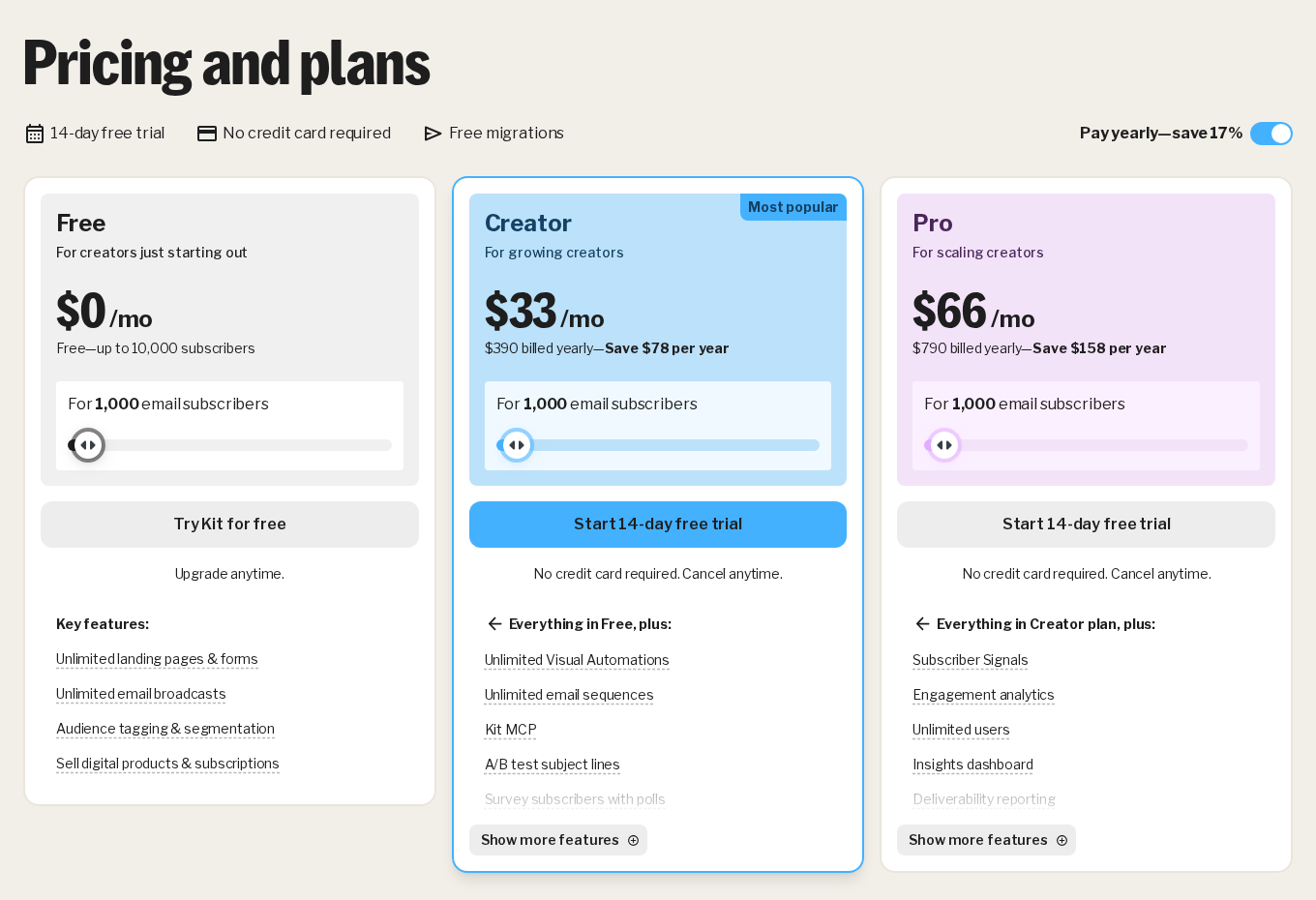
Kit is an email platform for content creators. Nathan Barry started it in 2013. The name changed from ConvertKit in October 2024. Pricing runs on subscriber count, not send volume. There are three tiers, a free Newsletter plan, Creator at $39 a month billed monthly, and Pro at $79. Billed yearly, those two drop to $33 and $66 a month. Broadcasts, visual automations, landing pages, forms, and digital product sales all sit in one dashboard.
Who Should Use Kit?
Kit is built for bloggers, podcasters, course creators, authors, and newsletter operators. They care more about what an email says than how it looks. Sell ebooks, courses, coaching, or paid newsletters and Kit's commerce tools replace a separate checkout. Start free. The Newsletter plan holds 10,000 subscribers before you owe anything, which is enough runway for most first lists.
What Changed with the Rebrand?
Two things changed, and only one was the name. ConvertKit became Kit in October 2024. Then on September 8, 2025, founder Nathan Barry published a letter raising prices for the first time in 12 years. New rates hit new customers that day. Existing customers moved on their first billing date after October 15, 2025. Kit never printed the old prices beside the new ones, so any review quoting an exact before and after figure is quoting a blog. The offset was the free plan, now 10,000 subscribers.
What Kit (ConvertKit) Actually Costs
True Cost Analysis
Annual Plan
$390
If paid annually
Cost is the Creator plan at 1,000 subscribers on yearly billing, $390 for the year. That is the entry rung. Kit's pricing slider runs from zero to more than 500,000 subscribers and the monthly price rises with the tier your list falls into, so the figure you sign up on is the smallest one you will pay. Paying month to month instead costs $39, which is $468 across the year, $78 more than the annual plan.
Kit (ConvertKit) Pricing Plans
See live pricing →Free
0month
- Up to 10,000 subscribers
- Unlimited email broadcasts
- Unlimited landing pages and forms
- Audience tagging and segmentation
- One basic visual automation, one sequence
- A/B test 2 subject lines
- Email support
Creator
Most Popular39month
- Starts at 1,000 subscribers, price rises by tier
- Unlimited automations and sequences
- Kit App Store, 100+ direct apps
- SMS marketing and Kit MCP
- Remove Kit branding
- Free migration from another platform
- 24/7 email and chat support
Pro
79month
- Everything in Creator
- Subscriber Signals and engagement analytics
- Subscriber engagement scoring
- Deliverability reporting and insights dashboard
- A/B test 5 subject lines plus content
- Unlimited users and collaborative editing
- Newsletter referral system (SparkLoop)
Kit (ConvertKit) Pros and Cons
Pros
- The free Newsletter plan holds 10,000 subscribers, with unlimited sends, landing pages, and forms. No rival on our roster matches it.
- Commerce is built in. Sell digital products, paid newsletters, and tip jars without bolting on a checkout like Gumroad or Payhip.
- The visual automation builder ships with templates for welcome sequences, launches, and RSS digests. Users praise it more than any other feature.
- One tag-based list, so a person counts once. Tools that bill per list can charge you twice for one human.
- Kit runs a deliverability team and publishes reports on it. Most rivals disclose nothing.
Cons
- Kit raised prices on September 8, 2025, its first increase in 12 years. It never published the old rates. Existing customers moved on their first billing date after October 15, 2025.
- Two prices for one plan. Creator is $39 a month billed monthly and $33 billed yearly. Kit shows one at a time, which is why reviews of this product contradict each other.
- The template library is thin. No free-form columns, no way to copy a section, and image sizing acts oddly.
- Subscriber scoring, deliverability reports, and the insights dashboard are Pro-only. Standard reporting keeps just 90 days.
- The free plan brands your emails and forms, blocks App Store apps, and makes you promote other creators through Recommendations. Kit marks that required on Creator too.
- Cross a subscriber tier and the bill rises on its own, with no warning. Going back down is manual.
Upsell Pressure & Hidden Fees
Transparency Check, We Documented Every Upsell
Kit bills on subscriber count, so your bill rises on its own the moment you cross a tier. There are no hidden fees and no overage charges, but there is no warning before the jump either, and going back down a tier is manual. Kit's own billing example runs $39 a month at 1,000 subscribers and $59 at the 3,000 tier, both billed monthly. Selling through Kit Commerce costs 3.5% plus 30 cents per transaction in total, and Kit's pricing page is clear that its own 0.6% cut sits inside that total rather than on top of it, which is the honest way to quote it. The free plan is the real upsell engine. It keeps Kit branding on your emails and forms, locks you out of the App Store, and requires you to promote other creators through Recommendations. Removing branding and opening integrations means Creator. Subscriber scoring, deliverability reporting, and the insights dashboard mean Pro, another $40 a month billed monthly. Annual billing is 12 months for the price of 10, and refunds run 30 days on every plan.
Pricing Transparency Score
4.2/5
5 = Fully transparent pricing · 1 = Heavy upsell pressure
What Real Customers Say
Is Kit (ConvertKit) Right for You?
Best For These Founders
Course Creators & Coaches
Perfect for easily selling digital products and managing tag-based subscriber journeys.
Bloggers & Authors
Ideal for those who value text-focused, high-deliverability emails over complex visual designs.
Beginner Creators
Great for getting started risk-free thanks to the highly generous 10,000-subscriber free plan.
Consider Alternatives If…
You send design-led campaigns. Kit cannot move columns or copy a section.
Your list will pass 10,000 fast and the budget is tight.
You want scoring and deliverability reports without paying Pro rates.
Features & Capabilities
Four menus run Kit. Grow, Send, Automate, and Earn. Under Grow you build landing pages and opt-in forms, inline, modal, slide-in, or sticky bar, from a template library. Under Send you write broadcasts in a block editor that takes images, buttons, countdown timers, video GIF embeds, and product blocks.
The visual automation builder is the standout. You set an entry point, a form subscription, a tag added, a product bought, a custom event, then branch it with actions, conditions, and delays. The free plan caps you at one basic automation and one sequence. Paid plans lift that. They also open the pre-built automation templates for welcome sequences, launches, RSS digests, and paid newsletter onboarding.
Kit runs one tag-based list rather than many lists. You tag people on behavior, a link click, a purchase, the form they came from, then segment with AND/OR logic across those tags. It stays simple. What it does not do is score engagement or predict much, and Kit puts scoring on Pro. ActiveCampaign gives you that depth lower down its range.
Commerce lets you sell digital downloads, paid newsletters (monthly, quarterly, or yearly), and tip jars straight through Kit. No separate Stripe page needed. The fee is 3.5% plus 30 cents per sale in total, and Kit's own 0.6% cut sits inside that total rather than on top of it.
Pricing Deep Dive
Kit has three plans. All of them include unlimited email sends.
Newsletter, free. Kit branding stays. You get up to 10,000 subscribers, unlimited broadcasts, unlimited landing pages and forms, one basic visual automation, one email sequence, tagging and segmentation, and digital product sales. Taking part in Recommendations is required, and Kit marks it required on Creator too.
Creator, $39 a month billed monthly or $390 a year. Yearly works out at $32.50 a month. Kit rounds that to $33. It adds unlimited automations and sequences, the Kit App Store (Kit says 100+ direct apps), SMS marketing, Kit MCP, RSS campaigns, polls, branding removal, free migration from another platform, a second user, and 24/7 email and chat support.
Pro, $79 a month billed monthly or $790 a year. That is $65.83 a month. Kit shows $66. It adds Subscriber Signals, engagement analytics, subscriber scoring, an insights dashboard, deliverability reporting, unlimited users, collaborative editing, Facebook custom audiences, the newsletter referral system, and priority support.
Here is what most reviews of Kit miss. Kit quotes two prices for the same plan and shows one at a time. The $33 and $66 figures are the yearly rates. The $39 and $79 figures are the monthly rates. Kit's own arithmetic proves which is which. Its pricing page advertises "Save $78 per year" on Creator, and $39 times 12 is $468, exactly $78 above the $390 annual price. Kit's help centre states the mechanism plainly, the annual plan is "12 months for the price of 10".
The price then climbs by subscriber tier. Kit's billing article works a real example, 1,000 subscribers costs $39 a month on Creator and the 3,000 subscriber tier costs $59. Cross a threshold and Kit moves you up automatically. There is no overage fee and no warning. Going back down is manual, your count has to sit under the lower tier's limit on your billing date, and dropping from Creator to the free plan means messaging support. Kit refunds anything paid in the last 30 days, annual plans included.
If that ladder looks steep for the list you actually have, our Mailchimp review and our ActiveCampaign review carry their current pricing.
Setup & Onboarding Experience
We made a free account in under 2 minutes. Kit asks for an email and a password. No credit card, no business questionnaire. The dashboard then loads a 5-step guide, set up your profile, create a form, import subscribers, send a broadcast, explore automations.
The menus are clear. We built a landing page from a template in about 8 minutes, changing the headline, body text, image, and form fields. Publishing took 1 click and Kit handed back a hosted URL straight away.
Importing is CSV only. Kit offers free migration from another platform on Creator and Pro, where its team rebuilds your forms, templates, and automations. Free plan users do it themselves. Kit counts only confirmed, unique subscribers toward your limit, so duplicates and unsubscribes do not pad your bill.
Email Editor & Templates
Kit's template library is small. What is there is clean and text forward, built for reading rather than for looks. You can add blocks for images, buttons, headings, dividers, countdown timers, video links (auto-converted to GIF previews), and product embeds.
The editor suits creators who want emails that read like personal messages. Design freedom is the trade. You cannot move columns freely, image sizing acts oddly, and no button copies a section. That last one slows real work down. Mailchimp's drag-and-drop builder is the better tool if layout matters to you.
You can write your own HTML templates. Liquid tags will show different content based on a subscriber's tags, which personalizes well and takes some technical comfort. A/B testing is not locked to the top tier, which several reviews get wrong. Kit's pricing page lists 2 subject lines on the free plan and on Creator, and 5 subject lines plus content testing on Pro.
Deliverability
Kit publishes two numbers on its own deliverability page, a 99.8% delivery rate and a 40% average open rate. Read the first one carefully. A delivery rate counts the messages a receiving server accepted, not the messages that reached an inbox. Mail can be accepted and still land in spam, so 99.8% is not a promise about where you land. Kit does publish regular deliverability reports, which is more disclosure than most rivals offer.
Kit puts creators on shared IP addresses grouped by sender type. That helps. Bulk marketers do not drag down the reputation of the pool you sit in. You can also verify your sending domain with SPF, DKIM, and DMARC. Kit suspends accounts that mail non-opt-in lists, which protects the same pool.
Most creators will be fine. Finance, health, and dating lists see worse inbox placement everywhere, Kit included.
Customer Support
Kit offers 24/7 email and chat support on Creator and Pro. The free Newsletter plan gets email support. Most first replies come from Kit's AI assistant before a human picks it up. The help centre is detailed, and Kit runs a community forum and an education arm called Kit University.
Now the part worth your attention. Kit has two Trustpilot profiles and they disagree violently. The kit.com profile scores 4.2 from 136 reviews. The convertkit.com profile, left over from the old name, scores 1.9 from 67. Same company, same product, one rebrand between them. Both were read on July 17, 2026. We have no way to tell you which population is more representative, and that is rather the point, a reader checking Kit's reputation will land on one of the two and get a completely different impression depending on which. Read the kit.com profile and the convertkit.com profile together, not separately.
The complaints repeat across both. Slow account deletion, support that talks around a problem rather than through it, and chatbot answers that stall on technical questions. Some EU users raise GDPR concerns. The praise repeats too, fast replies and a support team that knows the product.
Integrations & API
Kit's App Store links to tools like Shopify, WordPress, Teachable, Thinkific, Circle, and Canva. Kit advertises 100+ direct apps on Creator. Count first. A fair share of what gets listed is really a Zapier hop or a manual HTML embed, so the native count runs lower than the headline.
API access comes with every plan, free included. That is useful for custom links to a CRM, a membership site, or analytics. The App Store is different. Kit's pricing page marks direct apps as Creator and up, so a free account cannot reach outside tools through the App Store at all. Kit MCP, which wires Kit into Claude and ChatGPT, is Creator and up too.
Reporting & Analytics
Kit's reporting covers open rates, click rates, unsubscribes, and broadcast results. Bounce rates now show too. It still lacks click maps, geo-tracking, and any way to export a list of the people who clicked.
Standard reporting keeps 90 days. Deliverability reporting, subscriber scoring, Subscriber Signals, and the insights dashboard all sit on Pro, at $79 a month billed monthly or $66 billed yearly. That is a real gap at this price. ActiveCampaign gives you more depth for the money, and our ActiveCampaign review covers where it wins.
Final Verdict
Kit suits independent creators who want to build a list, sell digital products, and automate sequences from one dashboard. The free Newsletter plan holds 10,000 subscribers with unlimited sends, and it is the most generous free tier on our email roster. That is the draw. Paying starts at $39 a month billed monthly, or $390 a year, which Kit shows as $33 a month. Kit raised prices on September 8, 2025, its first increase in 12 years, and the bill climbs each time you cross a subscriber tier. If you want a drag-and-drop editor or deeper reporting, Mailchimp and ActiveCampaign do more on both.
By Eliot Reynolds, Editor, StartupOwl
Frequently Asked Questions
This review reflects independent, first-hand testing by the StartupOwl team. Affiliate relationships never influence our ratings or recommendations. Read our editorial policy →
About the Author
Editor, StartupOwl
Eliot leads StartupOwl's state data research. He maintains the site's fifty state records of LLC filing fees, annual costs, processing times, and small business grant programs, checking each figure against the state office that publishes it and logging the date it was verified. Based in New Jersey, he has spent his working life in and around small businesses, and he writes for the founder who wants the real number rather than the advertised one. Every figure under his byline traces to a named source, and when a state proves a number wrong, the correction is published, not buried.
Was this article helpful?


Questions about Kit (ConvertKit)
No comments yet. Ask the first question and a member of our team will answer.
Leave a comment