
Social Media Marketing for Small Business: A Practical Guide for 2026
Social media marketing for small business costs $0 to $300/month with DIY tools. Compare Buffer, Hootsuite, and 3 more platforms with real 2026 pricing.

In This Article
- Key Takeaways
- Step-by-Step
- Cost Breakdown
- Why Social Media Matters More Than Ever for Small Businesses
- 5 Steps to Launch Social Media Marketing on a Small Business Budget
- The 5 Best Social Media Tools for Small Businesses in 2026
- 5 Social Media Mistakes That Cost Small Businesses Time and Money
- What to Do Next
- FAQ
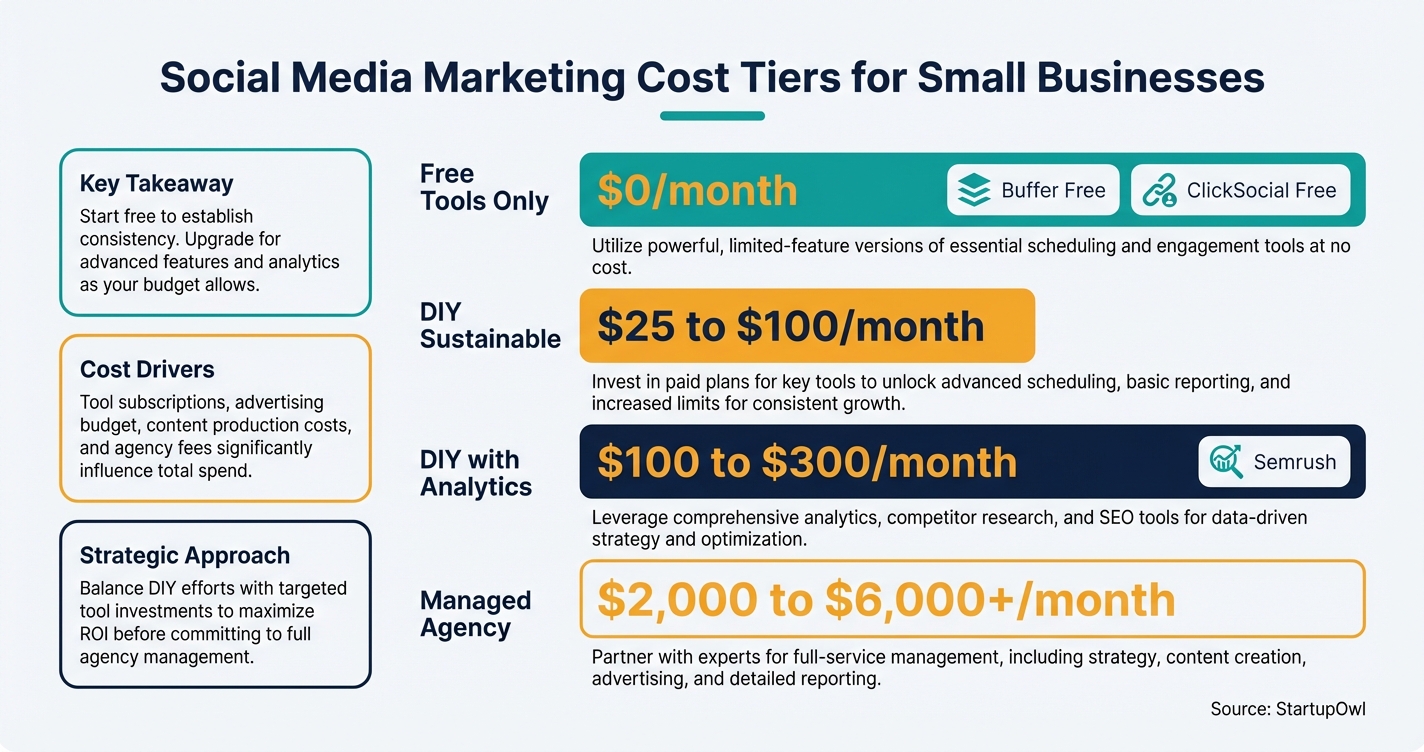
$0–$300
Est. Cost
2 hours
Timeline
5
Total Steps
About 96% of American small businesses use social media as of 2026, according to Dreamgrow's analysis of industry data. Customers who engage with your brand on social platforms spend 35 to 40% more on your products and services, per Synup's 2026 marketing statistics. The question is not whether you should be on social media. It is how to do it without burning hours or money you do not have.
The good news: you can start for $0/month with free scheduling tools and scale to a sustainable DIY stack at $50 to $150/month once you see results. This guide gives you a 5-step plan with real tool pricing, setup timelines, and the specific mistakes that waste small business owners' time and budgets.
Why Social Media Matters More Than Ever for Small Businesses
Over 5.42 billion people use social media worldwide in 2026, according to Synup. That is roughly 2 out of every 3 people on the planet. For your business, this means the audience is already there. The average user visits about 7 different platforms each month and spends over 2 hours daily scrolling.
Paid social media is now the #2 ROI-driving channel for B2B brands (behind website/SEO), and the #2 channel for B2C brands (behind email), according to the HubSpot 2026 State of Marketing Report. Even organic social (free posting) ties with email as the second most-used marketing channel across all business sizes.
If you already have a website, social media is the fastest way to drive traffic to it. If you do not have a website yet, check our comparison of Squarespace vs WordPress to get set up. Pair your social strategy with a local SEO guide to make sure people can find you both on Google and on social platforms.
5 Steps to Launch Social Media Marketing on a Small Business Budget
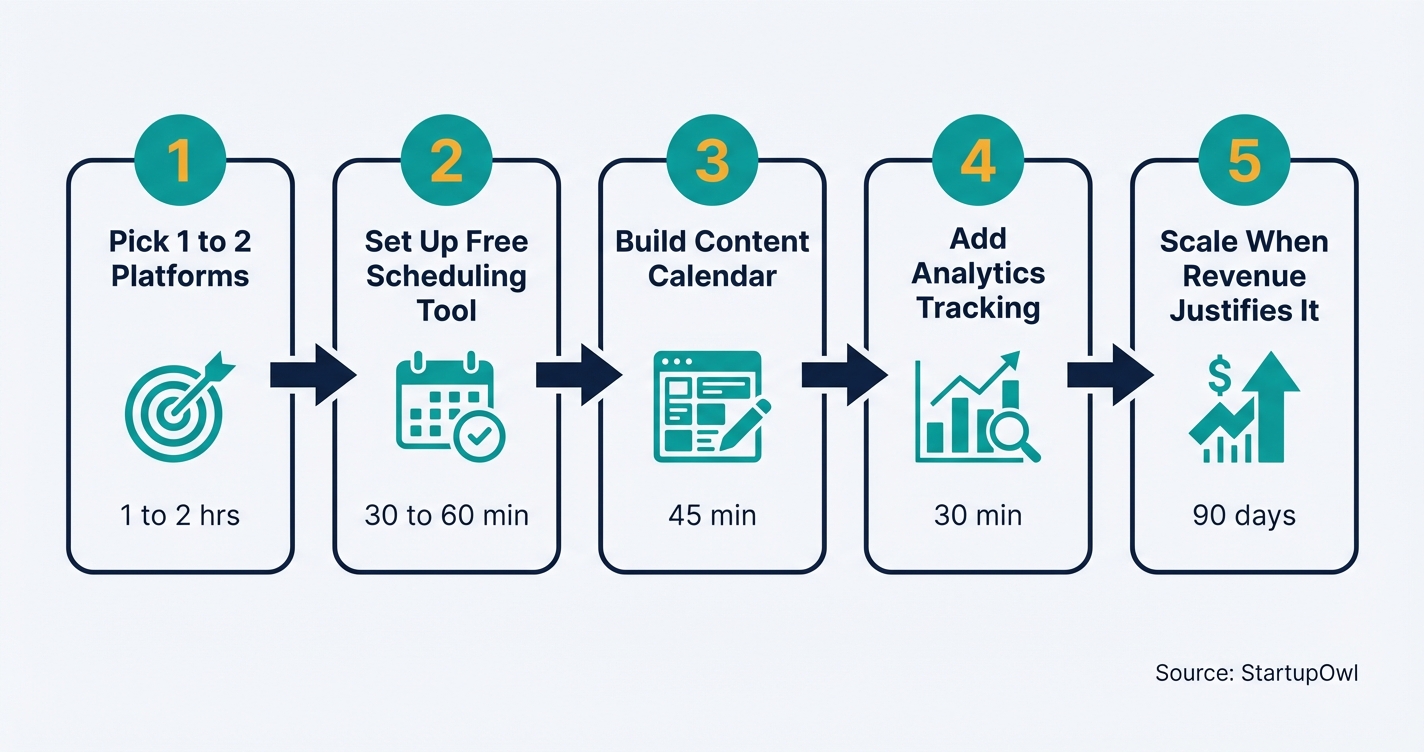
The following steps take you from zero to a working social media system. Total setup time is about 2 to 4 hours for the initial build, plus 2 to 3 hours per week for ongoing content creation and community engagement. Each step includes real costs, timelines, and tool links so you can act today.
If you want to connect this work to a broader growth plan, our free marketing plan template gives you a framework to combine social with email, SEO, and paid ads. You can also explore guerrilla marketing ideas for low-cost tactics that pair well with a social media presence.
The 5 Best Social Media Tools for Small Businesses in 2026
You do not need expensive software to run effective social media. Below are 5 tools with verified 2026 pricing, sorted from cheapest to most full-featured. Pick one scheduling tool and add analytics or CRM integrations as you grow.
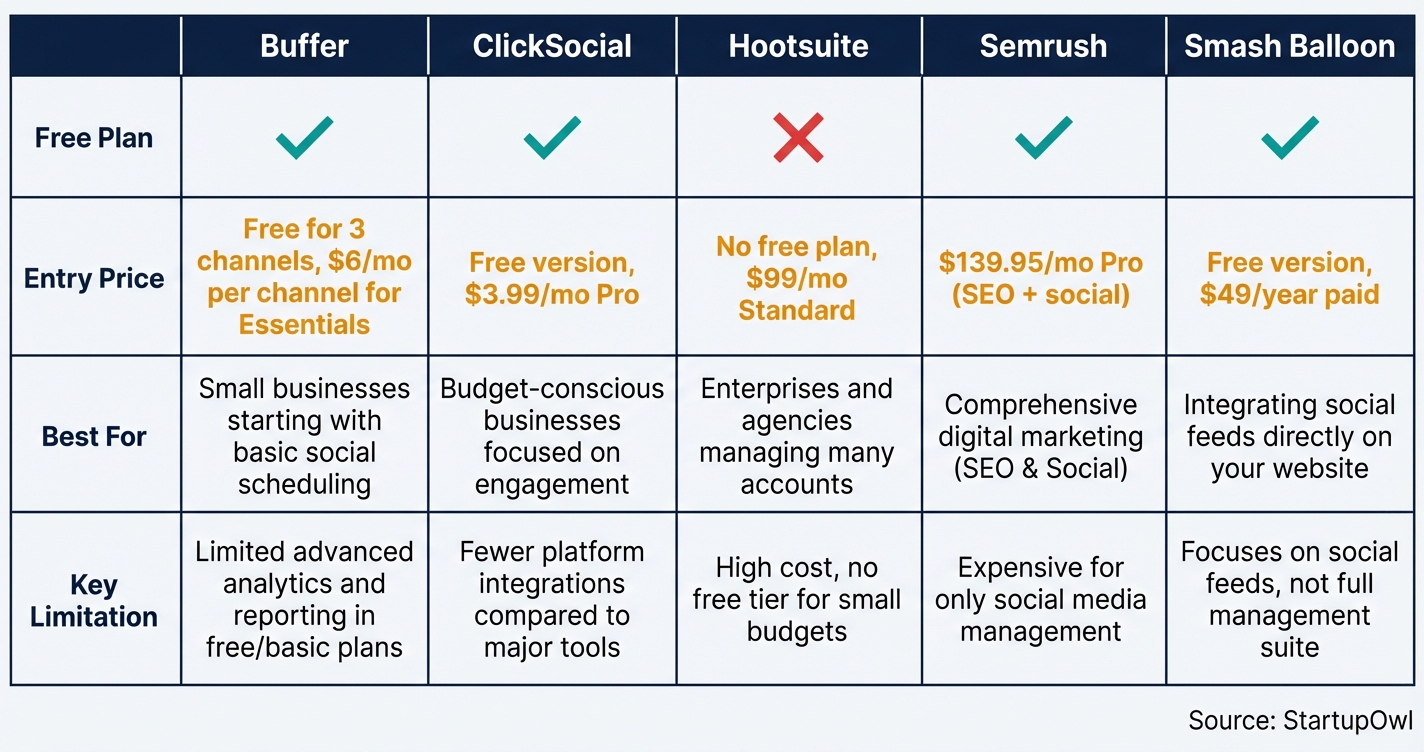
- Buffer is the simplest option. The free plan covers 3 channels with 10 scheduled posts each. The Essentials plan at $6/month per channel adds unlimited scheduling and analytics. The Team plan at $10/month per channel includes approval workflows and unlimited team members. It supports Instagram, Facebook, X, LinkedIn, Pinterest, TikTok, and YouTube.
- ClickSocial is built for WordPress users. The free version handles basic scheduling, and the Pro plan starts at $3.99/month per social account. It includes revival campaigns that automatically reshare older blog posts, plus a visual calendar for planning.
- Hootsuite is the legacy enterprise option. There is no free plan anymore. The Standard plan starts at $99/month (annual billing) for 1 user and up to 10 social accounts. It is best for teams that need a unified inbox for all comments and messages. The Advanced plan jumps to $249/month (annual).
- Semrush is an SEO-first tool with social media features. The Pro plan costs $139.95/month and includes keyword tracking, site audits, competitive analysis, and a social media poster. It is overkill if you only need scheduling, but valuable if you want SEO and social in one dashboard.
- Smash Balloon is a WordPress plugin suite that displays live Instagram, Facebook, TikTok, and YouTube feeds directly on your website. The free version works for basic feeds. Paid plans start at $49/year for a single plugin or $299/year for the All Access Bundle. It adds social proof to your site without custom code.
For a broader look at tools that support your entire marketing stack, see our guide to CRM for startups and our rundown of the best accounting software for small businesses.
Social Media Tool Pricing at a Glance (2026)
| Type / Provider | Rate | Notes |
|---|---|---|
| Buffer Free | $0/month | 3 channels, 10 posts per channel, no analytics |
| Buffer Essentials | $6/month per channel | Unlimited posts, analytics, AI assistant |
| Buffer Team | $10/month per channel | Unlimited users, approval workflows, custom permissions |
| ClickSocial Pro | $3.99/month per account | WordPress-native, revival campaigns, calendar view |
| Hootsuite Standard | $99/month (annual) | 1 user, 10 accounts, unified inbox, no free plan |
| Hootsuite Advanced | $249/month (annual) | 1 user, unlimited accounts, approval workflows |
| Semrush Pro | $139.95/month | SEO + social + competitor research, 17% off with annual billing |
| Smash Balloon (single plugin) | $49/year | Embed one social feed type on WordPress; All Access is $299/year |
| Managed agency (starter) | $2,000 to $6,000/month | Basic posting and light engagement, 1 to 3 platforms |
5 Social Media Mistakes That Cost Small Businesses Time and Money
1. Posting without a strategy or calendar. Random posting means inconsistent frequency, no content themes, and no way to measure what works. Businesses without a documented strategy report 60 to 80% lower engagement than those with one. Fix this by creating a simple 4-theme rotation and scheduling at least 2 weeks in advance.
2. Spreading across too many platforms at once. Trying to maintain Instagram, Facebook, TikTok, LinkedIn, and X simultaneously without a team leads to abandoned accounts. Algorithms penalize accounts that post sporadically. Start with 1 to 2 platforms and add a third only after you consistently post for 90 days.
3. Staying on free plans too long without a migration path. Free tools cap your analytics, scheduling depth, and team collaboration. When you finally need to upgrade, a rushed migration can lose data and disrupt your posting schedule. Plan your upgrade trigger in advance (for example, when you exceed 10 posts per week or add a second team member).
4. Ignoring ROI measurement entirely. Without tracking which posts drive website visits or purchases, you cannot justify your social media time or budget. Set up Google Analytics UTM tags on every social link from day one. Even 15 minutes of weekly review reveals patterns that improve your results.
5. Skipping audience segmentation. Generic posts to all followers produce low engagement. Even basic segmentation (different content for prospects versus existing customers, or different messaging on LinkedIn versus Instagram) increases relevance. Tools offering segmentation typically start at $35/month or more when you bundle email and social platforms.
Your Quickest Path to a Working Social Media Setup
Sign up for Buffer's free plan, connect your top 2 platforms, and use our social media content calendar to plan your first 2 weeks of posts. Total time: about 90 minutes. Total cost: $0. You can always upgrade later, but getting posts live this week matters more than picking the perfect tool.
What to Do Next
Pick your top 1 to 2 platforms today, sign up for a free scheduling tool, and block 90 minutes this week to create your first batch of posts. If you want to connect social media to a broader growth strategy, grab our free marketing plan template and read our guide on building a brand that ties your social presence to a consistent identity. You can also explore Google Ads for small business when you are ready to add paid channels, or use ChatGPT for small business to speed up caption writing and content ideation.
Step-by-Step Process
- 1
Choose 1 to 2 social platforms where your customers already spend time
You do not need to be on every platform. 78% of shoppers research social media before buying, but they cluster on specific networks based on age and interest (as of 2026, per Synup). If your audience is under 35, prioritize Instagram and TikTok. If you sell B2B services, LinkedIn is your primary channel.
Facebook still reaches the most users globally (over 3 billion monthly active users as of 2026) and delivers the highest perceived ROI among marketers at 28%, according to a Sprout Social analysis of Statista data. Start where your customers already are, and expand only after you consistently post on your first platform for 90 days.
Tips
- Search your business name on each platform to see where people already mention you.
- Look at where your top 3 competitors post most often and which posts get the most comments.
Common Mistakes
- Signing up for 5 platforms at once and abandoning most of them within 2 months.
- Choosing a platform based on personal preference instead of where customers actually are.
- 2
Set up a free scheduling tool to automate your posts
A scheduling tool saves you from logging into each platform daily. Buffer's free plan supports up to 3 channels with 10 scheduled posts per channel (as of 2026). That is enough for a brand-new business posting 2 to 3 times per week on each platform.
If you run a WordPress site, ClickSocial integrates directly into your dashboard and offers a free version with basic scheduling, plus a paid Pro plan starting at $3.99/month per social account. Connect your accounts, set your posting times, and batch-create a week of content in one sitting.
Tips
- Use Buffer's free plan for 3 channels, then upgrade to Essentials at $6/month per channel only when you need unlimited scheduling and analytics.
- Batch your content creation into one weekly session of 60 to 90 minutes to stay consistent.
Common Mistakes
- Paying for a tool before confirming you can post consistently for 30 days on free plans.
- Skipping the content calendar setup and returning to random, day-of posting.
- 3
Build a simple content calendar with 3 to 4 post themes
Random posting without a plan leads to inconsistent engagement. Businesses with a documented content strategy see 60 to 80% higher engagement than those that wing it. Pick 3 to 4 recurring themes (for example, customer tips, behind-the-scenes, product highlights, and user-generated content) and rotate through them weekly.
You can use our free social media content calendar to map out your first month. Aim for 3 to 5 posts per week on your primary platform. According to HubSpot's 2026 State of Marketing data, short-form video is the top content format marketers plan to invest in, so include at least one Reel or TikTok per week if your audience is on those platforms.
Tips
- User-generated content drives 28% more engagement than branded content (Sprinklr, 2026), so ask customers to tag you.
- Schedule your posts for the same days and times each week so followers know when to expect you.
Common Mistakes
- Posting only promotional content (follow the 80/20 rule: 80% value, 20% promotion).
- Not batching content creation, which leads to missed posting days.
- 4
Add analytics tracking so you know what actually works
Without tracking, you cannot tell which posts drive visits, leads, or sales. Buffer's Essentials plan at $6/month per channel unlocks analytics beyond the 30-day window available on free plans (as of 2026, per Buffer). If you need deeper competitive research plus SEO data, Semrush starts at $139.95/month for the Pro plan (with a 17% discount on annual billing).
At minimum, track these 4 numbers weekly: engagement rate (likes + comments / reach), link clicks, follower growth, and website traffic from social (use Google Analytics UTM tags). Once you can tie social posts to actual website visits or purchases, you can justify scaling your budget.
$0 (native platform analytics) to $140/month (Semrush Pro) 30 minutes for initial setup, 15 minutes per week to review analytics.google.comTips
- Use free UTM parameters on every link you share on social so Google Analytics shows exactly which posts drive traffic.
- Review analytics weekly, not daily, to spot real trends instead of reacting to noise.
Common Mistakes
- Tracking only vanity metrics (follower count) while ignoring link clicks and conversions.
- Not setting up Google Analytics goals, so you cannot tie social visits to revenue.
- 5
Scale your stack when revenue justifies the spend
Once you consistently post for 90 days and see traffic or sales results, consider upgrading. A sustainable DIY stack for a small business with 2 to 3 team members typically runs $50 to $200/month. That might look like Buffer Essentials for 3 channels ($18/month), a basic email and CRM tool ($15 to $35/month), and ClickSocial Pro ($3.99/month).
If your content production exceeds what your team can handle, managed agency services start at $2,000 to $6,000/month for basic posting and light engagement on a few channels. That jump only makes sense when your monthly revenue exceeds $20,000 and your time is better spent elsewhere. Before outsourcing, write a small business marketing plan so any agency has clear goals to work toward.
$50 to $200/month (DIY) or $2,000+/month (agency) Evaluate at 90 days, then quarterly Small Business Marketing PlanTips
- Lock in annual billing on Buffer and Semrush to save 17 to 20% versus monthly payments.
- Hire a freelance content creator ($500 to $1,500/month) before jumping to a full agency.
Common Mistakes
- Hiring an agency before you have a documented strategy and clear KPIs.
- Upgrading tools because of feature FOMO rather than a specific bottleneck you have hit.
Cost Breakdown
| Item | Cost Range | Notes |
|---|---|---|
| Buffer Free (3 channels, 10 posts each) | $0/month | Best for solo founders testing the waters. Upgrade to Essentials at $6/month per channel for unlimited posts. |
| Buffer Essentials (per channel, unlimited posts + analytics) | $6/month per channel | 3 channels = $18/month. Annual billing saves about 20%. |
| Buffer Team (per channel, team collaboration) | $10/month per channel | Adds approval workflows, unlimited team members, and custom permissions. |
| ClickSocial Pro (WordPress scheduling plugin) | $3.99/month per social account | Ideal for WordPress users. Free version available for basic scheduling. |
| Hootsuite Standard (10 social accounts, 1 user) | $99/month (annual) to $149/month (monthly) | No free plan. Price is per user, so costs scale quickly for teams. |
| Semrush Pro (SEO + social + competitor research) | $139.95/month (monthly) or ~$116/month (annual) | Overkill for social only. Best if you also need SEO keyword tracking and site audits. |
| Managed social media agency (starter tier) | $2,000 to $6,000/month | Covers basic posting and light engagement on 1 to 3 platforms. |
Frequently Asked Questions
You can start for $0/month using free plans from Buffer (3 channels) or ClickSocial. A sustainable DIY setup with scheduling, analytics, and a basic CRM typically runs $50 to $150/month. Outsourcing to a managed agency starts at $2,000 to $6,000/month for basic posting on a few platforms.
Facebook still delivers the highest perceived ROI among marketers (28% rank it first, per Statista/Sprout Social 2026 data). Instagram is strongest for product discovery, with 62.3% of users using it for brand research. If your audience is under 35, TikTok is a close second. Start where your customers already are, not where you personally spend time.
Hootsuite dropped its free plan and now starts at $99/month (annual billing) for 1 user and 10 accounts. For most small businesses, Buffer's Essentials plan at $6/month per channel offers enough scheduling and analytics at a fraction of the cost. Hootsuite makes sense only if you need a unified inbox for managing comments across many accounts or team approval workflows.
Aim for 3 to 5 posts per week on your primary platform. Consistency matters more than volume. Posting 3 times per week for 6 months beats posting daily for 3 weeks and then going silent. Use a scheduling tool to batch your content and maintain a steady rhythm.
Yes. About 94% of marketers plan to use AI in content creation in 2026, per the HubSpot State of Marketing Report. Buffer's paid plans include an AI assistant for caption ideas. You can also use ChatGPT to draft post ideas, then edit for your brand voice. AI works best for first drafts and brainstorming, not final copy.
The average return ranges from $3 to $5 for every $1 spent, according to recent industry studies compiled by iPromote. Businesses that allocate more than 25% of their marketing budget to social report 32% faster revenue growth year-over-year. The key is tracking results with UTM links and conversion goals, not just follower counts.
Some links on this page are affiliate links. If you sign up for a service through them, we may earn a commission at no extra cost to you. This does not influence our rankings.
Sources & References
- Buffer Pricing (Official)
- ClickSocial Pricing (Official)
- Hootsuite Plans and Pricing (Official)
- Semrush Pricing (Official)
- Smash Balloon (Official)
- HubSpot 2026 Marketing Statistics
- Synup Social Media Marketing Statistics 2026
- Sprout Social: Social Media ROI Statistics 2026
- Sprinklr: Key Social Media Marketing Statistics 2026
- Dreamgrow: 130+ Social Media Marketing Statistics 2026
- iPromote: Social Media Marketing Statistics and Results Guide
- SQ Magazine: Social Media Marketing Statistics 2026
- G2: Buffer Pricing 2026
- Hootsuite Pricing Guide 2026 (NapoleonCat)
About the Author
Editor, StartupOwl
Eliot leads StartupOwl's state data research. He maintains the site's fifty state records of LLC filing fees, annual costs, processing times, and small business grant programs, checking each figure against the state office that publishes it and logging the date it was verified. Based in New Jersey, he has spent his working life in and around small businesses, and he writes for the founder who wants the real number rather than the advertised one. Every figure under his byline traces to a named source, and when a state proves a number wrong, the correction is published, not buried.
Was this article helpful?
Questions about Social Media Marketing for Small Business
No comments yet. Ask the first question and a member of our team will answer.
Leave a comment