

Zoho Mail Review 2026
Custom domain email starting at $1/month with strong encryption, but expect a learning curve and inconsistent support.

Our Verdict
3.9
Based on our independent review
Ease of Use
3.4/5
Pricing & Value
4.7/5
Features & Add-ons
3.8/5
Customer Support
3.2/5
Setup Speed
4.5/5
Pricing Transparency
3.5/5
Privacy & Data
4.5/5
Best For: Cost-conscious businesses seeking a secure, ad-free email with custom domains.
True Year 1 Cost: $12
Year 2+ (renewal): $12
Top Advantages
- Mail Lite runs $1 per user per month billed annually, which is $12 a year for custom domain email. The mainstream suites cost far more. Their current prices sit on the comparison cards further down this page.
- Your inbox stays private. Zoho does not scan email for ad targeting. It encrypts data at rest with AES-256 and holds ISO 27001 and SOC 2 Type 2 certifications.
- The Forever Free plan supports up to 5 users with custom domain email at no cost, though it is region-restricted and lacks IMAP/POP.
$1/mo · Cancel anytime
In This Article
- Our Verdict
- How We Tested
- Overview
- True Cost
- Pricing Plans
- Pros & Cons
- Upsell & Hidden Fees
- Customer Reviews
- Who It's For
- Setting Up Your Custom Domain
- The Webmail and App Experience
- IMAP, POP, and Third-Party Client Access
- What each plan costs a five person team
- Security and Encryption
- Customer Support Reality
- Zoho Ecosystem Integration
- Final Verdict
- FAQ
How We Tested Zoho Mail
StartupOwl runs its own press mailbox on Zoho Mail Lite, set up in July 2026 on one of our subdomains, so the setup and IMAP notes below come from that account. We did not file a support ticket for this review. On 29 September 2026 we read Zoho's US dollar price list, its plan comparison table, its security and compliance pages, and its App Store and Google Play listings, and we checked Zoho's Trustpilot profile. The BBB status comes from our earlier read of that profile.
Read our full review methodologyZoho Mail Overview
What Zoho Mail Is
Zoho Mail is business email hosting from Zoho Corporation, an Indian software company founded in 1996. It is headquartered in Chennai and runs its US office in Austin, Texas. It puts your email on your own domain, not a generic gmail.com or outlook.com address. You also get a calendar, contacts, tasks, and a team feature called Streams. Mail is one piece of a larger suite. Zoho sells more than 50 apps across CRM, finance, and project management.
Why Founders Choose It
Price is the reason. Zoho Mail Lite costs $1 per user per month on the annual plan. A five person team pays $60 a year. The mainstream business suites we review start several times higher, and the cards on this page carry their live prices. Zoho also promises an ad-free inbox on every plan, including the free one.
The Privacy Angle
Zoho encrypts stored data with 256-bit AES and requires TLS 1.2 or 1.3 on every connection. It holds ISO 27001 and SOC 2 Type 2 certifications. The business runs on subscriptions, not ads, so your email is not mined for ad targeting. PGP encryption comes with every paid plan. S/MIME comes only with Mail Premium and Workplace Professional.
What Should Concern You
Zoho is currently Not Rated by the Better Business Bureau, which has flagged a pattern of complaints and notes the company is still working through previously closed ones. Zoho is not BBB-accredited. Its Trustpilot profile covers every Zoho app, not just Mail, and scores 3.9 from about 6,100 reviews. The most common negative theme across platforms is customer service. If something breaks, you may wait.
What Zoho Mail Actually Costs
True Cost Analysis
Starting Monthly Price
$1
Annual Plan
$12
If paid annually
Both figures cover one user on Mail Lite, billed annually at $12 a year. A $0 Forever Free plan exists. It blocks IMAP and POP, and it is limited to some regions. That makes Mail Lite the real entry point for a solo founder who wants Outlook or Apple Mail.
Zoho Mail Pricing Plans
See live pricing →Zoho Mail Pros and Cons
Pros
- Mail Lite runs $1 per user per month billed annually, which is $12 a year for custom domain email. The mainstream suites cost far more. Their current prices sit on the comparison cards further down this page.
- Your inbox stays private. Zoho does not scan email for ad targeting. It encrypts data at rest with AES-256 and holds ISO 27001 and SOC 2 Type 2 certifications.
- The Forever Free plan supports up to 5 users with custom domain email at no cost, though it is region-restricted and lacks IMAP/POP.
- Deep integration with more than 50 Zoho apps means your email, CRM, invoicing, and project management can run from one vendor with one login.
Cons
- The BBB lists Zoho as Not Rated and has flagged a pattern of complaints, most tied to billing disputes, cancellation friction, and slow support responses.
- The free plan blocks IMAP/POP access, forcing anyone who wants to use Outlook or Apple Mail onto the paid Lite tier.
- Search becomes noticeably slow on mailboxes over 50GB, and the spam filter misclassifies legitimate emails often enough that users mention it repeatedly in reviews.
Upsell Pressure & Hidden Fees
Transparency Check, We Documented Every Upsell
Zoho puts a Best Value badge on its Workplace Standard bundle at $3 per user per month, placed first on the price grid ahead of the standalone Mail Lite plan. Mail Lite and Mail Premium are sold on yearly subscriptions only. The two Workplace plans can also be paid monthly, at $4 and $7 per user, which costs a third more on Standard. Zoho also offers to register a domain for you if you do not have one. The Forever Free plan blocks IMAP, POP and ActiveSync and is offered only in some data centers. So most founders who want Outlook or Apple Mail end up on the $1 Lite tier.
Pricing Transparency Score
3.5/5
5 = Fully transparent pricing · 1 = Heavy upsell pressure
What Real Customers Say
Reddit / Community Sentiment
Community threads treat Zoho Mail as the budget pick for founders who care about privacy. The $0 Forever Free tier and the ad-free inbox draw the most praise. The complaints are consistent too. Setup confuses first-time admins, support replies run slow, and search drags on mailboxes past 50GB.
Is Zoho Mail Right for You?
Best For These Founders
Bootstrapped Startups
Founders who want custom domain email for $12 a year rather than a monthly suite bill.
Privacy-Conscious Professionals
Users who prioritize end-to-end encryption and a strictly ad-free inbox over flashy features.
Zoho Ecosystem Users
Teams already on Zoho CRM or Projects who want their mail behind the same login.
Consider Alternatives If…
Your organization handles massive mailbox sizes, which can cause the search functionality to lag.
You require immediate, highly responsive phone or live chat support for critical technical issues.
Your team relies heavily on the real-time collaboration features found in Google Workspace or Microsoft 365.
Setting Up Your Custom Domain
We set up our own Mail Lite mailbox on a subdomain in July 2026. Zoho's wizard hands you a verification record, then the MX, SPF and DKIM records for your domain. Take the values from the wizard, not from a guide. Our SPF include turned out to be zohomail.com, not zoho.com as an older guide said, and the hostnames depend on which Zoho data center your account lands in. If you add a subdomain, remember your DNS host may need the subdomain added to every record name. If you have changed DNS before, it is straightforward. If you have not, the admin panel throws a lot at you at once.
The Webmail and App Experience
Zoho webmail is clean and ad-free. Folders, labels, color-coded tags, and filters all work as expected. Streams lets your team comment on a thread internally instead of forwarding it around. The mobile apps rate 4.6 on the App Store and 4.5 on Google Play, and both handle reading and replying well. One genuine annoyance, search gets sluggish once a mailbox passes roughly 50GB, which plenty of users confirm.
IMAP, POP, and Third-Party Client Access
IMAP and POP are the sticking point. The Forever Free plan blocks IMAP, POP and ActiveSync, so you are locked into Zoho's own webmail and mobile apps. Mail Lite at $1/month includes IMAP, POP, and SMTP, and from there you can connect Outlook, Apple Mail, Thunderbird, or any client. One catch we hit on our own account. IMAP was denied by default at the organization level, and the error read like a plan limit. The fix sits in the admin console under Mail Settings, Email Policy, Access Restrictions, where an admin creates a rule that permits IMAP and attaches it to the user's policy.
What each plan costs a five person team
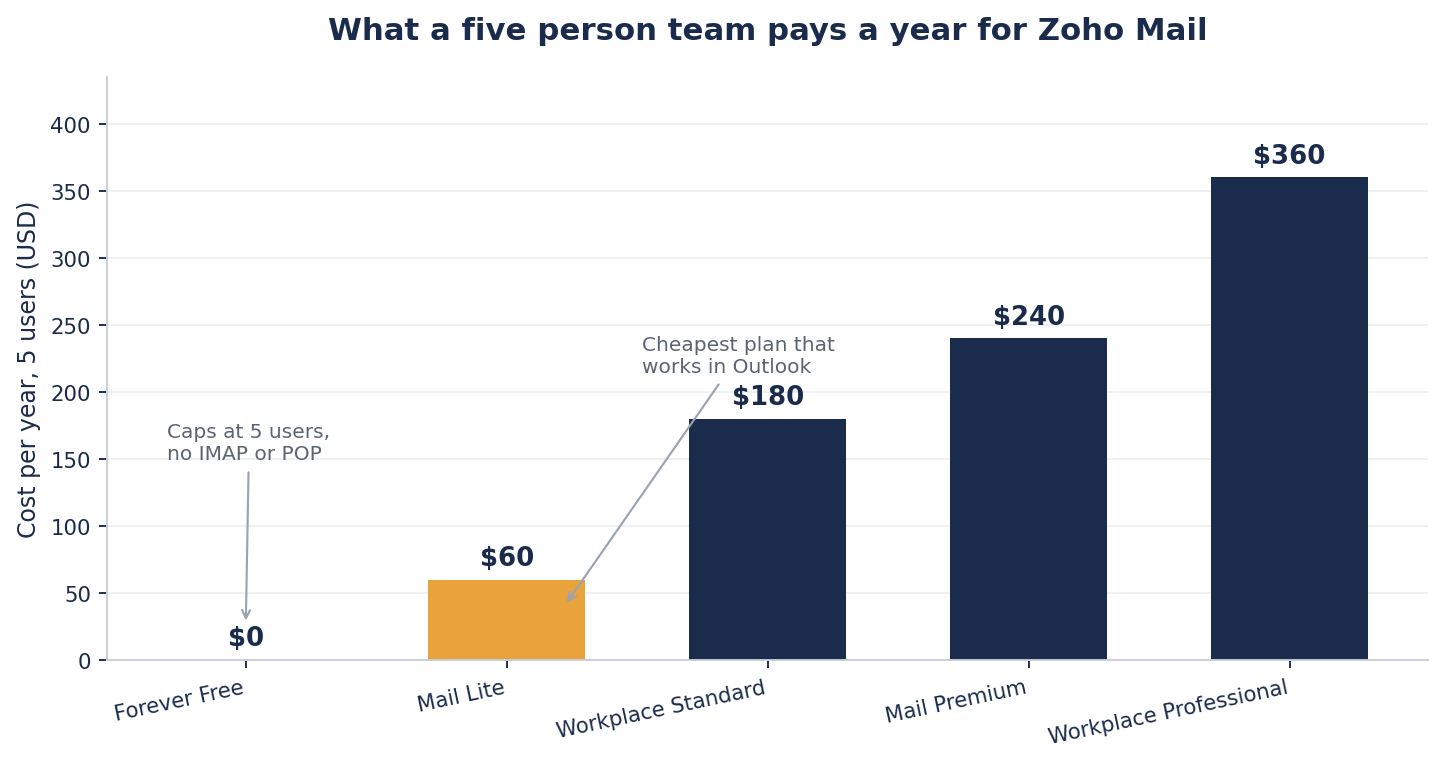
Zoho prices per user per month. The two Mail plans are billed annually only, so read them as a yearly bill for the whole team. Mail Lite costs $60 a year for five users, or $75 if you pick the 10 GB version at $1.25 per user. Workplace Standard is $180, Mail Premium is $240, and Workplace Professional is $360 on annual billing. The two Workplace plans can be paid monthly instead, at $4 and $7 per user, which comes to $240 and $420 a year for five people. The Forever Free plan is the catch. It costs nothing and caps at five users, which sounds generous until you need IMAP.
Security and Encryption
Zoho requires TLS 1.2 or 1.3 on every connection, including web, mobile apps and IMAP, POP and SMTP clients, and it encrypts stored data with 256-bit AES. PGP encryption is on every paid plan. S/MIME, for digitally signed and encrypted messages, comes only with Mail Premium and Workplace Professional. Two-factor authentication is available, and admin audit logs record changes in the control panel. For a $1/month product, that is a strong security stack.
Customer Support Reality
Zoho lists 24x7 support by email, chat, and phone on all four paid plans. We did not test that promise with a ticket for this review. The BBB, which lists Zoho as Not Rated, has flagged a pattern of complaints, many describing tickets closed before the issue was resolved. Treat it as the weakest part of the product, and do not buy Zoho on the strength of its support promise.
Zoho Ecosystem Integration
Mail plugs straight into Zoho CRM, Projects, Books and WorkDrive if you already run them, so you can act on a record without leaving your inbox. Outside Zoho, the integrations page lists extensions for Salesforce and Asana, and Zapier connects Zoho Mail to more than 750 other apps. Those outside links are thinner than the native Zoho ones. A team whose stack runs on Google or Microsoft tools will still find those suites fit more naturally.
Final Verdict
Zoho Mail is the cheapest way to get a professional custom-domain email that does not scan your inbox for ads. At $1/user/month for Mail Lite (or $0 on the restricted free tier), it undercuts Google Workspace and Microsoft 365 by a wide margin. The tradeoffs are real. The admin panel is dense. The spam filter lets things through. Support is slow, too. Zoho is currently Not Rated by the BBB, which flags a pattern of complaints, and its company-wide Trustpilot score is 3.9 from about 6,100 reviews. We like it for budget-focused solo founders and small teams already in the Zoho world. We do not recommend it if you need fast phone support or heavy real-time collaboration.
By Eliot Reynolds, Editor, StartupOwl
Frequently Asked Questions
Affiliate relationships never influence our ratings or recommendations. Read our editorial policy →
About the Author
Editor, StartupOwl
Eliot leads StartupOwl's state data research. He maintains the site's fifty state records of LLC filing fees, annual costs, processing times, and small business grant programs, checking each figure against the state office that publishes it and logging the date it was verified. Based in New Jersey, he has spent his working life in and around small businesses, and he writes for the founder who wants the real number rather than the advertised one. Every figure under his byline traces to a named source, and when a state proves a number wrong, the correction is published, not buried.
Was this article helpful?


Questions about Zoho Mail
No comments yet. Ask the first question and a member of our team will answer.
Leave a comment