
20 Small Business Marketing Ideas That Actually Work in 2026
20 vetted small business marketing ideas with the why and the how for each, free and local first, paid last. No filler, every idea earns its place.

$0–$1,400
Est. Cost
30 days
Timeline
6
Total Steps
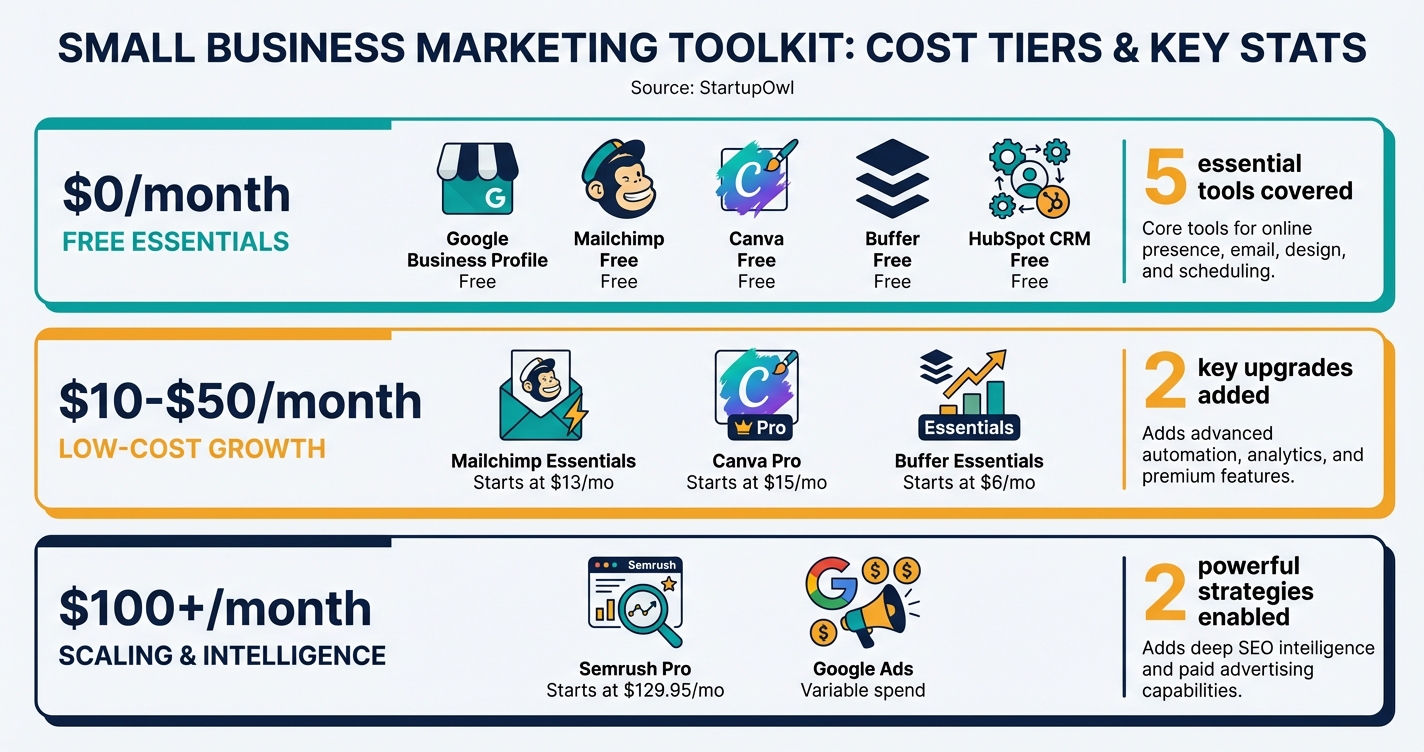
Small businesses spend between $50 and $1,400/month on marketing tools, depending on list size and business maturity. But the smartest founders start with free tools and upgrade only when the numbers justify it. This guide gives you 20 vetted marketing ideas organized by cost, effort, and expected timeline, with verified pricing for every tool mentioned.
You will find tactics for email, social media, SEO, local marketing, content, partnerships, and paid advertising. Each one includes a real price, a setup estimate, and the tool you need to execute it. No vague advice, no "it depends" answers.
Whether you are pre-revenue and spending $0/month or ready to invest $200+/month in growth, there is a starting point here for you. Use our free marketing plan template to pick your first 5 tactics and start executing today.
Why Most Small Business Marketing Fails (and What Actually Works)
The most common reason marketing fails for small businesses is not a lack of ideas. It is doing too many things at once with no system for measuring results. You do not need 15 tools and 8 social channels. You need 3 to 5 tactics, executed consistently, with a clear way to track what is working.
The marketing ideas below are organized into free tactics (your first week), low-cost tactics ($10 to $50/month), and growth-stage tactics ($100+/month). Start at the top. Move down the list as your revenue and team grow. Every recommendation links to a real tool with verified pricing from 2026 or 2026.
If you are just getting started, read our small business marketing plan guide first for the strategic framework. Then come back here to fill in the tactical details. If you are weighing website platforms, check our Squarespace vs WordPress comparison before building your site.
The 20 Marketing Ideas That Made the Cut
These 20 made the cut from a longer list. Every idea earns its place. For each one you get why it works and exactly how to start. Free and local ideas come first, paid experiments last, once something organic already converts.
Free and Local, Ideas 1 to 6
1. Claim and actually work your Google Business Profile. It is free. For "near me" searches it is your website, and most owners set it up once and abandon it. Complete every field, add 10 or more real photos, post one update a week, and seed the Q&A section with your five most asked phone questions. The weekly attention is the whole idea. An abandoned profile signals an abandoned business.
2. Build a same day review engine. Reviews are ranking fuel and social proof at the same time. Ask every happy customer for a review the same day, by text, with the direct link, because conversion collapses after 48 hours. Reply to every review within the week, including the angry ones. Buyers read your responses more carefully than the reviews themselves. Ten fresh reviews a quarter moves the map ranking in most towns.
3. Fill out Bing Places and Apple Maps. Ten minutes each. Every iPhone defaults to Apple Maps, and Bing's index now feeds AI assistants that answer "best plumber near me" questions. Your competitors stopped at Google, which leaves the other two maps nearly empty in most local categories. Empty maps are cheap to win.
4. Become the useful neighbor on Nextdoor and one community group. The rule is simple. Answer questions in your trade for a month before any pitch. Neighbors recommending you carries more weight than any ad you could buy. When leads start calls with "someone in the group mentioned you," this idea is paying.
5. Teach something monthly. A 45 minute workshop at the library, the chamber, or your own shop. Real skill, no pitch, and a signup sheet for your email list. Ten people who met you in person beat a thousand strangers who scrolled past. The workshop also hands you idea 10, every session is a case study waiting to happen.
6. Run a two sided referral program. Give the referrer $20 and the friend $20 off, simple beats clever. Print it on receipts, say it out loud at checkout, and hand the link over at the exact moment a customer praises you. Give your genuine superfans a personal code and a small cut. Referred customers close faster and haggle less.
Search and Content, Ideas 7 to 11
7. Answer your phone questions in public. Write down the ten questions customers ask most, then publish one honest page per question with the answer in the first paragraph. This is how small sites out rank big ones. The big site wrote about your topic in general. You answered the exact question.
8. Mine Search Console for page two rankings. Filter for queries ranked 11 to 20. Those pages need one push each, fresher facts, a better example, a short FAQ. Thirty minutes a month, and it is the cheapest traffic you will ever earn because Google already almost trusts you.
9. Build one real page per service area. Your homepage cannot rank in every suburb. A city page with local proof, jobs you did there, photos from that street, the local permit quirk, beats any find and replace template. Write five real ones before considering more.
10. Publish case studies with numbers. Before, after, cost, timeline, and one customer quote. One per month. Sales calls get shorter when the case study already did the arguing. Skip the adjectives, the numbers are the persuasion.
11. Pitch yourself to local media and niche podcasts. They need material weekly. Send one short pitch a month, a specific story angle, not a bio. You inherit their audience for an hour and keep the backlink forever.
Email and Follow Up, Ideas 12 to 14
12. Set up a three email welcome sequence. Who you are, what to expect, one clear offer. It greets every subscriber at the moment of peak interest and then runs forever at no cost. This is the highest leverage hour in email marketing.
13. Send one useful newsletter a month, no more. A tip worth stealing, one story, one offer. Useful beats frequent. Consistency builds the habit of opening. Your list is the only audience an algorithm change cannot take away from you.
14. Chase every quote that went quiet. Half your lost jobs die of silence, not price. One friendly follow up a week after the estimate, a second at three weeks, automated so memory is not required. Nothing in your marketing returns more per minute than this.
Video and Founder Posts, Ideas 15 and 16
15. Film the work, not an ad. Sixty second phone videos of the process, the before and after, the mess in the middle. No script, no editing. For trades and makers, process video outsells polished ads because it proves competence instead of claiming it.
16. Post as the founder, not the logo. One post a week on the platform where your buyers are, lessons, mistakes, small wins. People buy from people. Founder posts travel further than brand posts on every network that matters.
Partnerships, Ideas 17 and 18
17. Formalize referral swaps with adjacent businesses. A plumber and an electrician share customers without competing. Pick your three closest neighbors in the customer journey, agree one tracked referral a month each, review quarterly. Their earned trust becomes your pipeline.
18. Claim your suppliers' co-op marketing money. Manufacturers and distributors reserve budgets to fund local partners' marketing, and most of it goes unclaimed because nobody asks. Ask every supplier one question, "do you offer co-op funds." The yes pays for ideas 19 and 20.
Paid, Carefully, Ideas 19 and 20
19. Retarget your own visitors at $10 a day. They already know you. People who visited are the cheapest audience in advertising, and you built that audience for free. One offer, one small budget, judged by cost per lead against your margin. Kill it or scale it after 30 days.
20. Sponsor a small newsletter your buyers actually read. Local or trade, small lists convert better than big ones because trust is concentrated. One clear offer, one link, often for less than a day of search ads. Ask for the open rate before paying.
How to Build Your Marketing Stack Step by Step
The six steps below walk you through building a complete small business marketing system from scratch. Total cost for the starter stack is $0 to $43/month, and you can set everything up in a single weekend.
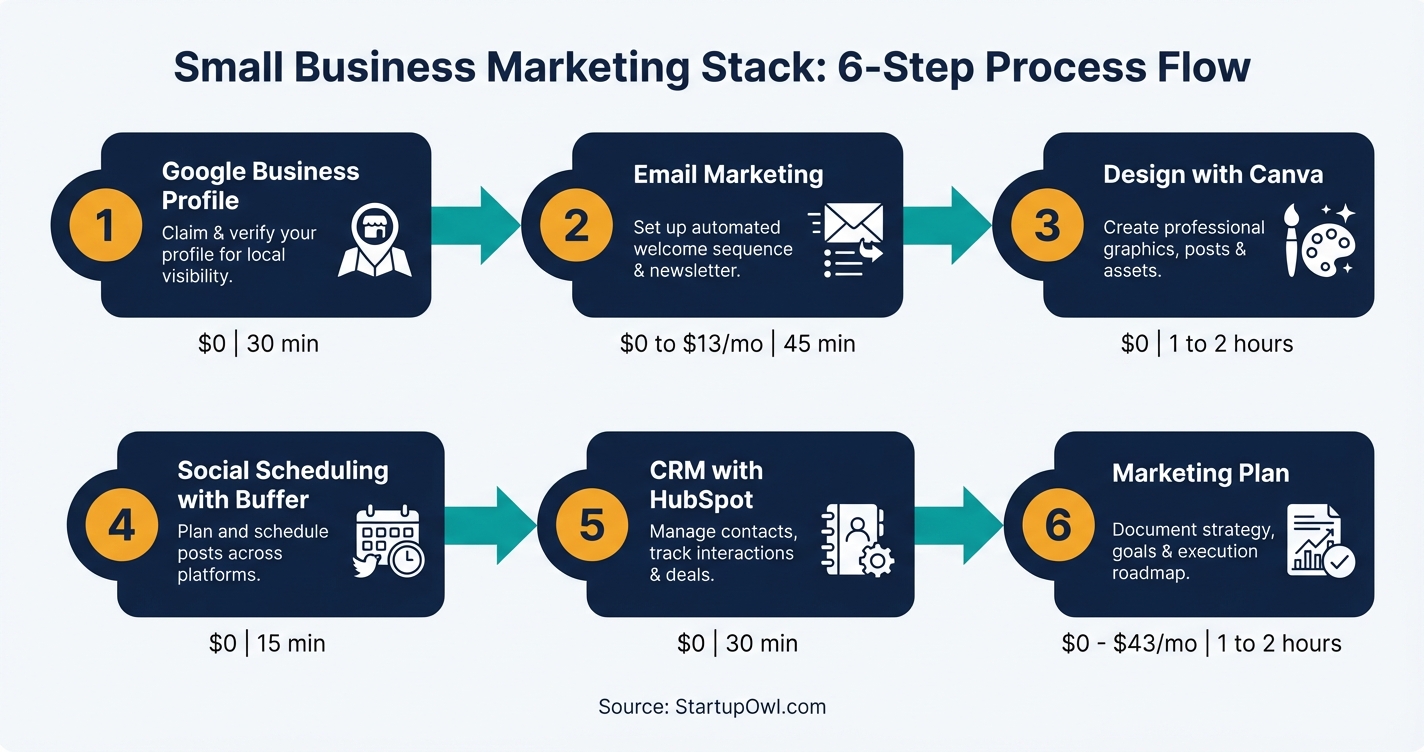
Step 1: Claim your Google Business Profile. This is the single fastest way to appear in local search results. Google Business Profile is 100% free and takes about 30 minutes to set up. Fill out every field, add at least 10 photos, and post weekly updates. Check our local SEO guide for the full optimization playbook.
Step 2: Set up email marketing. Mailchimp's free plan includes up to 250 contacts and 500 email sends/month as of January 2026. The Essentials plan starts at $13/month for 500 contacts with a 10x monthly send limit. Import your contacts, create a signup form, and send your first campaign within the first week.
Step 3: Create branded graphics. Canva's free plan includes 2 million+ templates, basic AI tools (50 uses), and 5 GB of storage. Canva Pro at $12.99/month adds background removal, brand kits, and Magic Resize. Most new businesses get by on the free plan for months.
Step 4: Schedule your social posts. Buffer's free plan covers 3 channels with 10 posts each. The Essentials plan costs $6/month per channel. Pair Buffer with our social media content calendar to batch-create a month of content in one sitting.
Step 5: Install a free CRM. HubSpot's free CRM supports 1,000 contacts, 2 users, and 2,000 marketing emails/month. It also includes forms, landing pages, and live chat at no cost. See our CRM for startups guide for alternatives if you need more contacts on a free plan.
Step 6: Write your marketing plan. Use our free marketing plan template to pick 5 tactics, set measurable goals, and commit to 90 days of consistent execution before adding anything new.
What a Starter Marketing Stack Costs in 2026
| Type / Provider | Rate | Notes |
|---|---|---|
| Google Business Profile | $0/month | Free forever. Essential for local visibility on Search and Maps. |
| Mailchimp Free Plan | $0/month | 250 contacts, 500 emails/month. Upgrade to Essentials ($13/month) at 251+ contacts. |
| Canva Free Plan | $0/month | 2M+ templates, 5 GB storage. Pro at $12.99/month for brand kit and background removal. |
| Buffer Free Plan | $0/month | 3 channels, 10 scheduled posts each. Essentials at $6/channel/month for unlimited posts. |
| HubSpot CRM Free | $0/month | 1,000 contacts, 2 users, 2,000 emails/month. Starter at $20/month for automation. |
| Google Search Console | $0/month | Free SEO monitoring. Track search performance, indexing, and core web vitals. |
| Semrush Pro (optional) | $139.95/month | Keyword research, competitor analysis, site audits. 17% off with annual billing ($117.33/month). |
The 5 Best Marketing Tools for Small Businesses in 2026
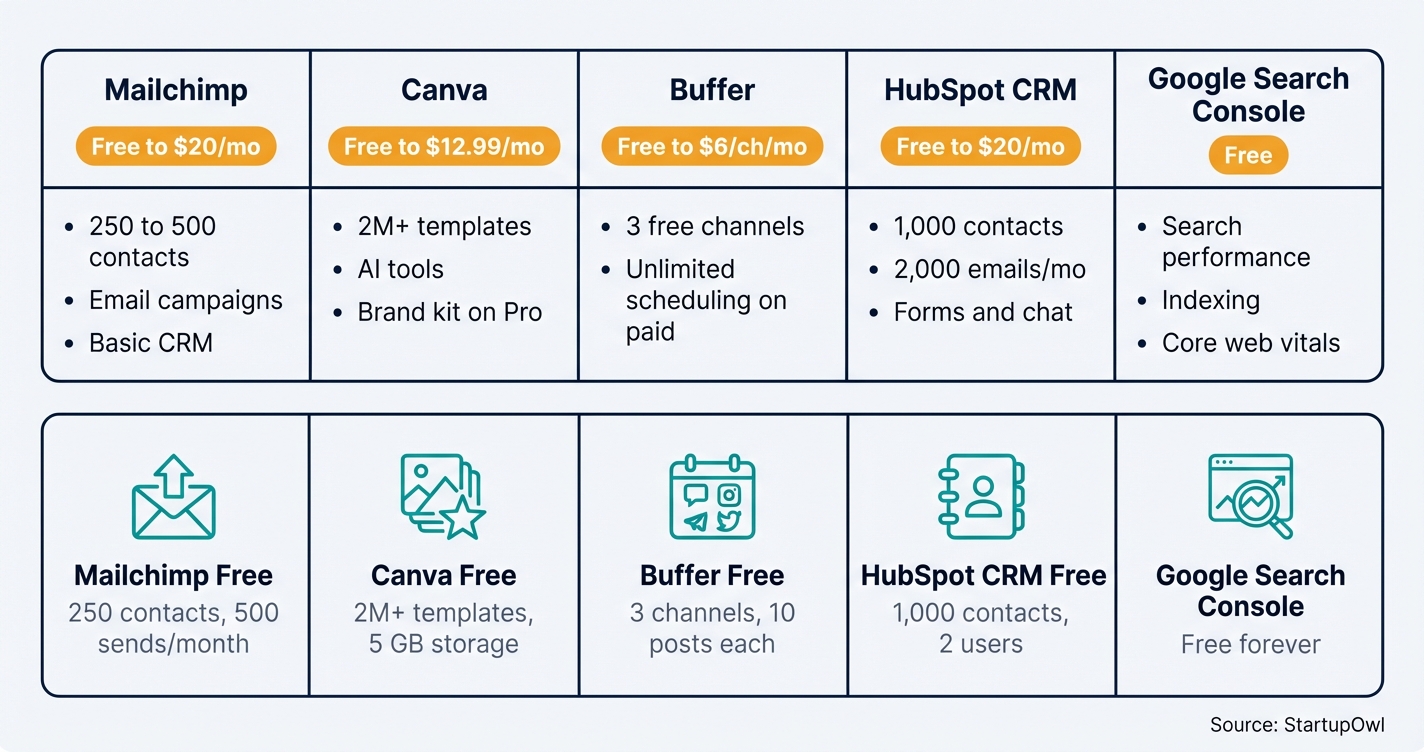
You do not need a dozen tools to market your business. These five cover email, design, social, CRM, and SEO for $0 to $43/month on free plans. Upgrade selectively as you grow.
1. Mailchimp (Email Marketing)
Mailchimp offers 4 tiers: Free ($0 for 250 contacts), Essentials ($13/month for 500 contacts), Standard ($20/month for 500 contacts with automation), and Premium ($350/month for 10,000+ contacts). The free plan no longer includes automation or A/B testing as of 2026. The Essentials plan supports up to 50,000 contacts and a 10x monthly send limit. Annual billing saves about 15%, and nonprofits get an additional 15% discount. If Mailchimp feels too restrictive, see our ConvertKit vs Mailchimp comparison.
2. Canva (Design)
Canva Free gives you 2 million+ templates, basic AI tools, and 5 GB storage. Pro costs $12.99/month (or $119.99/year) and includes 140 million+ stock assets, 1 TB storage, brand kits, background remover, and Magic Resize. Canva is free for verified K-12 educators and nonprofits.
3. Buffer (Social Scheduling)
Buffer Free covers 3 channels with 10 posts per channel. Essentials costs $6/month per channel and adds unlimited scheduling, analytics, and AI Assistant. The Team plan at $10/month per channel adds unlimited users, approval workflows, and custom permissions. Annual billing saves 20%.
4. HubSpot CRM (Customer Management)
HubSpot's free CRM includes 1,000 contacts, 2 users, email marketing (2,000 sends/month), forms, landing pages, and live chat. The Starter plan at $20/month removes HubSpot branding and adds basic automation. Note that HubSpot reduced the free contact limit from 1 million to 1,000 in late 2024, so plan your upgrade path accordingly.
5. Google Search Console (SEO)
Google Search Console is free and essential for every business with a website. It shows which keywords drive traffic to your site, flags indexing issues, and tracks core web vitals. For deeper competitor analysis and keyword research, Semrush Pro starts at $139.95/month (or $117.33/month with annual billing). Read our Google Ads for small business guide if you want to pair organic search with paid campaigns.
Your $0/Month Starter Stack
You can run a real marketing operation for $0/month using these five tools together: Google Business Profile + Mailchimp Free (250 contacts) + Canva Free (2M+ templates) + Buffer Free (3 channels) + HubSpot CRM Free (1,000 contacts). This stack covers local SEO, email, design, social, and lead tracking. Most businesses operate on this for the first 3 to 6 months before upgrading any single tool.
5 Marketing Mistakes That Waste Your Budget
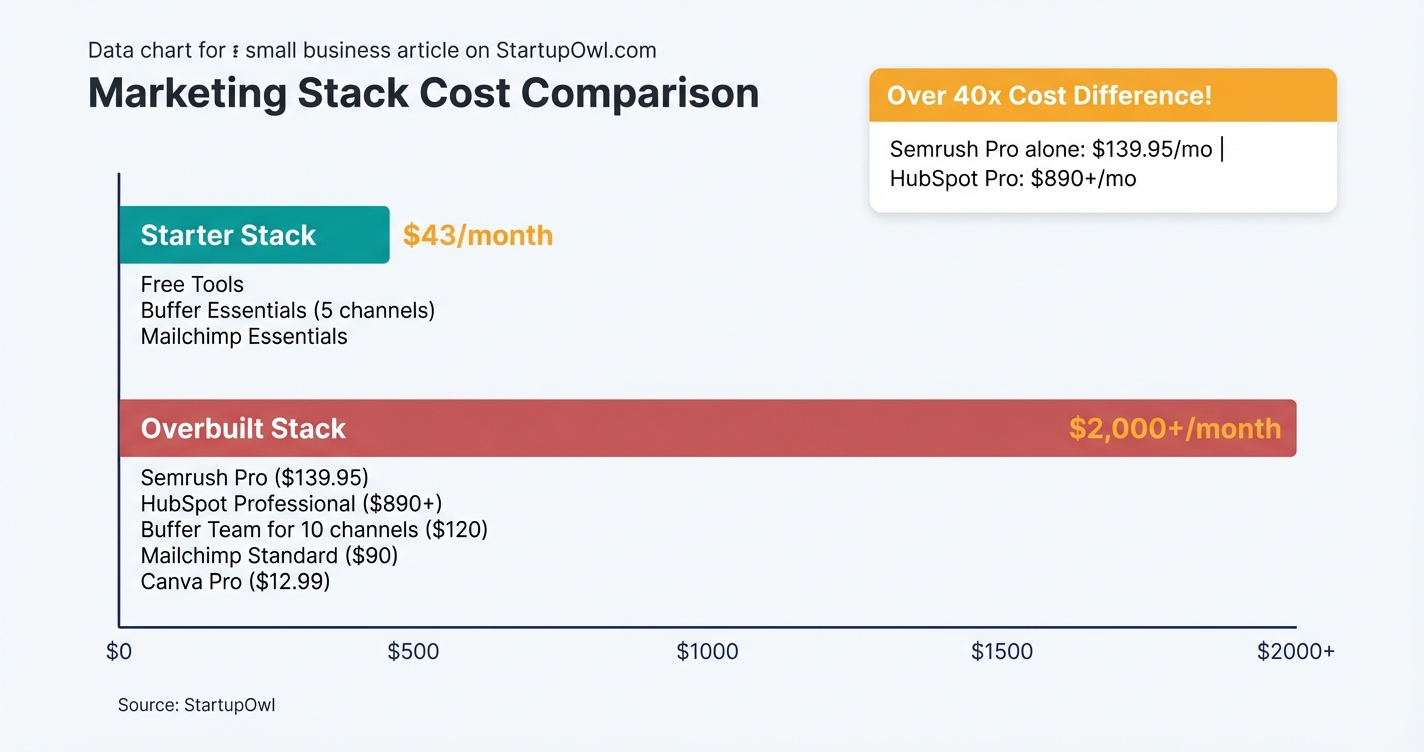
1. Overcomplicating your tech stack too early. Buying Semrush ($139.95/month), HubSpot Professional ($890+/month), and 3 social tools simultaneously before you have revenue to support it can put you at $2,000+/month in tool costs. Start with free plans and upgrade only when a specific limitation is costing you leads or sales.
2. Skipping email marketing for social media. You do not own your Instagram followers. If the algorithm changes or your account gets suspended, those followers vanish. Your email list is the only marketing asset you fully control. Even 250 free contacts on Mailchimp can generate revenue if you email them consistently.
3. Paying for annual billing before testing the tool. Annual prepay saves 15 to 25% across most marketing platforms. But locking in for 12 months before validating that the tool fits your workflow increases sunk costs. Use free plans and monthly billing for the first 60 days, then switch to annual if the tool is working.
4. Never cleaning your email list. Mailchimp (and most ESPs) charges based on contact count, including unsubscribed and inactive contacts on some plans. If you have 500 contacts but 200 have never opened an email, you are paying for dead weight. Archive or remove non-engaged contacts every quarter.
5. Ignoring your Google Business Profile after setup. Claiming your profile is step one. Posting weekly updates, responding to every review, and adding fresh photos signals to Google that your business is active. Profiles that go stale lose ranking in the Local 3-pack, which means fewer calls and visits. Follow our local SEO guide for the full optimization checklist.
What to Do This Week
Start with three actions today: claim your Google Business Profile, create a Mailchimp account and import your contacts, and sign up for Canva to start building branded visuals. Total cost: $0. Total time: about 2 hours.
By the end of week two, add Buffer for social scheduling and HubSpot CRM for lead tracking. Then use our free marketing plan template to choose your next 5 tactics from the list above. Commit to 90 days of consistent execution before adding paid tools. If you need help with building a brand, guerrilla marketing ideas, or using ChatGPT for your small business, those guides are ready when you are.
Step-by-Step Process
- 1
Claim your free Google Business Profile today
Your Google Business Profile is the single highest-impact free marketing move you can make. It puts your business on Google Search and Maps where local customers are already looking for you.
Fill out every field: business name, address, phone number, hours, services, photos, and a keyword-rich description. Businesses with complete profiles get significantly more clicks and calls than incomplete ones.
Tips
- Add at least 10 high-quality photos of your location, products, or team to stand out in Maps results.
- Post weekly updates (offers, events, news) to signal freshness to Google's algorithm.
- Ask every satisfied customer to leave a Google review and respond to every review you receive.
Common Mistakes
- Stuffing extra keywords into your business name field, which can get your profile suspended.
- Setting up the profile once and never updating it, which signals to Google that the business may be inactive.
- 2
Set up a free email marketing account and import your contacts
Email marketing consistently outperforms social media for direct revenue. Start with Mailchimp's free plan, which now includes up to 250 contacts and 500 email sends per month (as of January 2026). If you need more contacts at no cost, compare ConvertKit vs Mailchimp before committing.
Import your existing contacts via CSV, create a simple welcome email, and set up a signup form for your website. The whole process takes about 45 minutes.
$0 (free plan) to $13/month (Essentials for 500 contacts) 45 minutes for initial setup, 2 to 4 weeks for first measurable results MailchimpTips
- Set a monthly reminder to clean your list by archiving unsubscribed and bounced contacts so they do not count against your limit.
- Start with one email per week (a tip, a story, an offer) and track open rates to find what resonates.
Common Mistakes
- Staying on Mailchimp's free plan past 250 contacts and losing potential leads instead of upgrading to the $13/month Essentials tier.
- Buying an email list instead of building one organically, which tanks deliverability and can violate anti-spam laws.
- 3
Create branded social media graphics with Canva's free plan
Canva's free plan gives you access to over 2 million templates, basic AI tools, and 5 GB of cloud storage (as of 2026). That is enough to create professional-looking social posts, flyers, and email headers without hiring a designer.
If you need background removal, brand kits, or Magic Resize for repurposing designs across platforms, Canva Pro costs $12.99/month (or $119.99/year). For most new businesses, the free plan covers the first 3 to 6 months of design needs.
Tips
- Set up a simple brand kit (even on free) by noting your hex colors, fonts, and logo so every design looks consistent.
- Use the Magic Write AI feature (50 free uses) to draft social captions and email subject lines.
- Batch-create a week's worth of social graphics in one sitting to save time.
Common Mistakes
- Spending hours perfecting each design when a clean, on-brand template used consistently is more effective than one-off masterpieces.
- 4
Schedule your social media posts with Buffer
Buffer's free plan lets you connect up to 3 social channels and schedule 10 posts per channel. That is enough for a solo founder posting 2 to 3 times per week on each platform.
When you need unlimited scheduling and analytics, the Essentials plan costs $6/month per channel (as of 2026). For 5 channels, that comes to $30/month. Annual billing saves you 20%. Pair this with our social media content calendar to plan content a month in advance.
$0 (free) to $6/month per channel (Essentials) 15 minutes to connect accounts, 1 hour to schedule your first week buffer.comTips
- Use Buffer's AI Assistant (available on paid plans) to generate post ideas and rewrite captions for different platforms.
- Schedule posts at least a week ahead so you are never scrambling for content day-of.
Common Mistakes
- Connecting too many channels at once and spreading yourself thin; start with 2 platforms where your audience actually hangs out.
- Posting the exact same content on every platform without adapting the format (LinkedIn favors long text, Instagram favors visuals).
- 5
Install a free CRM to track every lead
HubSpot's free CRM supports up to 1,000 contacts, 2 users, and includes email marketing (2,000 sends/month), forms, landing pages, and live chat (as of 2026). It is 100% free with no expiration date. Read our full CRM for startups guide for alternatives.
Connect HubSpot to your email and website within the first week of launching your business. Every contact form submission, email reply, and meeting booking flows into one place so you never lose a lead.
$0 (free CRM) to $20/month (Starter for branding removal and basic automation) 30 to 60 minutes for initial setup HubSpotTips
- Use HubSpot's free meeting scheduler to let prospects book calls directly from your email signature.
- Tag every contact by source (Google, referral, social, email) so you can see which marketing channel converts best.
Common Mistakes
- Ignoring the 1,000-contact limit on the free plan; HubSpot reduced this from 1 million contacts in late 2024, so plan your upgrade path early.
- 6
Write a simple marketing plan and pick your first 5 tactics
You do not need all 40 tactics at once. Use our free marketing plan template to pick 5 ideas that match your budget, timeline, and business type. Then commit to executing them consistently for 90 days before adding more.
A good starter stack for most small businesses is: Google Business Profile (free), email marketing (free to $13/month), Canva (free), Buffer (free to $30/month), and HubSpot CRM (free). Total cost: $0 to $43/month. Read our full small business marketing plan guide for a detailed framework.
$0 to $43/month for the starter stack 1 to 2 hours to draft your plan, 90 days to execute and measure startupowl.comTips
- Set one measurable goal per tactic (e.g., 50 new email subscribers in 30 days) so you know what success looks like.
- Review results monthly and drop tactics that are not delivering before adding new ones.
- Pair your marketing plan with a clear understanding of your pricing strategy using our cost-plus pricing guide.
Common Mistakes
- Trying to do everything at once and executing none of it well; 5 consistent tactics beat 20 half-hearted ones every time.
- Not tracking results, which makes it impossible to know what is working and what is wasting your time.
Cost Breakdown
| Item | Cost Range | Notes |
|---|---|---|
| Google Business Profile | $0 | Free forever. Covers local SEO, Maps, and Search visibility. |
| Email Marketing (Mailchimp) | $0 to $20/month | Free for 250 contacts; Essentials at $13/month; Standard at $20/month for 500 contacts. |
| Design Tool (Canva) | $0 to $12.99/month | Free plan includes 2M+ templates and 5 GB storage. Pro at $12.99/month adds brand kit and background removal. |
| Social Media Scheduling (Buffer) | $0 to $30/month | Free for 3 channels (10 posts each). Essentials at $6/channel/month. 5 channels = $30/month. |
| CRM (HubSpot) | $0 to $20/month | Free CRM for 1,000 contacts and 2 users. Starter at $20/month removes branding and adds automation. |
| SEO Tool (Semrush) | $0 to $139.95/month | Google Search Console is free. Semrush Pro at $139.95/month (17% off with annual billing). |
| Google Ads | $5 to $500+/month | Set your own daily budget. Most small businesses start at $10 to $20/day. |
Frequently Asked Questions
Most small businesses spend between $50 and $200/month on marketing tools during their first year. Micro-businesses with fewer than 1,000 email subscribers typically spend $50 to $200/month, while growing SMBs with 5,000 to 20,000 subscribers spend $500 to $1,400/month. Start with free tools and upgrade only when you hit a specific limitation that is costing you leads.
Google Business Profile is the highest-impact free marketing tool for any business serving local customers. It puts you on Google Search and Maps at no cost and takes about 30 minutes to set up. For online-only businesses, Mailchimp's free email plan (250 contacts, 500 sends/month) delivers the most direct revenue potential.
Email marketing campaigns typically show measurable results (open rates, clicks, conversions) within 2 to 4 weeks. Social media engagement builds over 1 to 3 months of consistent posting. SEO takes the longest at 3 to 6 months minimum before you see meaningful organic traffic growth. Paid advertising (Google Ads, social ads) can generate clicks within hours of launching a campaign.
Yes, but the free plan is more limited than before. As of January 2026, Mailchimp's free plan supports up to 250 contacts and 500 email sends/month (reduced from 500 contacts and 1,000 sends). The free plan no longer includes automation or A/B testing. If you need more contacts at no cost, consider alternatives like MailerLite or Brevo, which offer more generous free tiers.
Google Search Console is free and covers the basics: search performance, indexing status, and core web vitals. It does not include keyword research, competitor analysis, or rank tracking. Semrush Pro at $139.95/month adds all of that, but most businesses do not need it until they are actively investing in SEO content. Start free and upgrade when you have a dedicated SEO workflow.
The cheapest complete marketing stack costs $0/month: Google Business Profile (free), Mailchimp Free (250 contacts), Canva Free (2M+ templates), Buffer Free (3 channels), and HubSpot CRM Free (1,000 contacts). This covers local SEO, email marketing, design, social scheduling, and lead tracking. You can run this stack for 3 to 6 months before any paid upgrade becomes necessary.
Some links on this page are affiliate links. If you sign up for a service through them, we may earn a commission at no extra cost to you. This does not influence our rankings.
Sources & References
- Mailchimp Pricing Plans (Official)
- Mailchimp About Pricing Plans (Help Center)
- PriceTimeline: Mailchimp Pricing Changes (January 2026)
- Buffer Pricing (Official)
- G2: Buffer Pricing and Reviews (2026)
- HubSpot Free CRM (Official)
- HubSpot CRM Free vs Paid: SalesTech Scout (2026)
- Semrush Pricing (Official)
- DemandSage: Semrush Pricing 2026
- Google Business Profile (Official)
- Canva Pricing (Official)
- Canva Pricing Plans Breakdown: CloudEagle (2026)
- FTC Endorsement Guidelines
About the Author
Editor, StartupOwl
Eliot leads StartupOwl's state data research. He maintains the site's fifty state records of LLC filing fees, annual costs, processing times, and small business grant programs, checking each figure against the state office that publishes it and logging the date it was verified. Based in New Jersey, he has spent his working life in and around small businesses, and he writes for the founder who wants the real number rather than the advertised one. Every figure under his byline traces to a named source, and when a state proves a number wrong, the correction is published, not buried.
Was this article helpful?
Questions about 20 Small Business Marketing Ideas That Actually Work in 2026
No comments yet. Ask the first question and a member of our team will answer.
Leave a comment