
Best Social Media Management Tools for Small Business in 2026 (Ranked)

- Buffer is the cheapest way in. A channel costs $5 a month on annual billing, or $6 month to month. Three channels come to $180 for the year.
- Only Buffer has a free plan. It covers three channels and ten scheduled posts on each. Later and Hootsuite both give you 14 days, then ask for a card.
- Later charges by the Social Set. One set is $18.75 a month on annual billing and holds eight profiles, one per platform. Posts cap at 30 per profile a month.
- Hootsuite Standard is $99 per user a month on annual billing. That covers up to 10 social accounts and one seat. Professional is $199 and Advanced is $399.
- Trustpilot splits the three. Buffer sits at 3.6 from 120 reviews, Later at 1.5 from 349, and Hootsuite at 1.3 from 555. Billing rows drive both low scores.
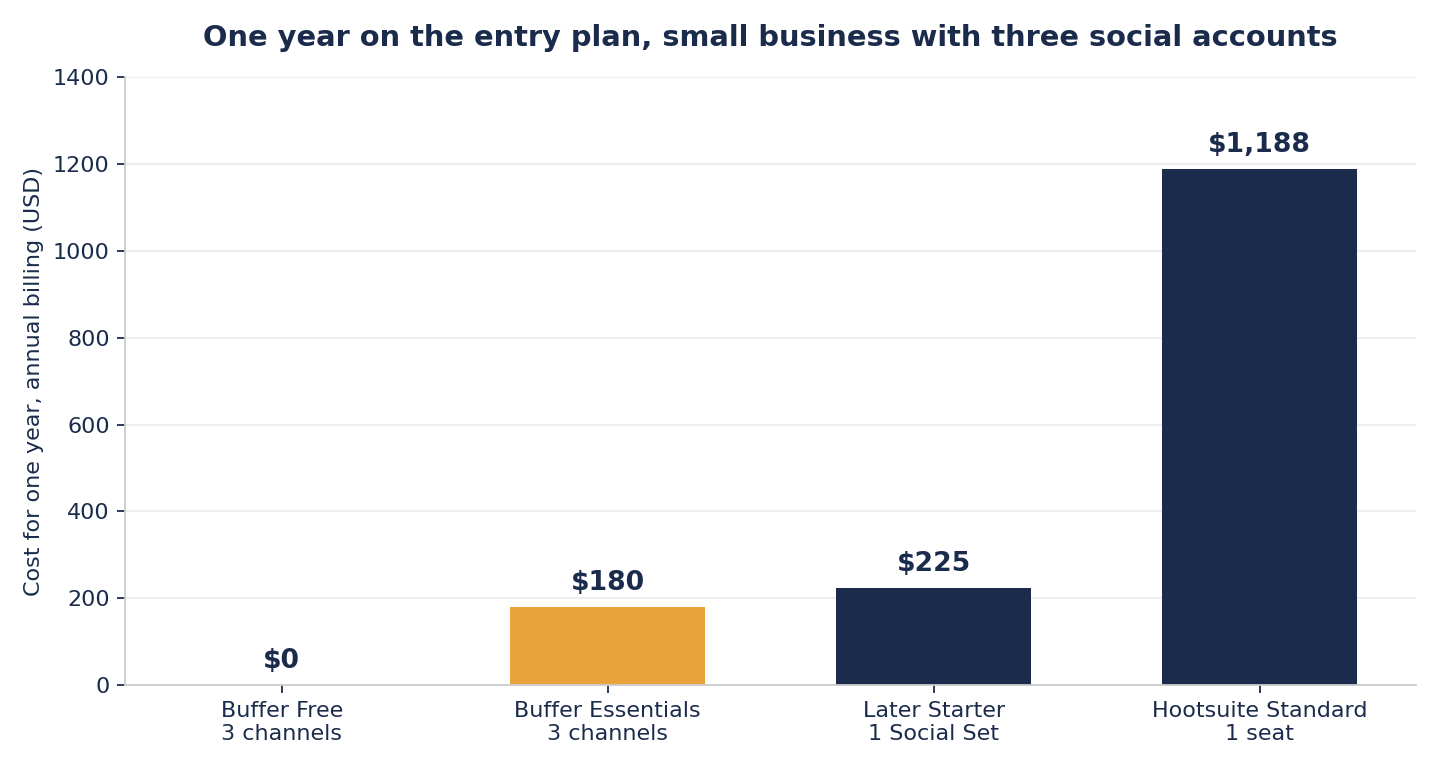
Buffer sells channels, Later sells sets of eight profiles, and Hootsuite sells seats. The headline prices measure different things. So we priced one small business on all three, three accounts and a single user. The year runs from $0 on Buffer's free plan to $1,188 on Hootsuite. Buffer is our pick for most founders.

Buffer
$0
Buffer offers the only usable free plan, the lowest paid entry at $6/month per channel, and scores 4.3/5 on G2 with the best ease-of-use rating in this group.
Get StartedSide-by-Side Comparison
| Feature | |||
|---|---|---|---|
| Entry price | $5/mo per channel on annual billing, $6 monthly | $18.75/mo on annual billing, $25 monthly | $99/mo per user on annual billing |
| What the entry plan covers | 1 channel, 1 user, unlimited scheduled posts | 1 Social Set, 8 profiles, 30 posts per profile a month | Up to 10 social accounts, 1 seat |
| One year, 3 social accounts | $180 | $225 | $1,188 |
| Free plan | Yes, 3 channels and 10 posts each | No | No |
| Free trial | 14 days, no card | 14 days | 14 days, no card |
| G2 rating | 4.3/5 from 1,041 reviews | 4.5/5 from 384 reviews | 4.3/5 from 7,437 reviews |
| Trustpilot | 3.6/5 from 120 reviews | 1.5/5 from 349 reviews | 1.3/5 from 555 reviews |
| Integrations | 40+ | 15+ | 100+ in the app directory |
| AI on the entry plan | AI Assistant, unlimited credits | 5 credits a month | Wisdom AI, on every plan |
| Support | Email and help centre on every plan | Email, 1 to 2 business days | Email and chat |
| Best for | Solo founders posting to a few channels | Instagram first brands planning a feed | Teams sharing seats across many accounts |
| Our rating | 3.9/5 | 3.1/5 | 2.9/5 |
Full Reviews
A clean, affordable scheduling tool for solo creators that falls short once you need analytics depth or a unified inbox.
Pros
- Free plan covers 3 channels with 10 scheduled posts each, enough for a solo founder to test scheduled posting at zero cost
- 14-day trial of paid plans requires no credit card, and forgetting to cancel just reverts you to free
- Per-channel pricing stays predictable: $5-$6/mo per channel with no surprise add-on fees beyond the channel count
- Supports 11 social networks including newer platforms like Threads, Bluesky, and Mastodon
- Setup from sign-up to first scheduled post took us about 10 minutes with no technical knowledge required
Cons
- The lower Trustpilot reviews flag unreliable scheduled posts, some needing a phone reminder to publish, so test your channels on the free plan before you commit
- No true unified inbox for managing DMs and mentions: the Engage tool only handles comments on select platforms
- Analytics are basic, lacking cross-channel comparison, competitive benchmarking, and social listening
- Per-channel cost adds up fast: managing 5 channels on the Team plan runs $600/year, which rivals tools that bundle more features
Later is a strong visual planner for Instagram-first brands, but a 1.3 Trustpilot score and rigid billing policies make it a cautious recommendation.
Pros
- The Instagram visual grid planner is the best in class for previewing your feed layout before publishing, with drag-and-drop scheduling that no competitor matches.
- Linkin.bio solves Instagram's single-link problem and is included on all paid plans, removing the need for a separate tool like Linktree.
- Batch scheduling across Instagram, TikTok, Pinterest, Facebook, and LinkedIn from a centralized media library saves hours of manual posting time each week.
- Setup takes roughly 5 minutes from account creation to first scheduled post, with a 14-day free trial on all paid plans.
Cons
- A Trustpilot score of 1.3 from 335 reviews, with widespread complaints about billing surprises, denied refunds, and slow support response times.
- The Starter plan's 30-post-per-profile monthly limit means you cannot even post once per day, pushing most active users to the Growth plan at $37.50 a month billed yearly.
- Priority support is reserved for the Scale plan at $82.50 a month billed yearly. Later's pricing page lists only basic customer support on Starter, and email replies run 1 to 2 business days.
- Later dropped X (Twitter) scheduling in August 2026, and LinkedIn features remain limited compared to competitors like Buffer.
- The 'Social Set' pricing model confuses users and makes it expensive to manage multiple accounts on the same platform.
Hootsuite is a well-known social media dashboard with 18 years of history, but its steep pricing and troubled customer reviews make it a hard sell for most small businesses.
Pros
- One dashboard for scheduling, inbox, analytics, and listening across 10 networks.
- Over 100 apps in the App Directory, among them Canva, Adobe Express, Slack, and ReviewTrackers.
- The Wisdom AI assistant runs on every plan, and post and image generation is included from Standard up.
- Approvals and message routing on Advanced and up, which is what agencies need for client work.
- 18 years in business, and a 4.3 score on G2 from 7,462 reviews, so daily users rate it well.
Cons
- No free plan, and a $99 per seat monthly entry price on annual billing makes it one of the most expensive options for solo users and small businesses.
- Per seat pricing scales aggressively, a three person team on Standard pays $297 a month, and there are no bundled seat discounts.
- A 1.3 Trustpilot score from 555 reviews and a BBB C+ grade, driven by billing surprises, renewal charges, and refund fights.
- The dashboard feels cluttered and dated next to Buffer and Later, and new users face a learning curve.
- Deep listening, employee advocacy, single sign on, compliance controls, and the Salesforce link all sit on Enterprise, which is quoted in private with no published price.
How to Choose
You sell products online and live on Instagram and TikTok.
Later's grid planner previews your feed before you post. Linkin.bio turns the profile link into a shop front. Both come on every paid plan.

You run a service business and want leads from social.
Buffer covers Google Business Profile alongside the big networks. Start free. You only pay for the channels that bring work in.
You are a creator posting across several platforms every week.
Essentials lifts the post cap at $5 a channel on annual billing. The AI Assistant has no credit limit. The calendar makes batching simple.
You are on a tight budget and just want to post consistently.
The free plan is enough. Three channels, ten scheduled posts on each, one user. Paid channels start at $5 a month when you outgrow it.
You are a local shop posting to a few platforms.
Three channels on Essentials cost $15 a month on annual billing. Google Business Profile is one of them. That fits a small local budget.
Five or more people share the posting work.
Standard covers 10 social accounts and a shared inbox. Seats are $99 each a month. Three people is $297, so the team has to earn it.

You are moving over from another scheduling tool.
Buffer's trial runs 14 days and asks for no card. Run it beside your current tool. Nothing is at risk if you go back.
Your Instagram feed layout is the brand.
Later is the only one of the three that previews a grid. You drag posts until the feed looks right. Nothing else here does that.
How We Priced and Checked These Tools
We price each tool from its own pricing page. The seller sets the price. Not a press release, not a review site. All three pages were read again on 3 September 2026. We record the entry plan, what that plan actually covers, the trial length, and whether a card is needed.
Then we cost a real setup. Three social accounts, one person doing the work, annual billing. That is the shape of most small businesses on this page, and it is the only fair way to compare a per channel price against a per seat price.
Ratings come from two places. G2 for people who use the product daily, Trustpilot for people who have had a billing problem. Both were pulled on 3 September 2026. The two disagree sharply here, and the gap is itself a finding.
Who This Comparison Is For
This page is for you if you run a small business, a freelance practice, or a creator brand. You want one place to schedule posts, read basic numbers, and handle a handful of accounts. Maybe you sell online and live on Instagram. Maybe you post to Facebook and Google Business Profile for a local shop. One of these three will fit. If social is a main channel in your small business marketing plan, this saves you a day of research.
Some readers should stop here. If you run more than 20 accounts, need deep social listening, or manage client approvals for an agency, none of these entry plans is built for you. Sprout Social starts where these stop. And if your growth is really coming from Google Ads, spend the budget there first.
How Each Tool Performs
Buffer is the easiest of the three to start. The free plan holds three channels and ten scheduled posts on each, which is enough to see whether scheduling changes anything for you. Essentials lifts the cap at $5 a channel a month on annual billing, or $6 month to month. Buffer publishes to 11 networks, including Threads, Bluesky and Mastodon. Later carries Threads, not Bluesky.
The weak spot is depth. Buffer's Community inbox handles comments, not direct messages, so it is not a full inbox. There is no social listening at all. Cost also climbs with channels. Five channels on the Team plan run $50 a month on annual billing, which is close to tools that bundle more. Above ten channels the per channel rate drops.
Later is the specialist. Its grid planner previews an Instagram feed before anything publishes, and nothing else here does that. Linkin.bio comes on every paid plan, so you can drop Linktree. Later publishes to Instagram, Facebook, TikTok, Pinterest, LinkedIn, YouTube, Threads and Snapchat. X is not on that list any more.
The billing model is the catch. You buy a Social Set, which is one profile on each of those eight platforms, not the accounts you actually want. Starter is $18.75 a month on annual billing and caps you at 30 posts per profile a month, which is under one a day. Growth lifts that to 180 posts at $37.50 a month. A second set is $11.25 a month on top.
Hootsuite is the one built for teams. Standard is $99 per user a month on annual billing and covers up to 10 social accounts from one calendar, with a shared inbox and brand monitoring. Its Wisdom AI assistant runs on every plan. The app directory lists over 100 integrations, including Canva and Google Drive.
The seat price is what rules it out for most readers here. There is no free plan. Seats do not get cheaper in bulk, so three people on Standard is $297 a month. Approvals and routing sit on Advanced at $399 a seat. Deep listening, single sign on and compliance controls are Enterprise only, quoted privately.
Where the Three Actually Differ
What you are actually buying. Buffer sells one channel at a time, so the bill matches the accounts you use. Later sells a set of eight profiles whether you want eight or one. Hootsuite sells a seat, and the seat carries up to ten accounts. That single difference explains most of the price gap above. A founder with three accounts pays Buffer for three and Hootsuite for ten.
How hard each one is to learn. Buffer is the shortest path from signup to a scheduled post. Later takes longer, because a Social Set has to be configured and Instagram auto publishing needs a Facebook page attached first. Hootsuite has the most surface area. Panels, streams and modules. That depth is the point for a team and a tax for one person.
How many posts you get. This trips people up. Buffer's paid plans do not cap scheduled posts. Later's Starter plan allows 30 a month per profile, so a daily poster outgrows it in the first month. Hootsuite does not cap posts on paid plans either, though trial accounts are limited while you test.
What the AI is worth. All three now ship an assistant. Buffer's has no credit limit on paid plans. Hootsuite's Wisdom runs on every plan. Later meters it, 5 credits a month on Starter and 50 on Growth, with more at $3.75 for another 100. If AI drafting matters to you, Later is the one that will run out.
What customers say. The review sites disagree. Daily users rate all three well on G2, 4.3 for Buffer and Hootsuite, 4.5 for Later. Trustpilot, where people go after a billing fight, tells another story. Buffer sits at 3.6, Later at 1.5, Hootsuite at 1.3. Read the low scores as a warning about renewals and refunds, not about whether the product schedules a post.
Which One to Pick
Pick Buffer if you are one person or a small team on a budget. It is the cheapest entry, the only free plan, and the fastest to learn. Three channels cost $180 for the year on annual billing. You add channels one at a time. The bill grows with the work, with no step change.
Pick Later if Instagram is the business and the feed layout matters. Nothing else previews a grid. Budget for Growth at $37.50 a month if you post daily, because Starter's 30 post cap will stop you. Read Later's Trustpilot page before you commit to a year.
Pick Hootsuite if several people share the posting and you need one inbox and an approval trail. It is built for that. The price says so. For a founder with three channels it is not close. Buffer does the same job for less than a sixth of the money, which is why it is our pick as your brand grows.
Frequently Asked Questions
Buffer, by a wide margin. Its free plan covers three channels. Paid channels are $5 a month each on annual billing, so three channels come to $180 a year. Later's cheapest plan is $18.75 a month on annual billing, or $225 a year. Hootsuite Standard is $99 per user a month on annual billing, which is $1,188 a year.
Yes. The free plan is permanent. It holds three channels, ten scheduled posts on each, and one user. Analytics history runs 30 days. If you trial a paid plan and let it lapse, you drop back to free with no charge. Neither Later nor Hootsuite has a free tier.
For feed planning, yes. Later previews your grid before you publish, and Buffer does not. Linkin.bio is included on every paid Later plan. Buffer is the better pick once you post to several networks, because you pay per channel instead of per set of eight profiles.
Buffer wins here. You connect a channel and schedule a post in one sitting. The trial runs 14 days and asks for no card. Later needs a Facebook page connected before Instagram auto publishing works. Hootsuite carries the most panels and takes the longest to learn.
Usually not. Standard is $99 per user a month on annual billing and covers 10 social accounts. That is fine for a team sharing the work. Seats do not get cheaper as you add them, so three people cost $297 a month. A founder posting to three channels pays far less on Buffer.
About the Author
Editor, StartupOwl
Eliot leads StartupOwl's state data research. He maintains the site's fifty state records of LLC filing fees, annual costs, processing times, and small business grant programs, checking each figure against the state office that publishes it and logging the date it was verified. Based in New Jersey, he has spent his working life in and around small businesses, and he writes for the founder who wants the real number rather than the advertised one. Every figure under his byline traces to a named source, and when a state proves a number wrong, the correction is published, not buried.
Was this article helpful?
The information on this page is for educational and informational purposes only and should not be considered professional advice. Product features, pricing, and availability may vary. Always compare multiple options and verify details directly with the provider before making a decision.
Questions about Best Social Media Management Tools for Small Business in 2026 (Ranked)
No comments yet. Ask the first question and a member of our team will answer.
Leave a comment