
How to Hire Your First Employee
Your complete 7-step guide to hiring your first employee, from EIN registration to running your first payroll. Expect to spend $3,000 to $6,000 all-in.

You need an EIN from the IRS (free, instant online), a payroll provider like Gusto (starts at $49/month + $6/employee), Form W-4 and I-9 from your new hire, state new-hire reporting within 20 days, and workers' comp insurance (averaging $54 to $94/month per employee). Budget $3,000 to $6,000 beyond salary for your first entry-level hire.
7
Total Steps
$500–$6,000
Est. Cost
1-3 weeks
Timeline
Medium
Difficulty
Hiring your first employee typically costs $3,000 to $6,000 beyond salary, according to SHRM's cost-per-hire benchmarks. When you factor in payroll taxes, workers' comp insurance, equipment, and onboarding, the SBA estimates total costs reach 1.2 to 1.4 times the employee's annual salary. A $50,000 hire really costs $60,000 to $70,000 in year one.
The good news: you can complete most of the compliance paperwork in a single afternoon if you know the steps. This guide walks you through every form, fee, and deadline so nothing falls through the cracks.
Before you begin the hiring process, make sure you have these items ready. Missing even one can delay your employee's start date or create compliance problems.
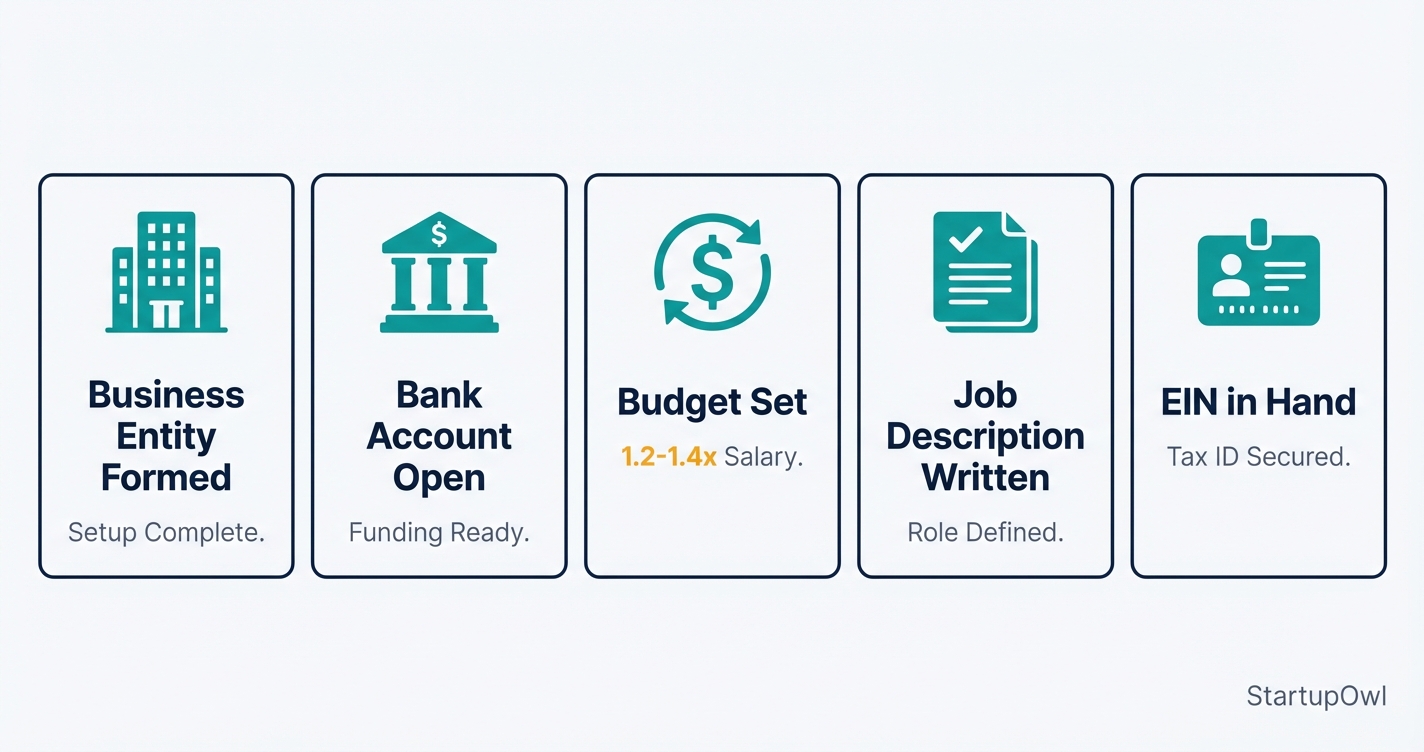
- Business entity formed. You should already have your LLC, S Corp, or other entity set up. If not, see our best LLC formation services guide.
- Business bank account open. Payroll providers need a verified bank account for direct deposit. Opening one takes 1 to 3 business days at most online banks. See how to open a business bank account.
- Budget for total employee cost. Beyond salary, budget for employer FICA (7.65%), SUI (2% to 4%), workers' comp ($30 to $200/month), payroll software ($49+/month), and equipment ($500 to $2,500).
- Job description written. Define the role, responsibilities, pay range, and whether the position is exempt or non-exempt under the Fair Labor Standards Act.
- EIN in hand (or ready to apply). You cannot set up payroll without one.
If you plan to offer health insurance, note that businesses with fewer than 50 full-time equivalent employees are not required to provide it under the ACA. However, offering it can help you attract stronger candidates. Small-group health plans typically become available once you have 1 to 2 employees depending on your state.
From posting the job to running your first payroll, expect the entire process to take 2 to 6 weeks. The compliance paperwork (EIN, state registration, payroll setup) can be done in a single focused afternoon. The longer timeline comes from recruiting and interviewing.
Here is what the process actually feels like:
- Week 1. Register for your EIN, state tax accounts, and payroll provider. Purchase workers' comp. Post your job listing.
- Weeks 2 to 4. Interview candidates, run background checks (1 to 5 business days turnaround), and extend an offer.
- Week 4 to 5. Onboard your new hire. Collect W-4, I-9, and direct deposit information. Set up their workstation and equipment.
- Week 5 to 6. Run your first payroll. Verify that tax withholdings and deposits are correct. Report the new hire to your state.
The biggest surprise for most first-time employers is the employer tax match. You owe 7.65% of gross wages in FICA taxes (Social Security + Medicare), plus FUTA and state unemployment. On a $50,000 salary, that is roughly $4,200+ in employer-side taxes alone, before workers' comp or benefits.
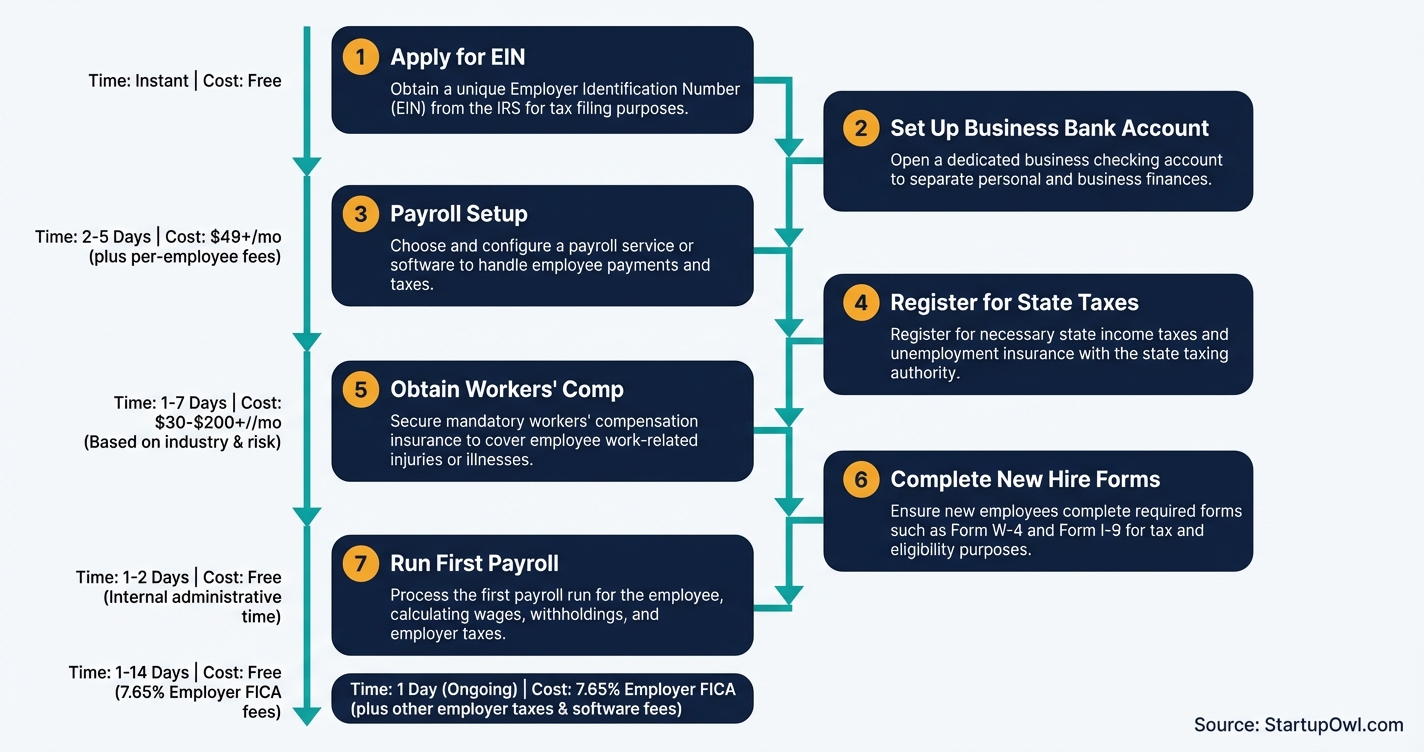
Step-by-Step Process
- 1
Apply for an Employer Identification Number (EIN)
Before you can legally pay an employee, you need an EIN from the IRS. This 9-digit number identifies your business for tax filing and reporting purposes. If you already have an EIN for your LLC or corporation, you can use the same number for employment taxes.
Apply online at IRS.gov during business hours (Monday through Friday, 7 a.m. to 10 p.m. Eastern). You will receive your EIN immediately after completing the online application. If you prefer, you can fax Form SS-4 and typically receive your EIN within 4 business days.
Keep your EIN confirmation letter in a safe place. You will need this number for payroll setup, tax filings, state registration, and opening a business bank account.
Tips
- Apply online for an instant EIN rather than mailing Form SS-4, which takes 4 to 6 weeks.
- If you are a sole proprietor with no prior EIN, you can only get one EIN per day online.
- Print and save your EIN confirmation letter immediately since the IRS does not email it.
Common Mistakes
- Applying outside IRS online hours (7 a.m. to 10 p.m. ET weekdays) and assuming the system is broken.
- Using your Social Security Number instead of an EIN for payroll, which exposes your personal identity to employees.
- 2
Register for State and Local Tax Accounts
Every state (except those with no income tax) requires you to register for state income tax withholding before you pay your first employee. You also need a state unemployment insurance (SUI) account, which is separate from federal unemployment tax. New employers typically pay a default SUI rate until you build an experience rating, usually 2% to 4% of taxable wages.
Visit your state's Department of Revenue or Secretary of State website to register. Most states let you register online in 15 to 30 minutes. Some states (like California, New York, and New Jersey) also require separate disability insurance or paid family leave registration.
Check whether your city or county levies a local payroll tax. Cities like New York, Philadelphia, and San Francisco have additional employer taxes that catch first-time employers off guard.
Free (registration) plus SUI taxes of 2% to 4% on wages 15 to 30 minutes online; account activation in 1 to 10 business days SBA.govTips
- Your payroll provider (Gusto, ADP, etc.) can often register you with the state automatically when you set up payroll.
- Note your state's SUI wage base, which varies widely (California at $7,000 vs. Oregon at $56,700 in 2026).
Common Mistakes
- Forgetting to register for SUI separately from state income tax withholding, which are two different accounts in most states.
- Missing local payroll taxes in cities with their own employer tax requirements.
- 3
Choose and Set Up a Payroll System
A payroll provider automates tax calculations, withholdings, direct deposits, and quarterly filings. For your first employee, the most popular option is Gusto, which starts at $49 per month plus $6 per employee as of 2026. That means you will pay roughly $55/month for one employee on the Simple plan, which includes single-state payroll, automatic tax filing, and employee onboarding tools.
Other solid options include OnPay at $40/month + $6/employee (multi-state included), and QuickBooks Payroll if you already use QuickBooks for accounting. If your tax liability will be under $1,000 per year, you may qualify to file annually using IRS Form 944 instead of quarterly Form 941.
Set up your payroll system at least one week before your first pay date. You will need your EIN, state tax account numbers, bank account details, and your employee's W-4 information.
$40 to $80/month base + $6 to $12 per employee 1 to 3 hours for initial setup; verify bank account in 2 to 3 business days GustoTips
- Gusto and OnPay both include unlimited payroll runs, so you can correct mistakes without extra charges.
- Connect your payroll software to your accounting software from day one to avoid reconciliation headaches later.
- If you only have contractors and are adding your first W-2 employee, you need to upgrade from a contractor-only plan.
Common Mistakes
- Running your first payroll without verifying your bank account, which delays direct deposit by 2 to 4 days.
- Choosing the cheapest plan without checking if your state requires multi-state payroll capabilities (Gusto Simple is single-state only).
- 4
Collect Required Tax and Employment Forms from Your New Hire
On or before your employee's first day of work, they must complete Form W-4 (federal tax withholding) and Section 1 of Form I-9 (employment eligibility verification). You then have 3 business days from the start date to complete Section 2 of the I-9 by examining your employee's identity and work authorization documents in person.
You cannot tell your employee which specific documents to bring. They choose from the USCIS List of Acceptable Documents. A U.S. passport satisfies both identity and work authorization (List A). Alternatively, a driver's license (List B) plus a Social Security card (List C) works.
Some states require a state-specific withholding form in addition to the federal W-4. California, for example, requires Form DE 4. Your payroll provider's onboarding flow typically handles these automatically, but verify that your state's form is included.
Tips
- Use your payroll platform's digital onboarding to collect W-4 and direct deposit info before day one.
- Store I-9 forms separately from personnel files, as ICE can request them with as few as 3 business days' notice.
- If your employee works less than 3 business days, both sections of Form I-9 must be completed on their first day.
Common Mistakes
- Failing to complete the I-9 within 3 business days, which can result in penalties of $281 to $2,789 per form for a first offense.
- Telling the employee which documents to present for I-9 verification, which violates anti-discrimination rules.
- 5
Get Workers' Compensation Insurance
Nearly every state requires workers' compensation insurance as soon as you have one employee (Texas is the notable exception). You can purchase a policy through a private insurer, your state's fund, or through your payroll provider's integrated option. Gusto offers pay-as-you-go workers' comp through AP Intego, which adjusts premiums based on actual payroll.
For a low-risk office employee earning $50,000 per year, expect to pay roughly $30 to $60 per month. High-risk industries like construction can run $200+ per month per employee. Insureon's small business customers pay a median of $54 per month for workers' comp across all industries.
Get your policy in place before your employee's first day. Operating without workers' comp when it is required can result in fines of $1,000+ per day in some states and personal liability for any workplace injury.
$30 to $200+ per month per employee (varies by industry and state) Same-day coverage available from most online providers insureon.comTips
- Pay-as-you-go plans through Gusto or your payroll provider eliminate large upfront deposits.
- Ensure each employee's job role is classified with the correct NCCI class code to avoid overpaying premiums.
- Ask about claim-free discounts, which can lower your rate by 10% or more in some states.
Common Mistakes
- Waiting until after an injury to purchase coverage, which means you are personally liable for all medical and lost-wage expenses.
- Misclassifying employees under a lower-risk code to save on premiums, which can trigger audit penalties and back-premiums.
- 6
Report the New Hire to Your State
Federal law requires you to report every new hire to your state's Directory of New Hires within 20 calendar days of their start date. Some states are stricter: Alabama requires reporting within 7 days, Georgia within 10 days, and Iowa within 15 days. Check your specific state's deadline.
You must report the employee's name, address, Social Security Number, and date of hire, along with your company name, address, and FEIN. Most states accept a copy of the employee's W-4 form as the report. Many states offer free online portals for electronic submission.
This reporting requirement exists primarily to help enforce child support orders and prevent benefits fraud. Your payroll provider may handle this automatically, but confirm that it does before assuming you are covered.
Tips
- Check whether your payroll provider files new-hire reports automatically; Gusto and ADP do this in most states.
- If you operate in multiple states, you can register as a multi-state employer with HHS and report all hires to one state.
Common Mistakes
- Assuming new-hire reporting is the same as quarterly wage reporting (it is not; they are separate requirements).
- Missing the state-specific deadline because you assumed the federal 20-day window applies everywhere.
- 7
Run Your First Payroll and Understand Tax Deposits
When you run your first payroll, you will withhold federal income tax (based on the employee's W-4), Social Security tax at 6.2% (employee share), and Medicare tax at 1.45% (employee share). You match both the Social Security and Medicare amounts, so your total employer payroll tax burden is 7.65% of gross wages. For 2026, the Social Security wage base is $184,500.
You also owe FUTA tax (Federal Unemployment Tax) at an effective rate of 0.6% on the first $7,000 of each employee's wages, which works out to a maximum of $42 per employee per year in most states. California employers pay a higher effective FUTA rate due to credit reductions.
How often you deposit these taxes depends on your liability. New employers typically deposit monthly (by the 15th of the following month). If your annual employment tax liability is under $1,000, you may qualify to file Form 944 annually instead of Form 941 quarterly. Set up EFTPS (Electronic Federal Tax Payment System) to make your deposits.
7.65% of gross wages (employer share of FICA) plus 0.6% FUTA on first $7,000 Monthly deposits due by the 15th; Form 941 due quarterly eftps.govTips
- Your payroll provider calculates and deposits all employment taxes automatically, but verify the first few filings yourself.
- Set calendar reminders for Form 941 quarterly deadlines (April 30, July 31, October 31, January 31).
- Register for EFTPS even if your payroll provider handles deposits, so you have a backup payment method.
Common Mistakes
- Missing a tax deposit deadline, which triggers IRS penalties of 2% to 15% of the unpaid amount depending on how late you are.
- Failing to match the employee's FICA contributions, which means you owe the IRS both shares plus penalties.
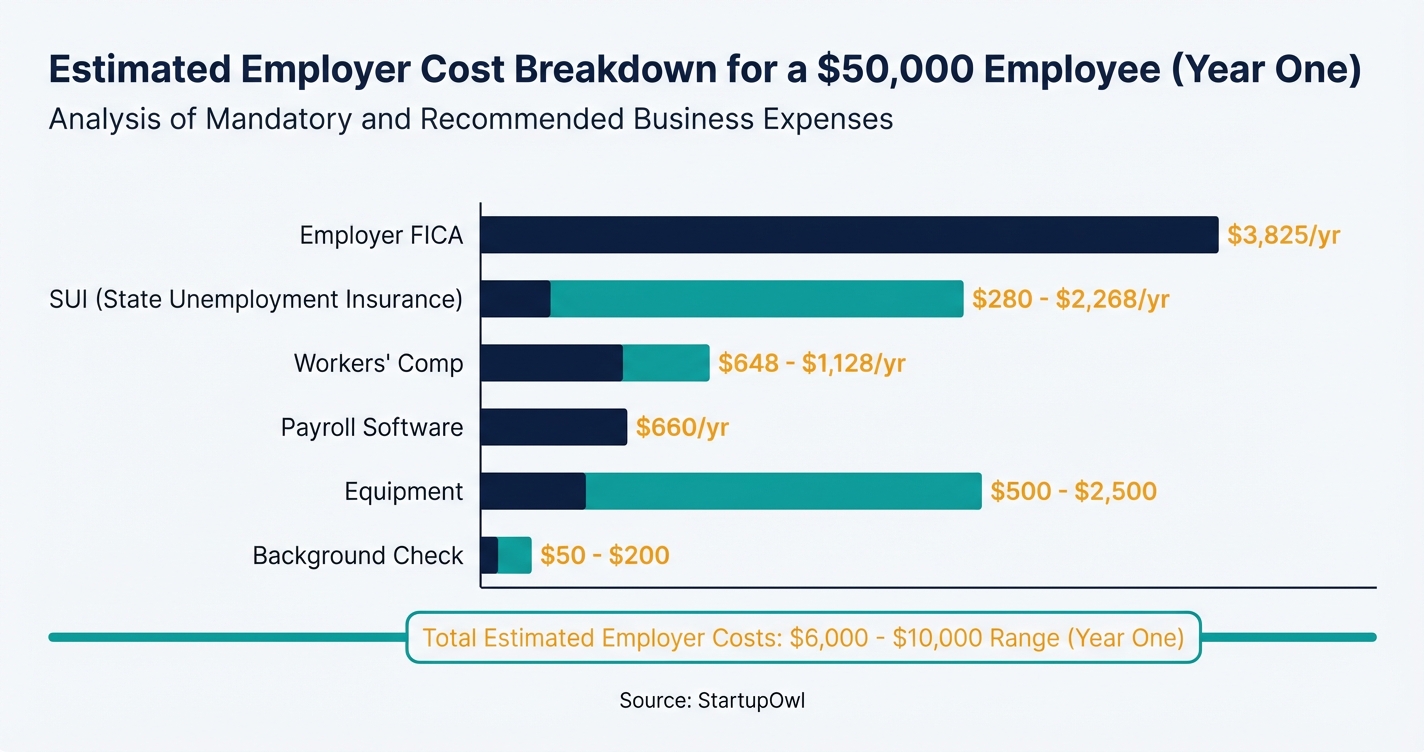
Your real cost to hire and employ your first worker depends on salary, location, and industry. Here is a realistic breakdown for an entry-level employee earning $50,000/year:
- Employer FICA (Social Security + Medicare): $3,825/year (7.65% of gross wages)
- FUTA: $42/year (0.6% on first $7,000)
- State Unemployment Insurance: $280 to $2,268/year (varies wildly by state and rate schedule)
- Workers' Comp Insurance: $648 to $1,128/year ($54 to $94/month average)
- Payroll Software: $660/year ($55/month for Gusto Simple with one employee)
- Background Check: $30 to $120 (one-time)
- Equipment and Onboarding: $500 to $2,500 (one-time)
Total first-year cost above salary: roughly $6,000 to $10,000. That aligns with the SBA's estimate that total employment costs reach 1.2x to 1.4x the base salary.
Cost Breakdown
| Item | Cost Range | Notes |
|---|---|---|
| EIN Application | Free | Apply online at IRS.gov; instant approval |
| Payroll Software (monthly) | $40 to $80/month base + $6 to $12/employee | Gusto Simple at $49 + $6/employee; OnPay at $40 + $6/employee |
| Workers' Compensation Insurance (monthly) | $30 to $200+/month per employee | Varies by state, industry, and claims history; median $54/month |
| Background Check | $30 to $120 per hire | Basic criminal search at $25 to $40; comprehensive packages at $80 to $120 |
| Employer FICA Taxes (per $50K salary) | $3,825/year | 6.2% Social Security + 1.45% Medicare on gross wages |
| FUTA Tax (per employee) | $42/year | 0.6% effective rate on first $7,000 of wages (most states) |
| State Unemployment Insurance (SUI) | 2% to 4% of taxable wages (new employer rate) | Taxable wage base varies by state ($7,000 to $56,700) |
| Employee Equipment (laptop, desk, etc.) | $500 to $2,500 | Depends on role; remote workers may need home office setup |
| Job Posting Fees | $0 to $500+ | Indeed and Google Jobs are free; LinkedIn job posts start at $5/day |
Congratulations on your first hire. Here is what to do in the first 30 days to stay compliant and set your employee (and yourself) up for success:
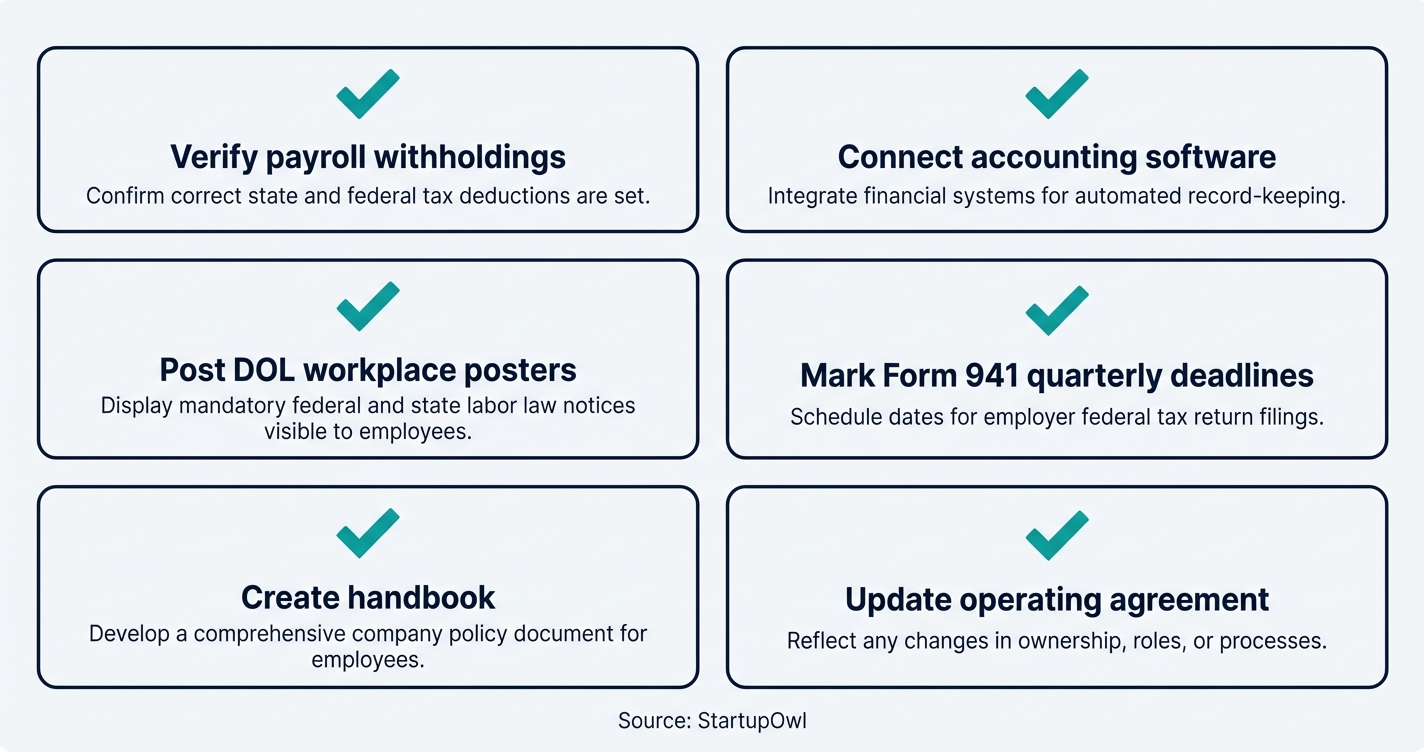
- Verify your first payroll run. Check that federal and state withholdings are correct. Confirm that your payroll provider deposited employment taxes on time.
- Set up accounting integrations. Connect your payroll software to your accounting software so payroll expenses automatically sync.
- Create an employee handbook. Even for one employee, document your PTO policy, code of conduct, and workplace safety guidelines. This protects you legally.
- Post required workplace notices. Federal law requires you to display OSHA, FLSA minimum wage, FMLA, and EEO posters. You can order a free all-in-one poster from the Department of Labor.
- Plan for quarterly filings. Mark your calendar for Form 941 deadlines (April 30, July 31, October 31, January 31). Your payroll provider should handle these, but verify.
- Consider an LLC operating agreement update. If your operating agreement does not address hiring employees or delegating authority, update it now.
- Know what happens when they leave. The exit has its own sequence and its own record keeping, including a Form I-9 you must keep for 3 years after the hire or 1 year after the last day, whichever is later. The employee offboarding checklist covers the order to work it in.
The Complete Checklist
- Apply for an EIN at IRS.gov01
Get your federal Employer Identification Number before setting up payroll.
Instant onlineFree - Register for state withholding and SUI accounts02
Set up state income tax withholding and unemployment insurance accounts.
15 to 30 minutesFree - Choose and set up a payroll provider03
Select Gusto, OnPay, or QuickBooks Payroll and enter your business and bank details.
1 to 3 hours$40 to $80/month - Purchase workers' compensation insurance04
Get a policy in place before your employee's first day.
Same day$30 to $200+/month - Create a written job description and post the role05
Post on Indeed, LinkedIn, or niche job boards with clear pay range and responsibilities.
1 to 2 hours$0 to $500 - Run a background check on your final candidate06
Use a provider like Checkr or First Advantage for FCRA-compliant screening.
1 to 5 business days$30 to $120 - Send an offer letter with compensation details07
Include salary, benefits, start date, and at-will employment status.
30 minutesFree - Collect Form W-4 and I-9 Section 1 on or before day one08
Employee completes federal tax withholding and employment eligibility forms.
Day 1Free - Complete I-9 Section 2 within 3 business days09
Examine identity and work authorization documents; record in Section 2.
Within 3 business days of start dateFree - Report the new hire to your state10
Submit employee info to your state's Directory of New Hires within 20 days.
7 to 20 days (varies by state)Free - Run your first payroll11
Process your first payroll run with correct withholdings and deposit employment taxes.
First pay date7.65% employer FICA + SUI
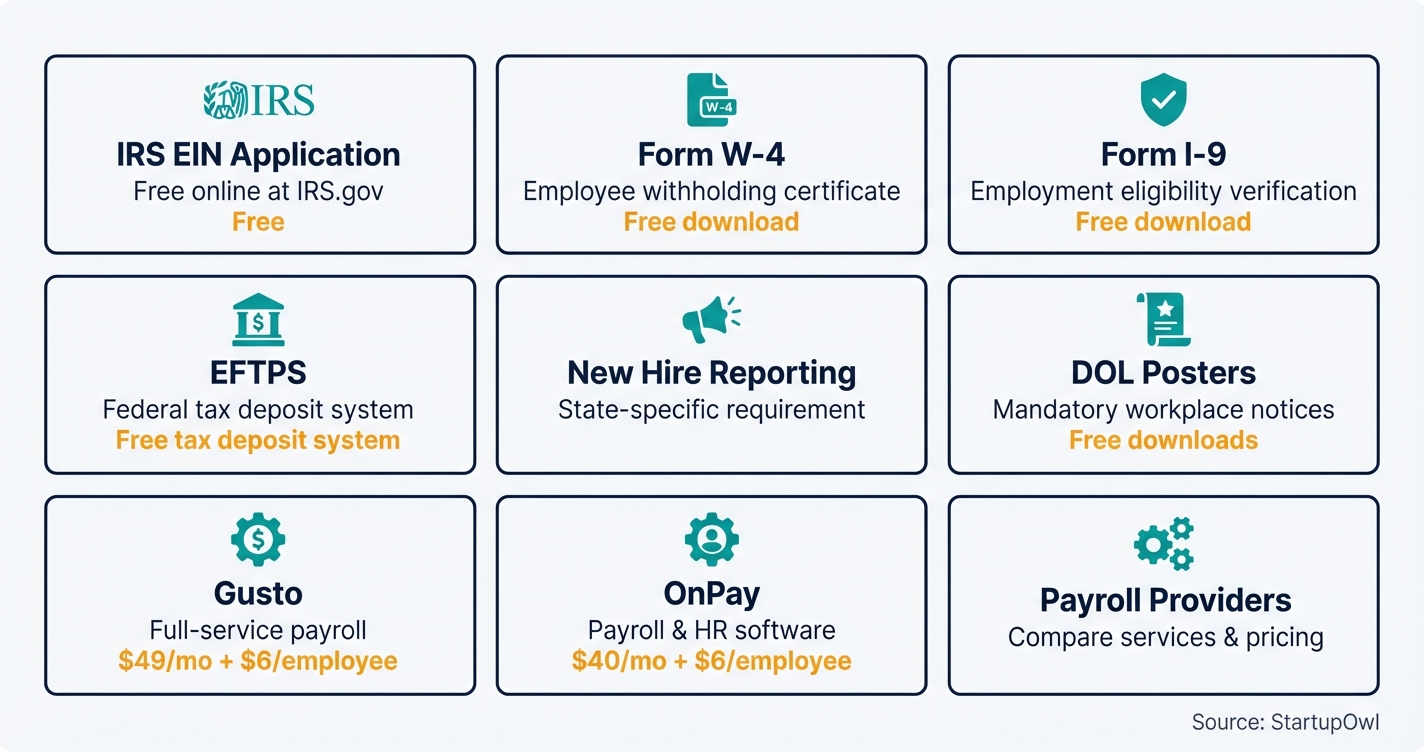
Here are the exact tools, forms, and government sites you need to hire your first employee:
- EIN Application: IRS.gov EIN Online (free, instant)
- Form W-4 (2026): IRS Form W-4
- Form I-9: USCIS Form I-9
- IRS Publication 15 (Circular E): Employer's Tax Guide 2026
- EFTPS (Tax Deposits): EFTPS.gov
- New Hire Reporting: ACF.gov New Hire Reporting
- DOL Workplace Posters: DOL.gov Poster Requirements
Payroll Providers:
- Gusto ($49/month + $6/employee) for the best all-in-one onboarding and payroll experience
- OnPay ($40/month + $6/employee) for multi-state payroll at a lower base price
- QuickBooks Payroll if you already use QuickBooks for accounting
For a deeper comparison, see our best payroll services for small business guide.
These are the costliest mistakes first-time employers make. Each one has a real dollar consequence.
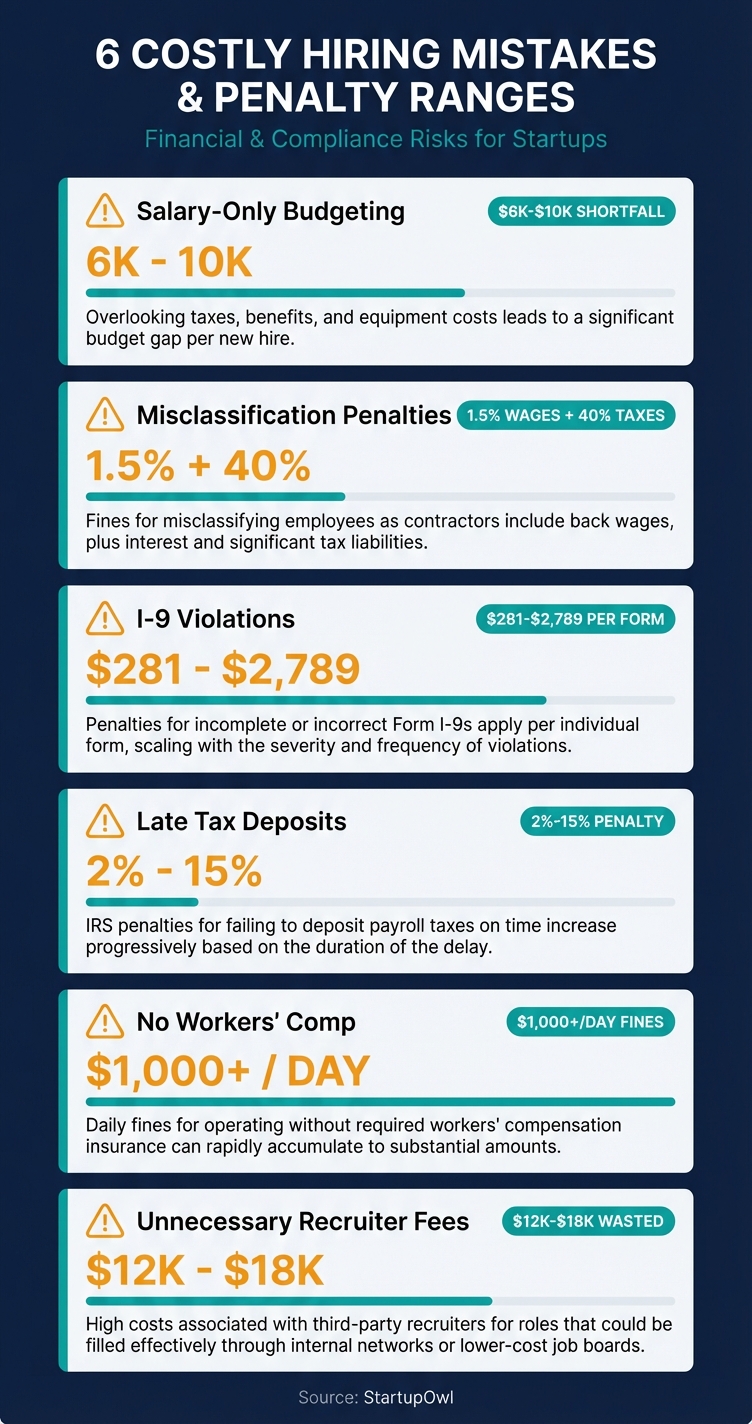
- Budgeting only for salary. If you budget $50,000 for a hire and forget employer taxes, insurance, equipment, and payroll software, you will overshoot by $6,000 to $10,000 in year one. That can burn through 2 to 3 months of runway for a lean startup.
- Misclassifying an employee as a contractor. The IRS can assess back employment taxes plus penalties of 1.5% of wages for the Social Security portion and 40% of income taxes that should have been withheld. State penalties stack on top of that. If the person works set hours, uses your tools, and follows your process, they are likely an employee.
- Skipping Form I-9 or completing it late. Penalties for I-9 violations range from $281 to $2,789 per form for a first offense. ICE can audit your records with only 3 days' notice. Keep completed I-9s on file for 3 years after the hire date or 1 year after termination (whichever is later).
- Missing payroll tax deposits. IRS penalties for late deposits start at 2% (1 to 5 days late) and escalate to 15% (more than 10 days past the due date). Your payroll provider should handle deposits automatically, but verify the first few months.
- Not purchasing workers' comp before day one. In states like California, operating without workers' comp is a criminal offense. Fines can exceed $10,000 plus the cost of any claims.
- Using a commission-based recruiter for a first hire. A contingency recruiter charges 20% to 30% of first-year salary. On a $60,000 hire, that is $12,000 to $18,000. For entry-level roles, posting the job yourself on free boards saves thousands.
Frequently Asked Questions
For an entry-level role, expect $3,000 to $6,000 beyond salary in hard costs (payroll taxes, insurance, equipment, software). The SBA estimates total employment costs reach 1.2x to 1.4x the employee's annual salary once you account for employer FICA at 7.65%, workers' comp, unemployment insurance, and onboarding expenses.
Yes. You need an EIN (Employer Identification Number) to set up payroll, withhold taxes, and report wages. You can get one for free at IRS.gov in about 10 minutes. If you already have an EIN for your business entity, you use that same number.
You owe the employer share of Social Security (6.2%) and Medicare (1.45%), totaling 7.65% of gross wages. You also owe FUTA at an effective rate of 0.6% on the first $7,000 of wages (about $42/year per employee), plus state unemployment insurance at your state's new-employer rate, typically 2% to 4%.
Your employee must complete Section 1 of Form I-9 on or before their first day of work. You must complete Section 2 within 3 business days of the start date by examining the employee's identity and work authorization documents. Penalties for non-compliance start at $281 per form.
Yes. Gusto handles W-4 collection, I-9 onboarding, payroll processing, tax filing, and new-hire reporting for most states. The Simple plan costs $49/month + $6/employee as of 2026. That comes to about $55/month for a single employee, including unlimited payroll runs and automatic tax deposits.
In almost every state, yes. The moment you hire your first W-2 employee, you are typically required to carry workers' compensation insurance. Texas is the only state where it is optional. Expect to pay $30 to $94 per month for a low-risk office employee. Buy your policy before day one to avoid fines and personal liability.
Sources & References
- IRS Publication 15 (Circular E), Employer's Tax Guide 2026
- USCIS Form I-9, Employment Eligibility Verification
- IRS FUTA Credit Reduction Information
- ACF.gov New Hire Reporting for Employers
- Gusto Pricing Page
- IRS Tax Inflation Adjustments for Tax Year 2026
- DOL FUTA Credit Reductions Page
- Insureon Workers' Comp Rates by State 2026
About the Author
Editor, StartupOwl
Eliot leads StartupOwl's state data research. He maintains the site's fifty state records of LLC filing fees, annual costs, processing times, and small business grant programs, checking each figure against the state office that publishes it and logging the date it was verified. Based in New Jersey, he has spent his working life in and around small businesses, and he writes for the founder who wants the real number rather than the advertised one. Every figure under his byline traces to a named source, and when a state proves a number wrong, the correction is published, not buried.
Was this article helpful?
Questions about How to Hire Your First Employee
No comments yet. Ask the first question and a member of our team will answer.
Leave a comment