
How to Get Google Reviews for Your Small Business: A Practical Guide for 2026
How to get Google reviews for your small business using free tools and compliant methods. 81% of consumers check Google reviews before choosing a local business.

In This Article
- Key Takeaways
- Step-by-Step
- Cost Breakdown
- Why Google Reviews Are the Most Valuable Free Marketing You Are Not Using
- What Google Reviews Actually Do for Your Business
- How to Set Up a Google Review System (Step by Step)
- Best Review Management Tools for Small Businesses in 2026
- 5 Mistakes That Can Get Your Google Reviews Removed (or Worse)
- What the FTC Consumer Review Rule Means for You
- What Changed for Google Reviews in 2026-2026
- Your Next Steps
- FAQ
$0–$300
Est. Cost
168 hours
Timeline
5
Total Steps
Some links in this guide are affiliate links. If you sign up through them, StartupOwl may earn a commission at no extra cost to you. We only recommend tools we have researched and believe provide real value. Our editorial opinions are not influenced by affiliate partnerships. For more details, see the FTC's endorsement guidelines.
Why Google Reviews Are the Most Valuable Free Marketing You Are Not Using
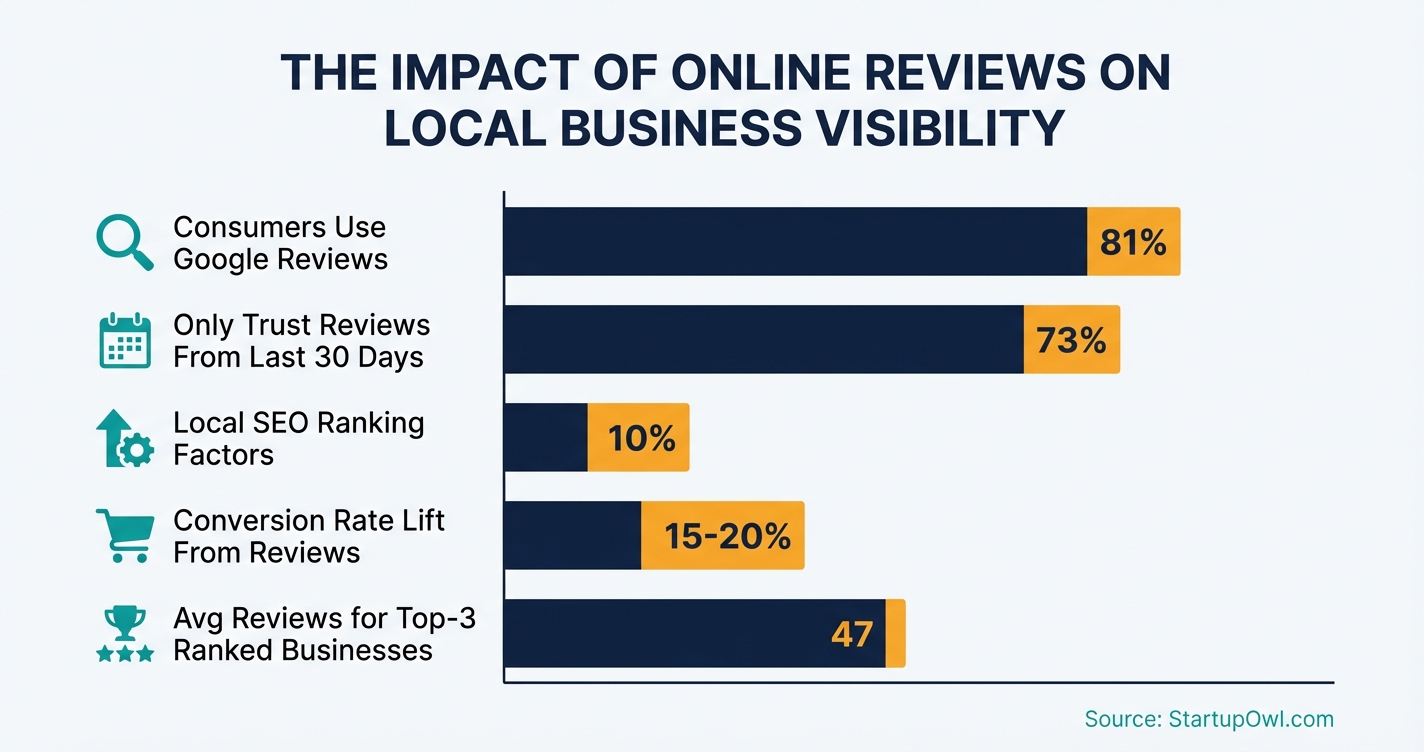
81% of consumers use Google to evaluate local businesses before making a purchase, and 88% read Google reviews before choosing one (BrightLocal, 2026 Local Consumer Review Survey). Google hosts roughly 57-58% of all online reviews globally, giving it more influence over your reputation than Yelp, Facebook, and TripAdvisor combined.
Reviews account for about 10% of local SEO ranking factors and can lift conversion rates by 15-20%, according to LocaliQ data. Businesses in the Google Local 3-pack receive approximately 126% more traffic and 93% more actions (calls, clicks, directions) than those ranked 4-10. If you are running a local business, your review profile is not optional; it is your storefront.
The good news: collecting reviews is free. Google's built-in review link and QR code tools cost nothing. This guide shows you exactly how to set up a review collection system, stay compliant with both Google's policies and the FTC's 2024 Consumer Review Rule, and decide whether a paid tool is worth it for your business.
What Google Reviews Actually Do for Your Business
Google reviews work on three levels simultaneously. First, they are a local ranking signal (about 10% of local SEO factors per LocaliQ). A 2026 case study from Sterling Sky found that businesses experience a noticeable Maps ranking boost when they cross the 10-review threshold. Businesses in the top 3 local positions average about 47 reviews, compared to 38 for positions 7-10 (BrightLocal).
Second, reviews are a trust filter. 71% of consumers will not even consider a business with an average rating below 3 stars (BrightLocal 2024). The trust sweet spot is a 4.2-4.5 star average (Trustmary). A perfect 5.0 can actually look suspicious.
Third, reviews drive revenue. Positive Google reviews are linked to up to 18% revenue growth (SocialPilot). A company with a 4.5-star average earns up to 25% more clicks than one at 3.5 stars. And 73% of consumers only trust reviews less than 30 days old, so freshness matters as much as volume.
If you are also working on your broader local SEO or putting together a small business marketing plan, Google reviews should be near the top of your priority list.
How to Set Up a Google Review System (Step by Step)
You do not need expensive software to start collecting reviews. The steps below use only free tools. We cover paid options in the tools section if you want automation later.
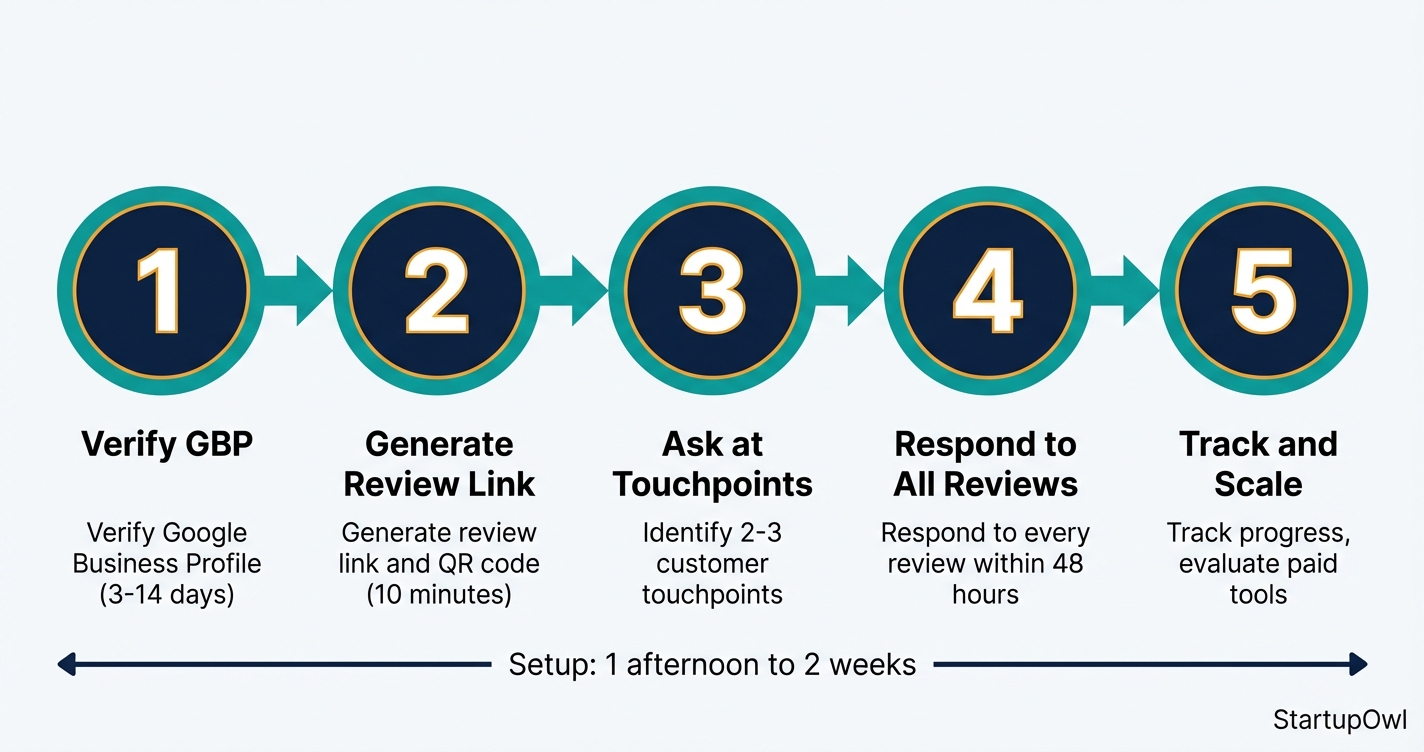
Follow these five steps in order. The entire setup takes about one afternoon if your Google Business Profile is already verified, or 1-2 weeks if you need to complete verification first.
Step 1: Claim and verify your Google Business Profile at business.google.com. Verified profiles with complete data are 80% more likely to appear in local search results (Birdeye 2026 study). Make sure your business name, address, phone number, hours, and categories are 100% accurate.
Step 2: Generate your free review link and QR code. Google published official documentation for this feature on December 31, 2026. In your GBP dashboard, click "Read Reviews" then "Get more reviews" to access your unique link and QR code. Test both on desktop and mobile before distributing.
Step 3: Identify 2-3 customer touchpoints where you will ask for reviews. The best moment is right after a clear "value moment" (problem solved, product delivered, service completed). Send the review link via email, text, or hand them the QR code. Keep the ask neutral and brief.
Step 4: Respond to every review within 48 hours. 97% of review readers also read business responses (Shapo, citing LocaliQ). Create 3-4 response templates, then personalize each one. As of 2026, Google pre-screens owner responses before publishing them.
Step 5: Track your progress and decide if you need a paid tool. A simple spreadsheet tracking requests sent vs. reviews received is enough for most businesses. Graduate to a paid tool when you consistently generate 5+ reviews per week and need automation.
Best Review Management Tools for Small Businesses in 2026
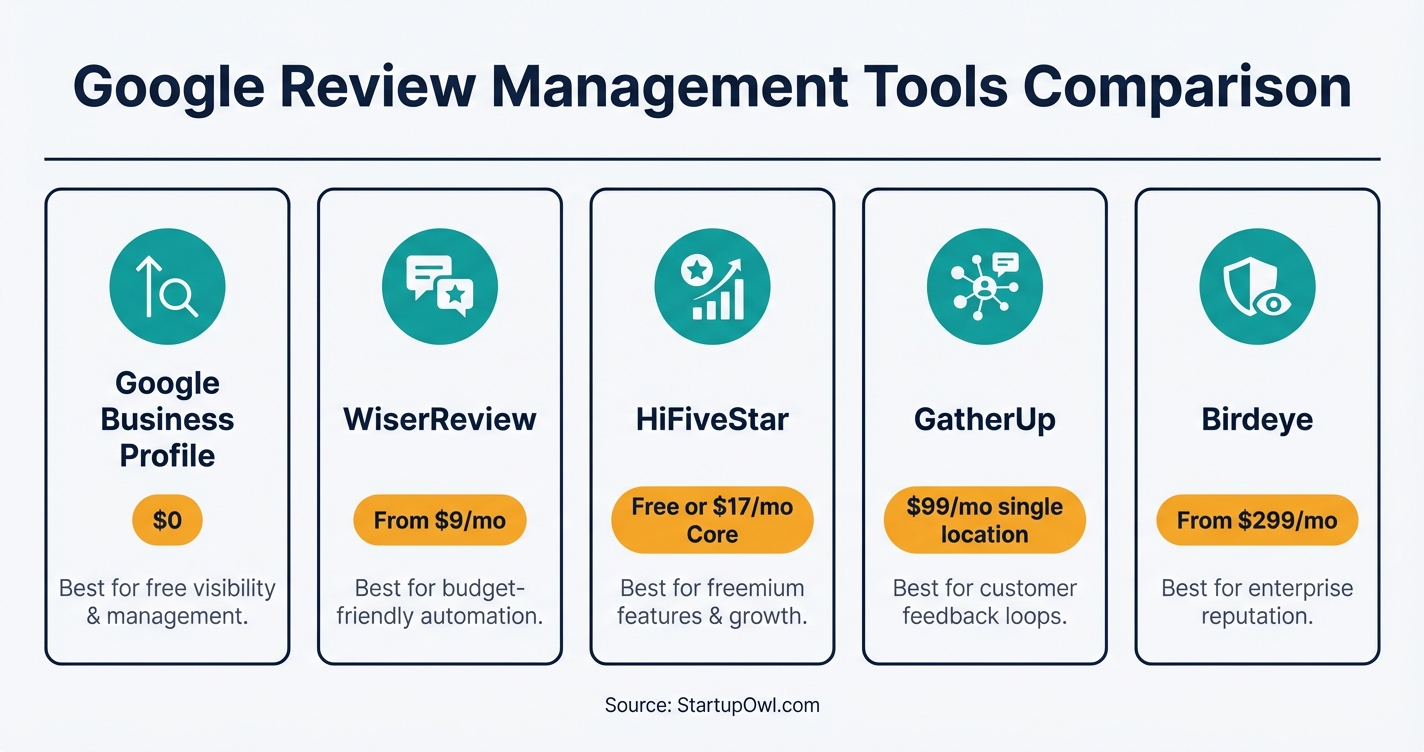
You do not need to pay for software to collect Google reviews. Google Business Profile gives you a free review link, QR code, and notification system. But if you want automated SMS/email requests, AI-generated reply drafts, or multi-location management, paid tools can save significant time.
Google Business Profile (Free)
Your starting point. Includes a review link generator, QR code download, review notifications, and the ability to respond to reviews. You also get Google Business Profile Insights to track views, searches, and customer actions. Every small business should have this set up before considering any paid tool.
WiserReview (From $9/month)
WiserReview is the lowest-priced review management tool on the market, starting at $9/month as of 2026. It sends automated review requests via email or WhatsApp, includes a centralized dashboard, and integrates with Shopify, WooCommerce, Wix, and 30+ platforms. Best for budget-conscious businesses that want automation without enterprise pricing.
HiFiveStar (Free Plan / $17/month Core)
HiFiveStar offers a free plan with unlimited review connections, plus a Core plan at $17/month that adds SMS, email, and WhatsApp review requests. Higher tiers include AI Reply and API access. The free plan is genuinely useful for single-location businesses that want a dashboard without paying anything.
GatherUp ($99/month)
GatherUp costs $99/month for a single location (or $60/month per location for multi-location businesses). It includes a Google Reviews widget, automated review requests, and detailed analytics. A solid mid-range option for established businesses that need more than basic monitoring.
Birdeye (From $299/month)
Birdeye starts at $299/month ($3,588/year on a 12-month contract). It is an enterprise-grade platform with AI-powered review replies, drip campaigns, multi-location management, and reputation monitoring across all major review sites. Best for franchises and multi-location businesses. Overkill (and overpriced) for most single-location small businesses.
Google Review Tool Pricing Comparison (as of Early 2026)
| Type / Provider | Rate | Notes |
|---|---|---|
| Google Business Profile | $0 | Free forever. Review link, QR code, notifications, response tools. |
| WiserReview | From $9/mo | Lowest entry price. Email + WhatsApp requests. 30+ integrations. |
| HiFiveStar | Free / $17/mo | Free plan available. Core adds SMS, email, WhatsApp requests. |
| SocialPilot Reviews | Free / $25.50/mo | Free for one brand. Pro plan (annual billing) covers multiple brands. |
| Chekkit | $25/mo | Business Plan. Business Pro at $149/mo. Prices updated Summer 2026. |
| NiceJob | From $49/mo | Automated invites, social sharing, trust badges. |
| GatherUp | $99/mo | Single location. Multi-location at $60/mo per location. |
| Grade.us | $110/mo | Review path, monitoring, Google Reviews widget. |
| Swell | $179/mo | Mid-range option with comprehensive features. |
| Broadly | $299-$699/mo | $350 setup fee on all plans. Custom pricing for franchises. |
| Birdeye | From $299/mo | $3,588/year on 12-month contract. |
| Podium | $399/mo | Premium tier. AI replies, advanced analytics. |
5 Mistakes That Can Get Your Google Reviews Removed (or Worse)
Google's review enforcement got significantly stricter in 2026, and the FTC's Consumer Review Rule (effective October 21, 2024) now carries civil penalties of up to $53,088 per violation. On December 22, 2026, the FTC sent its first batch of warning letters to 10 companies for potential violations. Here are the mistakes you need to avoid.
- Offering incentives for reviews. Discounts, freebies, or contest entries in exchange for reviews violate both Google's policy and the FTC rule. You can ask for reviews, but you cannot condition any reward on leaving one (or on the sentiment of that review). The FTC specifically prohibits "conditioning incentives on reviews expressing a particular sentiment."
- Review gating (filtering by sentiment). Sending happy customers to Google and unhappy ones to a private feedback form is called "review gating." Google explicitly prohibits it. Ask every customer the same way, with the same link, regardless of how you think their experience went.
- Posting fake reviews or using AI to generate them. Google's AI moderation now detects linguistic patterns associated with AI-generated reviews. The FTC rule also bans AI-generated fake reviews. Penalties apply to both the business and the broker or tool used to create them.
- Ignoring negative reviews. 53% of consumers expect a response to negative reviews within one week. Unanswered negative reviews damage trust far more than the review itself. A professional, empathetic response can actually improve how prospective customers view your business.
- Bulk-requesting reviews all at once. A sudden spike of 50 reviews in one week after months of silence looks suspicious to Google's anti-spam system. Aim for a steady, organic flow of 2-5 reviews per week rather than batch campaigns.
If you are also building your brand presence online, check out our guide on building a brand and our guerrilla marketing ideas for more low-cost visibility strategies.
What the FTC Consumer Review Rule Means for You
The FTC's Consumer Review Rule took effect on October 21, 2024, and the agency began sending enforcement warning letters in December 2026. The rule prohibits fake reviews (human or AI-generated), incentivized reviews tied to a specific sentiment, suppression of negative reviews, and insider reviews without disclosure. Violations carry penalties of up to $53,088 per violation as of 2026.
For small businesses, the practical takeaway is straightforward: ask for genuine reviews, never pay or reward for specific ratings, and do not suppress negative feedback. If an employee or family member leaves a review, they must disclose their connection to the business. You can read the full rule Q&A on FTC.gov.
What Changed for Google Reviews in 2026-2026
Several important changes affect how you collect and manage reviews going into 2026. First, Google rolled out pseudonymous reviews in late 2026, allowing users to post reviews with a nickname and avatar instead of their real name. The identity is still tied to their Google account (so it is not truly anonymous to Google), but you may see more reviews signed by unfamiliar names. This is expected to increase review volume, particularly in sensitive industries like healthcare and legal services.
Second, Google now pre-screens owner responses before publishing them. Your replies still appear as coming from the business (no personal name displayed), but the customer is notified when you respond and can modify their review afterward.
Third, Google officially documented its review link and QR code feature on December 31, 2026, nine months after the feature first became available. This means there is now a standardized, Google-approved way to create and share review request links.
If you are comparing platforms for your online presence, our Squarespace vs WordPress guide and Shopify vs Squarespace comparison can help you pick the right website foundation.
Your Next Steps
Start today by generating your free Google review link and QR code from your Google Business Profile dashboard. Send your first 5 review requests to recent customers this week. Then set a repeating weekly reminder to respond to new reviews and send fresh requests.
Once you have a steady flow, explore whether a tool like HiFiveStar (free plan) or WiserReview ($9/month) can save you time with automation. For help with the rest of your marketing stack, grab our free marketing plan template or explore our ChatGPT for small business guide for AI-assisted review response drafting.
Step-by-Step Process
- 1
Claim and verify your Google Business Profile
You cannot collect Google reviews without a verified Google Business Profile (GBP). Sign in at business.google.com, search for your business, and follow the verification steps (usually a postcard, phone call, or video verification). Verification typically takes 3-14 days.
Make sure your business name, address, phone number (NAP), hours, and categories are 100% accurate. According to Birdeye's 2026 study, verified profiles with complete data are 80% more likely to appear in search results.
Tips
- Double-check that your business name matches your real-world signage exactly. Keyword-stuffing your business name can get your profile suspended.
- Add photos of your storefront, products, and team. Listings with photos generate 35% more clicks.
Common Mistakes
- Leaving your GBP unverified and wondering why reviews are not appearing.
- Using a P.O. Box or virtual office address for a service-area business (Google may suspend your profile).
- 2
Generate your free Google review link and QR code
Google officially documented its review link and QR code feature on December 31, 2026. Inside your GBP dashboard, click "Read Reviews" then "Get more reviews" to see your unique link and downloadable QR code.
You can also generate a review link using your Place ID with this URL format:
https://search.google.com/local/writereview?placeid=YOUR_PLACE_ID. Free link generators from Whitespark and BrightLocal also work well.Tips
- Test the link on both desktop and mobile before distributing it. Some shortened URLs break on certain mobile browsers.
- Print the QR code large (at least 2 inches square) and place it where customers already look: receipts, counter signs, invoices.
Common Mistakes
- Sharing a link to the wrong business location if you have multiple branches. Always verify the Place ID matches the correct profile.
- Not testing the link before printing 500 table cards with it.
- 3
Pick 2-3 natural touchpoints to ask for reviews
The highest-converting ask happens right after a clear "value moment" when you have just solved a problem or delivered a product. Pick 2-3 specific moments in your customer journey, such as right after a successful service is completed, after delivery confirmation, or after a repeat customer's second or third positive interaction.
Keep the request simple. A proven script: "If you have a minute, would you share a quick Google review? It helps other people find us. Here's the link." Send the link via email, text, or hand them the QR code in person.
Tips
- Ask every customer the same way with the same link. Google prohibits "review gating" (only sending happy customers to your review page).
- Set a simple weekly calendar reminder to review who you served this week and send requests. Consistency beats volume.
Common Mistakes
- Waiting too long after the service to ask. The sweet spot is within 24-48 hours while the experience is fresh.
- Only asking verbally and never following up with the actual link. Most people forget within minutes.
- 4
Respond to every review within 48 hours
97% of consumers who read reviews also read the business's responses, according to LocaliQ research. Responding to every review (positive and negative) signals engagement to both Google and future customers. Businesses that respond to 80%+ of reviews see a 10-20% boost in local ranking visibility, per Search Engine Land.
For negative reviews, acknowledge the concern, apologize if appropriate, and offer to resolve the issue offline. Never get defensive or reveal private customer details. As of 2026, Google pre-screens owner responses before publishing them, so keep your tone professional.
Tips
- Create 3-4 response templates for common positive and negative scenarios, then personalize each one with specific details from the review.
- Block 15 minutes every Monday morning to review and respond to the past week's reviews. Track the number of new reviews in a simple spreadsheet.
Common Mistakes
- Ignoring negative reviews. 53% of consumers expect a response to a negative review within one week.
- Copy-pasting the exact same "Thank you!" response to every review. It looks robotic and Google's AI moderation may flag it.
- 5
Decide if you need a paid review management tool
For most businesses under 50 reviews, the free GBP dashboard is enough. Once you are handling higher volume, juggling multiple locations, or want automated SMS/email review requests, a paid tool saves real time.
Budget options start at $9/month with WiserReview. Mid-range tools like HiFiveStar offer a free plan plus a Core plan at $17/month that includes SMS, email, and WhatsApp review requests. For multi-location businesses, GatherUp runs $99/month for a single location. Enterprise tools like Birdeye ($299/month) and Podium ($399/month) include AI-powered reply suggestions and advanced analytics.
Tips
- Start free. Only upgrade to a paid tool when you are consistently generating 5+ reviews per week and need automation.
- Look for annual billing discounts (typically 10-16% off) before committing to a monthly plan.
Common Mistakes
- Paying $299+/month for an enterprise tool when you only have one location and 20 customers a month.
- Choosing a tool solely for AI reply features without checking if it integrates with your existing CRM or POS system.
Cost Breakdown
| Item | Cost Range | Notes |
|---|---|---|
| Google Business Profile (setup and review link) | $0 | Free forever. Includes review link generator and QR code. |
| Budget review management tool (WiserReview, HiFiveStar free plan) | $0-$17/month | Good for single-location businesses getting started with automated requests. |
| Mid-range tool (SocialPilot Reviews, Chekkit, NiceJob) | $25-$99/month | Adds multi-channel requests, sentiment analysis, and basic reporting. |
| Premium tool (GatherUp, Grade.us, Swell) | $99-$179/month | Multi-location support, advanced analytics, Google Reviews widget. |
| Enterprise tool (Broadly, Birdeye, Podium) | $299-$399/month | AI replies, white-label options, franchise support. Broadly charges a $350 setup fee. |
| Professional GBP management (agency) | $125-$475/month | One-time setup $300-$499 plus monthly management. Includes review response crafting. |
Frequently Asked Questions
The average local business has about 39 Google reviews (Trustmary). Businesses in the top 3 local pack positions average 47 reviews (BrightLocal). Aim for at least 10 to cross the initial ranking threshold, then target a steady flow of 2-5 new reviews per week rather than a specific total number.
No. Both Google's review policy and the FTC's Consumer Review Rule prohibit conditioning incentives on reviews expressing a particular sentiment. You can ask for reviews, but you cannot tie the request to a discount, freebie, or contest entry. Violations carry penalties up to $53,088 per violation.
The trust sweet spot is 4.2-4.5 stars (Trustmary). A perfect 5.0 can actually look suspicious to consumers. 71% of consumers will not consider a business below 3 stars, and 92% will use a business with at least 4 stars. Focus on consistently good service rather than chasing perfection.
53% of consumers expect a reply to a negative review within one week (ReviewTrackers). Respond within 24-48 hours if possible. Acknowledge the concern, apologize if appropriate, and offer to resolve the issue offline. 97% of people who read reviews also read the business's responses, so your reply matters as much as the review itself.
Yes. Reviews account for approximately 10% of local SEO ranking factors (LocaliQ). A 2026 Sterling Sky case study confirmed a noticeable Maps ranking boost when businesses crossed the 10-review mark. Review recency, keywords in review text, and your response rate all contribute to your local search visibility.
Not at first. Google Business Profile gives you a free review link, QR code, and notification system. Paid tools become worthwhile once you are generating 5+ reviews per week and need automation. Budget tools like WiserReview start at $9/month, while HiFiveStar offers a genuinely useful free plan. Only consider enterprise tools ($299+/month) if you manage multiple locations.
No. This is called "review gating," and Google explicitly prohibits it. You must ask all customers using the same link, without filtering based on their sentiment. The FTC rule also bans suppressing negative reviews. Send everyone the same review request and let the feedback fall where it may.
Some links on this page are affiliate links. If you sign up for a service through them, we may earn a commission at no extra cost to you. This does not influence our rankings.
Sources & References
- BrightLocal Local Consumer Review Survey 2026/2026
- Google Review Statistics 2026 (Shapo)
- Sterling Sky: Does the Number of Google Reviews Impact Ranking? (2026)
- BrightLocal Google Reviews Study
- FTC Consumer Reviews and Testimonials Rule Q&A
- FTC Final Rule Banning Fake Reviews (August 2024)
- FTC Warning Letters for Consumer Review Rule Violations (December 2026)
- Google Formalizes Review Request Links (PPC Land, January 2026)
- Whitespark Google Review Link Generator
- BrightLocal Google ID and Review Link Generator
- Google Business Profile Guidelines 2026 (Birdeye)
- Google My Business 2026: Reviews and Responses (Business E-Reputation)
About the Author
Editor, StartupOwl
Eliot leads StartupOwl's state data research. He maintains the site's fifty state records of LLC filing fees, annual costs, processing times, and small business grant programs, checking each figure against the state office that publishes it and logging the date it was verified. Based in New Jersey, he has spent his working life in and around small businesses, and he writes for the founder who wants the real number rather than the advertised one. Every figure under his byline traces to a named source, and when a state proves a number wrong, the correction is published, not buried.
Was this article helpful?
Questions about How to Get Google Reviews for Your Small Business
No comments yet. Ask the first question and a member of our team will answer.
Leave a comment