
Does Your Business Need a Privacy Policy
Yes, if your website collects any personal data. Here is how to create a compliant privacy policy for $0 to $3,000 in under 30 minutes.

Yes, your business needs a privacy policy if you collect any personal information (names, emails, payment data, IP addresses, or cookies). You can create one for free using tools like Termly or GetTerms, or pay $500 to $3,000 for an attorney to draft a custom policy. California CCPA fines alone run $2,663 per unintentional violation, so skipping this step is a costly gamble.
$0–$3,000
Est. Cost
If your website has a contact form, email sign-up, payment page, or even just Google Analytics, you almost certainly need a privacy policy. As of 2026, 20 U.S. states have comprehensive data privacy laws on the books, and Rhode Island now requires all commercial websites to post a privacy notice regardless of revenue or company size. The good news: you can generate a compliant privacy policy in under 30 minutes for anywhere from $0 to $20 per month using a generator tool, or pay $500 to $3,000 for an attorney-drafted version.
Before you create your privacy policy, gather these items:
- A list of every form on your website that collects user information (contact forms, checkout pages, newsletter sign-ups, account registration).
- A list of every third-party tool your site uses that touches user data (Google Analytics, Stripe, Mailchimp, Facebook Pixel, Hotjar, etc.).
- Your business entity details including legal name, physical address, and contact email. These appear in your privacy policy.
- Your EIN or business registration number if you have one. See our guide to getting an EIN if you have not applied yet.
- An understanding of where your customers are located. Check your analytics dashboard for geographic breakdowns by state and country.
If your business formation is not yet complete, handle that first. Our best LLC formation services guide walks you through creating a legal entity, which determines the business name and address on your privacy policy.
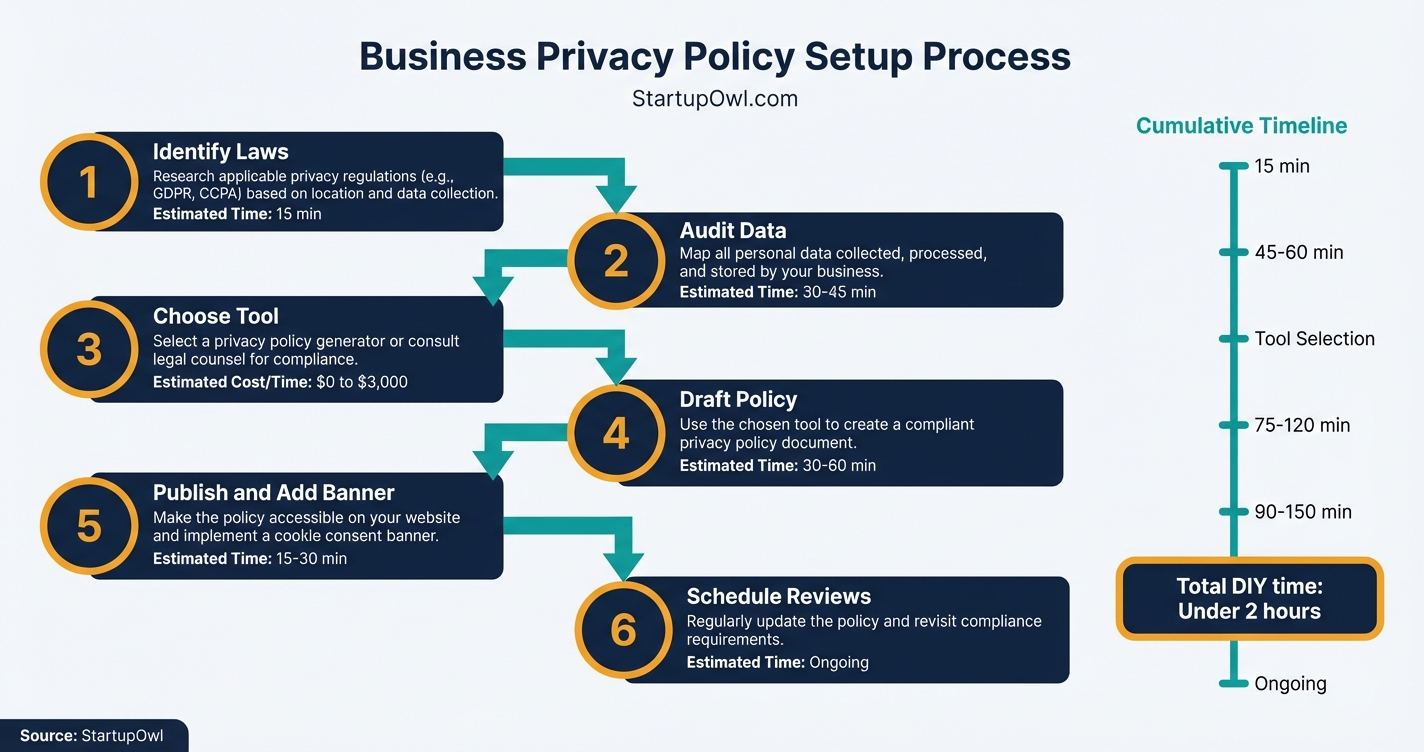
Creating a privacy policy is one of the fastest legal tasks you will complete as a business owner. If you use a generator tool, expect to spend about 10 to 30 minutes answering questions about your website and data practices. The tool produces a ready-to-publish document immediately.
If you hire an attorney, expect 1 to 2 weeks for drafting and revisions, plus a back-and-forth where they ask detailed questions about your data flows. Attorney fees run $500 to $3,000 depending on complexity.
The most time-consuming part is not the policy itself. It is the data audit in Step 2. Most business owners underestimate how many tools and trackers are running on their site. A cookie scan tool (available free from Termly or Iubenda) will uncover trackers you forgot about.
After publishing, your ongoing obligation is to update the policy whenever you add new data collection tools, change vendors, or when new laws take effect. If you use a paid generator with auto-update features, this is largely handled for you.
Step-by-Step Process
- 1
Determine Which Privacy Laws Apply to Your Business
Start by identifying where your customers are located. If you serve California residents, you are likely subject to the CCPA/CPRA. If you have European visitors, the GDPR applies. As of January 1, 2026, Indiana, Kentucky, and Rhode Island each have comprehensive privacy laws in effect.
Most state laws apply when you control or process personal data of 100,000 or more residents annually, or 25,000 residents if you derive 50% or more of revenue from data sales. Rhode Island has no threshold at all. Connecticut dropped its threshold from 100,000 to 35,000 consumers in mid-2026.
Even if you fall below these thresholds, CalOPPA (California Online Privacy Protection Act) requires any website collecting data from California residents to publish a privacy policy. Since nearly every business has some California traffic, a policy is effectively mandatory for you.
Tips
- Use Google Analytics geographic reports to confirm which states your visitors come from.
- If you sell to EU customers or accept GDPR-covered data, your policy must meet GDPR standards too.
- Rhode Island requires all commercial websites to post a privacy notice, with no revenue threshold.
Common Mistakes
- Assuming your business is too small to need a privacy policy. Size does not exempt you if you collect personal data.
- Ignoring state laws outside California. Over 20 states now have their own data privacy rules.
- 2
Audit Every Piece of Personal Data You Collect
Before you write a single word, map out exactly what data your website collects and why. Open your site and list every form field, cookie, analytics tracker, payment processor, and email tool. Common sources include contact forms (names, emails), checkout pages (addresses, credit cards), newsletter sign-ups, Google Analytics (IP addresses, browsing behavior), and embedded social media widgets.
For each data point, document three things: what you collect, why you collect it, and which third-party tools process it. For example, if you use Stripe for payments and Mailchimp for email, both need to be disclosed in your policy. Your privacy policy must list categories of personal data collected, third parties who receive it, and how long you retain it.
Tips
- Check your website's cookie scanner (Termly and Iubenda both offer free cookie scanning tools).
- Include data collected from mobile apps, chatbots, and customer support forms.
- Document your data retention schedule now; modern privacy laws require specific timeframes.
Common Mistakes
- Forgetting to include third-party tools like Google Analytics, Facebook Pixel, or Hotjar in your data audit.
- 3
Choose How to Create Your Privacy Policy
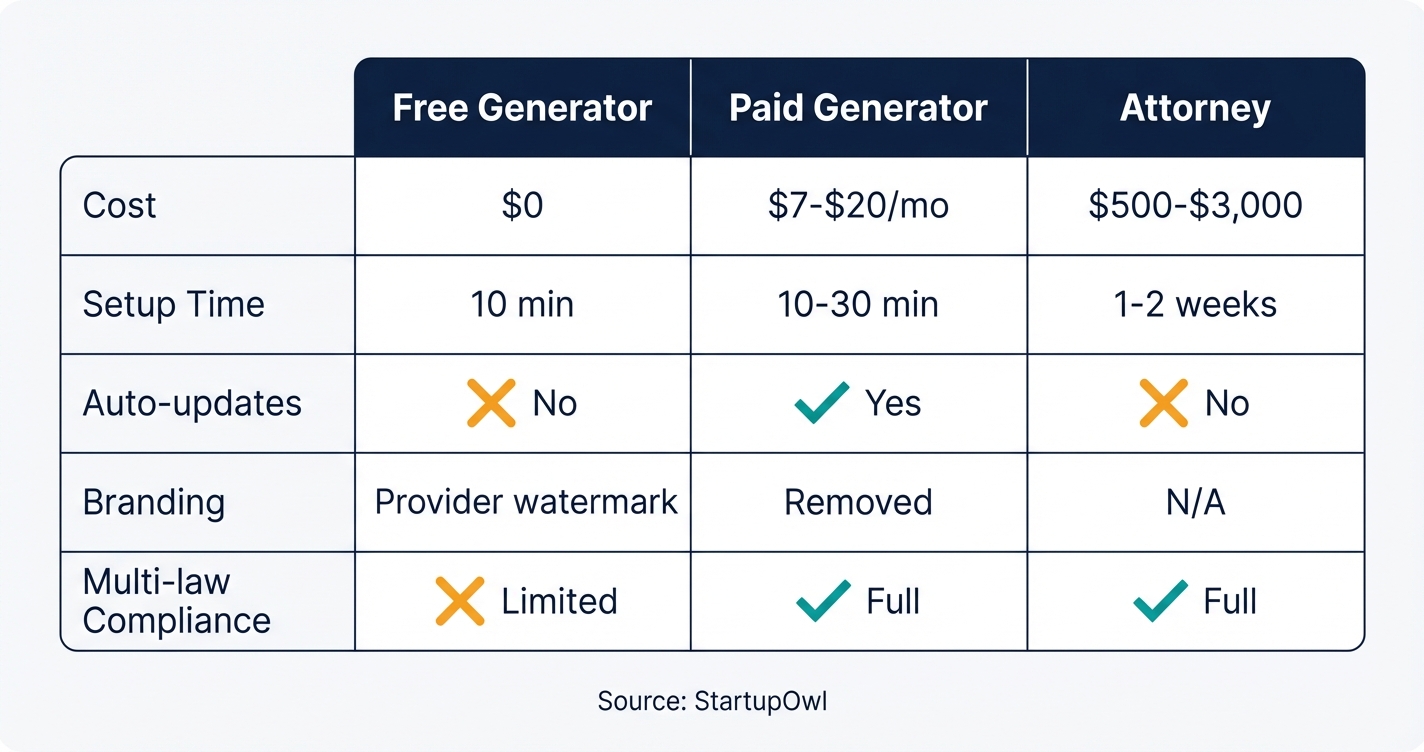
You have three options: a free generator, a paid generator ($5 to $20/month), or an attorney ($500 to $3,000). For most small businesses collecting standard data (names, emails, payment info), a paid generator like Termly is sufficient and costs $10 to $20 per website per month. GetTerms offers a Starter Pack at $49/year and a Comprehensive Pack at $69/year. Iubenda starts at about $6.99/month per site.
Free generators (Termly Free, GetTerms Lite) work for basic sites but often include the provider's watermark and limit you to a single policy. If your business handles health data, children's data, or processes data across multiple jurisdictions, hire an attorney. Attorney costs run $500 for a simple policy up to $3,000+ for complex e-commerce businesses.
Tips
- Termly's paid plans include automatic updates when laws change, which saves you from manually rewriting your policy.
- If you operate in healthcare or finance, spend the $500+ on attorney review. Generator tools do not cover HIPAA or Gramm-Leach-Bliley.
- TermsFeed offers one-time pricing with no recurring subscription, starting around $25 for a basic policy.
Common Mistakes
- Using a free template from an unverified source. Poorly drafted policies can be considered deceptive by the FTC.
- Copying another company's privacy policy. This is both a copyright violation and potentially inaccurate for your data practices.
- 4
Generate or Draft Your Privacy Policy
If you chose a generator, follow the step-by-step questionnaire. Termly's generator asks about your platform type, data collection methods, third-party integrations, and applicable laws. The process takes roughly 10 minutes. Your generated policy must include these mandatory components: what personal data you collect and why, which third parties process user data, data retention limits, how users can request access or deletion, and your contact information.
If you hired an attorney, provide them with the data audit from Step 2. Request that the policy specifically address every state law you identified in Step 1. Make sure the policy includes a clear process for users to withdraw consent, as required by the CCPA and most newer state laws. For Rhode Island specifically, your policy must identify categories of personal data collected, disclose any data sales or targeted advertising, and list third parties who receive data.
Tips
- Review the generated policy line by line. Check that every third-party tool from your audit appears in the disclosure section.
- Add a 'Last Updated' date to your policy. Many state laws require this.
Common Mistakes
- Accepting the generator's default output without customizing it. Generic policies miss business-specific data practices.
- 5
Publish Your Privacy Policy and Add a Cookie Consent Banner
Add your privacy policy as a dedicated page on your website (typically at yoursite.com/privacy-policy). Link to it from your website footer, checkout pages, account sign-up forms, and email opt-in forms. If you use a generator like Termly, you can embed a hosted policy that auto-updates when laws change. Alternatively, download the HTML and host it yourself.
Most privacy laws also require a cookie consent banner that appears when visitors first land on your site. Termly, Iubenda, and CookieYes all offer consent management tools. Iubenda's free tier supports up to 1,000 pageviews/month. Termly's free tier includes a basic banner. If you use Google Analytics or run ads targeting EU visitors, Google requires Consent Mode v2 integration.
By August 1, 2026, California businesses must also comply with the new DROP (Data Request Opt-Out Preference) signal requirement from the CPPA.
Tips
- Test your cookie banner on mobile devices. A banner that blocks content or has no clear 'decline' option can itself be a violation.
- Link your privacy policy in app store listings if you have a mobile app.
- Set up a dedicated email address ([email protected]) for data access requests.
Common Mistakes
- Burying the privacy policy link where users cannot find it. It must be clearly accessible from every page, typically in the footer.
- Assuming cookie consent is only a European requirement. California and several other U.S. states now require consent for certain tracking.
- 6
Schedule Regular Reviews and Updates
A privacy policy is not a set-and-forget document. Schedule a quarterly review to check for new third-party tools, changes in data collection, and new laws. Colorado eliminated its cure period entirely in 2026, meaning violations now have immediate enforcement risk with no grace period. Connecticut's threshold drops to 35,000 consumers in mid-2026, and California's DROP deadline hits August 1, 2026.
If you use a paid generator like Termly (Pro+ plan at $20/month), automatic updates are included when laws change. If you self-host your policy, set calendar reminders to check for new state laws at least every 90 days. Keep a changelog of every update with the date and description of changes.
Consult a qualified attorney or licensed CPA if your business model changes significantly (for example, adding e-commerce, entering a new state, or beginning to process health data).
$0 to $20/month (generator plan) or $200 to $500/year (attorney review) 30 minutes per quarter termly.ioTips
- Use Termly's scheduled site scans to detect new cookies or trackers automatically.
- When adding any new SaaS tool (email platform, CRM, ad network), update your privacy policy within 30 days.
- Indiana and Kentucky offer 30-day cure periods for initial violations, but only if you act immediately.
Common Mistakes
- Holding onto personal data indefinitely 'just in case.' Modern laws require documented retention limits and deletion processes.
- Ignoring vendor compliance. You are responsible for how third parties handle your users' data.
Your total cost depends on which route you take. A free generator like Termly Free or GetTerms Lite costs $0 but includes the provider's watermark and limits you to one site and basic clauses. Paid generators run $7 to $28/month per site and include automatic legal updates, branding removal, and multi-law compliance.
Attorney-drafted policies cost $500 to $1,500 for a simple business and $1,500 to $3,000+ for complex e-commerce or multi-jurisdiction operations. Annual review by an attorney adds another $200 to $500/year.
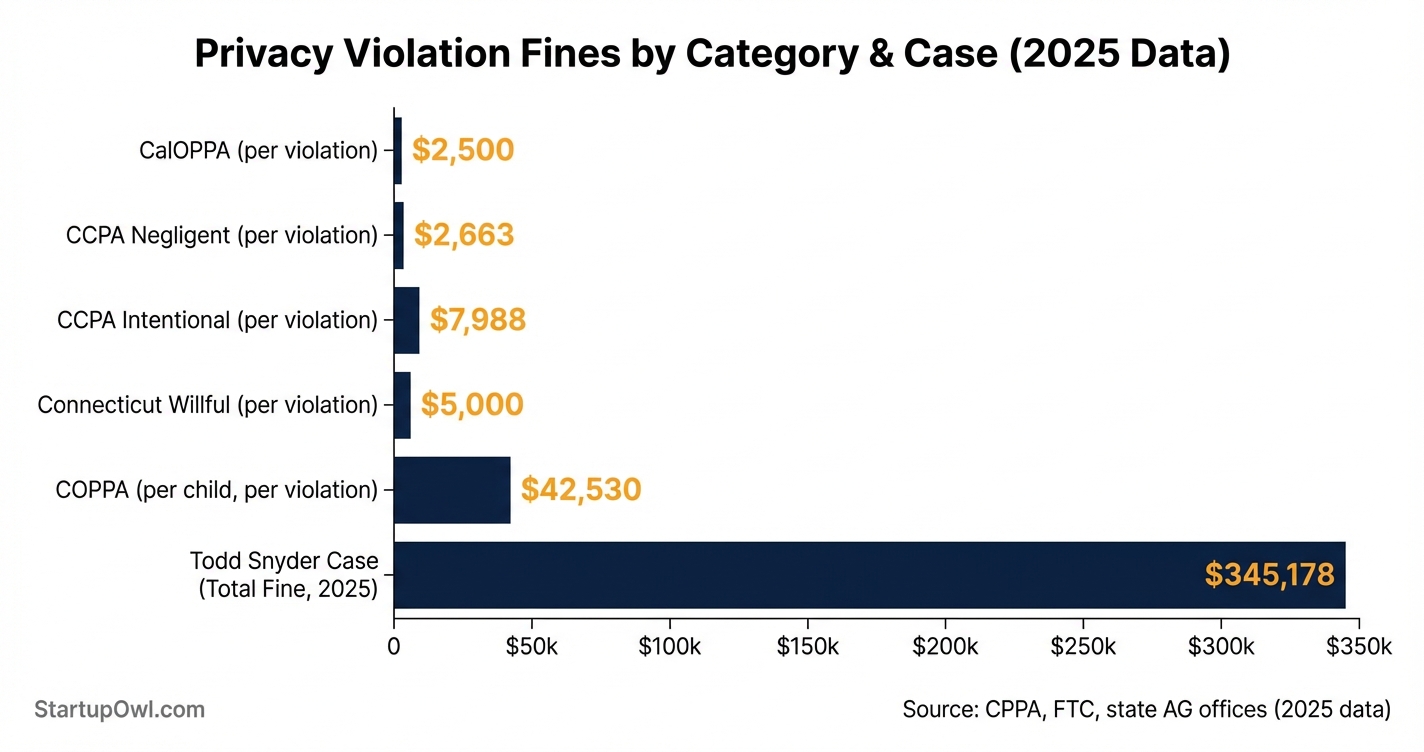
The cost of not having a privacy policy is far higher. California CCPA fines run $2,663 per negligent violation and $7,988 per intentional violation as of 2026. These are assessed per affected consumer, so even a small data incident can produce five-figure penalties. Connecticut imposes up to $5,000 per willful violation. COPPA violations involving children's data can reach $42,530 per violation per child.
Cost Breakdown
| Item | Cost Range | Notes |
|---|---|---|
| Free privacy policy generator (Termly Free, GetTerms Lite) | $0 | Includes provider branding; limited to one policy and one site |
| Paid privacy policy generator (Termly Starter) | $10 to $14/month per site | Removes branding; adds GDPR/CCPA compliance and auto-updates |
| Paid privacy policy generator (Termly Pro+) | $20/month per site | Unlimited policies and edits; full GDPR and CCPA compliance |
| GetTerms Starter Pack | $49/year | Includes privacy policy, terms, and cookies for one site |
| GetTerms Comprehensive Pack | $69/year | Comprehensive privacy policy plus terms and conditions |
| Iubenda Essentials Plan | $6.99/month per site | Privacy and cookie policy with up to 30 third-party clauses |
| Iubenda Advanced Plan | $27.99/month per site | Geo-targeting, multi-lingual policies, and monthly scans |
| Attorney-drafted privacy policy (simple) | $500 to $1,500 | Basic policy for a simple website or blog |
| Attorney-drafted privacy policy (complex e-commerce) | $1,500 to $3,000+ | Multi-jurisdiction compliance; includes terms and conditions |
| Cookie consent banner (free tier) | $0 | Termly, Iubenda, and CookieYes offer free tiers with pageview limits |
| Cookie consent banner (paid) | $10 to $28/month | Higher pageview limits, geo-targeting, and full customization |
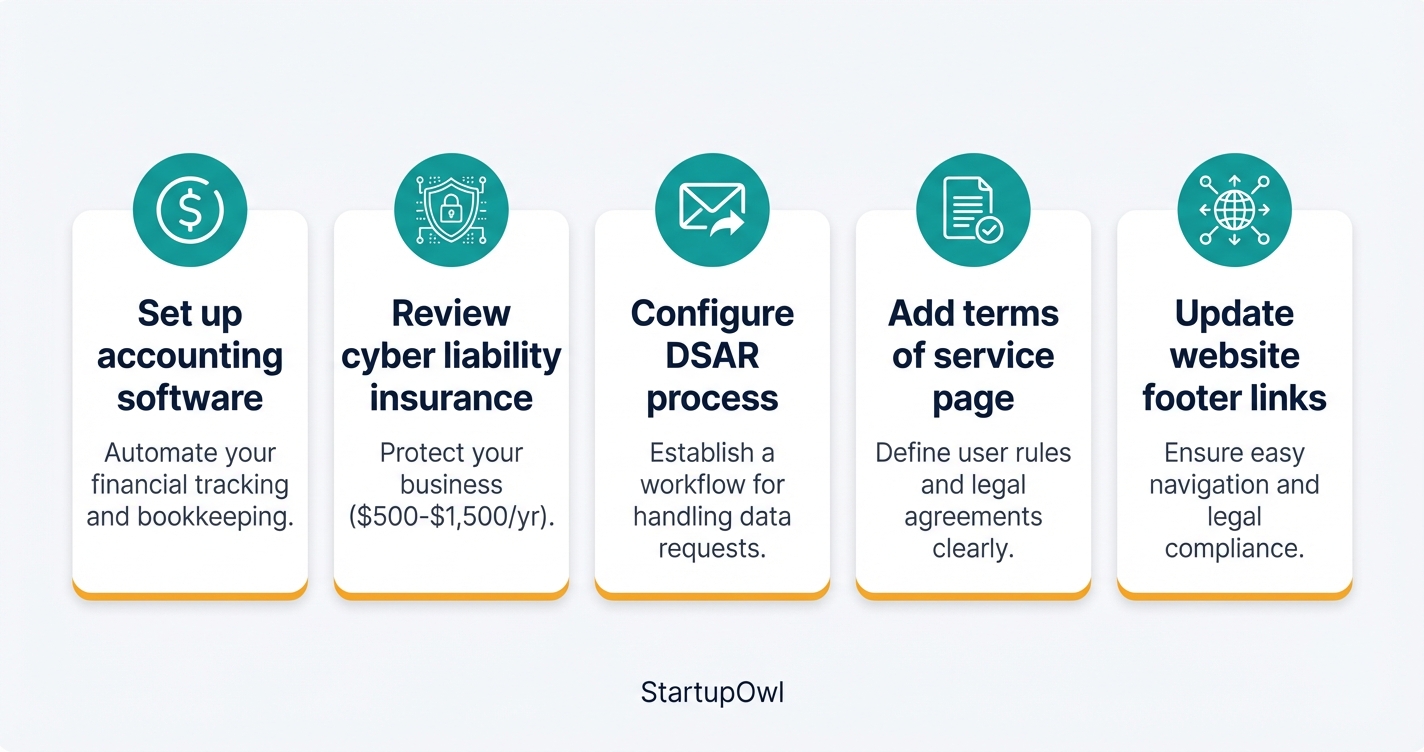
Once your privacy policy is live, take these follow-up steps:
- Set up your small business accounting if you have not already. Your accounting software (like QuickBooks or Wave) collects financial data that should be disclosed in your privacy policy.
- Review your business insurance coverage. Cyber liability insurance typically costs $500 to $1,500/year for small businesses and covers data breach response costs.
- Configure a data subject access request (DSAR) process. Create a dedicated email ([email protected]) or use Termly's embeddable DSAR form so users can request their data.
- Add a terms of service page. Most generator tools create this alongside your privacy policy. Terms of service protect your business from liability disputes beyond data privacy.
- Update your business website footer to include links to both your privacy policy and terms of service.
If you plan to run paid advertising on Google or Meta, both platforms require an active and accessible privacy policy before approving ad accounts. Complete this step before launching any campaigns.
The Complete Checklist
- Identify which state and federal privacy laws apply to your business01
Map customer locations to determine CCPA, GDPR, and state-specific obligations.
15 minutes$0 - Audit all personal data your website collects02
Document every form field, cookie, tracker, and third-party integration.
30 to 60 minutes$0 - List every third-party tool that processes user data03
Include payment processors, email platforms, analytics, and ad networks.
15 minutes$0 - Choose a generator tool or hire an attorney04
Free generators work for basic sites; hire an attorney for healthcare or complex data flows.
10 minutes to decide$0 to $3,000 - Generate or draft your privacy policy05
Answer the generator questionnaire or provide your data audit to your attorney.
10 minutes to 2 weeks$0 to $3,000 - Create a terms of service page06
Most generator tools include a terms of service generator alongside the privacy policy.
10 to 30 minutes$0 to $500 - Publish the privacy policy on a dedicated URL07
Add it to yoursite.com/privacy-policy and link from the site footer.
5 minutes$0 - Add a cookie consent banner to your website08
Use Termly, Iubenda, or CookieYes to display a compliant consent popup.
15 to 30 minutes$0 to $28/month - Link the privacy policy on all forms and sign-up pages09
Add a link near every email opt-in, checkout page, and account creation form.
15 minutes$0 - Set up a privacy request email address10
Create [email protected] for data access and deletion requests.
5 minutes$0 - Schedule quarterly policy reviews11
Set calendar reminders to review for new tools, data changes, and law updates.
5 minutes to schedule$0
Here are the tools and resources referenced in this guide:
- Termly Privacy Policy Generator (free tier available; paid plans $10 to $20/month per site)
- GetTerms Privacy Policy Generator (free lite version; paid plans from $49/year)
- Iubenda Compliance Platform (free tier; paid plans from $6.99/month per site)
- TermsFeed Privacy Policy Generator (one-time payment model starting around $25)
- CookieYes Cookie Consent Manager (free tier available)
- California Privacy Protection Agency (CPPA) for CCPA/CPRA compliance guidance
- FTC Privacy and Security Enforcement for federal privacy enforcement actions
- SBA.gov for general small business compliance resources
For related setup tasks, see our guides on how to create a business website, best registered agent services, and registered agent requirements.
These are the most expensive privacy policy mistakes small business owners make:
- Assuming your business is too small to need a policy. Rhode Island requires all commercial websites to post a privacy notice regardless of size or revenue. CalOPPA applies to any site with California traffic. Skipping a privacy policy exposes you to fines starting at $2,500 per violation under CalOPPA.
- Using vague or generic language. Regulators expect specificity. A policy that says "we may collect some information" without listing exact data categories and third-party recipients can be deemed deceptive by the FTC.
- Holding data indefinitely without a retention schedule. Modern privacy laws require you to document how long you keep personal data and how you delete it. "We keep your data until you ask us to delete it" is not compliant in most states.
- Ignoring cookie consent requirements. If you run Google Analytics, Facebook Pixel, or any tracking script, you likely need a consent banner. California, Connecticut, Colorado, and EU/UK regulations all require opt-in or opt-out mechanisms for tracking cookies.
- Failing to update your policy when you add new tools. Every time you integrate a new email platform, CRM, analytics tool, or payment processor, your privacy policy must be updated to disclose that third party. The CPPA fined Honda $630,000 in 2026 partly for sharing consumer data without proper contracts.
- Not honoring opt-out signals. California now requires businesses to honor Global Privacy Control (GPC) browser signals. Todd Snyder was fined $345,178 in 2026 for ignoring opt-out requests for 40 days due to a misconfigured privacy tool.
Frequently Asked Questions
Yes, if your blog uses Google Analytics, has a contact form, or runs ads, you are collecting personal data and need a privacy policy. A free generator like Termly Free covers basic blogs in about 10 minutes.
A free generator produces a basic policy for $0. Paid generators run $7 to $20/month per site with automatic legal updates. Hiring an attorney costs $500 to $3,000 depending on your business complexity.
You face fines of $2,500 to $7,988 per violation under California law alone. Connecticut can fine up to $5,000 per willful violation. COPPA violations involving children's data reach $42,530 per violation. Beyond fines, Google and Meta will reject your ad account applications without an active privacy policy.
Most small businesses do not need a lawyer. Generator tools like Termly and Iubenda produce compliant policies for a fraction of legal fees. Hire an attorney if you handle health data, children's data, or operate across multiple international jurisdictions.
Review it at least every 90 days and update it immediately whenever you add a new data-collecting tool, enter a new market, or when new privacy laws take effect. Paid generators like Termly Pro+ auto-update when legislation changes.
Yes. Both Apple's App Store and Google Play require apps that collect personal data to have a published privacy policy. You can use one policy for both your website and app, but it must address app-specific data collection (like device identifiers and push notification tokens).
A privacy policy explains how you collect, use, and protect personal data. Terms of service set the rules for using your website or product (acceptable use, liability limits, dispute resolution). You need both. Most generator tools create them together.
Sources & References
- California Privacy Protection Agency (CPPA)
- FTC Privacy and Security Enforcement
- Termly Privacy Policy Generator
- Termly Pricing
- Iubenda Pricing
- GetTerms Privacy Policy Generator
- TermsFeed Fines for Not Having a Privacy Policy
- Cookie Script US State Privacy Laws Guide 2026-2026
- CCPA Fines and Penalties (WP Legal Pages)
- Privacy Policy Cost (GetTerms)
- Privacy Policy Cost (Free Privacy Policy)
- ContractsCounsel Privacy Policy Cost
About the Author
Editor, StartupOwl
Eliot leads StartupOwl's state data research. He maintains the site's fifty state records of LLC filing fees, annual costs, processing times, and small business grant programs, checking each figure against the state office that publishes it and logging the date it was verified. Based in New Jersey, he has spent his working life in and around small businesses, and he writes for the founder who wants the real number rather than the advertised one. Every figure under his byline traces to a named source, and when a state proves a number wrong, the correction is published, not buried.
Was this article helpful?
Questions about Does Your Business Need a Privacy Policy?
No comments yet. Ask the first question and a member of our team will answer.
Leave a comment