
Small Business Marketing: The Complete Guide for 2026
Small business marketing costs $0 to $500/month to start. Compare 5 top tools with real pricing, build your first marketing stack, and avoid the 5 costliest mistakes.

In This Article
- Key Takeaways
- Step-by-Step
- Cost Breakdown
- Why Small Business Marketing Actually Works (When You Have a System)
- How to Build Your Small Business Marketing Stack (Step by Step)
- The 5 Marketing Tools Every Small Business Should Evaluate
- 5 Marketing Mistakes That Cost Small Businesses Thousands
- What to Do This Week
- FAQ
$0–$500
Est. Cost
30 days
Timeline
6
Total Steps
Some of the links in this guide are affiliate links, which means StartupOwl may earn a small commission if you sign up through them. This does not affect our recommendations or the price you pay. We only recommend tools we have researched and believe provide genuine value for small businesses. Our editorial opinions are our own.
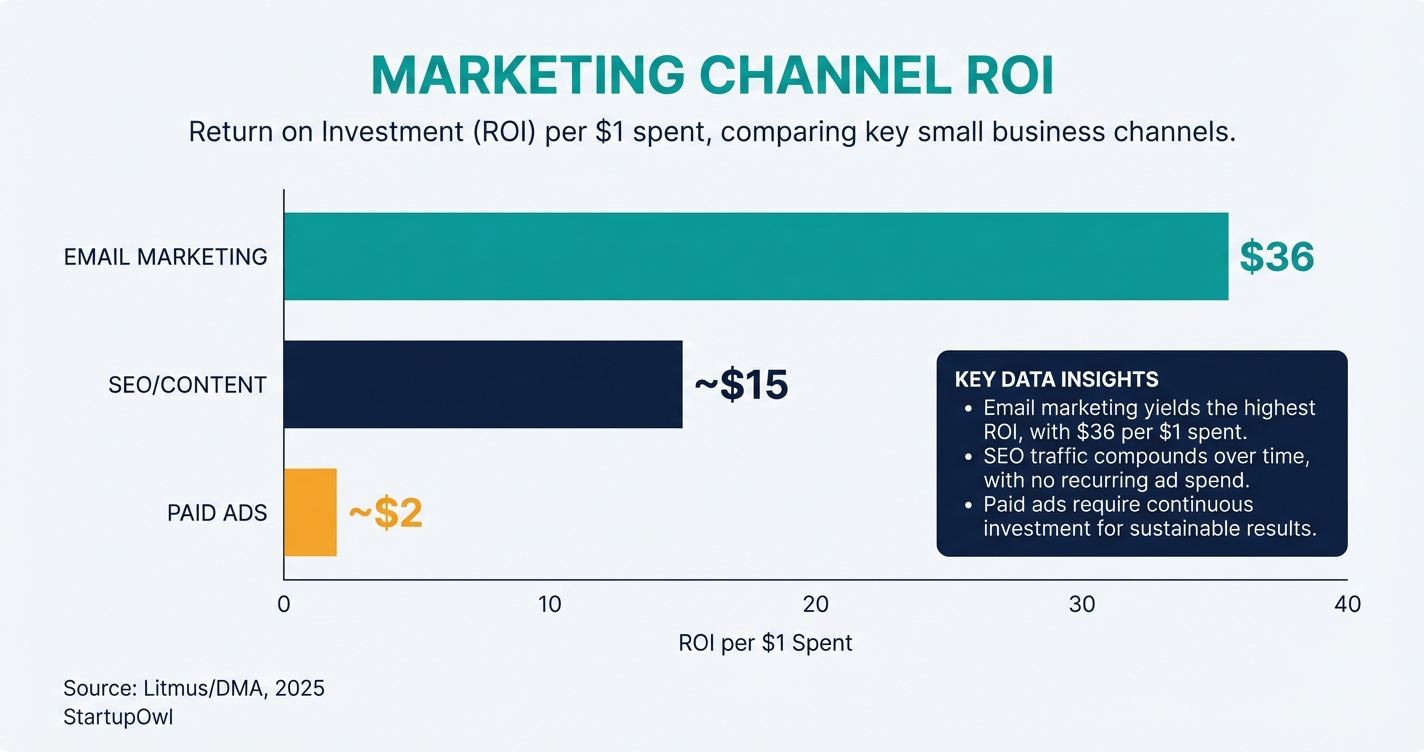
Email marketing returns an average of $36 for every $1 spent, according to industry benchmarks from Litmus and the DMA. That makes it the single highest-ROI digital marketing channel available to you, regardless of your business size or industry. And it is just one piece of a marketing stack you can build for under $100/month using free and starter-tier tools.
The average small business spends between $500 and $10,000 per month on digital marketing. But you do not need to start there. This guide shows you how to set up a complete marketing system (email, SEO, CRM, social media) starting at $0/month and scaling up only when the numbers justify it. Every price, feature, and recommendation is based on verified 2026-2026 data from official product pages.
Why Small Business Marketing Actually Works (When You Have a System)
Marketing without a system means posting randomly on Instagram, sending the occasional email, and hoping something sticks. Marketing with a system means connecting your email list, CRM, SEO, and social media so every piece of content serves a purpose. The difference shows up in your revenue within 90 days.
Here is the core idea: you need exactly four marketing channels working together. Email converts subscribers into customers (average ROI of 36:1). SEO drives free organic traffic that compounds over time. A CRM tracks your leads so nobody falls through the cracks. And social media distributes your content to new audiences. When these four channels share data (contacts synced, analytics connected), they create a feedback loop that gets more effective every month.
If you already have a small business marketing plan, this guide plugs the specific tools and costs into that framework. If you are starting from zero, follow the steps below in order. Each one builds on the previous step.
How to Build Your Small Business Marketing Stack (Step by Step)
Follow these six steps in order over your first 90 days. Each step includes exact costs, timelines, and the specific tools to use. By the end, you will have a complete marketing system generating leads on autopilot.
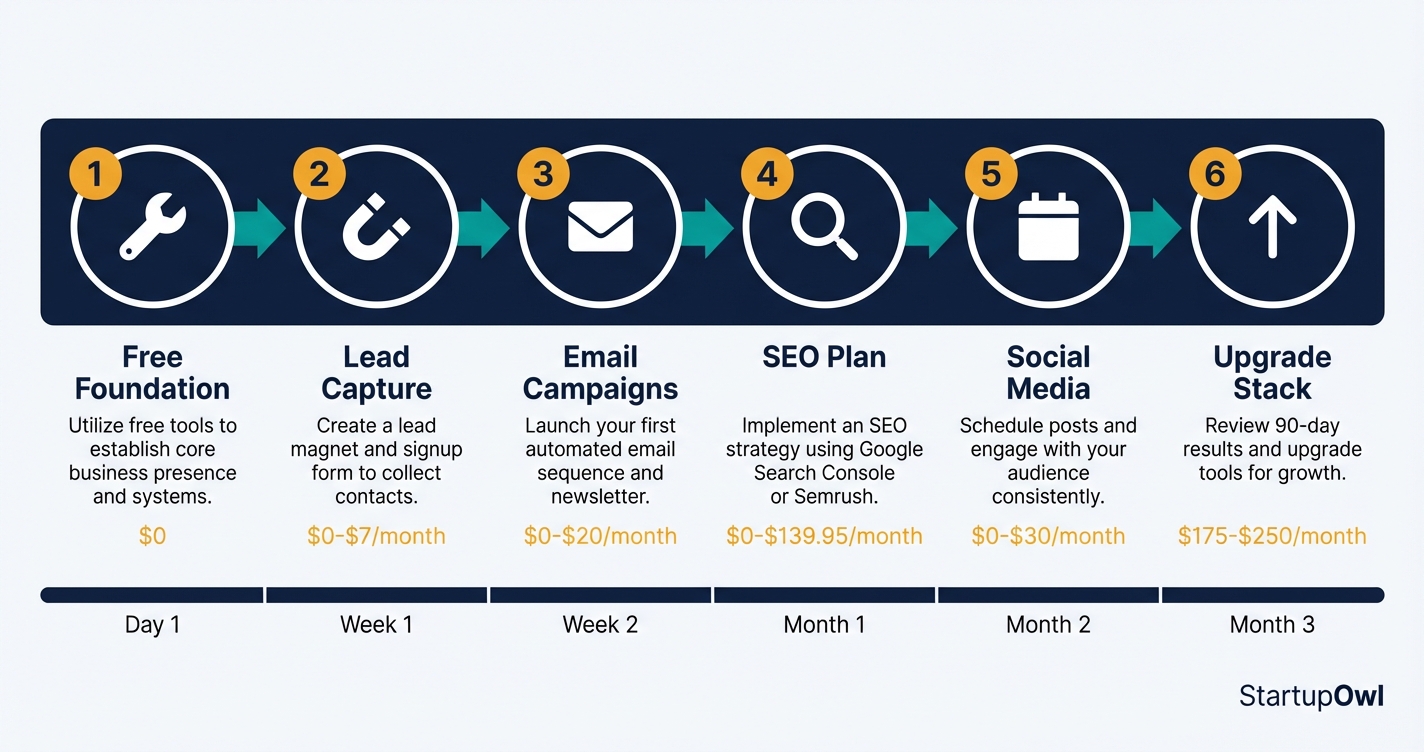
The steps start with free tools and add paid upgrades only when you outgrow the free tier. If you need help choosing between website platforms for your marketing, see our Squarespace vs WordPress comparison or our Shopify vs Squarespace guide for e-commerce businesses.
Small Business Marketing Stack Costs (2026)
| Type / Provider | Rate | Notes |
|---|---|---|
| Email Marketing (Mailchimp Free) | $0/month | 500 contacts, 1,000 sends/month. No automation or scheduling on free plan. |
| Email Marketing (Mailchimp Essentials) | $13/month | 500 contacts, 5,000 sends/month, 3 seats, 24/7 support, basic automation. |
| Email Marketing (Mailchimp Standard) | $20/month | 500 contacts, 6,000 sends/month, 5 seats, send-time optimization, predictive segmentation. |
| CRM (HubSpot Free) | $0/month | Basic contact management, email tracking, up to 2 users, HubSpot branding included. |
| CRM (HubSpot Starter) | $15/seat/month | 1,000 marketing contacts, automation, branding removed. Month-to-month commitment. |
| SEO (Google Search Console) | $0/month | Free. First-party Google data: keyword queries, clicks, impressions, indexing status. |
| SEO (Semrush Pro) | $139.95/month | 500 keyword tracking, 5 projects, 10K results/report. ~$117/month with annual billing (17% savings). |
| Social Scheduling (Buffer Free) | $0/month | 3 channels, 10 posts per channel. No analytics. |
| Social Scheduling (Buffer Essentials) | $6/channel/month | Unlimited scheduling, analytics, AI assistant. 5 channels = $30/month. |
| Lead Capture (OptinMonster) | $7/month (annual) | Exit-intent popups, A/B testing, targeting rules. |
The 5 Marketing Tools Every Small Business Should Evaluate
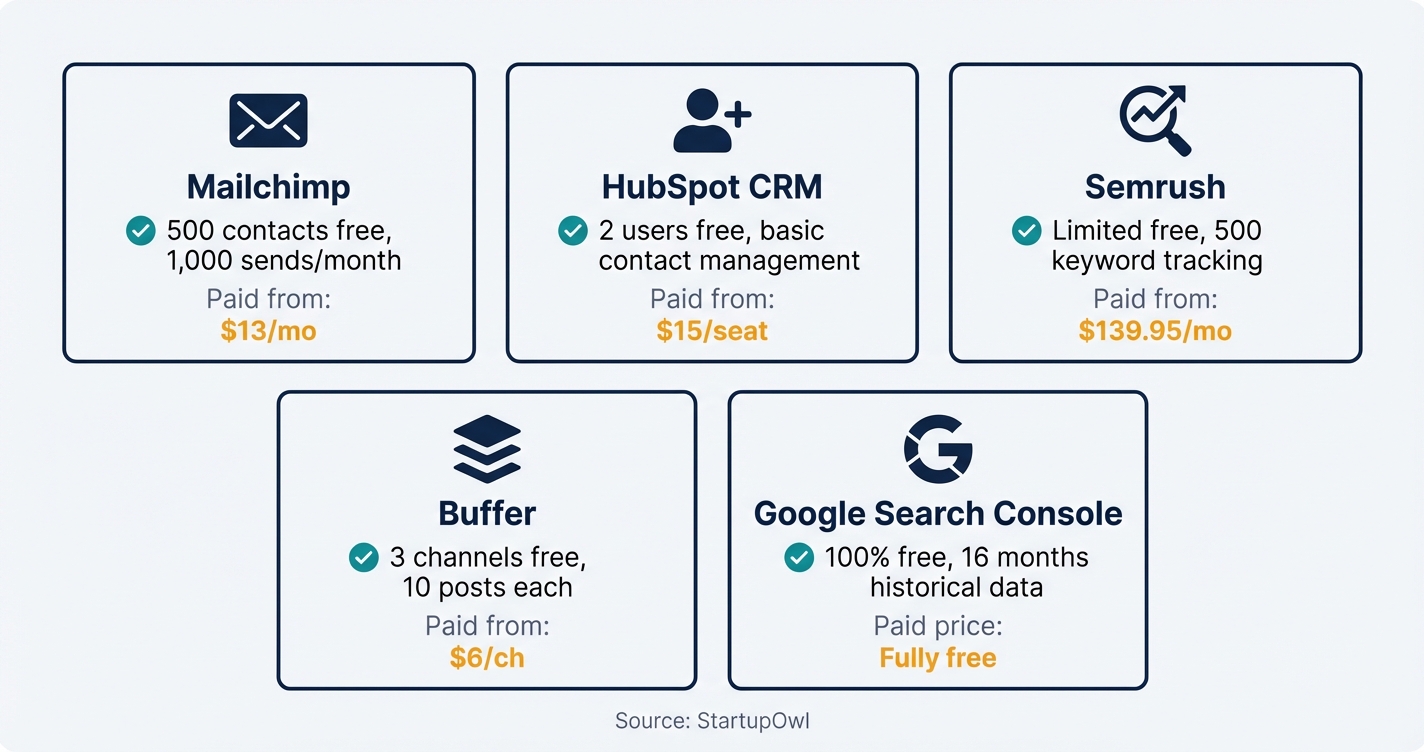
You do not need 15 marketing tools. You need 4-5 that integrate well and match your current stage. Here is what to use (and what to skip) based on verified pricing as of early 2026.
Mailchimp (Email Marketing)
Mailchimp's Free plan includes up to 500 contacts and 1,000 email sends per month, with a daily cap of 500 sends. You get basic templates and one audience, but no automation, A/B testing, or email scheduling. Once you hit 501 contacts, you are looking at the Essentials plan at $13/month or Standard at $20/month for send-time optimization and predictive segmentation. Mailchimp charges you for unsubscribed contacts too, so clean your list regularly. For a full email platform comparison, see our ConvertKit vs Mailchimp breakdown.
HubSpot CRM
HubSpot's free CRM includes basic contact management and email tracking for up to 2 users. The Starter plan costs $15/month per core seat with month-to-month flexibility and includes email marketing, lead capture forms, and basic automation with 1,000 marketing contacts. Professional pricing jumps to $800/month (with 3 seats included and a required onboarding fee), so make sure you actually need that tier before upgrading. For more CRM options, check our guide on CRM for startups.
Semrush (SEO and Competitive Intelligence)
Semrush Pro costs $139.95/month (or about $117/month billed annually). It includes keyword research, site audits, competitor analysis, 500 keyword tracking positions, and 5 projects. The Guru plan at $249.95/month adds historical data and content marketing tools, while Business at $499.95/month adds API access and 5,000 keyword positions. Semrush also offers a 14-day free trial on Pro and Guru plans so you can test before committing.
Buffer (Social Media Scheduling)
Buffer's Free plan supports 3 channels with 10 posts per channel and no analytics. The Essentials plan costs $6/month per channel and adds unlimited scheduling, analytics, and AI-assisted caption writing. The Team plan costs $10/month per channel with unlimited users and approval workflows. Buffer charges per channel (one Instagram account = 1 channel), so costs scale with the number of platforms you use.
Google Search Console (Free SEO Data)
Google Search Console is completely free and gives you first-party search data that no paid tool can replicate. You get 16 months of historical keyword data, click and impression counts, indexing status, and Core Web Vitals reports. Every small business with a website should have this set up, regardless of whether you pay for Semrush or any other SEO tool.
The $0/Month Starter Stack
For your first 90 days, you can run a complete marketing operation with zero monthly cost: Mailchimp Free (email), HubSpot CRM Free (lead tracking), Google Search Console (SEO data), and Buffer Free (social scheduling). Upgrade only after you hit the free-tier limits. Use our free marketing plan template to map out your first 90 days.
5 Marketing Mistakes That Cost Small Businesses Thousands
1. Staying on Free Email Plans Too Long
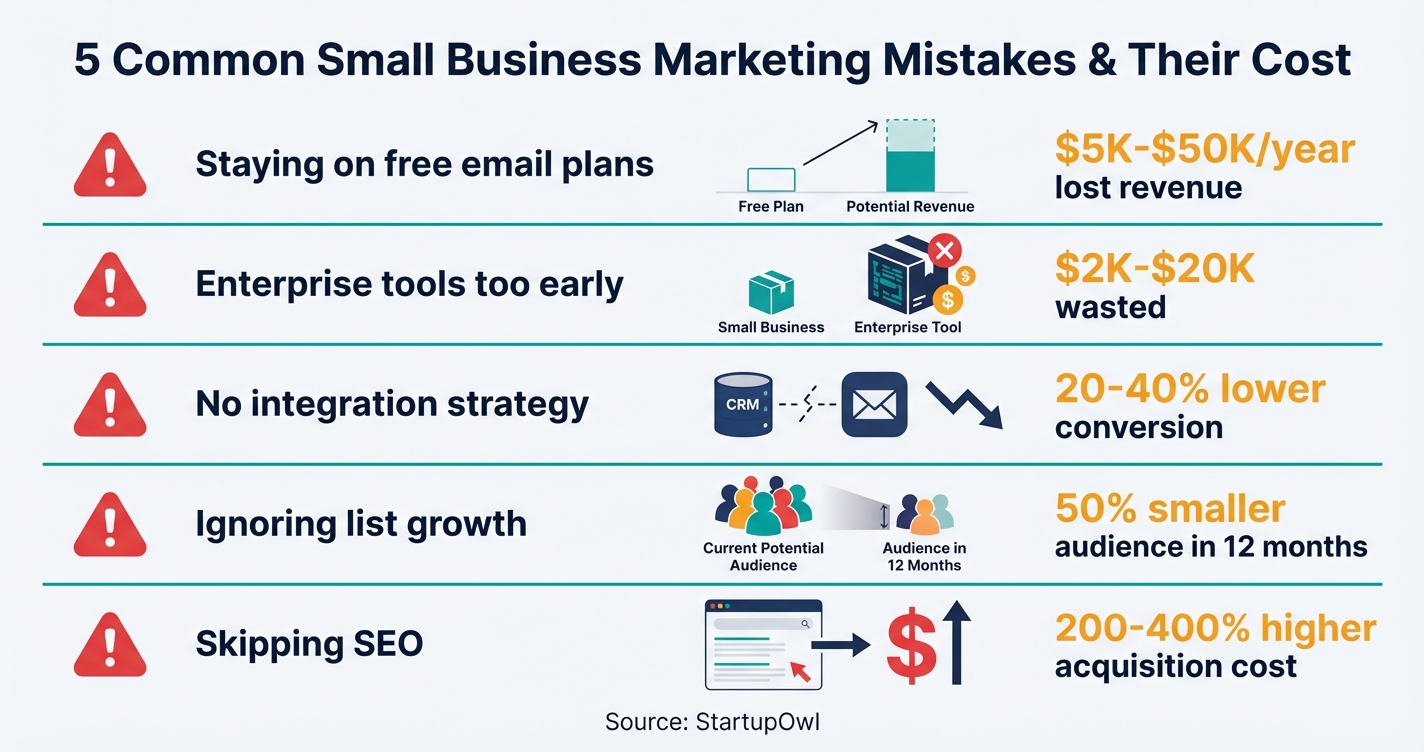
Free email plans cap you at 250-500 contacts with no automation, no A/B testing, and limited analytics. Businesses that stay on free plans see 15-25% lower email performance compared to paid users because they cannot segment their audience or automate follow-ups. The fix costs as little as $13/month on Mailchimp Essentials. The cost of not upgrading is estimated at $5,000-$50,000 in lost annual revenue from poor email engagement.
2. Choosing Enterprise Tools Before You Need Them
Selecting a CRM like HubSpot Professional (starting at $800/month plus onboarding fees of $7,000-$10,000) when a $15/month Starter plan covers your needs is one of the most expensive mistakes you can make. Enterprise CRMs take 4-12 weeks to implement properly, and many small businesses abandon them within 6 months. Start small, validate the tool with real data, then upgrade.
3. Running Marketing Channels Without Integration
Using email, CRM, and social tools that do not sync data creates contact duplicates, missed follow-ups, and an inability to track which channel is driving revenue. This results in 20-40% lower conversion rates because your lead workflows are broken. Before adding any new tool, confirm it integrates with your existing stack (most tools list their integrations on their pricing page).
4. Ignoring Email List Growth
Without active lead capture (signup forms, exit-intent popups, lead magnets), your email list shrinks by roughly 3-5% per month from natural attrition. Over 12 months, that means a 50% smaller audience and a shrinking sales pipeline. Tools like OptinMonster ($7/month) or Thrive Leads ($99/year) pay for themselves by keeping your list growing.
5. Skipping SEO Entirely
Relying solely on paid ads means your customer acquisition cost never decreases. Businesses without an organic search strategy pay an estimated 200-400% more per customer over time compared to those investing in SEO. The minimum viable SEO investment is free (Google Search Console + blog content), and results compound over months. For specific tactics, follow our local SEO for small business guide. If you want creative low-cost marketing ideas while your SEO grows, explore our guerrilla marketing ideas.
What to Do This Week
Set up your free marketing foundation today: Google Search Console, HubSpot CRM Free, Mailchimp Free, and Buffer Free. That takes about 30 minutes and costs nothing. Then create your first lead magnet and email signup form this week so you are building your list from day one.
After 90 days, review your numbers and upgrade one tool at a time based on what is actually driving results. A typical small business lands at $175-$250/month for a complete marketing stack by month four. Track everything, cut what does not work, and double down on what does. For a structured roadmap, download our free marketing plan template and start filling it in today.
Step-by-Step Process
- 1
Set up your free marketing foundation
Before you spend a dollar on marketing, claim three free accounts that form the backbone of every small business marketing stack. Start with Google Search Console, which is a free tool from Google that tracks your site's search performance, indexing status, and keyword data. Next, create a free HubSpot CRM account, which gives you basic contact management and email tracking at no cost.
Finally, sign up for Mailchimp's Free plan, which includes up to 500 contacts and 1,000 email sends per month. If you also use social media, Buffer's Free plan covers up to 3 channels with 10 scheduled posts per channel. These four tools cost nothing and take roughly 30 minutes total to set up.
Tips
- Connect Google Search Console to Google Analytics immediately so keyword data flows into your traffic reports.
- Use Mailchimp's free templates to send your first welcome email within 24 hours of setting up your account.
- Claim and verify your Google Business Profile (free) if you have a physical location or serve local customers.
Common Mistakes
- Skipping Google Search Console because you think SEO is only for big sites. It takes 5 minutes to set up and gives you free first-party search data no paid tool can replicate.
- Choosing a CRM based on features you won't need for 12 months. Start free, upgrade later.
- 2
Build your email list with a lead magnet and signup form
Your email list is the only marketing asset you truly own (social media algorithms can change overnight). Create a simple lead magnet (a checklist, template, or short guide) and place a signup form on your website. Mailchimp's free plan includes basic landing pages and embedded forms to capture email addresses.
For more advanced lead capture, OptinMonster starts at $7/month (billed annually) and includes exit-intent technology and A/B testing. Thrive Leads costs $99/year and offers multiple opt-in form types with advanced targeting. Without active list building, your email list shrinks by 3-5% per month due to natural attrition from unsubscribes and inactive addresses.
Tips
- Place your signup form above the fold on your homepage and at the end of every blog post.
- Offer something specific and immediately useful as your lead magnet (a one-page pricing template beats a generic ebook every time).
Common Mistakes
- Not having any lead capture on your website. If visitors leave without joining your list, you have no way to reach them again.
- Asking for too much information on signup forms. Name and email are all you need to start.
- 3
Launch your first email campaign and automation sequence
Once you have even 50 subscribers, start sending. A simple welcome sequence of 3-5 automated emails introduces your business, shares your best content, and makes a soft offer. Mailchimp's free plan does not include automation or email scheduling, so if you need those features, you will need to upgrade to the Essentials plan at $13/month (for up to 500 contacts) or the Standard plan at $20/month for send-time optimization and predictive segmentation.
Set a consistent sending schedule (weekly or biweekly) and track your open rates. The average email open rate across industries is around 21%, as of 2026. If yours is significantly lower, test your subject lines and sending times. For a deeper comparison of email platforms, check our guide on ConvertKit vs Mailchimp.
Tips
- Write your welcome email first. It gets the highest open rate of any email you will ever send.
- Use Mailchimp's A/B testing (available on paid plans) to test two subject lines per campaign and learn what your audience responds to.
- Review our small business marketing plan guide at /grow/small-business-marketing-plan for a weekly content calendar.
Common Mistakes
- Staying on the free plan past 500 contacts. Upgrading to a $13/month paid plan unlocks automation and better analytics that can significantly improve performance.
- Sending emails without a clear call to action. Every email should ask the reader to do one specific thing.
- 4
Create a basic SEO and content plan
SEO is the only marketing channel that compounds over time. Every blog post you publish can drive traffic for years, unlike paid ads that stop the moment you pause spending. Start by using Google Search Console to identify which queries already bring people to your site, then create content that targets related keywords.
If you want competitive intelligence and keyword research beyond what free tools offer, Semrush Pro costs $139.95/month (or about $117/month with annual billing, a 17% discount). The Pro plan includes 500 keyword tracking positions, 10,000 results per report, and 5 projects. For most small businesses, the Pro plan is more than enough for the first 12 months. Check our local SEO guide if you serve customers in a specific geographic area.
Tips
- Publish one high-quality blog post per week targeting a specific long-tail keyword. Consistency matters more than volume.
- Use Google Search Console's striking-distance keywords (positions 8-20) to find quick-win content opportunities.
- Explore how AI can speed up your content workflow with our guide on ChatGPT for small business at /grow/chatgpt-for-small-business.
Common Mistakes
- Expecting SEO results in weeks. Competitive keywords take 6-12 months to rank for, and new domains may take longer.
- Skipping SEO entirely and relying only on paid ads, which can cost 200-400% more per customer acquisition over time.
- 5
Schedule social media and track results weekly
Social media works best as a distribution channel for the content you are already creating (blog posts, emails, offers) rather than a standalone strategy. Pick the 1-2 platforms where your target customers spend time and post consistently using a scheduling tool.
Buffer's Essentials plan costs $6/month per channel and includes unlimited scheduling and analytics. If you manage 5 channels, that totals about $30/month. The Team plan costs $10/month per channel and adds approval workflows and unlimited users. Use our free social media content calendar to plan your first month of posts. Track weekly metrics (reach, engagement, link clicks) and cut any platform that is not driving measurable traffic or leads within 90 days.
Tips
- Repurpose blog posts into 3-5 social media posts each. One piece of content should feed multiple channels.
- Post at least 3 times per week on your primary platform. Consistency beats frequency.
Common Mistakes
- Trying to be active on 5+ social platforms at once. You will burn out and post low-quality content everywhere instead of great content somewhere.
- Treating social media as your primary lead generation tool instead of building your email list.
- 6
Upgrade your stack based on 90-day results
After 90 days of using free and low-cost tools, review your numbers. Look at email open rates, website traffic from organic search, social media referral traffic, and (most importantly) leads or sales generated. Upgrade only the tools that are driving measurable results.
A typical upgrade path for month 4-12 looks like this: email moves to Mailchimp Standard at $20/month for automation and segmentation, CRM upgrades to HubSpot Starter at $15/month per seat for lead scoring and basic automation, and you add Semrush Pro at $139.95/month for ongoing competitive intelligence. That puts your total marketing stack at roughly $175-$250/month, which is well within the typical small business range. Before upgrading, use our pricing calculator to estimate your monthly marketing budget.
Tips
- Only upgrade tools where you have hit the limits of the free plan. If you have 200 contacts, you do not need a $350/month email plan.
- Look for annual billing discounts. Semrush saves 17%, and most CRM and email tools offer 10-25% off for annual commitments.
- Document your marketing results before and after each upgrade so you can calculate actual ROI.
Common Mistakes
- Upgrading to enterprise tools too early. Choosing a CRM at $800+/month when a $15/month Starter plan covers your needs wastes thousands in the first year.
- Not integrating your tools. Your email platform, CRM, and landing pages should sync contacts automatically to avoid data silos.
Cost Breakdown
| Item | Cost Range | Notes |
|---|---|---|
| Email Marketing (Mailchimp) | $0-$20/month | Free plan covers 500 contacts and 1,000 sends. Essentials starts at $13/month; Standard at $20/month with automation. |
| CRM (HubSpot) | $0-$15/month per seat | Free CRM includes basic contact management. Starter plan at $15/seat/month adds automation and removes branding. |
| SEO Tool (Semrush Pro) | $0-$139.95/month | Google Search Console is free. Semrush Pro at $139.95/month (or ~$117/month annual). 14-day free trial available. |
| Social Media Scheduling (Buffer) | $0-$30/month | Free for 3 channels. Essentials at $6/channel/month. 5 channels = $30/month. |
| Lead Capture (OptinMonster or Thrive Leads) | $7/month-$99/year | OptinMonster starts at $7/month (annual). Thrive Leads at $99/year with A/B testing and advanced targeting. |
| Landing Page Builder (SeedProd) | $39.50/year | Drag-and-drop builder with pre-designed templates. Affordable entry point for custom landing pages. |
Frequently Asked Questions
Most small businesses spend between $500 and $10,000/month on digital marketing, but you can start at $0/month using free tiers of Mailchimp, HubSpot CRM, Google Search Console, and Buffer. A practical target for your first year is $175-$250/month once you upgrade to paid plans, covering email, CRM, SEO tools, and social scheduling.
Google Search Console is the single most valuable free marketing tool because it gives you first-party search data directly from Google (keyword queries, click-through rates, indexing issues, and 16 months of historical performance). No paid SEO tool can replicate this data. Pair it with Mailchimp Free (up to 500 contacts) and HubSpot's free CRM for a complete zero-cost starter stack.
Expect 3-6 months for competitive keywords to start ranking, and 6-12 months to reach the first page for established domains. New domains often take 12+ months. The investment breaks even by roughly month 6-9 for most businesses. During the waiting period, use Google Search Console to target striking-distance keywords (positions 8-20) for quicker wins.
Mailchimp's free plan has gotten smaller over time (now limited to 250-500 contacts depending on your account type, and just 500-1,000 sends/month), and it no longer includes automation on the free tier. Paid plans starting at $13/month (Essentials) are competitive, but alternatives like MailerLite and Brevo offer more generous free plans. If you are already on Mailchimp and it is working, stick with it. If you are starting fresh and budget is tight, compare options first.
Yes, but you do not need to pay for one. HubSpot's free CRM tracks contacts, logs emails, and manages your sales pipeline at no cost for up to 2 users. Starting a CRM early (even with 10 contacts) builds a habit of tracking leads and follow-ups that pays off as your business grows. For more options, see our guide on CRM for startups.
Email marketing leads with an average ROI of $36 for every $1 spent (some sources report up to $42:1). SEO and content marketing rank second because organic traffic compounds over time with no recurring ad spend. According to HubSpot's 2026 State of Marketing report, website/blog/SEO was the #1 ROI channel for B2B brands, while email marketing was #1 for B2C brands.
Some links on this page are affiliate links. If you sign up for a service through them, we may earn a commission at no extra cost to you. This does not influence our rankings.
Sources & References
- Mailchimp Pricing Plans (Official)
- About Mailchimp Pricing Plans (Help Center)
- Semrush Pricing (Official)
- HubSpot Marketing Software Pricing
- Buffer Pricing (Official)
- Google Search Console (Official)
- About Google Search Console (Google Support)
- HubSpot 2026 Marketing Statistics and Trends
- Email Marketing ROI Statistics (Litmus)
- Email Marketing ROI Statistics (EmailMonday)
- Semrush Pricing Analysis (Vendr, Feb 2026)
About the Author
Editor, StartupOwl
Eliot leads StartupOwl's state data research. He maintains the site's fifty state records of LLC filing fees, annual costs, processing times, and small business grant programs, checking each figure against the state office that publishes it and logging the date it was verified. Based in New Jersey, he has spent his working life in and around small businesses, and he writes for the founder who wants the real number rather than the advertised one. Every figure under his byline traces to a named source, and when a state proves a number wrong, the correction is published, not buried.
Was this article helpful?
Questions about Small Business Marketing
No comments yet. Ask the first question and a member of our team will answer.
Leave a comment